SmartHand Review: Opponent Stats Before the First Hand
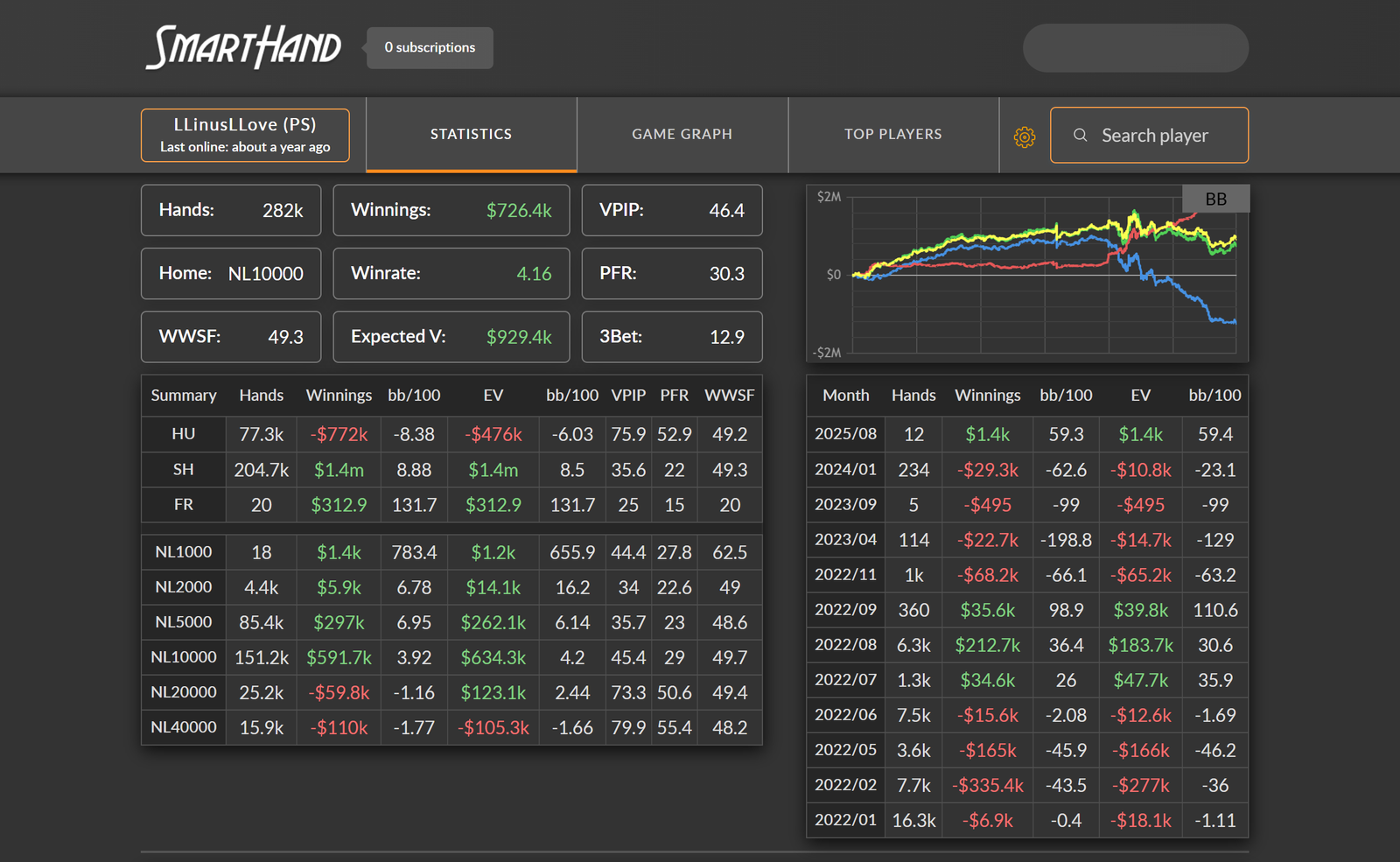
In online poker, information about an opponent is worth money in the most literal sense: the sooner you understand who is sitting at the table—a cautious regular or a casual recreational player—the easier it is to decide whom to play against and how to approach them. The usual route to this information is a long one: you need to install a tracker, play several hundred hands with an opponent, and only then will you have meaningful stats.
SmartHand approaches this problem differently. It is an online service that already stores statistics on cash-game players from popular poker rooms and retrieves them by screen name. You do not need your own hand database or have to install anything: the service runs in a browser, each search requires only one query, and data on an unfamiliar opponent appears before you have played even a single hand against them.
Where the Numbers Come From and Why SmartHand Is Not a Tracker
To understand the service’s capabilities and limitations, it helps to know how it works. It is based on data mining—the collection of hand histories from poker tables. Specialized programs observe tables and record everything that is publicly visible: bets, pot sizes, and cards revealed at showdown. These hands are added to a shared database, used to calculate player statistics, and then made available through the service.
This is the main difference between SmartHand and a poker tracker. A tracker is a program installed on your computer that builds a database from hands you have personally played. Until you have collected enough hands, the statistics are unreliable, and there is simply no data on an opponent you are facing for the first time. SmartHand works the other way around: its database is shared and already populated, so statistics on a particular player are available immediately. However, the data is not collected by the user and does not cover every hand played worldwide.
Another consequence of this system is what is known as missing hands. Data mining cannot physically cover every table at every moment, so some hands never make it into the database. The service states that no hands are lost during processing, but the completeness of its coverage depends on the poker room and stakes. The practical takeaway is simple: the sample for a player is almost always smaller than the number of hands they have actually played, so it should be treated as a representative sample rather than a complete record.
A third consequence is the lower stake limit. The database covers cash tables from NL10 upward. NL2 and NL5 hands are not available and are not planned: micro-stakes games generate an enormous volume of hands, and because the service stores every hand separately to preserve calculation accuracy, handling such a volume of data would not be technically feasible.
Player Profile: What One Screen Name Reveals
Using the service is essentially a matter of searching: enter an opponent’s screen name in the field at the top of the page, and their profile opens within a second. The data is organized into several tabs.
The main tab contains general statistics. It shows the total number of hands in the database, the player’s main stake—the one at which they have played the most hands—their win rate and total career profit, as well as results broken down by stakes and month. This overview immediately answers several practical questions: whether the opponent is comfortable at the current stakes or has only recently moved up, whether they play regularly or only occasionally, and whether their results are improving or declining.
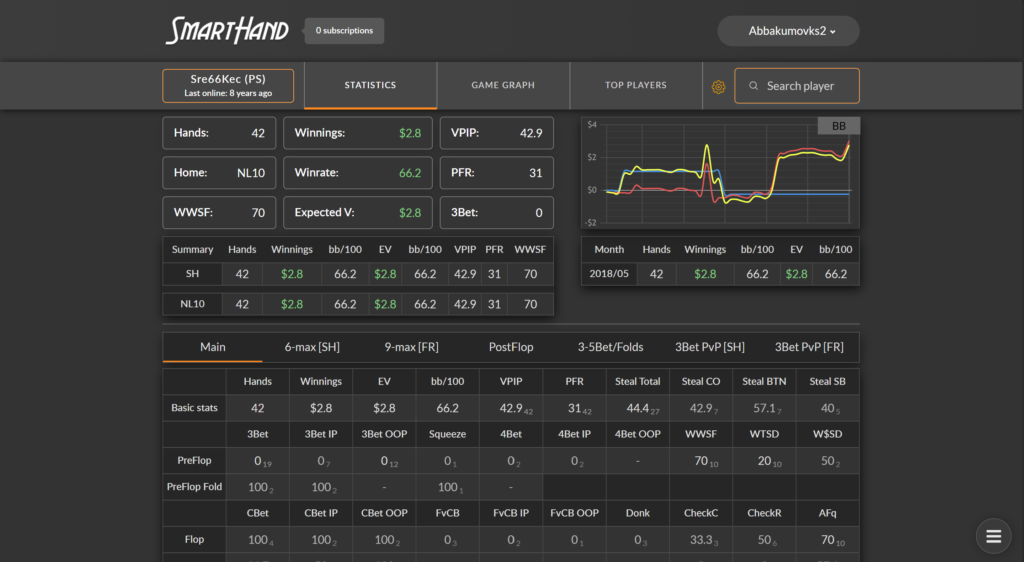
Below that is a section containing more than one hundred poker stats. These are familiar to anyone who has used a tracker: VPIP (the percentage of hands in which a player voluntarily puts money into the pot), PFR (the percentage of hands in which they open-raise), 3-bet, continuation bet, WWSF (Won When Saw Flop), WTSD (Went to Showdown), Steal (attempts to steal the blinds from late position), and many others, including postflop stats.
Beginners do not need to master all one hundred stats at once. Four or five basic ones are enough to classify an opponent: a high VPIP combined with a low PFR indicates a passive recreational player who enters many pots but rarely raises; moderate VPIP and PFR values that are close to each other suggest an aggressive regular; and a low continuation-bet frequency indicates caution on the flop. The remaining stats can be introduced as your experience grows.
The Graph Tab and the All-in EV Line
A separate tab displays the opponent’s results as a graph. It includes several lines: total winnings, showdown winnings, non-showdown winnings, and a separate expected-value line called All-in EV.
All-in EV deserves a more detailed explanation because it is one of the most informative metrics in a player’s profile. When all the money goes into the pot and the hand reaches showdown, the outcome depends on the remaining community cards. The actual result is what the player really won, while All-in EV shows what they would be expected to win with average card distribution. The difference between the lines indicates the effect of luck.
In practice, it works like this. If the actual results line is significantly above the EV line, the opponent has recently won more than their equity in all-in situations would justify: their results have been inflated by good luck, and their actual level of play may be lower than their earnings suggest. The opposite situation—the results line running below EV—means that the player is performing better than their current graph indicates and may be experiencing an extended downswing. For beginners, this is a useful safeguard against jumping to conclusions: an opponent who is winning money is not necessarily playing well.
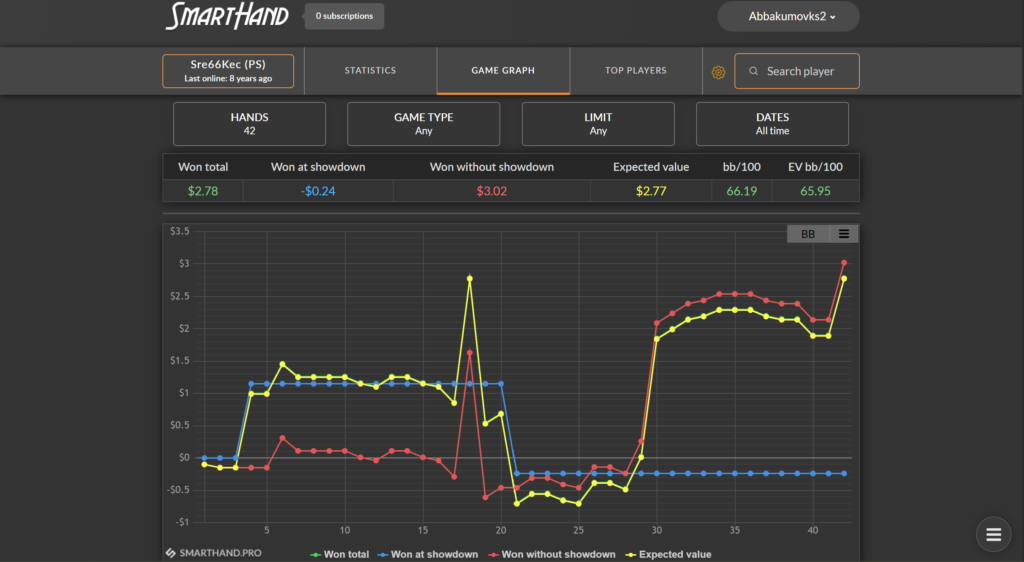
The graph is designed so that zooming in on a particular section loads additional data and reduces the interval between points. This allows you to examine a specific stretch of hands rather than only the overall trend. Results can be displayed in either dollars or big blinds; the latter is more useful when a player has moved between stakes over the course of their career.
There is also a third tab containing a leaderboard of the best players based on the service’s data. It can be filtered by poker room, game type, stakes, and date. It is useful for study as a source of player names: you can examine the stats of the strongest regulars at a particular stake and compare them with your own.
Customizing Your Stat Layout
The set of stats in a player profile can be customized. In editing mode, you can choose which stats to display, arrange them into rows and columns, and break them down by table position: UTG or early position, MP or middle position, CO or cutoff, BTN or button, SB or small blind, and BB or big blind.
A positional breakdown is more important than it may seem. An overall VPIP of 24% tells you very little: that figure combines cautious play from early positions with a wide range on the button. Stats broken down by position show exactly where an opponent plays too wide and where they are overly cautious—and those are the spots where opportunities to exploit them arise.
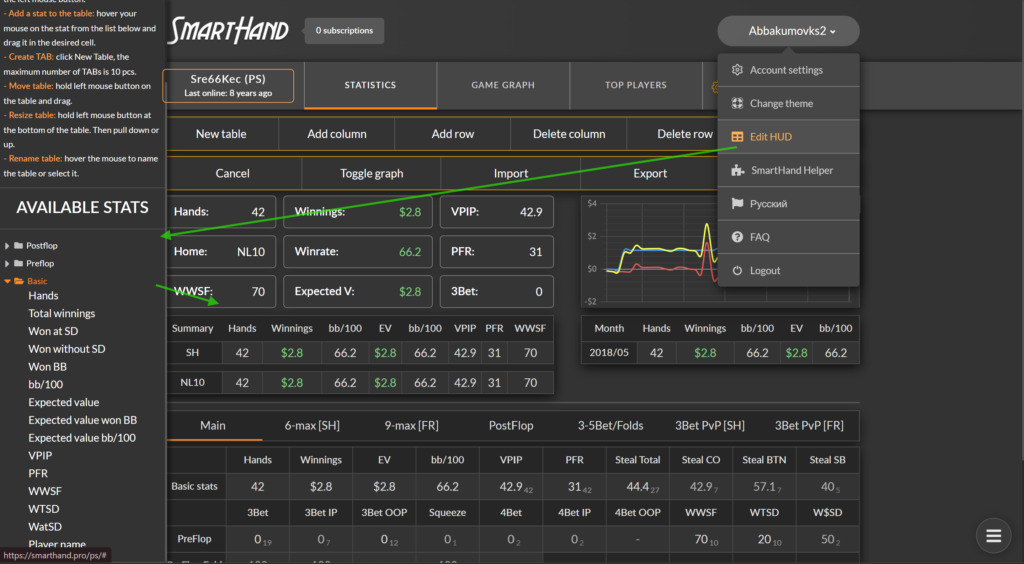
The saved layout is applied to all subsequent searches, so it only needs to be configured once. In essence, it serves the same purpose as the HUD familiar to tracker users: displaying a compact set of key stats. There is, however, an important distinction: in SmartHand, this panel remains on the service’s web page rather than appearing over the poker table. The service does not provide an in-game table overlay.
The same applies to sample filters. You can configure them by stakes, game type, table type, and date range, then save them as permanent settings. The date filter is especially useful: if an opponent played NL10 three years ago but you now encounter them at NL200, the old data will only distort the picture and is better excluded.
How the Service Fits Into Your Play at the Tables
Manually entering screen names in the middle of a multi-table session is inconvenient, so the service offers two ways to speed up player searches.
The first is the SmartHand Helper extension for Google Chrome. It monitors the clipboard: as soon as you copy an opponent’s screen name, the extension automatically inserts it into the search field and opens the player’s profile, always in the same window rather than in a new tab each time. The extension works with multi-tabling tools such as StarsHelper, StarsCaption, 888Caption, MPN Tools, WPN Tools, iPoker Tools, and Table Tamer. There are two requirements: the browser must be open, and auto-paste mode must be enabled in the extension.
The second method is a URL template. A link in the format smarthand.pro/ps/#[SCREENNAME] is added to the supporting software, which automatically replaces the placeholder in brackets with the screen name of the player you click. Each poker room uses a different address: /ps/ for PokerStars, /888/ for 888poker, /chi/ for Chico, /wpn/ for WPN, and /ip/ for iPoker. Once configured, a clickable panel appears next to each opponent’s name at the table, and clicking it opens their profile in the browser.
There is little difference between the two methods: the extension saves one click and keeps everything in a single window, while the URL template does not require a browser extension. Beginners may find it easier to start with the second option and switch to the extension once they begin playing more tables simultaneously.
Data Mining: Purchasing the Hand Histories Themselves
In addition to ready-made statistics, the service sells the underlying data—archives of played hands. This is a separate service with three options.
A cash-game data-mining subscription provides daily hand-history exports for your chosen network, game type, set of stakes, table type, and table currency. Archives for each completed day are sent by email and are also available through a personal link that stores the most recent 30 days. This is convenient if you prefer to download hands once a week rather than every day. These archives can be imported into a poker tracker and converted into a full database for analysis.
A tournament data-mining subscription works in the same way but collects hands from tournaments.
Player-specific data mining is a one-time purchase of all available hands for a particular opponent. It is available for NL100 and above, and the export includes every card the opponent revealed at showdown. This is the most detailed material available for preparing to play against a strong regular: revealed hands show exactly which cards they use to take particular lines.
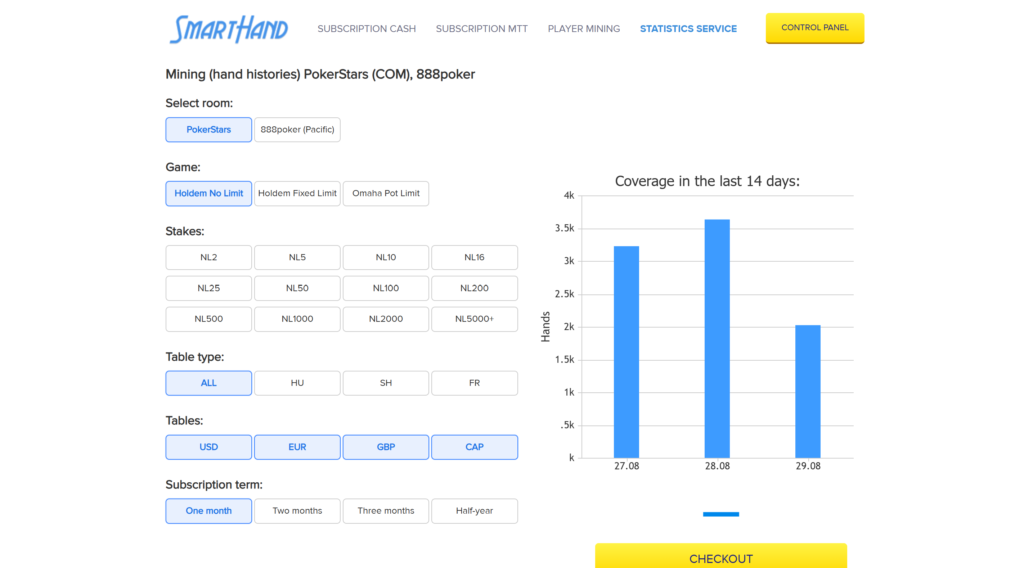
Data-mining prices are calculated according to the selected parameters, so there is no single fixed price. The total appears after you choose the poker room, game type, stakes, and subscription period.
Compatibility: Poker Rooms, Game Types, and Limitations
Statistics are collected from seven platforms: PokerStars, 888poker, Chico (Tiger Gaming), WPN, iPoker, GGPoker, and Winamax.
Only one game type is covered: No-Limit Hold’em cash games. The service does not provide Omaha statistics and does not cover tournaments or sit-and-gos; those formats require other tools. The available stakes start at NL10, while the NL2 and NL5 micro stakes are not collected.
Fast-fold formats also require special consideration. Tables such as Zoom, where players are instantly moved to a new table after folding, are difficult to cover through data mining, so substantially less data is available for them than for regular tables.
The service has no operating-system requirements: it runs in a browser on any computer, and there is no separate desktop application to install. The SmartHand Helper extension is available only for Google Chrome. The service interface is available in Russian and English.
There is one more limitation related to how subscriptions are structured. They are sold as two poker-room packages, and data for a single room cannot be purchased separately. Even if you only need one room, you must pay for the entire package.
Getting Started
Getting started with the service requires only a few steps.
The first step is registration. You need a username, password, and email address, and the account is confirmed by clicking the link in the email. Nothing needs to be installed.
The second step is a free test. NL10–25 stakes in the PokerStars, 888poker, Chico, WPN, and iPoker package are available free of charge with no time limit. It is worth looking up several familiar players or even yourself to see how complete the database is for your poker room and stakes, and how convenient the search is to use.
The third step is to configure the layout and filters. Select the stats you need, arrange them by position, and set a sensible date range. The settings are saved and applied automatically to every subsequent search.
The fourth step is to speed up player searches. Install the SmartHand Helper extension or configure the URL template in the supporting software you use for multi-tabling.
The fifth step is to subscribe if the free stakes are not sufficient. Choose the required poker-room package, range of stakes, and subscription period; if necessary, both subscriptions can be paid for in a single order. Payments are accepted in cryptocurrency—USDT TRC-20, Bitcoin, or Ethereum—and access is activated automatically once the payment is confirmed.
Pricing at a Glance
Free access is permanent and limited to NL10–25 in the PokerStars, 888poker, Chico, WPN, and iPoker package. Paid plans differ in two respects: the poker-room package—the first includes PokerStars, 888poker, Chico, WPN, and iPoker, while the second includes GGPoker and Winamax—and the upper stake limit: NL10–50, NL10–500, or NLMAX, which unlocks all stakes in the package. Subscription periods range from one month to one year, with longer periods in the first package costing less per month. Hand-history data mining is charged separately, with the price calculated according to the selected parameters.
A detailed description of the plans and prices is available on the product page.
Conclusion
SmartHand addresses a narrow but important need: it provides statistics on opponents when you do not yet have your own data on them. This is useful for beginners for two reasons. First, table selection is no longer a blind process—a few searches reveal where the recreational players are sitting and where the regulars have gathered. Second, it provides study material: other players’ stats and graphs clearly illustrate how a winning player’s game differs from that of a losing player.
However, the service does not replace either a tracker or an equity calculator. It does not display statistics over the tables, analyze your own play, or recommend decisions—it only answers the question, “Who am I up against?” A sensible learning path is to first understand four or five basic stats and the relationship between actual results and All-in EV, then customize your layout to suit your usual playing style, and only afterward consider subscribing for higher stakes and purchasing hand-history archives. This approach ensures that you understand the data before spending money on it.

Featured software



Latest posts
-
 Poker Academy Review: Ranges, Solver, and Trainer in One Browser Window Oct 11, 2026
 -
 888Caption Review: A Tool for Fast-Paced Multi-Tabling Oct 9, 2026
 -
 Preflop ICM Solving in GTO Wizard: ICM-Aware Preflop Solutions in Seconds Oct 8, 2026
 -
 Octopi Poker Review: Tournament GTO With Pro Hand Reviews Oct 7, 2026
 -
 PLO Mastermind Review: Solver-Based Solutions and an Omaha Trainer Oct 6, 2026
All the poker software you need, gathered in one place. Exclusive discounts, bonuses, latest news and updates.
Join now