StarsCaption
A PokerStars utility that sets up hotkeys, auto bet sizing, and table arrangement, taking routine actions off the player during multi-tabling. Read full review
Screenshots
Pros & Cons
| Pros | Cons |
|---|---|
| Approved by PokerStars | PokerStars only |
| Precise zone-based hotkeys on the table | Windows only |
| Smart table arrangement | No built-in opponent stats |
| SNG and Spin & Go registrar | Requires an English-language client |
| Free mode on micro stakes | |
| Affordable license price |
Description
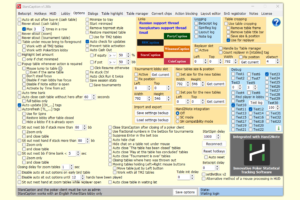
StarsCaption is a helper tool for playing on PokerStars: the PokerStars.com and PokerStars.eu rooms and their national versions. The tool doesn’t replace the poker room’s client — it runs on top of it, adding features missing from the standard interface: hotkeys, preset bet sizes, automatic table arrangement, and tournament registration. It’s built for players who sit at several tables at once and want to spend less time on repetitive actions.
At its core are hotkeys and the Betscript module — preset bet and raise sizes for typical situations that get placed in the bet field with a single click or a turn of the mouse wheel. Hotkeys can be bound not only to keys but to specific zones of the table: the same mouse button can perform different actions depending on which part of the window it’s clicked on, letting a player get by with fewer combinations and avoid mixing them up during play.
A separate module, Table Manager, handles on-screen order during multi-tabling: tables are automatically arranged into set cells, brought to the front when it’s the player’s turn to act, and repositioned as the hand progresses. For tournament players there’s an SNG and Spin & Go registrar that signs up for selected tournament types on its own, based on set criteria — from the number of seats already filled to the limit on simultaneously open tables.
The built-in HUD shows the table’s game math: stack size in big blinds, pot odds, push/fold odds, stack-to-pot ratio (SPR), and other numbers that would otherwise have to be worked out in one’s head. For opponent stats, the tool integrates with Hand2Note, so both tools can be used together. StarsCaption also takes care of small routine tasks: it closes pop-ups about table reseating or add-ons, turns on the time bank at the right moment, and keeps a table from going into sit-out mode where that isn’t wanted.
The tool is officially approved by PokerStars, which reduces the risks typical of third-party software. StarsCaption runs on Windows, needs to be launched as administrator, requires an English-language poker client interface, and its license is tied to a nickname on the developer’s server — it can be extended to cover several national PokerStars versions used by the same player.
Pricing
-
Free version — no time limit, but only at cash limits of NL10 and below, and in tournaments with a buy-in of up to $3 inclusive, including Spin & Go; at higher limits the tool closes automatically.
-
Trial period — 30 days of full access with no limit restrictions, available on request through the License tab in the tool itself.
-
Annual license — $24 a year; renewing an active license adds 365 days to the current term, while purchasing a new license activates a year from the date of payment.