888Caption
A helper tool for 888poker that fills in bet sizes from a betscript, arranges tables into slots, and cuts down on manual work when multitabling. Read full review
Screenshots
Pros & Cons
| Pros | Cons |
|---|---|
| Approved by 888poker | Windows only |
| Flexible bet script | No opponent stats |
| On-screen bet buttons | English client only |
| Stacks shown in big blinds | Auto-registration works with the old lobby |
| Table manager | |
| Works with Hand2Note | |
| Free at micro stakes |
Description
888Caption is a helper tool for playing in the 888poker client and in other rooms on the same network. It doesn’t play for the user or suggest decisions: its job is to take over the mechanical work that eats up time and leads to mistakes when rushing. The bet size is entered into the bet box automatically, actions are performed with hotkeys, and tables are placed in predefined spots on the screen. Use of the tool has been cleared with 888 support.
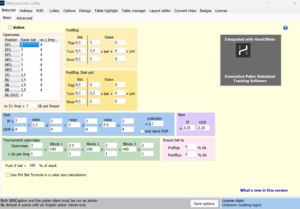
The core of the tool is the betscript, a set of rules for calculating bet sizes automatically. Open-raise sizes are set for each position with the number of limpers taken into account, tournament sizes are configured separately by blind level, 3-bet and 4-bet multipliers depend on the opponent’s bet, and postflop bets and raises are set as a fraction of the pot. When it’s the player’s turn to act, the right amount is already in the bet box, and all that’s left is to confirm the action or fold.
The second major block is its own HUD. Rather than opponent stats, it shows values calculated for the current hand: pot odds, SPR, pot and stack size on the next street, stack in big blinds, each player’s action history in the hand, and data from the tournament lobby. Panels can be placed anywhere on the table, colored based on their values, and set up as on-screen bet buttons with custom formulas.
For multitabling, there’s a table manager with slot configurations and auto-sorting, color highlighting of tables based on some twenty conditions, automatic handling of pop-up windows, auto buy-in and auto rebuy, lobby customization, and cropping of table borders. Stacks, the pot, and button labels can be displayed in big blinds, effective blinds, or M-ratio, which makes the math noticeably easier in tournaments.
The tool works together with Hand2Note: data about the situation at the table is passed to the tracker and used in its dynamic HUD.
Pricing
-
Free mode — permanent, with no registration required: cash games up to NL10/PLO10 inclusive and tournaments with buy-ins up to $3. When a table above these limits is opened, the tool closes automatically.
-
Trial — one month at any stakes. It's requested with the Request for Trial button on the License tab after logging in to the poker client and is activated within a few hours.
-
License — $25 per year. It's tied to a nickname; nicknames from other rooms on the network can be added to the same license (one nickname per room), so there's no need to buy a separate license for each room.
Payment is accepted directly in cryptocurrency, as well as through partner shops that take bank cards, PayPal, Skrill, Neteller, and other methods.