888Caption Review: A Tool for Fast-Paced Multi-Tabling
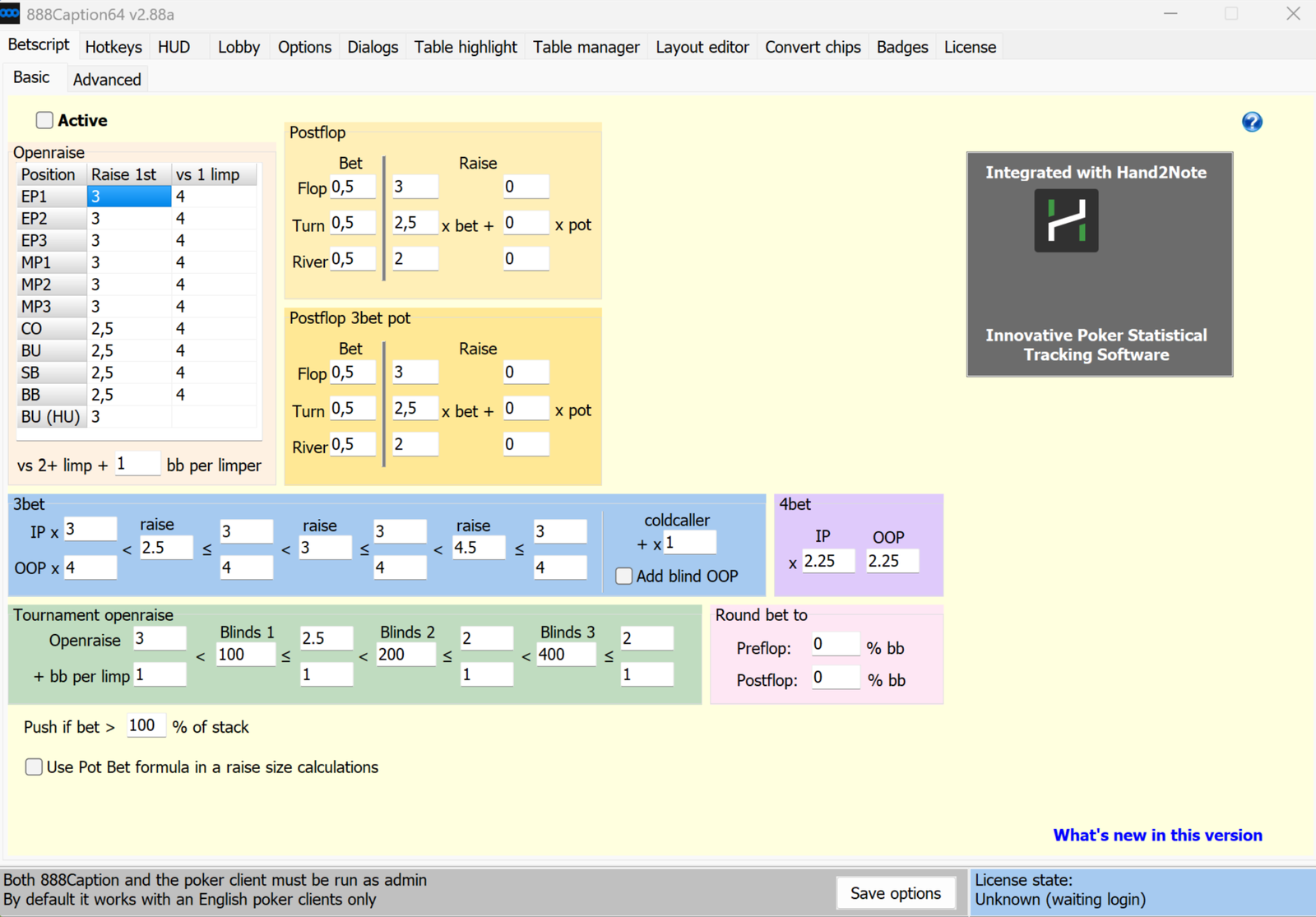
888Caption is a utility for the 888poker client. It does not analyze hands or collect opponent statistics like poker trackers do. Its purpose is different: it handles all the mechanical work at the tables so players can spend their time making decisions instead of entering bet amounts, moving windows, and closing pop-up messages.
The difference is especially noticeable when playing multiple tables at once. Without an assistant, you have to enter a bet size manually, find the right window with your mouse, click the button, and do it all before the timer expires. The program enters the amount in advance, arranges tables in fixed positions on the screen, and performs actions via hotkeys. Over time, this saves more than just time: it also prevents mistakes caused by rushing, such as entering the wrong bet size, folding accidentally, or timing out.
It is also worth noting that 888Caption has been approved by 888 support. This is important because any third-party program that interacts with the poker client requires the poker room’s permission, and 888Caption has that permission. In fact, some features were removed from the program at the request of 888 support because the room believed they provided an unfair advantage.
How the Program Works: Client, Settings, and Table Overlays
The program works in a straightforward way. 888Caption runs in a separate window alongside the poker client and connects to it: it reads the status of tables and the lobby, clicks buttons for the player, and draws its own elements over the client windows. All settings are collected in one window and organized into tabs covering the bet script, hotkeys, HUD, lobby, dialogs, table highlighting, table manager, and more.
Three concepts appear throughout the program, so it is worth explaining them right away.
A bet script is a set of rules that the program uses to calculate the appropriate bet size for the current situation and enter it into the bet box before the player needs it. The rules are configured once: a certain number of big blinds for an open raise from a particular position, a particular multiplier for a 3-bet, or a certain fraction of the pot for a flop bet.
The HUD in 888Caption is a set of panels that the program displays directly on the table. It is important not to confuse it with a tracker HUD: tracker HUDs show statistics about opponents based on previously played hands, while the 888Caption HUD shows calculated values for the current hand, such as pot odds, stack-to-pot ratio, stack size in big blinds, and similar information. The program does not collect opponent statistics.
Slots are predefined positions on the screen where the program automatically places newly opened tables. One slot holds one table. The player arranges the windows in a convenient layout once and saves it; after that, every new table automatically moves into an available slot.
Settings are stored in a separate configuration file that can be copied to another computer or saved as a backup before reinstalling the operating system.
Bet Script: Bet Sizes Without Manual Input
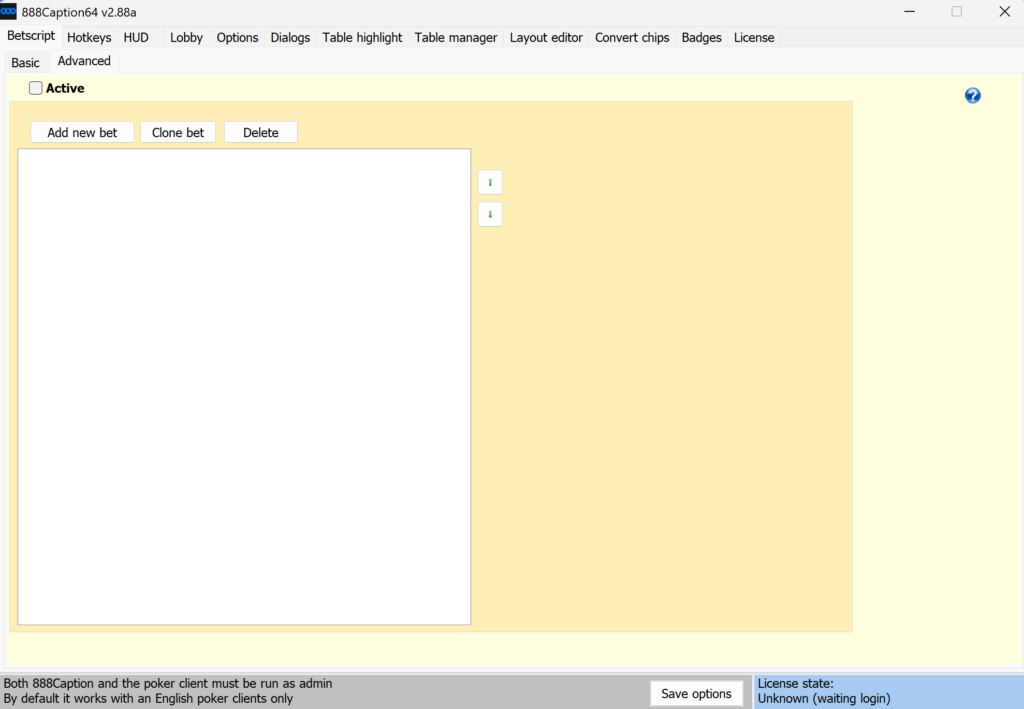
The bet script is the program’s most extensive feature and the main reason most players install it. The idea is that players define their sizing strategy once, after which the required amount automatically appears in the bet box whenever it is their turn to act.
Preflop in Cash Games
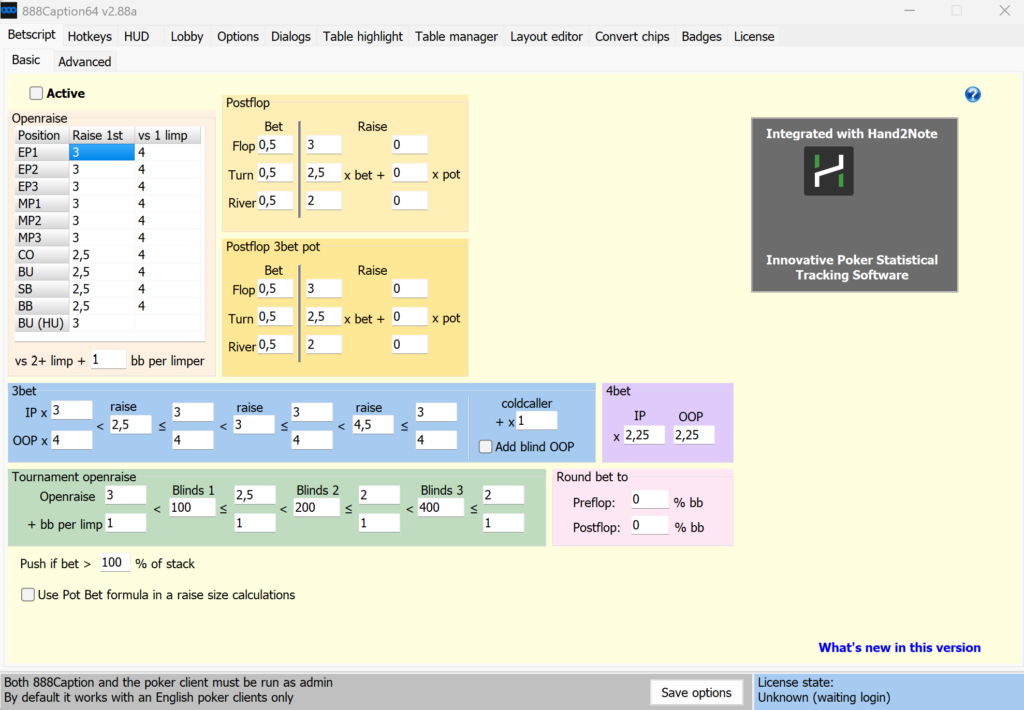
Opening sizes are configured in a table with one row for each position, from UTG or early position through the CO, BTN, and blinds. The column for situations without limpers contains the standard open-raise size, while the adjacent column specifies the isolation-raise size against one limper. A separate field defines how many big blinds should be added for each additional limper.
In practice, it works like this: the player is in the CO, there are two limpers ahead, and the program automatically enters an amount calculated using the formula “size against one limper plus an increment for the second.” The table is completed for a ten-handed table, with the lower rows used for nine-handed and six-handed tables. The opening size from the button in heads-up games is configured separately.
Rounding can also be configured: all preflop bets can be rounded to a specified fraction of a big blind so the sizes look natural and do not attract attention with unusual amounts.
Preflop in Tournaments
In tournaments, the opening size depends on the blind level. You can define up to four ranges: while the big blind is below a specified value, one opening size is used; above that value, another is used, and so on. The increment for each limper is configured separately for every range.
This is useful for a simple reason: as the blinds increase and stacks become shorter in big-blind terms, tournament opening sizes decrease, and keeping track of this across eight tables at once is difficult. The program changes the sizing automatically based on the current level.
3-Bets, 4-Bets, and Squeezes
3-bet sizes are defined not in big blinds but as a multiple of the opponent’s bet, with separate settings for in-position and out-of-position play. As with tournament opening sizes, you can configure up to four ranges: one multiplier when an opponent opens small and another when they use a larger size.
For example, an opponent opens from MP to 2.3 big blinds, the player is on the BTN, and the in-position multiplier is set to 3. The program will enter an amount three times the size of the opponent’s open.
For squeezes—situations where an opponent opens, another player calls, and the player then 3-bets—there is a separate multiplier increment for each cold caller. Another increment is added when the player 3-bets from the blinds and will therefore be out of position for the rest of the hand.
4-bet sizes are configured in the same way: as a multiple of the 3-bet, with separate values for in-position and out-of-position play. The same settings are used for 5-bets and any subsequent raises.
There is also a safeguard: if the calculated bet exceeds a specified percentage of the stack, the program suggests going all-in instead of raising. This prevents situations where the calculated 5-bet is 80 big blinds out of a 100-big-blind stack—a size that almost never makes sense.
Postflop
Bet sizes for the flop, turn, and river are configured separately as fractions of the pot: 0.5 means half pot, 0.75 means three-quarters pot, and 1 means a full-pot bet. These values are entered when the player is first to act and no one has bet on the current street.
Raise sizes are calculated more flexibly using a formula with two components: the opponent’s bet multiplied by one coefficient, plus the pot multiplied by another. This structure can describe “raise to three times the opponent’s bet,” “raise to one and a half times the pot,” or any combination such as “two bets plus half the pot.” Each street has its own coefficients.
You can also enable sizing based on the pot-bet formula, producing a size that gives the opponent predetermined odds to call.
Hotkeys and the Mouse Wheel
The second most important feature is the ability to control the action without carefully aiming at buttons with the mouse. A hotkey applies to whichever table the cursor is currently over, so with a multi-table layout, you only need to move the pointer onto the appropriate window.
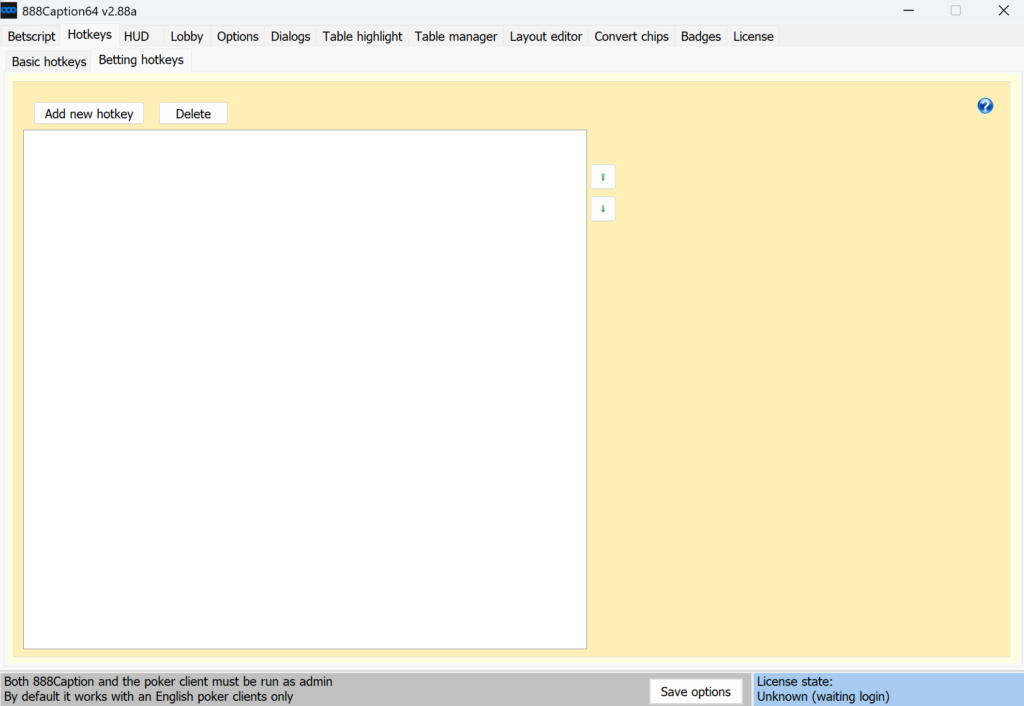
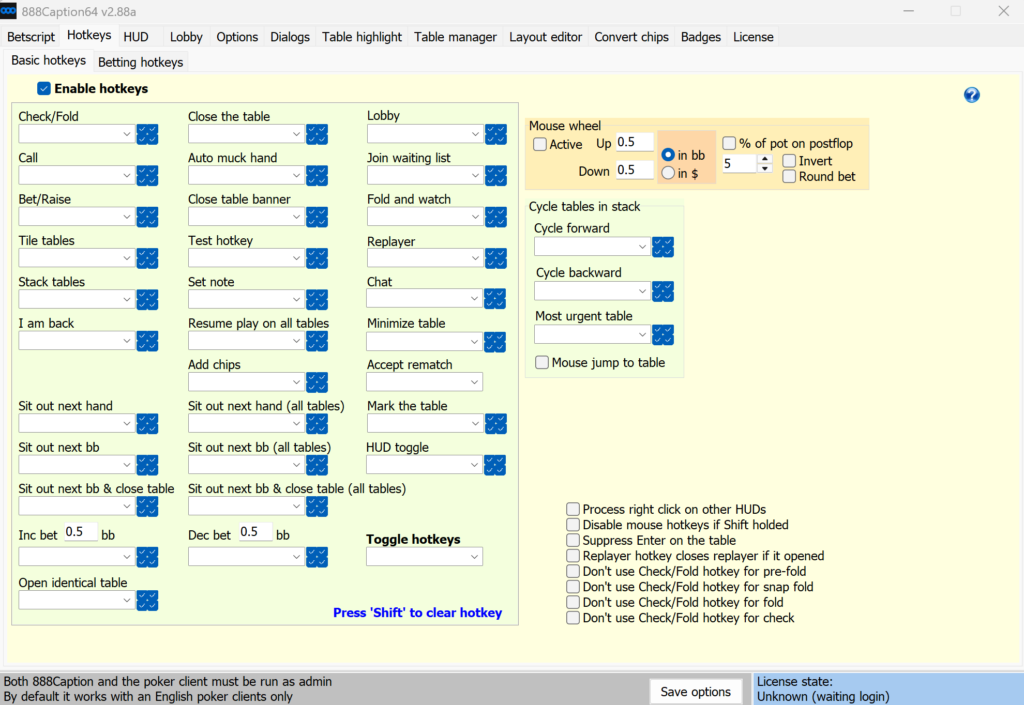
Both keyboard combinations and mouse buttons can be assigned as hotkeys, including the right, middle, fourth, and fifth mouse buttons, as well as a double-click of the left button. One technique significantly reduces the number of keys required: the table can be divided into four zones, with the same button performing a different action in each zone. For example, clicking the middle mouse button in the top-left corner of the table could mean “sit out next big blind,” while the top-right corner closes the table, the bottom-left calls, and the bottom-right bets or raises.
The available actions include:
- Smart check-fold: the program chooses which button to press depending on whether checking is available. If a check is possible, it checks; otherwise, it folds. It also works as a pre-action before it is the player’s turn.
- Call and bet/raise.
- Options such as “sit out next big blind,” “sit out now,” and “fold to any bet,” as well as commands for all tables at once, including sitting out everywhere or returning to play at every table.
- Automatic rebuy to the maximum and rebuy to a specified number of big blinds.
- Increasing or decreasing the amount in the bet box by a specified number of big blinds.
- Opening the lobby, replayer, or chat; joining a waiting list; and minimizing or closing the table.
- Switching to the most urgent table—the one where the action timer is closest to expiring—with the option to move the mouse cursor there automatically.
- Quick color-coded notes on opponents.
A separate and highly practical feature lets you control bet sizing with the mouse wheel. Scrolling up increases the amount, while scrolling down decreases it. The step can be specified in big blinds or money, and the direction can be reversed if preferred. Postflop, the wheel can adjust the bet by a percentage of the pot instead of a fixed amount.
There is also protection against accidental actions: the program can intercept the Enter key when it is pressed over a table, preventing a bet from being submitted accidentally if the table window becomes active while you are typing in another program.
Quick Notes on Opponents
Notes deserve a separate mention because this is one of the program’s few opponent-related features. Pressing a hotkey while hovering over a player opens a small window with sixteen buttons containing color labels, icons, and an option to open a text note. An opponent can be tagged in two clicks, after which the label remains visible at the table.
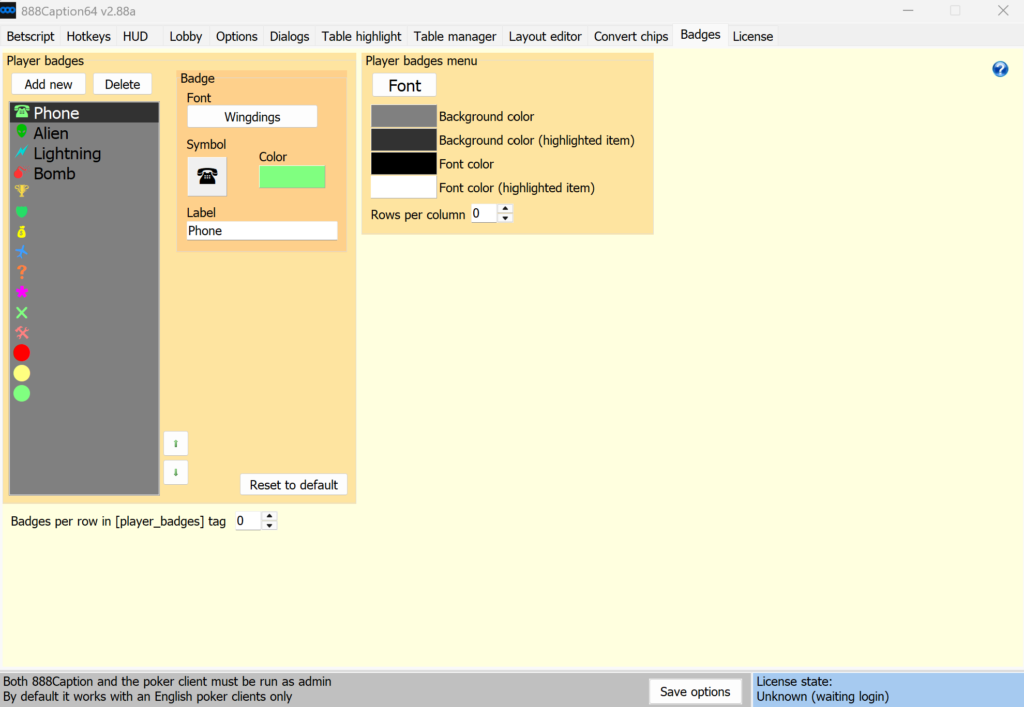
The program does not suggest which label to use—that decision is left to the player. However, the mechanism removes the main obstacle: players often fail to take notes not because notes are useless, but because there is no time to open a notes window in the middle of a hand while playing eight tables.
HUD: Current-Hand Calculations Directly on the Table
The 888Caption HUD consists of panels—small text elements that the program draws over the table. There are two types of panels: general table panels and panels linked to individual players. A panel’s contents are defined by a format string that combines regular text with tags—short codes in square brackets that are replaced with numbers when displayed.
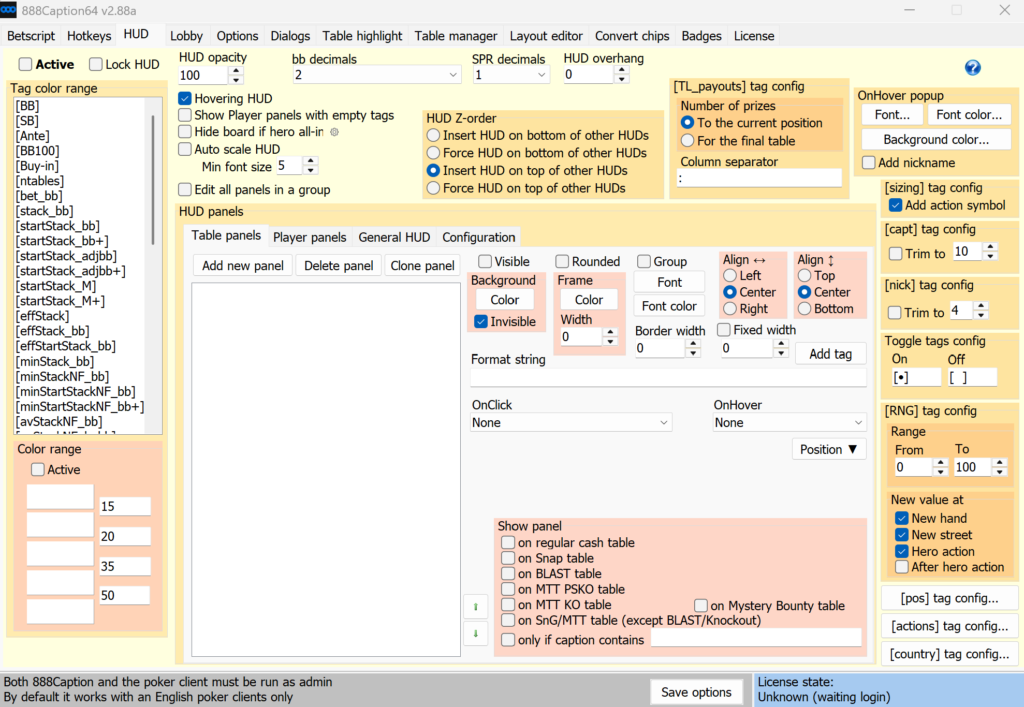
For example, a format string such as “Odds: [%]” would appear at the table as “Odds: 35,” where 35 is the current pot odds for a call, expressed as a percentage. Tags are selected from a list with descriptions, so there is no need to memorize them.
The following information can be displayed on the table:
- Pot odds for a call, shown as either a percentage or a ratio, as well as the number of outs required to call.
- SPR, or stack-to-pot ratio, including effective SPR based on the shortest stack among the opponents.
- The pot and stack sizes on the next street based on the current value in the bet box. These values are recalculated in real time: the player changes the amount with the mouse wheel and immediately sees how large the pot will become and how much will remain in the stack.
- The odds an opponent will receive to call a bet of the current size.
- Stacks in big blinds, the effective stack, the shortest stack at the table, and the average stack among players who have not folded.
- Each player’s action history in the current hand in a compact notation—limp, check, call, open, bet, donk bet, 3-bet, and so on—separated by street and including bet sizes.
- Player positions at the table, their countries, time spent at the table, and notes.
- Tournament data from the lobby: average stack, number of players remaining, the player’s position, number of paid places, estimated average stack when the money and final table are reached, current payout, and the next payout level.
- Session counters: number of open tables, tables awaiting action, number of hands and tournaments played, and session duration.
- A random number generated when it is the player’s turn, for those who want to randomize some decisions.
Numbers in the panels can be color-coded by value range. For example, stakes can be shown in red at the micro stakes and green at the mid stakes, while stack colors change as stacks become shorter. This is faster than reading the numbers because colors can be picked up through peripheral vision.
Panels can be moved with the right mouse button, including as groups—all panels of the same type for every player or all panels belonging to one player. The overall HUD transparency is controlled with a single setting.
Another option is a general HUD window that is not attached to any table. It can contain information that does not need to be duplicated on every table, such as session time, the total number of hands, and the number of tournaments played.
On-Screen Betting Buttons
HUD panels can do more than display information: they can also respond to clicks. This is the basis of one of the most useful features—custom betting buttons placed directly on the table.
It works as follows: you create a panel labeled something like “3bb” or “75%,” assign it a “bet by formula” action, and define the required size in the formula. The button can be placed anywhere on the table, and you can create as many as you want—unlike the poker client’s standard buttons, which are limited in number and positioned wherever the room has chosen to put them.
There are two modes: clicking can simply enter the amount into the bet box, or it can enter the amount and immediately click the bet button, allowing you to place a bet of the required size with one click.
To keep the buttons from getting in the way, their display can be restricted by conditions: show them only preflop, only postflop, or only when it is the player’s turn. This allows preflop and postflop buttons to occupy the same position on the table because they will never appear at the same time.
The same mechanism can be used to create utility buttons for minimizing or closing the table and opening the lobby. This is useful if the table’s title bar has been removed and the standard buttons are unavailable.
Stacks in Big Blinds Instead of Chips
A separate feature converts the display of stacks, bets, the pot, and button labels from chips or money into big blinds. For tournaments, effective blinds adjusted for antes are also available, along with the M-ratio—a measure of how many orbits the stack can survive at the current blinds and antes.
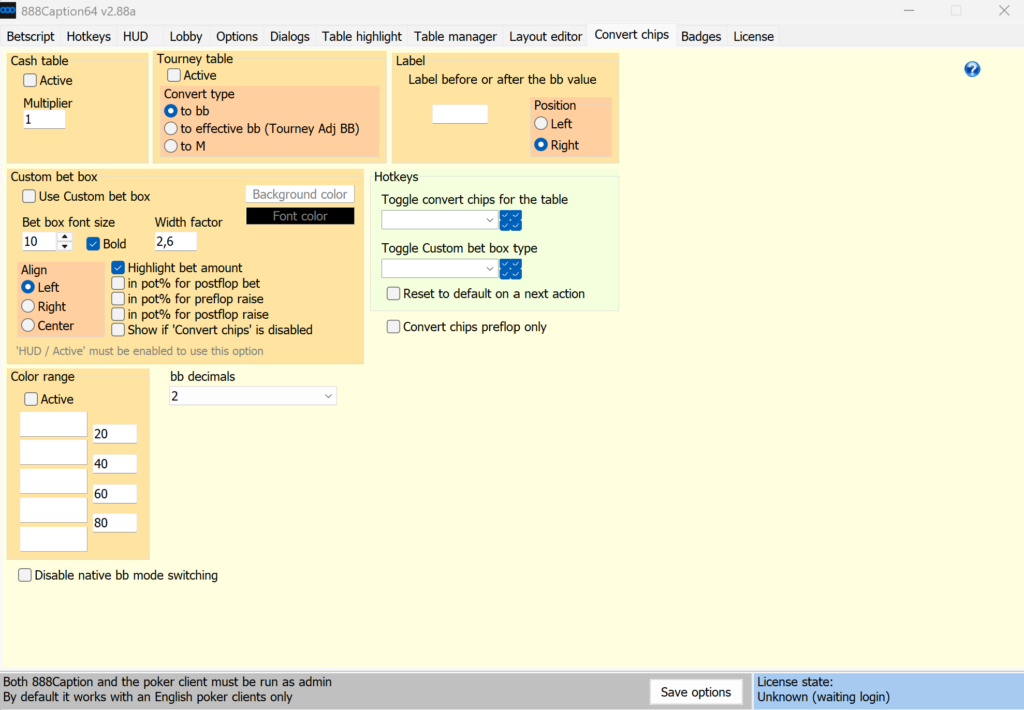
For beginners, this removes a significant amount of mental arithmetic. A stack of 13,450 chips at blinds of 200/400 does not immediately convey much, while “34 big blinds” is clear and unambiguous. Stacks in big blinds can also be color-coded by range, with short stacks shown in red and deep stacks in green.
The standard bet box still uses chips, so the program provides its own big-blind input field, which is placed over the original one. It also has a mode for entering postflop bets as a percentage of the pot.
Table Manager: Layouts and Automatic Sorting
The table manager controls exactly where windows appear on the screen. A layout is defined by a configuration containing a set of slots with specified coordinates and dimensions. Each new table automatically occupies the first available slot on the list.
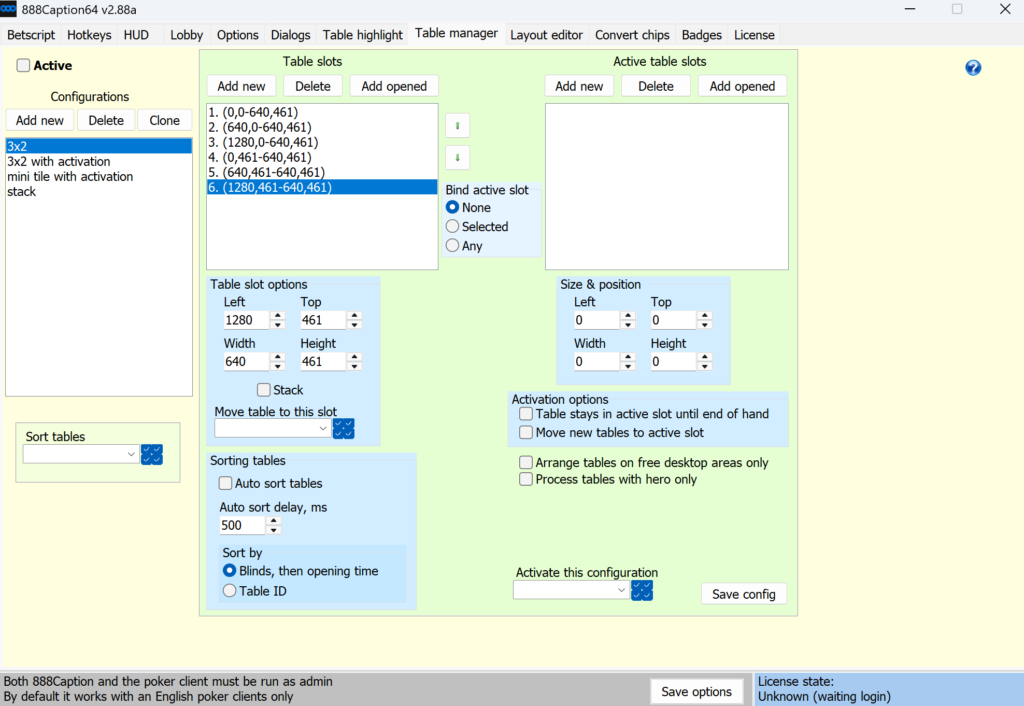
There is no need to create slots manually. Simply open the desired number of tables, arrange them with the mouse, and click the button that saves their current coordinates and window sizes to the configuration. You can create multiple configurations—for example, one for four tables and another for twelve—and switch between them by selecting the desired option from a list.
Tables can be dragged between slots with the mouse. When released, the window automatically snaps into the nearest available slot.
Automatic sorting is useful: tables are arranged so that those with higher blinds occupy the first slots, while tables with the same blinds are sorted by name. Sorting occurs when a table is opened or closed and, in tournaments, when the blind level changes. This keeps the table order predictable throughout the session.
There is one important detail that the program itself warns about: before tables move, they briefly become translucent. Hotkeys should not be used on them during this moment because the table is about to move and another will take its place. The delay before movement can be configured and exists specifically to give the player time to notice the warning.
In addition to slot-based layouts, there are separate settings for the size and position of new tables, as well as a fixed position for the replayer window.
Table Highlighting
Table highlighting answers the question, “Which table should I look at right now?” The program draws a colored border around a table or covers it with a translucent color when the table meets a specified condition.
There are more than twenty conditions, covering far more than simply highlighting tables awaiting action:
- The table under the mouse cursor and a table awaiting action.
- Blind level and tournament buy-in.
- The player’s stack in big blinds, effective stack, and the shortest opposing stack.
- Pot size in big blinds.
- Number of players at the table and number of players who reached the postflop stage.
- Number of raises or limpers before the player’s first action.
- The presence of specific text in the table name, allowing tables of a particular format to be highlighted.
- An active time bank and the remaining time to act.
- Out-of-play situations: the player is sitting out, waiting for the big blind or the tournament to start, has folded, or is observing without participating.
- A table manually marked with a hotkey.
- A custom formula—for example, highlighting tournament tables where fewer than five players remain before the money.
Rules are ordered by priority: if a table matches several rules at once, the highest rule on the list takes effect. The border color and thickness, as well as the fill color and transparency, can be configured for each rule.
Automating the Small Tasks
A significant part of the program is dedicated to pop-up windows and routine confirmations. Each may take only a few seconds, but over a long session with many tables, they become a considerable distraction.
The program can automatically close one-button messages, confirm tournament registrations, rebuys, and add-ons, and decline offers to register for the next tournament after the current one ends.
Cash-table seating can also be configured separately. The buy-in is specified in big blinds and entered automatically. If the table’s minimum buy-in is higher than the configured amount, the minimum permitted buy-in is used instead.
Auto-rebuy is designed for players who use partial stacks: you specify the stack threshold at which a rebuy should occur and the amount to rebuy to. For full-stack players, the poker client’s own auto-rebuy works faster, and the program openly notes this.
Other small features include automatically returning to play after sitting out, activating the time bank automatically, automatically selecting “wait for big blind,” bringing the table awaiting action to the foreground and moving the cursor to it, blocking all tables except the one under the mouse, and automatically sitting out and closing a table when the stack reaches a specified size.
The lobby can also be cleaned up: advertisements can be hidden, lobby minimization when opening a table can be disabled, and the lobby window can be cropped and fixed in a specific position on the screen. Hotkeys are available for registering, joining a waiting list, and instantly hiding the lobby beyond the edge of the screen.
The table’s appearance can be customized through the layout editor. You can change the fonts used for labels—including player names, stacks, the pot, and buttons—as well as their size and color, and configure the minimum size to which a table can be reduced. The table border and title bar can be removed entirely to fit more windows on the screen. Color-coded opponent notes can be enlarged so they are visible through peripheral vision.
An auto-registration feature is available for sit-and-gos. It automatically enters the player into selected tournament types while maintaining a specified number of simultaneous tables, with limits on the number of tournaments per session and the registration period. There is one significant limitation: this feature only works with the old version of the 888 lobby and is unavailable in the current client.
Hand2Note Integration
888Caption sends information about the current table situation to the Hand2Note tracker, which uses it for its dynamic HUD—a mode where the displayed set of statistics changes based on the current hand.

This is an important part of the overall picture. 888Caption itself does not collect or display opponent statistics. Moreover, tags that provided information about opponents’ decision-making speed and bluff equity were removed from the program at the request of 888 support. If you need conventional opponent statistics, the tracker provides them, while 888Caption handles gameplay convenience and current-hand calculations. Together, they cover both needs.
Compatibility: Rooms, Formats, and System Requirements
The program is designed for the 888poker client and works in every room on the network, including local 888poker versions for Spain, Denmark, Romania, Italy, Sweden, Portugal, and Germany, as well as WSOP clients for US states. One license covers all these rooms: screen names from different clients can be added to the same key, with one screen name per room.
Limitations to be aware of in advance include:
- The program is available only for Windows. There are no versions for macOS, mobile devices, or browsers.
- A 64-bit build is available for the current client, while a 32-bit build is provided for older clients.
- Both the program and the poker client must be run as administrator; otherwise, some hotkeys will not work.
- The poker client must be set to English.
- The computer’s system clock must be synchronized over the internet; otherwise, the program will be unable to connect to the license server.
- It is recommended that both the program and the client be added to the antivirus exception list.
- The sit-and-go auto-registration feature works only with the old lobby.
Features are not divided between cash games and tournaments: both are fully supported, with separate sizing settings for each. There are no restrictions by game type—the program works with the tables available in the client, including No-Limit Hold’em and Omaha.
Getting Started
Getting the program running takes only a few steps.
First, download the program from the developer’s website. If you use the current version of the 888 client, you need the 64-bit build. Next, enable “Run as administrator” in the shortcut properties for both the program and the client, and add the executable files to your antivirus exception list. Set the client language to English and synchronize the computer’s clock over the internet.
Next, launch the poker client and log in to your account. Only then should you start 888Caption: the program detects the player’s screen name and requests the license status from the server.
Without registration, the program works immediately at the micro stakes: cash games up to NL10/PLO10 and tournaments with buy-ins up to $3. It is important not to open tables above these limits because the program will close without warning. To test it at any stakes, open the License tab before opening any tables and click the button to request a trial. The trial is activated within a few hours and lasts for one month.
It is best to learn the settings gradually rather than configuring everything at once. A sensible order is to start with the preflop bet script—opening and 3-bet sizes. Then add two or three essential hotkeys, such as check-fold, call, and bet. Next, convert stacks to big blinds, configure the table manager for your usual number of windows, and only then move on to HUD panels and table highlighting. Add each new feature once the previous one no longer requires conscious attention.
Pricing
The pricing structure is simple. The free mode is available indefinitely without registration, but only at the micro stakes: cash games up to and including NL10/PLO10 and tournaments with buy-ins up to $3. No features are restricted—the only limitation is the stakes.
The one-month trial removes the stakes restriction and can be requested directly from the program.
A paid license costs $25 per year, is linked to a screen name, and covers all rooms on the network if screen names from other clients are added to it. If the license is renewed before the current period expires, the new time is added to the remaining term.
A detailed description of the plans and prices is available on the product page.
Conclusion
888Caption is not a strategy tool; it is designed to improve the playing environment. It will not tell you how to play a hand, but it removes the distractions that make it harder to play calmly: entering amounts manually, finding the right window among a dozen others, closing pop-up messages, and converting chip stacks in your head.
For a new 888poker player, it provides two immediate benefits. First, bet sizing becomes consistent: the strategy is defined in advance and does not change due to fatigue or rushing. Second, the attention it frees up can be directed toward decisions rather than window management. This becomes especially noticeable when moving from one or two tables to four or more.
It makes sense to begin with the free mode at the micro stakes. All features are available there, allowing you to learn the bet script and hotkeys at your own pace without worrying about the trial period expiring. The remaining tools—the HUD, highlighting, and table manager—can then be added one at a time as the previous features become second nature.

Featured software

Latest posts
-
 Poker Academy Review: Ranges, Solver, and Trainer in One Browser Window Oct 11, 2026
 -
 SmartHand Review: Opponent Stats Before the First Hand Oct 10, 2026
 -
 Preflop ICM Solving in GTO Wizard: ICM-Aware Preflop Solutions in Seconds Oct 8, 2026
 -
 Octopi Poker Review: Tournament GTO With Pro Hand Reviews Oct 7, 2026
 -
 PLO Mastermind Review: Solver-Based Solutions and an Omaha Trainer Oct 6, 2026
All the poker software you need, gathered in one place. Exclusive discounts, bonuses, latest news and updates.
Join now