PLO Mastermind Review: Solver-Based Solutions and an Omaha Trainer
Pot-Limit Omaha is a discipline where intuition only gets you so far. There are dozens of times more hands than in Hold’em, boards interact with ranges in more complex ways, and a single river mistake can be far more costly. Solving these situations independently requires a solver, a powerful computer, and many hours to prepare each game tree.
PLO Mastermind approaches this problem differently: all calculations have already been completed and stored in a shared database that players can access through a browser. The platform consists of two connected parts. The first is PLO Trainer, a library of precomputed solutions and a trainer that deals hands from those solutions and evaluates every action. The second is a video library and community where coaches explain why the solutions look the way they do and the order in which to study them.
This article examines both parts: how the solution database is organized, what the trainer can do, which formats and poker sites are supported, and where players new to the game should begin.
What Is a Database of Precomputed Solutions, and Where Do They Come From?
A solver is a program that calculates an equilibrium strategy for a given situation: which hands should bet, call, or fold, and at what frequency. Solving a single Omaha situation can take anywhere from several hours to several days, so running a solver whenever you want to study is inconvenient.
PLO Mastermind takes a different approach: calculations are run in advance on the platform’s servers, and the results are stored in a browser-accessible database. Each calculation is called a simulation, or sim, while an individual decision point within it is called a node. A node is defined by the players’ positions, stack size, previous actions, and, for postflop situations, the specific board.
A key feature is that calculations cover the entire hand, from the flop through the river, rather than being solved one street at a time. This means that the flop strategy is based on precisely calculated turns and rivers, rather than an approximate estimate of what will happen next. In practice, this avoids a common problem with precomputed libraries, where some spots are solved accurately and others approximately, with no way to tell where the boundary lies.
The 4-card Omaha database contains more than one million solutions and 3.6 billion solved nodes, covering cash games, tournaments, ICM, eight-handed live games, and heads-up play. More than 100,000 solutions are available for 5-card Omaha, although coverage is more selective because calculations for this format are more resource-intensive. The database is updated monthly.
Study Mode: How to Read a Precomputed Solution
Studying begins with selecting a scenario. In the selection menu, you specify the format, discipline, stack depth, and pot type. A table with the relevant positions then opens. The player whose strategy is currently displayed is highlighted at the table, while their range appears on the right.
The action panel above the table lets you move through the hand step by step. For example, if you select fold for EP (early position), the action moves to MP (middle position), and its range appears on the right. This makes it possible to review the entire action sequence up to the relevant point in just a few clicks.
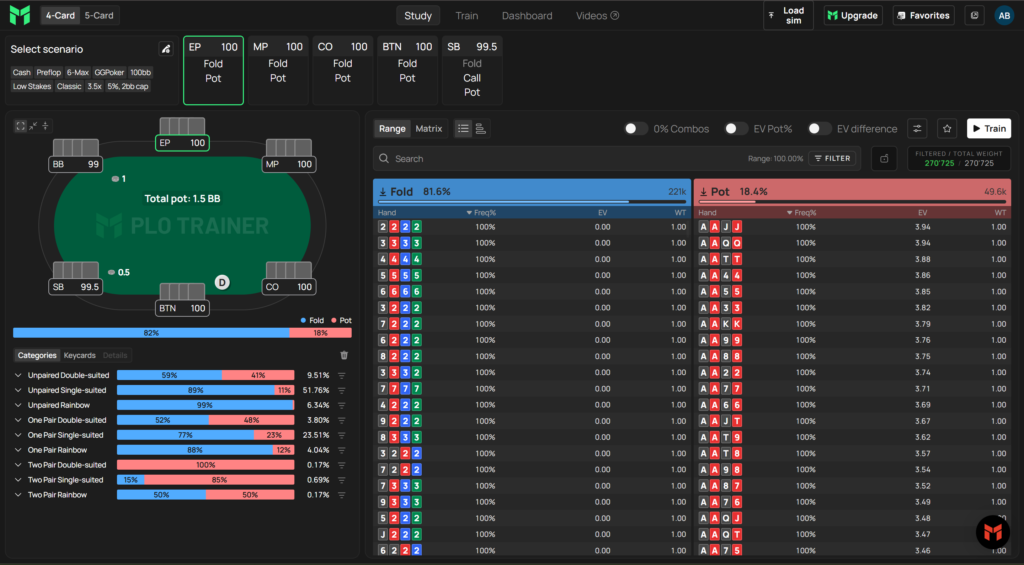
The range is displayed not as one long list but as a table with several columns:
- hand — a specific combination of starting cards;
- frequency — how often the specified action is taken with that hand;
- EV — the expected value of the action in big blinds;
- EV difference — how much more profitable the best action is than the next-best option. This column shows the cost of a mistake: if the difference is close to zero, the choice barely matters; if it is large, the mistake is costly;
- weight — how many combinations of that hand are present in the range.
Suit isomorphism is also worth mentioning: strategically identical suit combinations of the same hand are displayed in a single row. Double-suited AAKK in spades and hearts plays the same way as AAKK in clubs and diamonds, so there is no need to duplicate them in the table. This significantly reduces the amount of information you need to keep in mind.
Hand Categories, Matrix, and Key Cards: How to Avoid Drowning in Combinations
There are too many starting hands in Omaha to memorize them individually, so the platform offers three ways to view the range as a whole.
Starting hand categories group combinations by structure: paired, disconnected, double-suited, and so on. Each category includes a bar chart of actions and its share of the overall range. For example, you can see that double-suited disconnected hands are open-raised 41% of the time and account for 9.51% of the early-position range. This shows not only how a group of hands is played but also how important it is within the overall range.
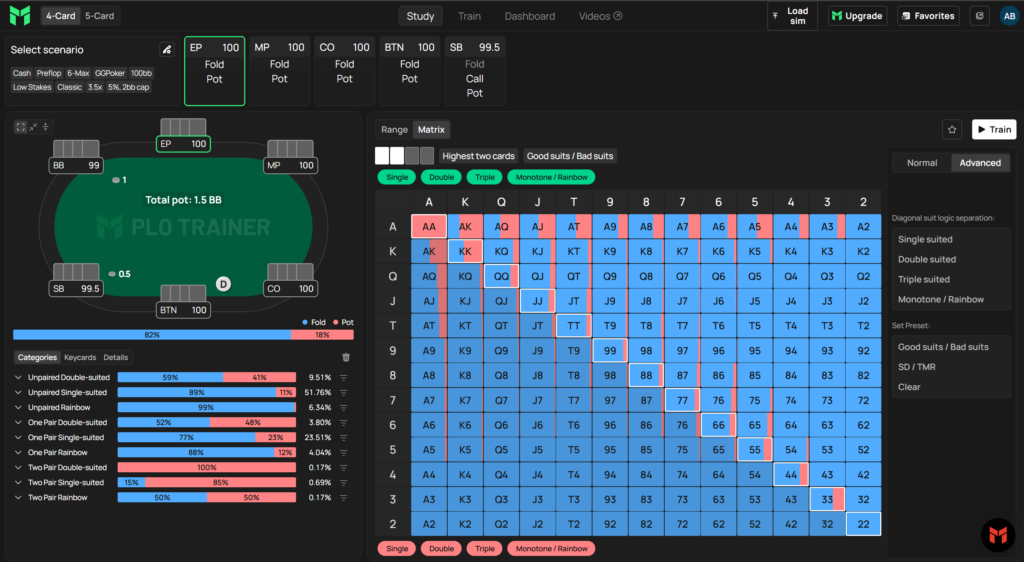
The matrix is the familiar 13×13 Hold’em grid adapted for Omaha. You select the two highest cards or a pair, after which the cells display suit variations: favorable combinations above the diagonal and unfavorable ones below it. Filters on the right let you show only double-suited or single-suited hands. The matrix is available both preflop and on the flop.
Key Cards provide a third perspective: a list of individual cards showing the overall strategy for hands containing each card. Preflop, this lets you see how often hands containing an ace are open-raised, called, or 3-bet; postflop, it shows how often hands containing that card continuation-bet or check.
For players new to the game, this is the most useful part of Study Mode: instead of memorizing tables, you develop an understanding of the underlying patterns—which hand structures are strong and which only appear to be.
Postflop: Boards, Equity, and Aggregate Reports
To move to postflop study, switch streets in the scenario selection menu and specify the pot type and positions—for example, 100 bb, single-raised pot, BTN (button) versus BB (big blind). A list of available flops then opens, with filters for board texture: paired, monotone, connected, and so on. Flops with solved turns and rivers are marked with a separate icon.
Once a flop is loaded, you can move through the actions just as you do preflop. Selecting an action that leads to the next street opens a list of available turns and then rivers.
The equity graph shows how the strength of both players’ ranges is distributed on a specific board. The ranges are ordered from the strongest hands to the weakest, and the distance between the lines shows who has the advantage and in which part of the distribution. This tool helps you quickly understand why aggression is justified on some boards but not on others.
Aggregate reports approach the problem from the opposite direction: instead of displaying a single board, they show a player’s strategy across all available flops or turns at once. Each board appears as a row with a bar chart of action frequencies, and the report can be sorted by a specific action and filtered by texture. In just a few minutes, you can see which boards are continuation-bet most often and where the range shifts toward checking.
Trainer: From a Single Node to a Complete Hand
Training reinforces the solutions you study. The button for opening the trainer is available directly from Study Mode, and the session begins from the node you were reviewing. You can train the entire range or a filtered portion of it.
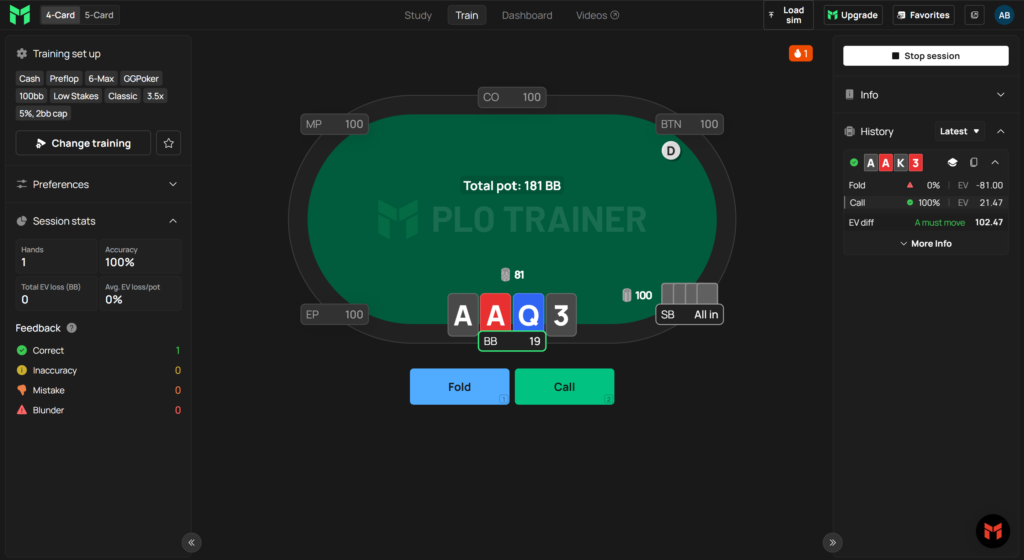
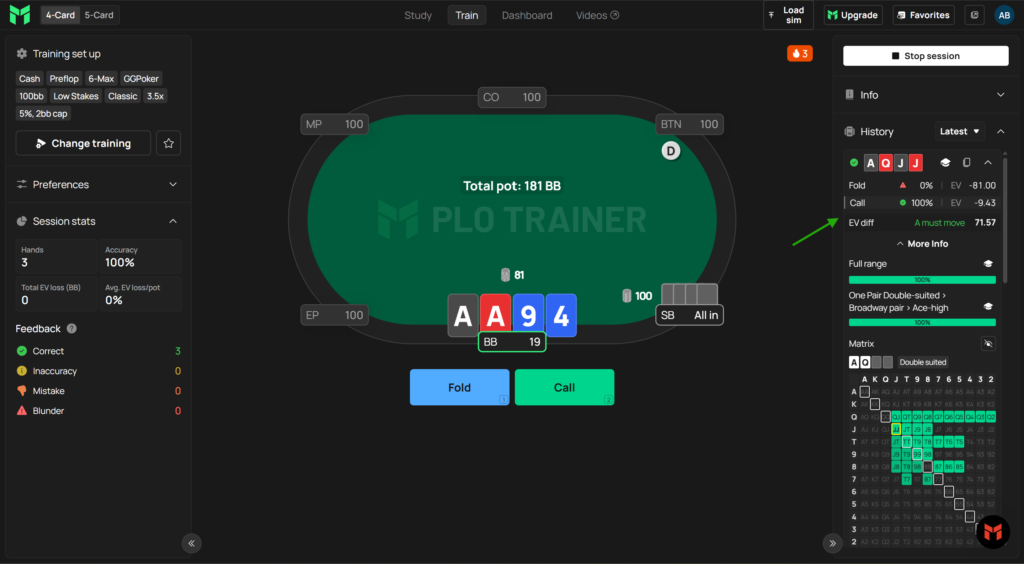
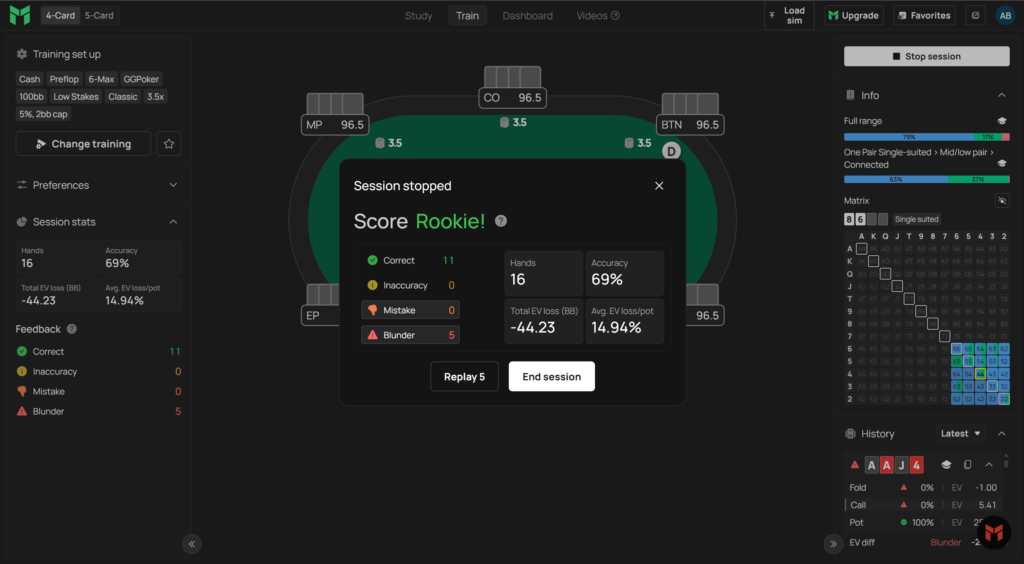
The program then deals hands from that range, and you select actions using the buttons below the table. Every decision is evaluated immediately: results are classified as correct actions, inaccuracies, mistakes, or blunders, with the amount of EV lost also displayed. A hand history on the right shows action frequencies and values; you can open any hand for a detailed review or switch from it to Study Mode.
Several training modes are available, and they differ significantly in intensity.
Quick Start (Skills) offers ready-made exercise sets that launch with one click. You select cash games or tournaments, a stake, and a scenario such as open-raising or playing in position against a single raise. Positions alternate within the set, so you train an entire class of situations rather than just one spot.
Single-node training focuses on one specific decision: after you choose an action, a new hand is immediately dealt in the same spot. This is the fastest way to get in a large number of repetitions.
Training to the river plays out the entire hand: the opponent responds with an action, you face another decision, and the process continues to the end. Once the hand is complete, the platform displays every decision point, your accuracy, and the total EV lost during the hand, while also revealing the opponent’s cards. You can replay an incorrect decision without restarting the hand.
Random-board training adds variety: the turn is selected randomly or filtered by transition type—for example, only cards that pair the board, complete a flush, or add a draw. This is a convenient way to practice the specific street transitions that cause you difficulty.
Multi-table mode lets you open up to four tables simultaneously, while the time bank limits how long you have to make each decision. Together, they make training feel more like a real session, where decisions must be made quickly and under time pressure. For difficult spots, you can instead use one table and enable a pause after every action or mistake.
Ending a session opens a results summary with an option to replay the mistakes you made.
Personal Progress: Dashboard and Favorites
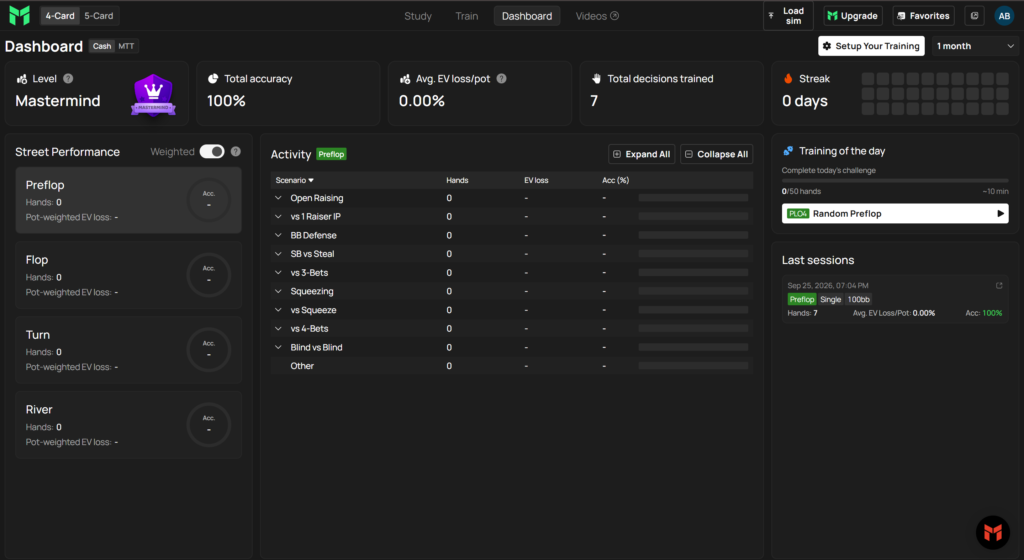
Your training results accumulate in a personal dashboard. It displays your overall level, decision accuracy, average EV loss relative to pot size, number of hands played, and consecutive days trained. Nodes you have not yet trained are marked separately—there is simply no data for them, which immediately highlights gaps in your preparation. The daily challenge offers a random node and 50 hands to play from it.
Favorites solve a practical problem: frequently studied spots can be saved in named collections and opened with one click, without going through the filters again. Collections can be renamed, deleted, exported, and imported.
Solving Turns and Rivers in the Browser and Working With Your Own Simulations
In addition to its precomputed database, the platform can run calculations itself. For 4-card Omaha, any turn or river spot can be solved directly in the browser. The result is added to the tree as a new node and can be studied there alongside the other solutions. Solving a turn automatically produces exact solutions for every river below it.
Before starting, you select the target accuracy, ranging from an initial estimate to high precision. The greater the required accuracy, the longer the calculation takes. One important detail is that the calculation runs on the user’s computer, so its speed depends on the number of CPU cores. Simple situations are solved quickly, while wide ranges and large trees take considerably longer. The rest of the platform remains available while the calculation is running.
You can also upload your own simulations in .mkr format—files calculated using the external solver MonkerSolver. Uploaded calculations can be studied using the same tools as database solutions, including categories, Key Cards, and EV differences. Ranges can also be exported and imported, which is useful when transferring your work between tools.
Exploitative Solutions: Playing Against Specific Mistakes
An equilibrium strategy assumes a strong opponent who does not make mistakes. In real games, opponents make mistakes constantly, and maximum profit comes not from remaining at equilibrium but from deviating from it in the right direction.
For this purpose, the library includes a separate group of solutions with fixed opponent frequencies. These are known as node-locked solutions. The principle is simple: the opponent’s behavior at a specific point is set manually—for example, they fold the big blind too often—and the platform then calculates the strategy that maximally exploits that particular mistake.
There are 54 such solutions at 100 bb: 50 preflop scenarios and four postflop scenarios. The preflop set covers common opponent profiles—tight-aggressive, loose-aggressive, tight-passive, and loose-passive—in opening situations, responses to an open raise, play against 3-bets and 4-bets, and play against squeezes. The postflop scenarios examine single-raised pots with CO (cutoff) versus BTN (button) at different opponent calling frequencies.
For new players, this is an effective way to see in concrete numbers how the correct strategy changes when an opponent stops playing perfectly.
Educational Content and Community
The solution library answers the question “How should I play?” while the video courses explain “Why should I play this way?” The video library contains more than 500 videos, with two new videos per week for each format, live-game reviews, and subtitles in ten languages, removing the language barrier for most players. The content is presented by active coaches specializing in different formats, including mid- and high-stakes cash games, tournaments, poker app games, and heads-up play.
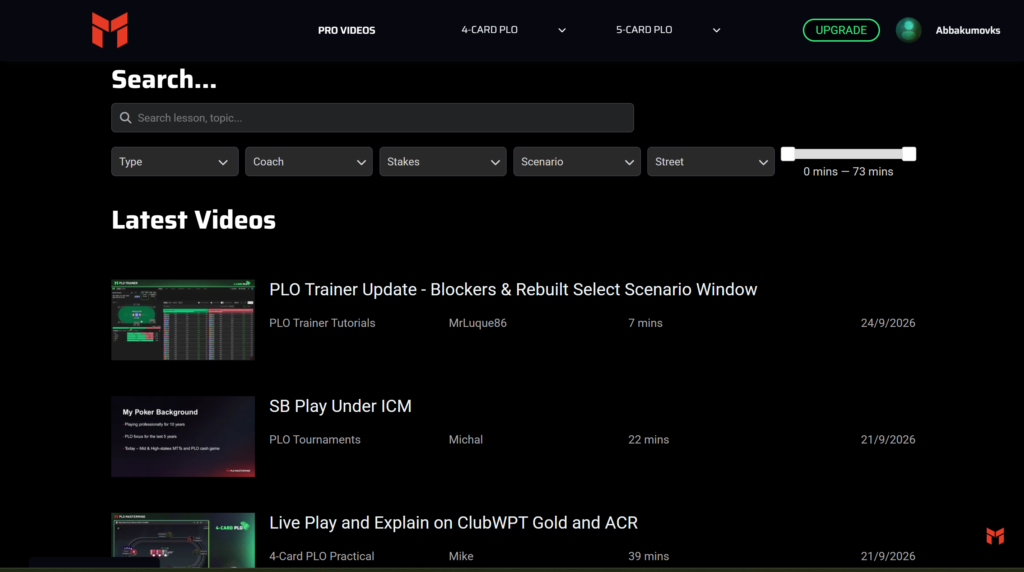
There is also a 30-day study plan—a sequence of lessons with daily trainer assignments. For players new to the discipline, this is the most practical entry point because there is no need to decide where to start or what order to follow.
The community is hosted on Discord and has more than a thousand members, channels for different formats—4-card, 5-card, and 6-card Omaha, tournaments, and bomb pots—plus hand reviews and answers from coaches. The public channels are also available on the free plan.
Compatibility: Formats and Poker Sites
The platform is dedicated entirely to Pot-Limit Omaha; Hold’em and other disciplines are not included. It supports 4-card and 5-card Omaha, each with its own subscription. For 6-card Omaha, only educational materials are available, with no trainer solutions.
The range of supported formats is broad: 6-max, 7-max, eight-handed live games, heads-up, tournaments, and ICM situations. Solutions are calculated for the real-world conditions of specific poker sites, including the rake structures of PokerStars, GGPoker, and CoinPoker, variants with antes and straddles, and packages for app and live games. Stakes range from approximately PLO50 to PLO5000, so players at both low and high stakes should be able to find a structure close to their games.
There are no operating system requirements because everything runs in a browser. Windows, macOS, iOS, and Android are supported, as are Chrome, Safari, and Firefox, although turn and river calculations can only be run in Chrome or Firefox. A vertical mobile mode is available: you can add the page to your phone’s home screen and use it like a regular app without browser toolbars. A powerful computer is only necessary for running your own calculations; studying the precomputed database requires nothing more than an ordinary computer and a standard internet connection.
One important limitation is that the platform is designed for studying between sessions, not during play. Running the trainer and a poker client at the same time violates the rules of most poker rooms, so you should close the trainer before playing.
PLO Stat Lab is also available separately. It is a collection of more than 10,000 postflop statistics, two HUDs, and benchmark values that works with Hand2Note version 4.1 or later. It is a standalone product and is not included in the platform’s subscriptions; the tracker must also be purchased separately. The trainer itself does not require any third-party programs.
Where to Start
Getting started comes down to a few steps.
- Create a free Starter account. There is nothing to install, no bank card is required, and the plan has no time limit.
- Open the 100 bb preflop tree for 6-max and view the ranges using starting hand categories and the matrix. This makes it easier to understand the underlying logic instead of memorizing combinations.
- Launch a training session directly from the node you are studying and play several dozen hands while monitoring the EV difference. It shows which mistakes are costly and which have almost no effect on the outcome.
- Watch the free training videos—three for each format—and decide which discipline suits you better: 4-card or 5-card Omaha.
- Join the public Discord channels and review a couple of your own hands there.
- If you upgrade to a paid plan, your account and accumulated statistics are retained, so you will not have to start over.
Plans and Pricing
Subscriptions are divided according to two criteria: format—4-card Omaha, 5-card Omaha, or both—and included content. The PLO Trainer plan provides only the solution library and trainer. The PLO Mastermind System plan adds the video library and 30-day study plan, while the PLO Mastermind Coaching plan provides access to the videos without the trainer. You can pay monthly or make a one-time annual payment, with the annual option working out significantly cheaper per month. The free Starter plan has no time limit but provides access to only some preflop trees and does not include postflop training. First-time purchases come with a seven-day money-back guarantee. A detailed description of the plans and prices is available on the product page.
Conclusion
PLO Mastermind handles two tasks that usually require separate tools: it provides accurate, precomputed Pot-Limit Omaha solutions and turns them into training with measurable results. For players new to the discipline, the value lies precisely in this combination. Categories and the matrix explain range structure, videos provide a clear study order, and the trainer’s EV-loss feedback shows what you have truly learned and what only seems clear.
It makes sense to learn the platform gradually: start with the free plan and preflop play, build automatic proficiency with basic opening ranges and responses to raises, and only then move on to postflop play, aggregate reports, and exploitative solutions. The subscription is expensive, so upgrading to a paid plan makes the most sense when you can set aside regular study time. With only occasional short sessions, you are unlikely to make use of most of the available features.

Featured software

Latest posts
-
 Poker Academy Review: Ranges, Solver, and Trainer in One Browser Window Oct 11, 2026
 -
 SmartHand Review: Opponent Stats Before the First Hand Oct 10, 2026
 -
 888Caption Review: A Tool for Fast-Paced Multi-Tabling Oct 9, 2026
 -
 Preflop ICM Solving in GTO Wizard: ICM-Aware Preflop Solutions in Seconds Oct 8, 2026
 -
 Octopi Poker Review: Tournament GTO With Pro Hand Reviews Oct 7, 2026
All the poker software you need, gathered in one place. Exclusive discounts, bonuses, latest news and updates.
Join now