Poker Academy Review: Ranges, Solver, and Trainer in One Browser Window
Poker Academy is an online platform for studying no-limit hold’em that combines three tools usually offered separately: a library of ready-made preflop solutions, a postflop solver, and a trainer where you play through entire hands. Everything runs in the browser, with no software installation or powerful computer required: all calculations are performed on the platform’s servers.
The service is designed to shorten the path from asking “What is the correct play here?” to turning the answer into a practiced skill. First, you find the relevant situation in the range library, then analyze the postflop play with the solver, and finally send it to the trainer and repeat it until the decision becomes second nature. The platform supports only no-limit hold’em; Omaha, five-card Omaha, and short deck are not supported.
How the Platform Works
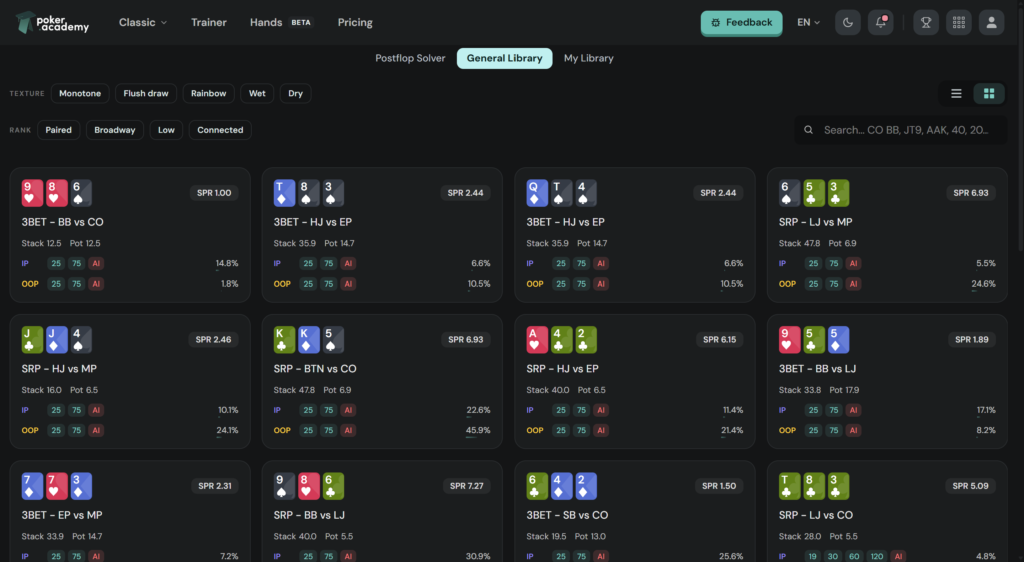
The key concept here is a range: a 13×13 matrix showing how to play each starting hand in a specific situation. A situation is defined by a set of parameters: the game format, stack size, players’ positions, and previous actions at the table. A combination of these parameters is called a spot, and these spots make up the library.
The library’s solutions were calculated using Monker, a solver that uses approximation methods to find an equilibrium strategy—one that an opponent cannot exploit for an advantage. Calculations have been running around the clock since 2020, so the library continues to grow and now contains more than 1,500,000 ranges.
The platform’s own postflop solver is the second source of data. Unlike the library, it does not use precomputed solutions: you enter the required board manually, and the strategy is calculated on demand. Its stated accuracy averages a 0.6% Nash distance. This metric indicates how far the calculated strategy is from a perfect equilibrium—the lower it is, the more reliable the result.
The third component is the trainer, which uses strategies from the same sources in two ways: the opponent at the virtual table responds according to the solver’s solutions, while every action taken by the player is compared against the same strategy and evaluated.
Preflop Solution Library
The library covers multi-table tournaments with eight- and nine-handed tables, 6-max cash games, and Spin & Go. The tournament section includes separate calculations for final tables with ICM, satellites, progressive knockout tournaments (PKOs), and hands with a big blind ante—a format in which the player in the big blind posts the entire ante, significantly changing how profitable it is to compete for the pot.
Stack sizes are divided into 23 values ranging from 3 to 100 big blinds, while tournament stages are split into separate calculation sets: the direct bubble, 10% of the field remaining, 25% of the field remaining, and more. There are also dedicated solutions for facing squeezes, facing cold 4-bets, multiway pots, blind-versus-blind play, and responding to an opponent’s limp.
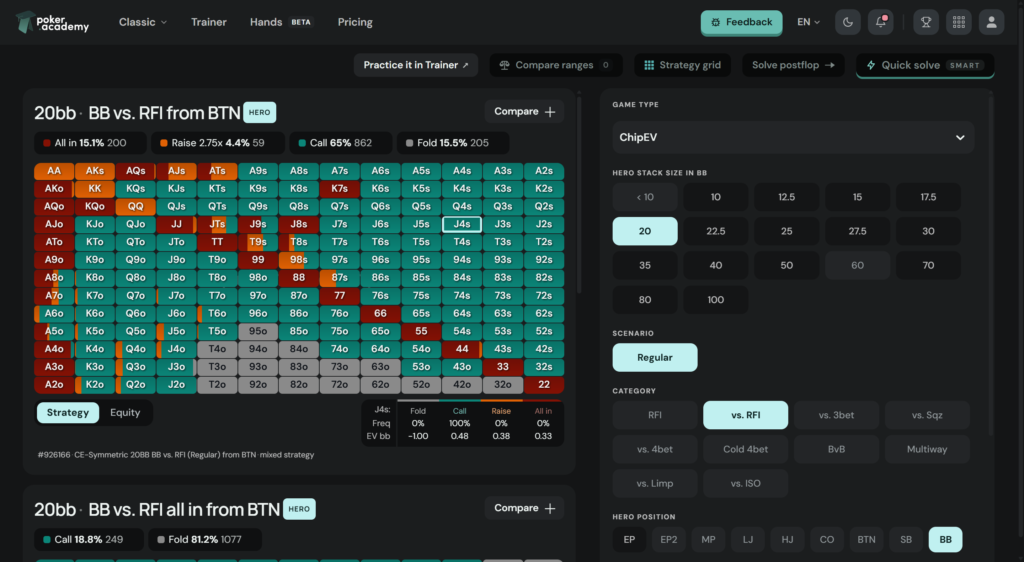
A spot is built step by step. First, you select the calculation type: ChipEV, where chips are valued directly, or ICM, which accounts for the payout structure. Next, you choose the stack size, situation category (open-raising, facing an open, 3-bets only, or facing a limp), the sequence of actions at the table, and finally the players’ positions. Three-player situations also include a third position: facing a squeeze, facing a cold 4-bet, playing a multiway pot, or facing an isolation raise.
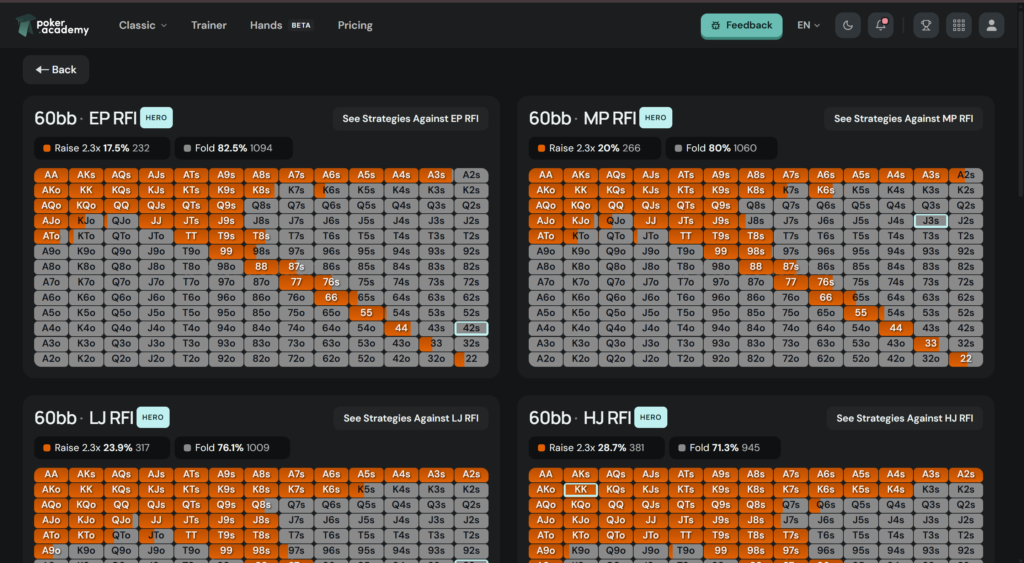
Strategy Grid provides a separate viewing mode. It displays the ranges for a selected action across all positions on a single screen—for example, opening ranges for MP or middle position, CO or cutoff, BTN or button, and SB or small blind. Instead of opening ranges one by one, you can immediately see how the range tightens or widens from one position to another. For beginners, this is the fastest way to grasp the underlying logic: the later the position, the wider the opening range.
You can also upload your own simulations from HoldemResources Calculator. Solutions calculated in the third-party calculator are added to your personal library and can be viewed through the same interface as the platform’s ready-made ranges.
A Postflop Solver With No Game Tree Setup
A conventional solver requires users to configure a game tree before running a calculation—a set of permitted bet sizes on each street, calculation depth, and accuracy. For beginners, this is the most frustrating barrier: incorrect settings produce meaningless results, and it can be difficult to recognize the problem from the output alone.
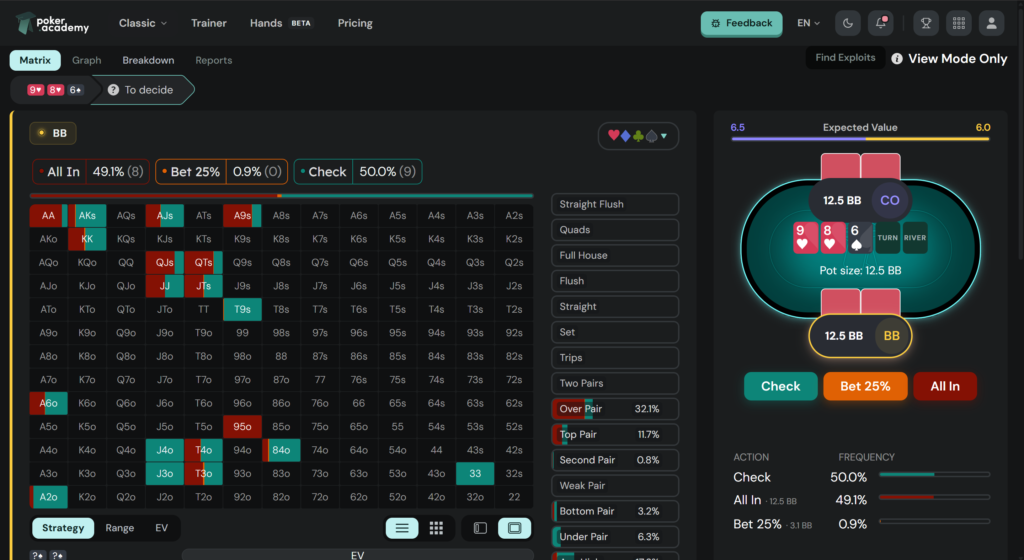
That step has been removed here. Ranges are imported from the preflop library based on the selected spot, the board is entered manually—any combination of cards can be used—and the calculation begins immediately. The result displays a strategy for every hand in the range, including action frequencies and the expected value (EV) of each option.
Settings are still available when needed: you can specify up to five custom bet sizes per street and see which ones the solver prefers and why. This is a useful exercise in itself, as it demonstrates that bet sizing should be based not on habit but on board texture and the stack-to-pot ratio.
Another feature is node locking. This lets you lock an opponent’s strategy at a specific point in the game tree. For example, if you know that an opponent almost never folds to a continuation bet, you can manually define their behavior at that node, and the solver will recalculate the most profitable strategy against them. This produces an exploitative rather than an equilibrium solution—a strategy designed to punish a specific mistake. One important limitation is that each street is calculated independently, so locking a strategy on the turn does not affect the flop or river strategy.
The solver calculates heads-up situations. The ranges available for calculations come from the library sections included with your subscription: tournament ranges are available on every plan, while cash-game and Spin & Go ranges are limited to the highest-tier plan.
Aggregate Reports: Rules Instead of Individual Flops
Analyzing a single board reveals specific details but does not establish a general rule. An aggregate report solves the same preflop situation across a set of flops and averages the strategies. Each flop is weighted according to how often it actually occurs.
You can select a board set from ready-made collections of 25, 49, 95, or 184 flops, use all 1,755 distinct flops, or create a custom list. For a flop that has already been solved, you can generate a report covering all 49 possible turn cards. Before the calculation begins, the platform shows how many boards are already in your personal library, how many still need to be calculated, and how long the process will take.
The top row of the table represents the general rule: the average check frequency and frequencies for each bet size across the entire set. The rows below show individual boards, revealing where the rule does not apply—for example, the frequency of a large bet may increase several times over on a paired board. The action line is clickable, allowing you to drill down into a specific node. For instance, you can see how the opponent responds to a 30%-pot bet across every board in the set.
The table can be filtered by board texture (monotone, two-tone, rainbow, paired, or connected) and grouped by the highest card or connectedness, with a separate average row for each group. You can also view results by hand class, recalculating all figures specifically for top pair, a flush draw, or a particular hand. Boards on which that hand class cannot exist are marked as “no data” rather than zero—an important distinction.
A separate calculation shows the cost of simplification: how many big blinds are lost by always taking the same action across the entire board set. For beginners, this provides the clearest answer to whether a single bet size is sufficient. Any complete report can be sent to the trainer with one click: boards selected by the filter are dealt in sequence, and every decision is evaluated.
Trainer: Complete Hands and the Cost of Mistakes
Most trainers stop at preflop: one situation, one choice, and either a check mark or a cross. Here, you play through the entire hand. You sit at a table with defined stacks, blinds, and antes; opponents act in turn; and the flop, turn, and river are dealt after preflop, with pot sizes, stacks, and ranges carried over from the previous streets. The opponent responds according to the solver’s strategy at every node, while bet sizes are displayed both as percentages of the pot and in big blinds.
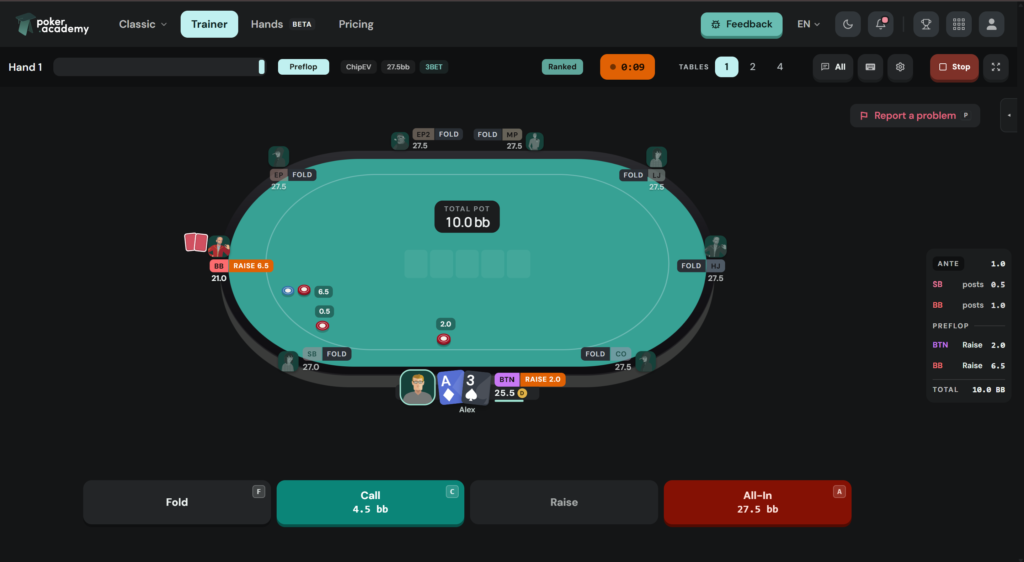
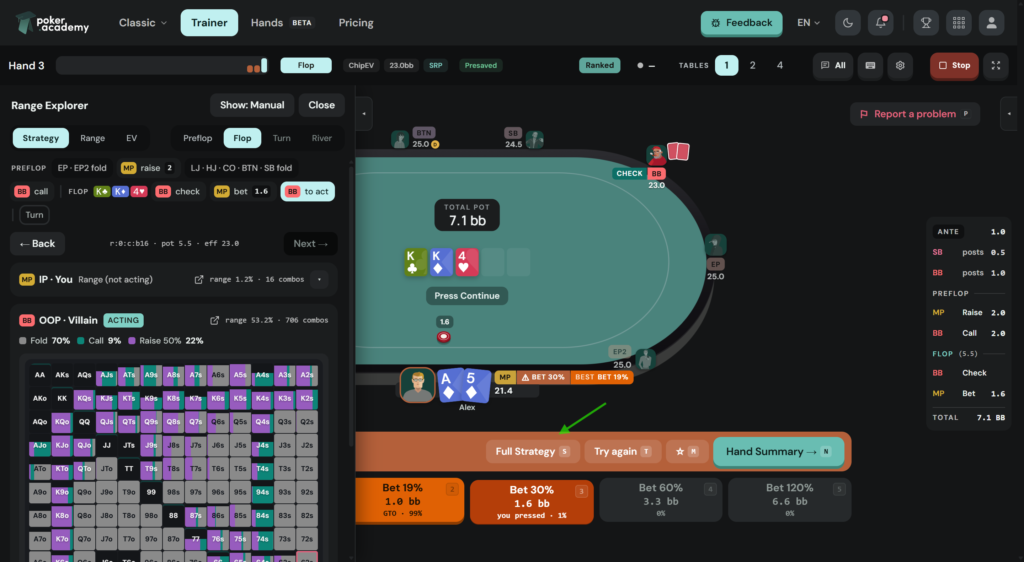
The main feature is that decisions are evaluated not simply as “right” or “wrong,” but according to the value lost. After each decision, you receive a verdict (best, correct, inaccuracy, mistake, or blunder) and the exact loss in big blinds. The difference between a decision that costs one-hundredth of a blind and one that costs half the pot becomes visible instead of being reduced to a generic “incorrect” label.
The trainer also distinguishes between two questions that beginners often confuse: how the range plays and how a specific hand plays. The big blind’s range might continue 60% of the time, while this particular hand folds 100% of the time at the same node. Both figures are displayed side by side and clearly labeled.
You configure the session in advance: the format (cash games, tournaments, or Spin & Go), stack range, ten categories of preflop situations (open-raises, facing an open, 3-bets, squeezes, blind-versus-blind play, and limped pots), the positions of the player and opponent, specific starting hands, and board textures. You can also adjust how the trainer behaves: the number of hands, when hints appear, the decision timer, the order in which opponents’ cards are revealed, and the number of tables—one, two, or four simultaneously.
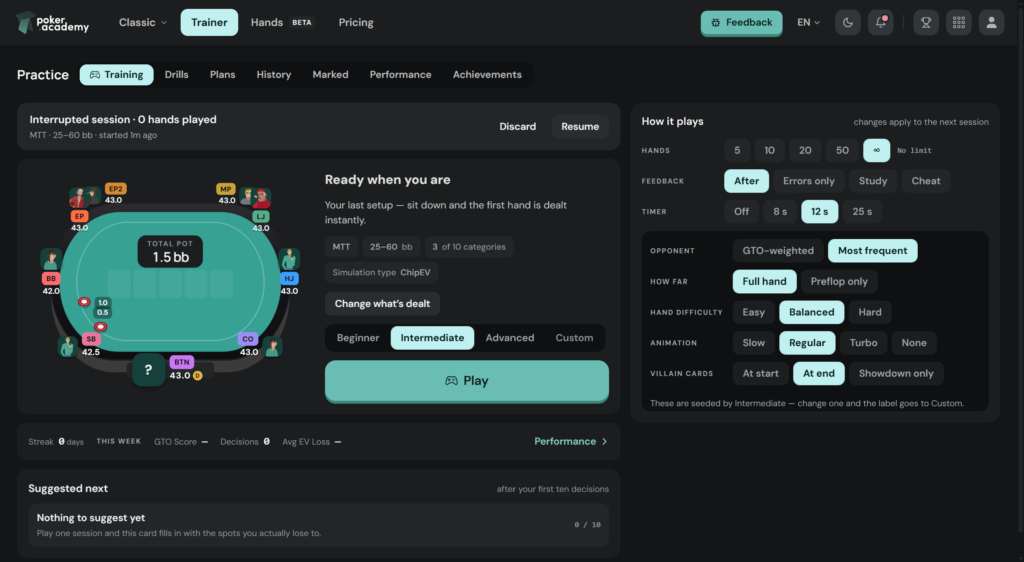
You can also select the difficulty of the hands. This setting applies only preflop and affects which hands are dealt: easier levels feature more straightforward situations, while difficult levels focus on spots where the solver uses mixed strategies and mistakes carry a meaningful cost. The proportion of hands that always fold is also limited; otherwise, most hands would end with a trivial fold.
Any configuration can be saved as a drill and launched with one click—for example, blind-versus-blind play at 20 big blinds or responding to a 3-bet in position on paired boards. Each drill tracks its own statistics, including the number of attempts, dates, and accuracy, turning the list into a record of your progress. In addition to custom drills, there is a ready-made catalog and multi-week study plans with training schedules.
Questionable hands can be marked with a single key during play and collected in a separate section. The trainer automatically looks for patterns among marked hands and suggests dealing similar ones consecutively. Reviews take place in the replayer, which shows the hand street by street and compares your decision with the solver’s strategy for both the specific hand and the entire range.
A separate statistics screen tracks results over 7, 30, and 90 days: accuracy, average EV loss per decision, and breakdowns by position and street. The platform identifies your weakest area, shows how far it falls below your personal average, and provides a button for launching the relevant drill.
Collaborative Study and Overall Statistics
Ranges, boards, and conclusions from reports can be arranged on a shared Canvas: several range matrices side by side, with labels and connections between them. This provides a workspace for comparisons without having to keep analyses open in multiple tabs or transfer screenshots between programs.
Solved situations are saved in a personal library with folders, while training results contribute to overall rankings: leagues with promotion and relegation, a shared weekly challenge, and training streaks. There is also a built-in chat and a Discord community. The competitive component does not replace analysis, but it helps users maintain a consistent study routine.
Free calculators are also available without a subscription or registration: an equity calculator (hand versus hand, hand versus range, and range versus range, for up to nine players), a tournament variance calculator, a break-even calculator for bluffs and calls, a randomizer, and a calendar of live tournaments in Las Vegas. There is also a free educational course comprising 28 articles, available without creating an account.
Compatibility: Formats and Platforms
Only no-limit Texas hold’em is supported. Omaha, five-card Omaha, and short deck (6+ hold’em) are not supported.
Supported game formats include multi-table tournaments (8-max and 9-max), knockout tournaments, satellites, final tables with ICM, 6-max cash games, and Spin & Go.
The main application runs in a browser on any operating system—Windows, macOS, or Linux—and requires no installation. The mobile version of the website is not optimized for small screens, so separate iOS and Android apps are available. They include the entire preflop range library and trainer but lack some features found in the web version, including range highlighting and range comparison. The postflop solver is available in the mobile apps with the Standard and Premium plans.
There are several known limitations to keep in mind: the solver calculates heads-up situations only, node locking applies to one street at a time, and cash-game and Spin & Go ranges are included only with the highest-tier plan.
Getting Started
The recommended first steps are:
- Register on the website and choose a plan. The three-day trial unlocks the full feature set of the highest-tier plan regardless of which plan you select.
- Open the range library and build your first spot: select ChipEV as the calculation type, choose a medium stack, and set an open-raise from late position. Strategy Grid will show how the range changes from one position to another.
- Analyze one postflop situation in the solver: enter the board manually, import the ranges from the selected spot, and initially leave the bet sizes at their suggested default values.
- Run your first trainer session using the default settings, displaying the verdict after each decision and playing 20 hands. This is enough to receive an evaluation of every action and see the session’s total cost in big blinds.
- Review marked hands in the replayer and save any recurring problem spot as a separate drill.
From there, repeat the cycle: play, review, narrow the range of situations, and practice again. There is no need to master everything at once—the library is enormous, and attempting to cover it all is less useful than regularly working on two or three situations.
Plans
The subscription is divided into three plans. The entry-level Essential plan includes tournament ranges, the preflop trainer, and the mobile app, but limits the full-hand trainer to 30 hands per day and automated reports to one per day. The Standard plan adds the postflop solver with a limit of five calculations per day, custom bet sizes, node locking, and custom reports covering up to 200 boards. The Premium plan removes the solver and trainer limits, unlocks reports covering all 1,755 flops with two calculations running in parallel, and includes cash-game and Spin & Go ranges.
Every plan includes a three-day trial with full access to the highest-tier plan’s features. Once the trial ends, the account switches to the selected plan. A detailed breakdown of the plans and prices is available on the product page.
Conclusion
Poker Academy covers the entire study cycle in a single browser window: find a situation in the library, analyze it with the solver, derive a general rule from a report, and practice it in the trainer while seeing the cost of every mistake in big blinds. For beginners, its main advantage is the absence of technical barriers: there is no need to configure a game tree, choose a powerful computer, or transfer study materials between programs.
The downside of this comprehensive approach is the sheer volume of material. It makes sense to learn the platform gradually: start with basic opening and defense ranges at a single stack size, then study postflop play in one specific situation, and only afterward move on to reports and multi-table training. Consistently working on two or three situations per week is more productive than quickly browsing the entire library.

Featured software

Latest posts
-
 SmartHand Review: Opponent Stats Before the First Hand Oct 10, 2026
 -
 888Caption Review: A Tool for Fast-Paced Multi-Tabling Oct 9, 2026
 -
 Preflop ICM Solving in GTO Wizard: ICM-Aware Preflop Solutions in Seconds Oct 8, 2026
 -
 Octopi Poker Review: Tournament GTO With Pro Hand Reviews Oct 7, 2026
 -
 PLO Mastermind Review: Solver-Based Solutions and an Omaha Trainer Oct 6, 2026
All the poker software you need, gathered in one place. Exclusive discounts, bonuses, latest news and updates.
Join now