Preflop ICM Solving in GTO Wizard: ICM-Aware Preflop Solutions in Seconds
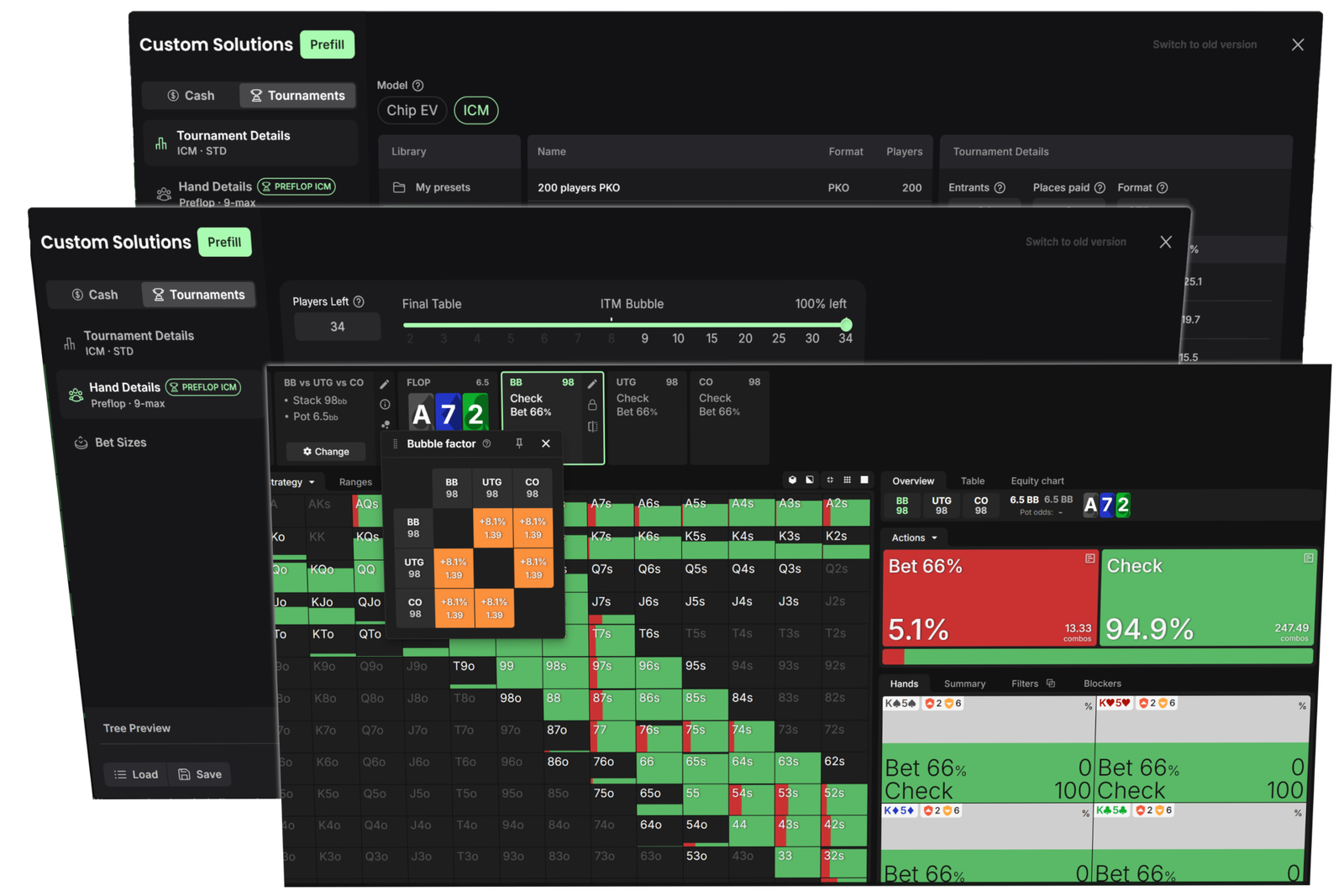
Preflop ICM Solving is a GTO Wizard feature for solving tournament preflop spots with ICM implications. Players can enter stack sizes, antes, payouts, bounties, and bet sizes, and receive a solution in about a second. Previously, this type of calculation took around half an hour, and changing any parameter meant waiting just as long for a new solution.
This review covers all the feature’s capabilities in detail, including tournament settings, hand history imports, nodelocking and player profiles, transitioning to postflop, limitations, and access requirements.
Why Tournament Preflop Play Cannot Be Studied in Chips Alone
Most tournament players study chip EV strategies. These strategies aim to win as many chips as possible. In tournaments, however, money—not chips—is what ultimately matters, and the relationship between the two is nonlinear: doubling your stack does not double your expected payout.
ICM (the Independent Chip Model) converts the stacks at the table into shares of the prize pool. Once payouts are included in the model, it becomes clear that losing chips “costs” more than winning the same number of chips is worth. As a result, strategy changes in ICM spots: calling ranges against all-ins become tighter, while big stacks can apply more pressure.
According to GTO Wizard, chip EV strategies lose a significant amount of money during the late stages of tournaments, particularly around the bubble and at the final table. These spots occur less frequently than ordinary situations, but much more is at stake. At a final table, a single decision can be worth several times the original buy-in.
The main problem with the previous approach was the time involved. Solving a single ICM spot required extensive data entry and a wait of about 30 minutes. If you wanted to change one stack or test a different assumption, the calculation had to start again. Under these conditions, players reviewed only their most painful hands and rarely explored how strategy changed under different conditions.
How the Feature Works in a Nutshell
Preflop ICM Solving is powered by the GTO Wizard AI engine—the same engine used by its multiway preflop solver. It combines the classic CFR algorithm with neural-network EV evaluation. The neural network was trained on billions of hands featuring different stack sizes, blinds, and ante structures.
In practical terms, this means:
- spots are solved in the cloud, so you do not need a powerful computer;
- most spots are solved in about one second;
- the feature is available in both the browser and mobile app;
- recalculating after changing any parameter takes about the same amount of time.
This speed changes the way players can study. You can ask a “what if?” question, change one condition, and immediately see how the strategy responds.
Where to Find the Feature and How to Create a Spot
Preflop solutions are created in the Study section. To do this, create a new custom solution and select preflop as the starting street. You can then enter the tournament parameters, player stacks, and bet sizes before submitting the spot to be solved.
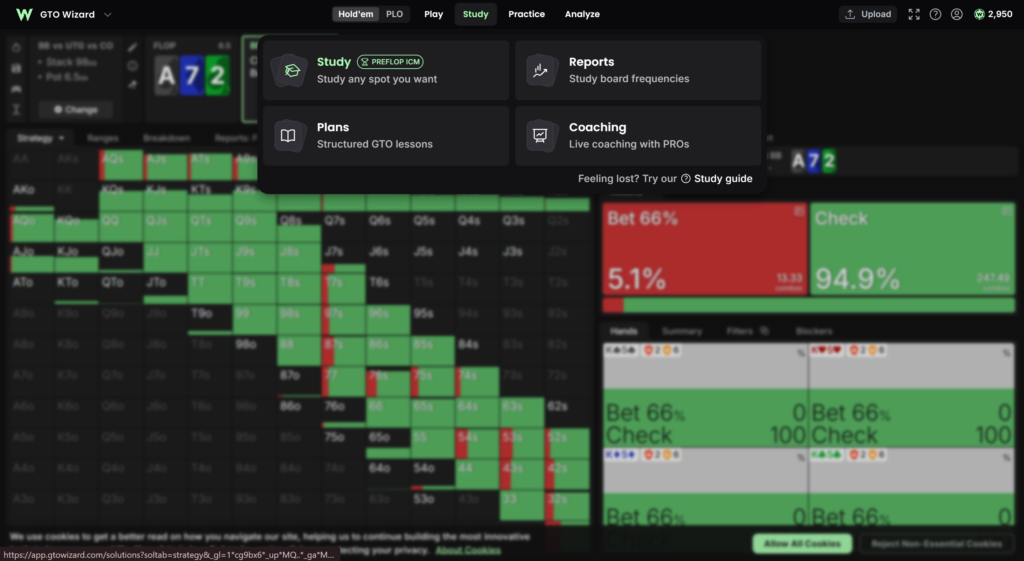
All groups of settings are covered below in order.
Tournament Settings
Tournament Format
The feature supports all major tournament formats:
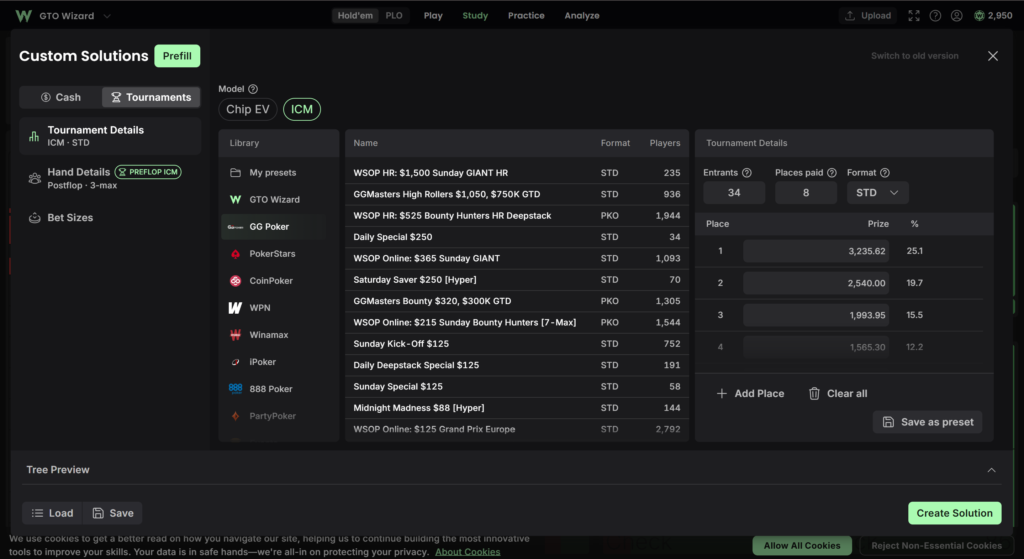
- regular MTTs;
- satellites;
- bounty tournaments: Knockout (KO), Progressive Knockout (PKO), and Total Knockout (TKO);
- Mystery Bounty tournaments can also be modeled.
The format has a major impact on strategy. In a satellite, all winning places are often worth the same amount, making ICM pressure particularly intense around the bubble. In bounty tournaments, by contrast, the reward for eliminating an opponent makes contesting the pot more profitable.
Payouts and Presets
The payout structure can be configured entirely by hand. This makes it possible to recreate any tournament, even if it is not available as a preset.
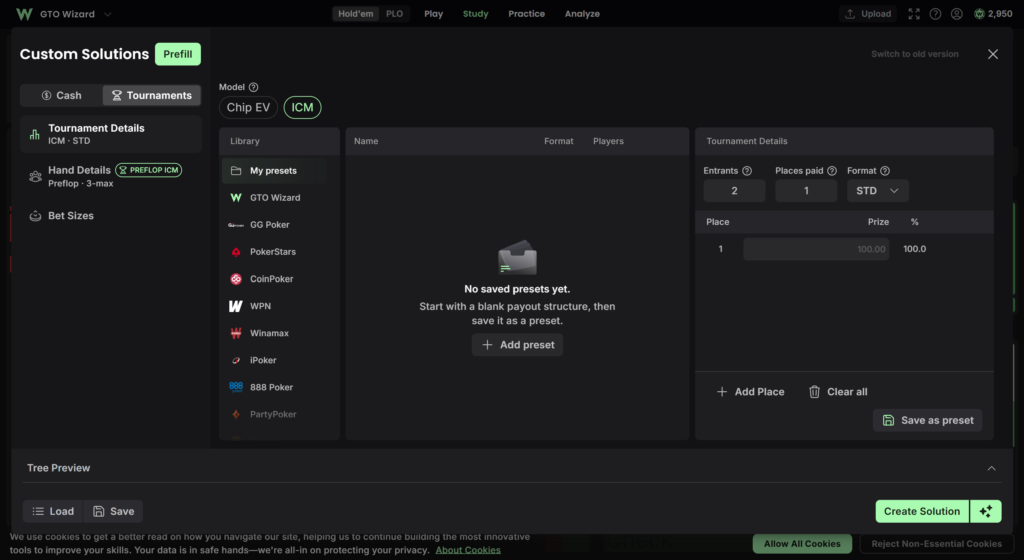
Presets are available for popular tournaments. With one click, a preset loads the payouts, field size, and blind structure. According to GTO Wizard, the presets cover most popular poker rooms and tournament series, including GGPoker and the GOPC series on CoinPoker. Other examples include the $1K Sunday Supersonic on PokerStars and the $2,650 The Venom on WPN. The list of presets continues to grow, and users can suggest tournaments to be added.
Field Size and Players Remaining
The feature supports tournaments with fields of up to 4,096 entrants. The number of players remaining in the tournament is configured separately using a slider. This parameter determines how close the tournament is to the bubble or the next pay jump.
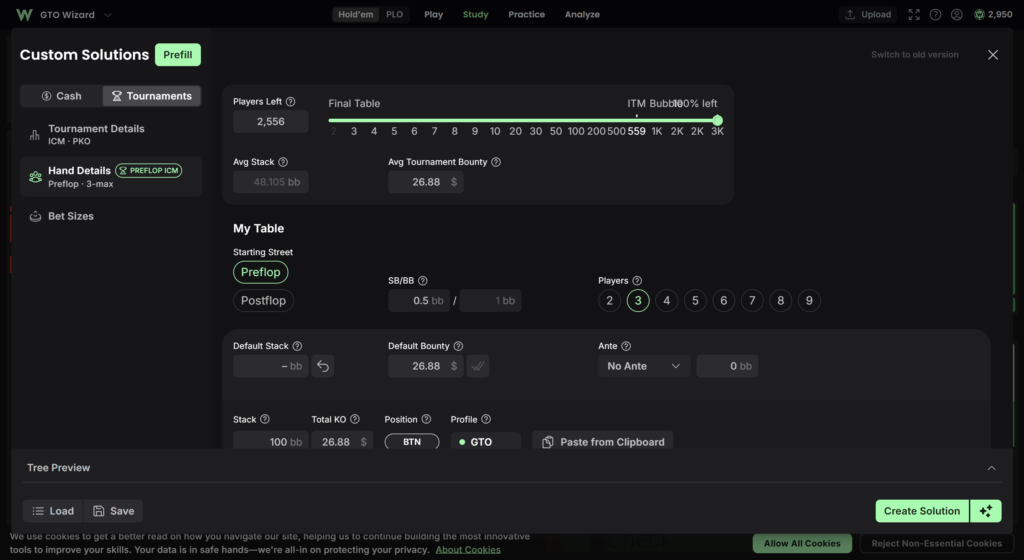
Stacks, Antes, and Bounties
The stack of each player at the table is entered manually. The feature supports up to nine players and stacks of up to 250 bb. Antes can also be configured manually. In bounty formats, you can enter the bounty amount for each player.
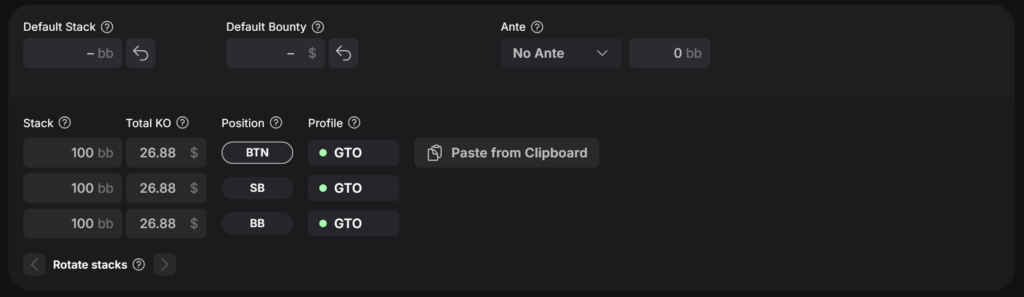
Individual stack configuration is what distinguishes a custom calculation from ready-made ranges. Prebuilt ranges usually assume a standard chip distribution, whereas real tables can include micro stacks, chip leaders, and players with nearly identical stacks. Each of these situations affects strategy differently.
Calculation Mode: ICM or Chip EV
The same spot can be solved using either ICM or chip EV. Comparing the two solutions shows exactly how payout pressure changes the optimal action.
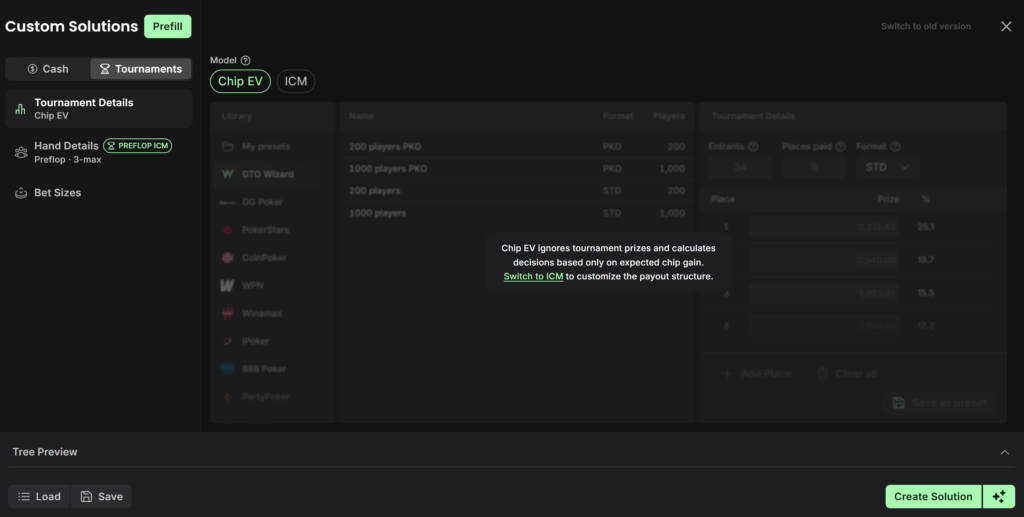
This is one of the most useful study features. For example, a hand that is an easy all-in under chip EV may become a marginal decision or a fold under ICM. Seeing this difference helps players understand where intuition built around chip EV can lead them astray.
Bet Sizes
By default, you can use the standard sizes included in the preset. If different sizes were used in the actual hand, you can enter them manually:
- opening raise size;
- 3-bet size;
- 4-bet size;
- all-in.
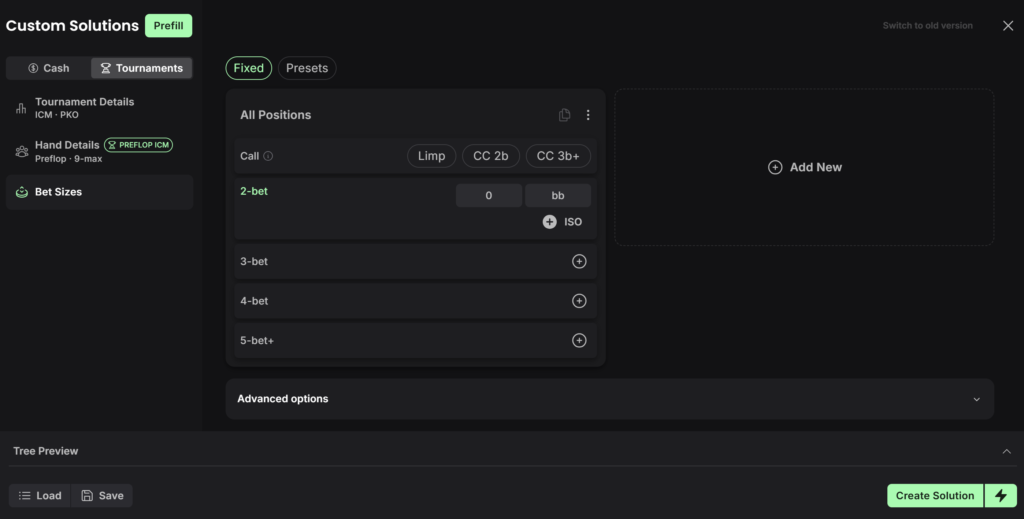
This is important when reviewing real hands. Prebuilt ranges assume specific sizes, but in an actual game, an opponent might min-raise or make a 3-bet that commits almost their entire stack. The solution for a different bet size can vary significantly.
Engine and Speed
GTO Wizard’s multiway preflop engine operates in two modes:
- Fast Mode uses a shorter lookahead horizon and recalculates the solution more frequently. This mode is better suited to large, complex trees.
- Classic Mode solves one street at a time. It is better suited to exploitative work involving nodelocking and player profiles.
The mode is selected automatically based on the complexity of the tree, but it can also be changed manually.
Alongside the release of Preflop ICM Solving, GTO Wizard also improved the engine’s overall speed. According to the developers, many large calculations are now three to six times faster. For example, a heads-up single-raised pot at 100 bb with automatic bet sizes can now be solved in 1.2 seconds instead of 4.2 seconds.
Importing a Hand From Hand History
Hands played online can be reviewed without entering all the data manually. GTO Wizard imports stacks, antes, and bounties from the hand history.
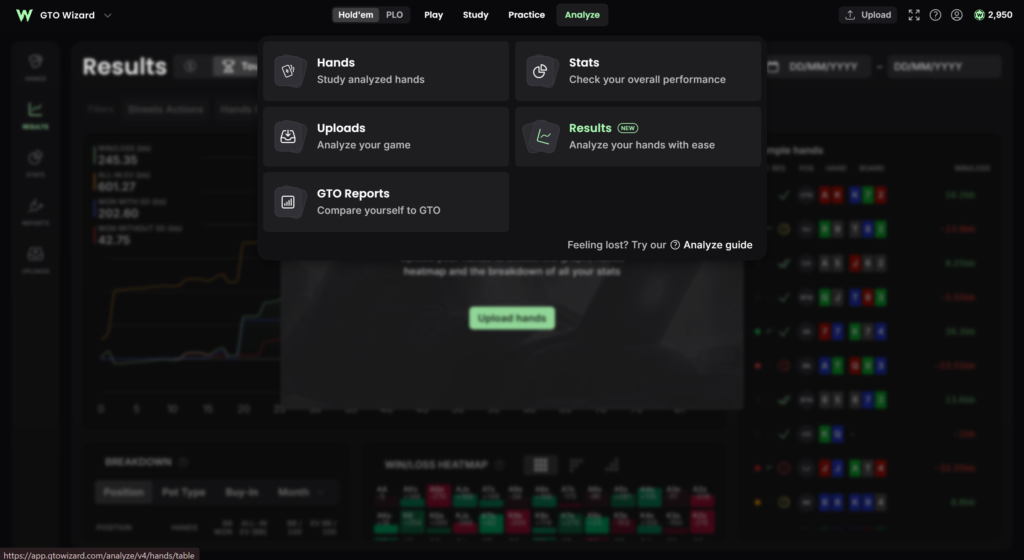
The process is as follows:
- Upload the hand.
- Import its parameters.
- Enter the payout structure and number of players remaining.
- Run the calculation.
Payouts and the number of players remaining must be entered manually because hand histories do not contain this information. For well-known tournaments, using a payout preset is a convenient option.
How to Read the Solution
The solution is displayed in GTO Wizard’s familiar interface. For each player at every point in the tree, you can see:
- a 13×13 range matrix showing the frequency of each action;
- overall action frequencies for folds, calls, raises, and all-ins;
- hand EVs.
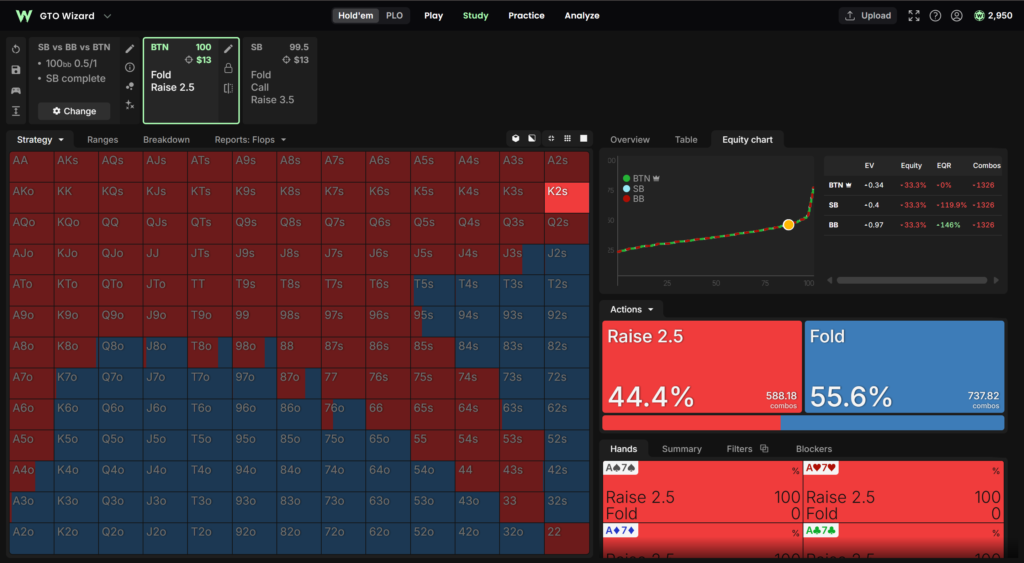
By navigating through the branches of the tree, you can see how the remaining players respond to an open, what the 3-betting range looks like, and how to respond to an all-in.
Nodelocking, Player Profiles, and Frequency Locking
A balanced solution answers one question: how should you play against eight opponents who understand ICM perfectly? Such a table is almost never found in real games. Chip leaders often apply too much pressure, while short stacks fold too frequently because they are afraid of busting on the bubble. Accounting for these deviations is one of the main sources of an edge in tournaments.
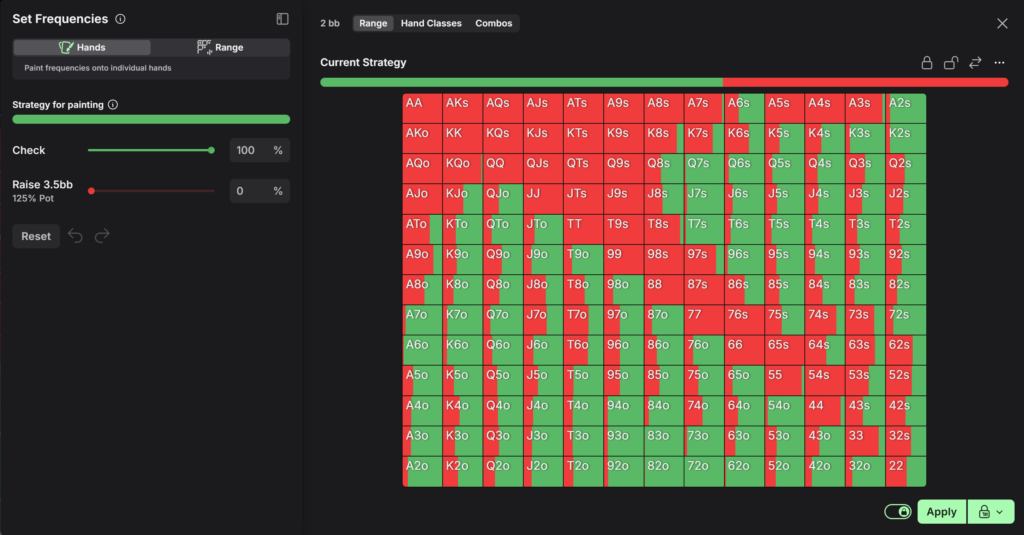
The feature provides three tools for this purpose.
Nodelocking. You can manually lock any player’s strategy at any point in the tree. The solver then calculates the optimal response of the other players to that strategy.
Player Profiles. Instead of configuring a strategy manually, you can apply a prebuilt exploitative profile to a player. For example, the multiway preflop solver includes profiles such as “maniac,” “calling station,” and “wide opener.” The solver recalculates the strategy for the entire table based on the selected profile.
Frequency Locking. If you only want to change the frequency of an action, you can do so with a single slider. The solver automatically determines which range corresponds to the new frequency.
Examples of questions these tools can help answer include:
- how much wider you can open if the players behind fold too often;
- what a reshove range should look like against a chip leader who 3-bets too frequently.
Moving to Postflop: Three-Player ICM Solutions
A solved preflop spot can be continued postflop. GTO Wizard AI carries the ranges, stacks, and payouts calculated preflop over to the flop. As a result, the flop strategy is based on the exact ranges that were just calculated.
ICM-aware postflop calculations are available for three-player pots. This is particularly important in tournaments because each player in a multiway pot faces different pressure. For example, a medium stack risks busting before a short stack, while a large bounty makes contesting the pot more profitable.
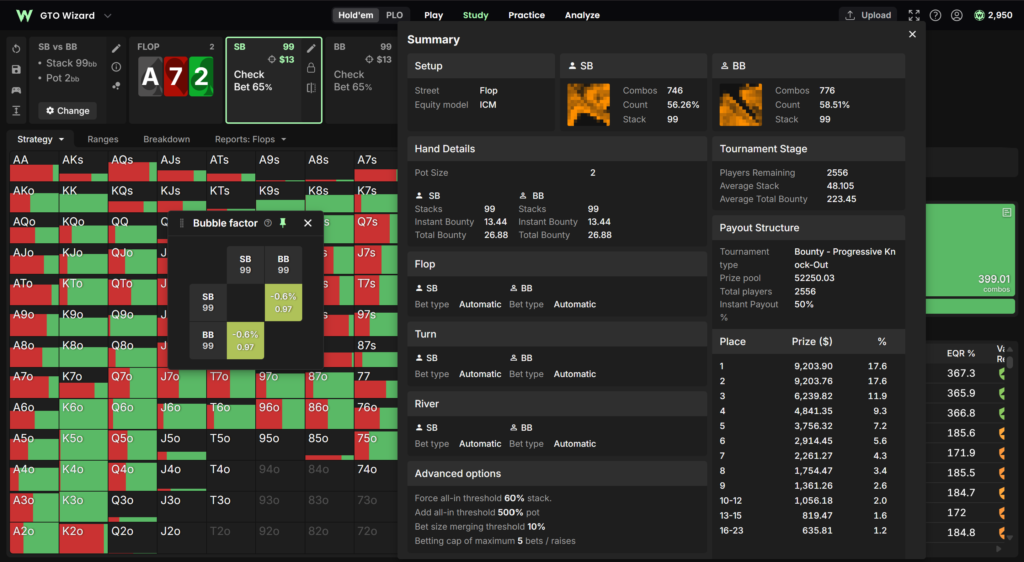
Postflop, you can:
- compare the same flop under ICM and chip EV;
- change which player covers whom;
- increase the bounty;
- lock the strategy of an opponent who calls too frequently and see how the other two players should adjust.
Access varies by subscription tier. The Ultra plan lets you create fully customized three-player ICM solutions with your own bet sizes, ranges, stacks, payouts, bounties, nodelocks, and profiles. The Elite plan provides access to prebuilt three-player Single Size ICM solutions in the Study and Practice modes.
Why Fold EV Is Not Always Zero in a Multiway Pot
In a standard chip EV calculation, folding returns zero chips, and the value of the other actions is measured relative to it. In a tournament, however, value is measured as a share of the prize pool rather than in chips.
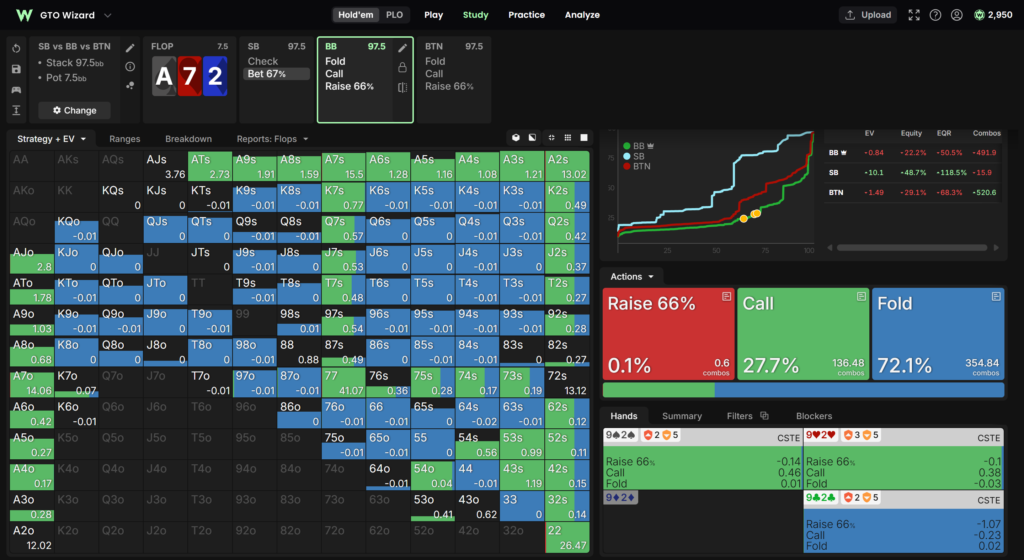
When a player folds in a multiway pot, the remaining players continue to compete. One of them may be eliminated, allowing the player who folded to move up the payout ladder without winning a single chip. In addition, the folded cards affect the likely holdings of the remaining players, which means some hands generate more EV when folded than others.
To account for this, GTO Wizard measures all actions, including folding, relative to a single fixed reference point. This is the player’s share of the prize pool if they lost the pot and the remaining players split it among themselves.
Questions You Can Explore
Fast recalculation lets you change one condition at a time and observe how the strategy responds. GTO Wizard suggests exploring questions such as:
- how strategy changes when there is a micro stack at the table;
- what happens with a flatter payout structure;
- how play changes on a satellite bubble;
- how having the chip leader on your left affects strategy.
This approach helps you understand not only the correct action in a specific hand, but also which tournament parameter is driving the strategy.
Limitations
At launch, the feature has several limitations:
- no more than three players can reach the flop in the preflop tree—the same rule applies to the multiway preflop solver for cash games;
- spots where a fourth player overcalls or overlimps are not currently supported;
- ICM-aware postflop calculations are limited to pots with no more than three players.
GTO Wizard says that support for more overcalls and overlimps is planned for an upcoming update.
Fair Play Check
To prevent the tool from being used during play, GTO Wizard has extended Fair Play Check to cover Preflop ICM Solving. Anyone can enter a date and time to view every preflop ICM spot solved in GTO Wizard within five minutes before or after that moment. For each spot, the tool displays its ID, exact time, every player’s stack, and the complete tournament configuration, including payouts.
GTO Wizard also reports that it works with poker rooms—including GGPoker, WPN, and iPoker—to identify unfair play.
Access and Pricing
Plan. Full access to Preflop ICM Solving is included with the Ultra tier of the Tournament plan. Custom preflop and multiway postflop ICM calculations are exclusive to this tier.
Free trial. Custom preflop ICM spots can be solved without a subscription when the effective stack does not exceed 10 bb. This is enough to learn how the interface works before purchasing a plan.
Power Credits. Preflop ICM calculations do not use Power Credits. These credits are only spent on custom aggregate reports.
Elite plan. Elite subscribers retain their existing benefits: custom heads-up calculations and access to prebuilt three-player Single Size ICM solutions.
Ultra pricing. The standard price is $359 per month when billed monthly or $289 per month when billed annually.
You can cancel your subscription within seven days. Prices are accurate as of October 2026. You can learn more about the available plans on the GTO Wizard software page.
How to Get Started
- Try it for free. Create a preflop spot with an effective stack of up to 10 bb and ICM enabled in the Study section to familiarize yourself with the settings.
- Review a familiar situation. Take a hand from one of your tournaments, import it from your hand history, and enter the payouts and number of players remaining.
- Compare ICM and chip EV. Solve the same spot in both modes and identify the hands whose optimal action changes.
- Change one condition at a time. Adjust one player’s stack, a bet size, or the payout structure and see how the strategy changes.
- Add an exploitative adjustment. Apply a nodelock or player profile to an opponent who plays suboptimally and study the resulting response.
- Continue postflop. If three players reach the flop, carry the spot over to postflop and study the play with ICM taken into account.
Conclusion
Preflop ICM Solving addresses one of the most difficult areas of tournament poker to study: the late stages, where decisions are worth the most. The feature combines support for any tournament format, calculations completed in seconds, hand imports, ICM and chip EV comparisons, exploitative adjustments, and the ability to continue postflop—all in one tool.
Its main advantage is speed. When recalculation takes one second instead of half an hour, you can freely experiment with different conditions and determine which factor is driving the strategy in a particular spot.
The limitations should also be considered: no more than three players can reach the flop, and full access is only available through the expensive Ultra plan. The free mode for stacks of up to 10 bb is a good way to try the feature.

Featured software

Latest posts
-
 Poker Academy Review: Ranges, Solver, and Trainer in One Browser Window Oct 11, 2026
 -
 SmartHand Review: Opponent Stats Before the First Hand Oct 10, 2026
 -
 888Caption Review: A Tool for Fast-Paced Multi-Tabling Oct 9, 2026
 -
 Octopi Poker Review: Tournament GTO With Pro Hand Reviews Oct 7, 2026
 -
 PLO Mastermind Review: Solver-Based Solutions and an Omaha Trainer Oct 6, 2026
Get an exclusive discount on GTO Wizard — the AI solver and trainer that helps you study any spot and stop leaking EV.
Get GTO Wizard