Vision GTO Trainer Review: Ready-Made Omaha Solutions in Your Browser
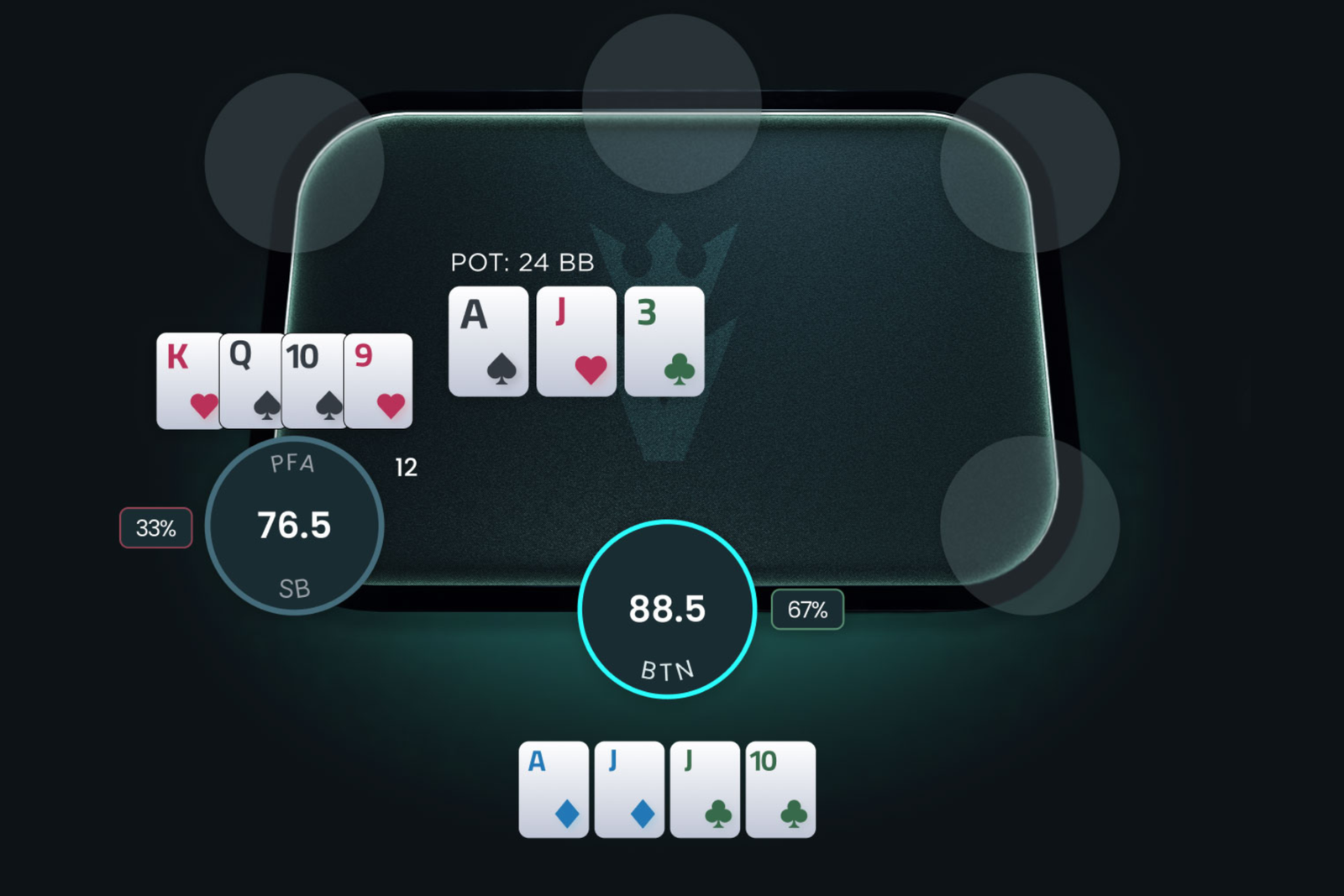
Pot-Limit Omaha is more complex than Hold’em: instead of two hole cards, players receive four, five, or six, increasing the number of possible combinations thousands of times over. This is why running your own Omaha calculations is so challenging—a solver simulation can take hours and requires a powerful computer. Vision GTO Trainer approaches the problem differently: all calculations have already been completed, so players only need to select the relevant situation and review the ready-made solution.
The software was created by Matthias Pum and is developed in partnership with Run It Once, the training platform founded by Phil Galfond. It is designed both for players transitioning from Hold’em to Omaha and for regulars who need to check a specific spot quickly. A spot is a particular game situation with defined positions, pot size, and community cards.
Where the Solutions Come From and How They Work
All solutions in the software have been precomputed using MonkerSolver. A solver is a program that finds an equilibrium strategy—one in which neither player can increase their profit by unilaterally changing their game plan. This strategy is known as GTO.
The calculations are stored on a server, so nothing needs to be recalculated when you open a spot—the database simply delivers the ready-made result. This gives the software its two main advantages: speed and no demanding hardware requirements. The solutions use certain assumptions: postflop rake reflects the conditions at PokerStars 500 Zoom tables (5%, capped at 1,200 mSB), while preflop rake can be adjusted to your stakes. Four rake levels are available: up to PL100, PL100–200, PL400–600, and above PL600.
Instead of listing every possible combination, the software groups hands by strength and structure: nut flush draws, flush draws with backdoor equity, nut-flush blockers, and so on. A blocker is a card in your hand that reduces the number of strong combinations your opponent can have. This approach saves a great deal of time in Omaha because what matters is not the exact cards but the category they belong to.
Building the Right Situation in a Few Clicks
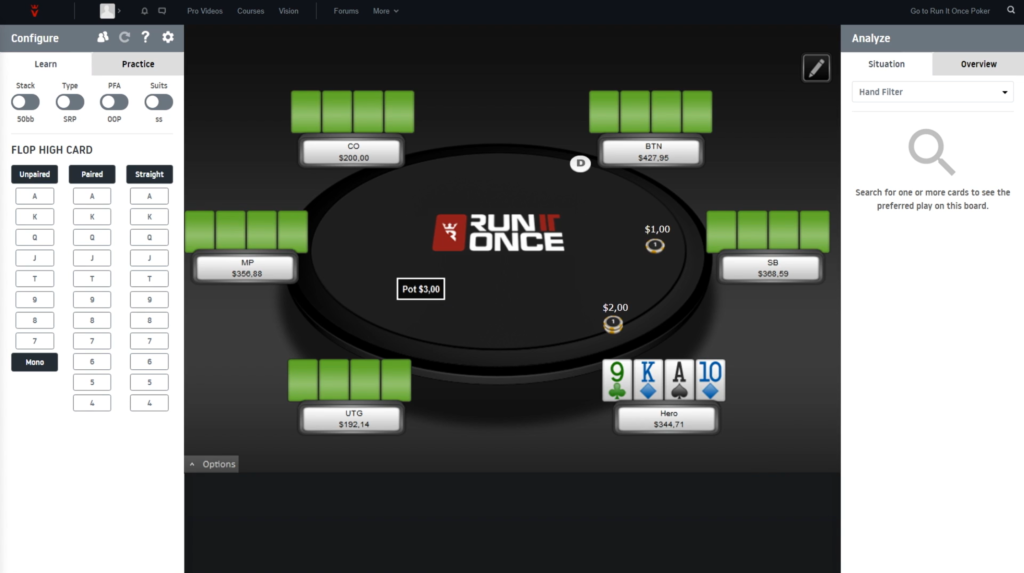
You build the situation in the left-hand panel. The format selector lets you choose between six-max and heads-up, while the stack selector sets the effective depth—50 or 100 big blinds, depending on the plan. You can also choose between a single-raised pot and a 3-bet pot. Additional settings specify whether the preflop aggressor is in position or out of position and the board’s suit texture: two-tone, rainbow, or monotone.
Next, you select the flop itself. Boards are grouped into categories—paired, connected, and mixed-suit—and can also be filtered by their highest card. To open the solution for a T98 flop, simply click the ten in the connected-board column.
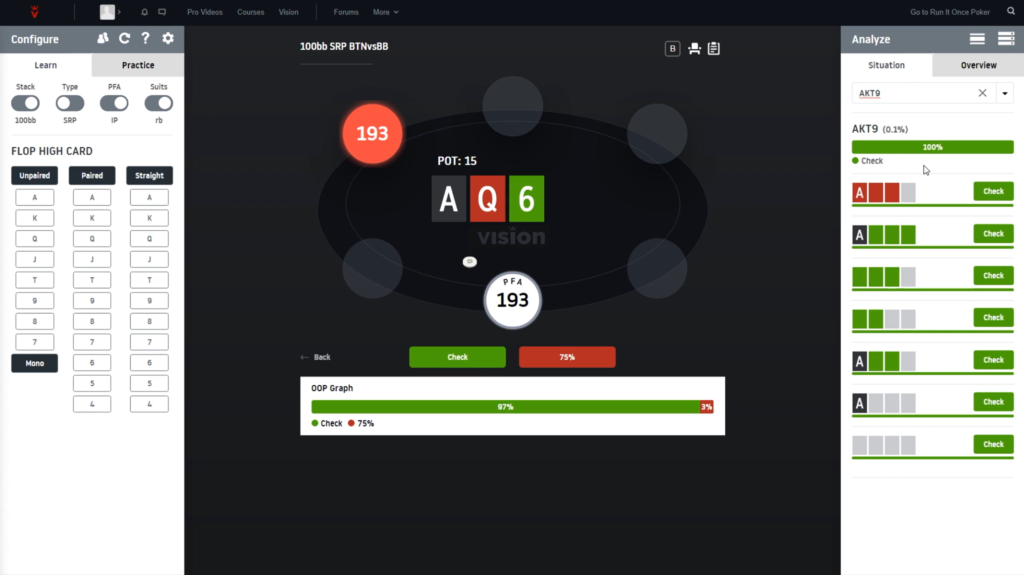
A table appears in the center of the screen with $1/$2 stakes, the selected flop, an indicator showing the preflop aggressor, and the active player highlighted. At the bottom is an action-frequency chart: for example, the cutoff (CO) bets this flop 37% of the time and checks 63%. Any of these ranges can be copied to the clipboard in ProPokerTools format with a single click on the percentage, allowing it to be used in other poker software.
The buttons below the table let you move forward and backward through the game tree, so you can follow the same hand from the flop to the river and see how the strategy changes on every street.
Analyzing a Solution: From the Range to a Specific Hand
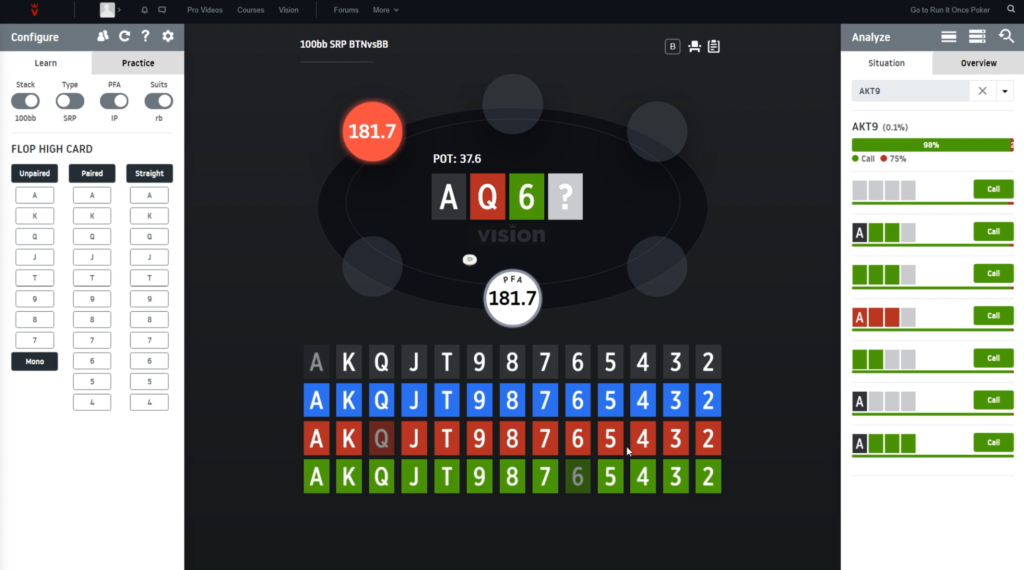
The right side of the screen contains the analysis panel, which is the software’s primary working tool. The tab for the current situation displays the active player’s entire range, divided into hand categories. Next to each category is a chart showing action frequencies: how often the hand bets, checks, calls, or folds.
The hand search accepts both individual cards and card groups: “AJT8,” “KK,” and “QT” are all valid queries. There is also an exclusion filter where you can specify cards to remove, making it easier to filter out all straight draws or pairs, for example.
Suits are selected using dedicated controls rather than entered manually, and the logic depends on the board. On a two-tone flop, you specify how many cards of the relevant suit are in the hand; on a rainbow flop, you select the number of backdoor flush draws; and on a monotone board, you choose how many cards match the board’s suit. The software automatically groups strategically equivalent combinations and shows how the strategy differs for each group.
You can expand a category to reveal subcategories—more specific hand features that shift the decision one way or another—and then drill down to individual hands. This is the deepest level of analysis. For convenience, the first 100 hands load immediately, while the rest can be loaded by clicking a button.
In practice, this helps you understand the underlying principles instead of memorizing individual combinations—which hand features genuinely affect the decision and which do not. This is especially useful for Omaha beginners because memorizing ready-made answers with four hole cards is virtually impossible, whereas learning a few dozen rules is entirely manageable.
Comparing Different Boards
The second tab in the analysis panel displays not one situation but a list of all available flops for the selected conditions, sorted by the frequency of the aggressive action. At the top, you can see the average frequency across all boards—for example, the cutoff checks to the button (BTN) on unpaired flops in single-raised pots 80% of the time.
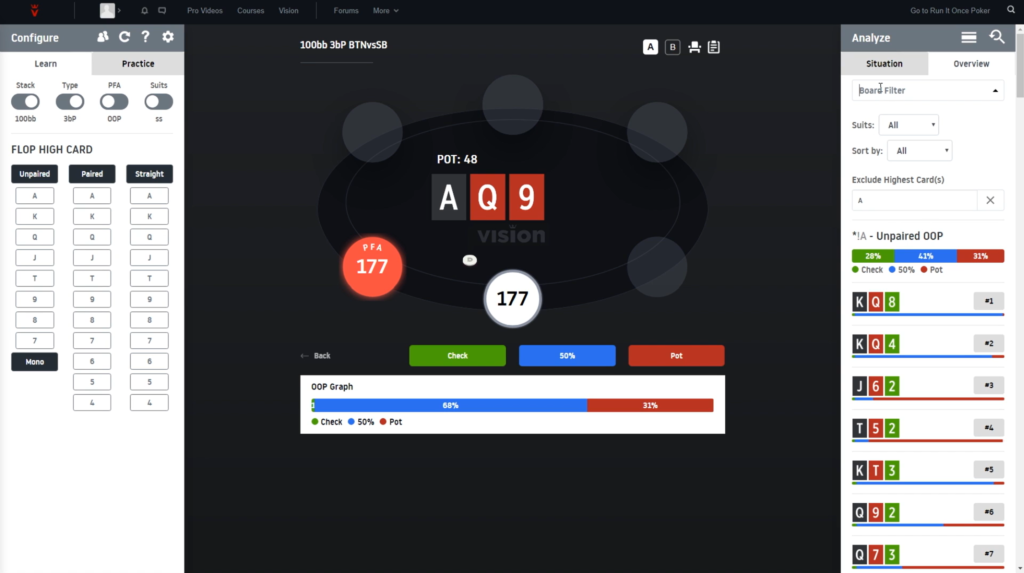
The list can be filtered by the highest card and suits, then sorted by frequency or rank. This makes it easy to see which textures are bet almost all the time and where the strategy shifts in the opposite direction.
For beginners, this is the fastest way to identify general patterns: instead of analyzing 100 flops individually, you can view the entire spectrum at once and understand which community cards have the greatest effect on strategy.
Training Mode: Testing Yourself With Random Hands
Studying solutions and applying them at the table are different skills, so the software includes a dedicated training section. You can access it directly from the spot you are analyzing: clicking the tablet icon deals a random hand in the same situation and asks you to make a decision.
For greater flexibility, the training tab lets you configure the conditions from scratch: positions, streets, pot types, and, if desired, the type of hand that should be made postflop. For example, you can disable all turn actions and receive only flop spots. Clicking the generate button starts a series of exercises.
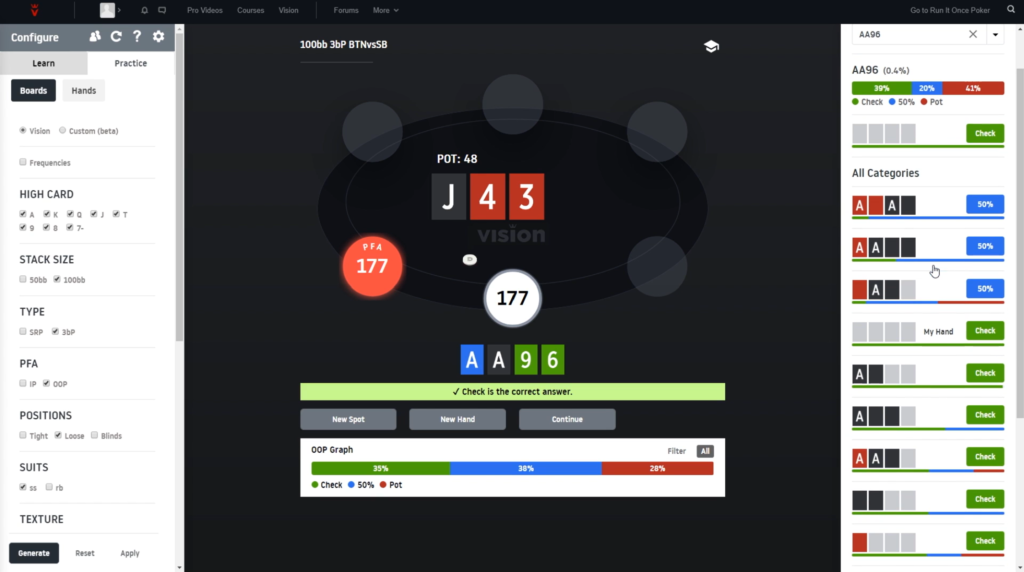
There is also a more demanding format: when frequency mode is enabled, the software does not simply ask you to choose an action. Instead, it asks you to adjust sliders and estimate how often the hand should bet, check, or fold. This comes much closer to demonstrating a genuine understanding of strategy than simply selecting one of three actions.
Streak: Runs, Rankings, and Competition
A separate mode is built around streaks of correct answers. The goal is to continue answering correctly for as long as possible. You earn points, unlock new streaks, and place on an overall leaderboard where prizes are awarded. The mode covers both preflop ranges and postflop situations.
Competition is not the only purpose of this mode. The software identifies the sections where you make the most mistakes and suggests what you should study in greater detail. For players who struggle to study regularly, this format works better than simply reading tables: a short series of 30 questions on a phone takes only a few minutes, and progress is immediately visible.
Custom Simulations and Exploitative Solutions
The ready-made database covers standard situations, but sometimes you may need a spot that is not included. For this purpose, the software supports custom calculations. You specify the players, their stacks and actions, the pot size, the community cards, and the actions available to the player, then paste the ranges in ProPokerTools format. You can analyze your custom spot using the same tools as the built-in solutions, including filters, hand categories, and training exercises.
In addition to equilibrium solutions, the software offers exploitative strategies for four-card six-max Omaha. Exploitative play means deviating from equilibrium to take advantage of a specific type of opponent. Three profiles are available: maniac, nit, and whale—in other words, an excessively aggressive player, an excessively cautious player, and a weak recreational player. You can test yourself both preflop and postflop.
The practical benefit is straightforward: at micro and low stakes, opponents rarely play close to equilibrium. Understanding exactly how to adjust your strategy against an obvious maniac or nit is therefore more valuable than memorizing GTO perfectly.
Analyzing Your Own Hands
The six-card plan includes a hand-history uploader. The software accepts exported histories of played hands, automatically evaluates your preflop decisions, highlights mistakes, and lets you revisit the same situations in training mode.
This is the shortest route from theory to improving your own game. Instead of guessing which areas to study, you can identify where your mistakes occur most often and focus specifically on them.
Training Videos Included With the Subscription
The subscription includes a selection of more than 40 training videos from the Run It Once library, featuring Phil Galfond, Martin Dam, Richard Gryko, and other coaches. The videos are collected in a dedicated section and help explain the logic behind the solutions: why strategies differ in situations that appear similar and which board features deserve the most attention.
Compatibility: Formats and Platforms
Vision GTO Trainer runs entirely in a browser, so there is nothing to install and no separate desktop client. It supports all modern browsers, and the interface is optimized for smartphones and tablets, allowing you to study on any internet-connected device. There are no computer performance requirements because the calculations are not performed locally.
In terms of game types, the software supports Pot-Limit Omaha only: four-card, five-card, and six-card variants. It does not include No-Limit Hold’em or any other games.
For four-card Omaha, six-max and heads-up solutions are available for every street, including the river. The available situations include single-raised pots—cutoff versus button, under the gun (UTG) versus button, button versus big blind (BB), UTG versus big blind, button versus small blind (SB), small blind versus big blind, as well as limped pots—plus 3-bet and 4-bet pots, squeezed pots, three-way situations, and heads-up play across all pot types. Most four-card spots have been calculated for stacks of 50 and 100 big blinds, while 3-bet and 4-bet pots are also available at 200 big blinds.
The five-card plans include single-raised, 3-bet, and 4-bet pots, as well as heads-up play. Squeezed and multiway spots have not yet been calculated for this format. Available stack depths are 100 big blinds for six-max and heads-up, plus 50 big blinds for six-max. The six-card plan covers preflop situations.
There are three main limitations to consider. First, the available bet sizes are fixed. They were chosen to minimize the loss in expected value, but you do not have complete freedom when selecting a sizing. Second, the database assumes a pot-sized preflop raise, whereas many players use a three-big-blind open raise. This has almost no effect postflop, but the preflop range is wider with the smaller opening size. Third, the software is not tied to any specific poker room. It is a study tool that does not connect to poker tables or operate during play.
How to Get Started
Getting started takes just a few steps.
- Create an account on the Run It Once website.
- Choose a plan for your preferred game: four-card Omaha, five-card Omaha, six-card Omaha, or the combined package.
- Set the preflop rake level for your stakes. You only need to do this once, and it determines which ranges are displayed.
- Analyze your first spot in study mode. The easiest place to start is a single-raised pot at a depth of 100 big blinds, where you can see how the frequencies change across different flops.
- Switch to training mode for the same situation to reinforce what you have studied.
It is also worth reviewing the user guide and training videos. The interface contains a great deal of information, and understanding what the suit colors mean within the hand categories will save considerable time when getting started. The software does not offer a free trial, so you must select a paid plan from the outset. The minimum subscription period is one month.
Pricing Plans
Subscriptions are divided by game type, with separate plans for four-card, five-card—which includes six-card—and six-card Omaha, plus a combined package covering all three. You can pay monthly, quarterly, or annually, with longer periods offering lower prices. The main difference between plans is the set of available precomputed situations. Four-card Omaha has the most comprehensive coverage, five-card Omaha offers fewer spots, and the six-card plan covers preflop and includes a hand-history uploader. A detailed description of the plans and prices is available on the product page.
Conclusion
Vision GTO Trainer addresses the main challenge of studying Omaha by providing access to solver solutions without requiring you to use a solver yourself. There is no need to learn simulation syntax, wait for calculations to finish, or keep a powerful computer on hand—all you need is a browser and a few minutes of free time.
The software is more suitable for beginners than its reputation as a tool for regulars might suggest. Grouping hands into categories, offering training modes, and highlighting weak areas turns studying into a clear sequence of steps. The main drawback is the price: the subscription costs more than most poker software and is worthwhile only if you study regularly.
A sensible learning path is to begin with preflop ranges in training mode, then move on to the most common postflop situations—single-raised pots at a depth of 100 big blinds—and only afterward study 3-bet and 4-bet pots, multiway situations, and heads-up play. Trying to cover everything at once will almost certainly lead to confusion, while progressing through the sections step by step produces results much faster.

Featured software

Latest posts
-
 Poker Academy Review: Ranges, Solver, and Trainer in One Browser Window Oct 11, 2026
 -
 SmartHand Review: Opponent Stats Before the First Hand Oct 10, 2026
 -
 888Caption Review: A Tool for Fast-Paced Multi-Tabling Oct 9, 2026
 -
 Preflop ICM Solving in GTO Wizard: ICM-Aware Preflop Solutions in Seconds Oct 8, 2026
 -
 Octopi Poker Review: Tournament GTO With Pro Hand Reviews Oct 7, 2026
All the poker software you need, gathered in one place. Exclusive discounts, bonuses, latest news and updates.
Join now