Poker Copilot Review: A Tracker With a HUD and Leak Detectors for Mac and Windows
Poker Copilot is an online poker tool that imports played hands into its own database and displays statistics for both you and your opponents. While you play, it overlays a HUD on the table with stats for every opponent. After the session, it turns the same database into graphs, reports, and tools for identifying mistakes.
The tasks handled by the software fall into two groups. The first is making decisions at the table: understanding how widely an opponent enters pots, how often they raise, and whether you should try to steal their blinds. The second is studying away from the table: finding spots where you consistently lose chips, reviewing difficult hands, and determining which stakes and formats produce your best results.
The supported operating systems are also worth noting. Poker Copilot is available as a standalone application for both Windows and macOS, with Mac builds for Apple Silicon and Intel processors. Few poker trackers offer full Mac support, so players on this platform usually have a much narrower choice.
Where the Numbers Come From
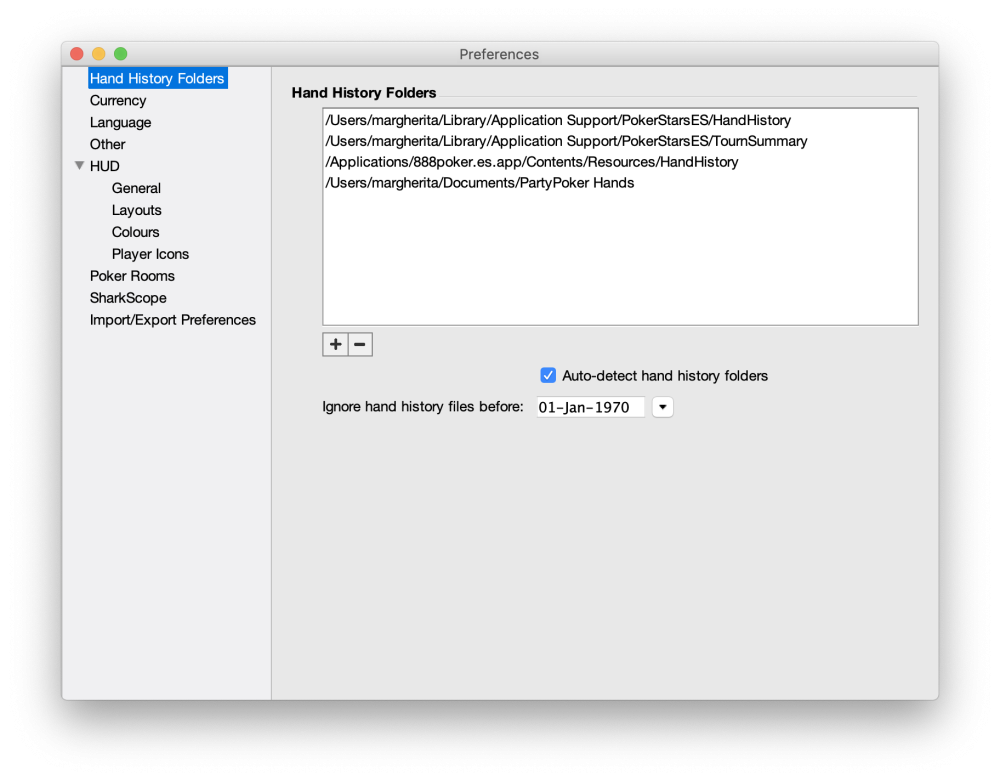
The software does not secretly access the poker client or interfere with gameplay. The poker room itself saves hand histories to your drive as text files containing a line-by-line record of everything that happened at the table. Poker Copilot monitors the folder where the room stores these files, processes each new hand, and adds it to a local database on your computer.
This has several practical implications. Statistics on an opponent are collected only from hands you have played with them at the same table; the software does not obtain data from a shared cloud database. The more hands you have played, the more reliable the numbers become. Stats can fluctuate considerably over a small sample, so you should not rely on them too heavily at first.
A hand is written to the file only after it has finished, so the database updates with a delay of a few seconds. That is fast enough for the HUD, as the stats will already be updated by the next hand.
The database uses approximately one gigabyte of disk space for every 200,000 hands and is stored locally. You can back it up and transfer it between computers, including between Mac and Windows systems.
HUD: Statistics Directly on the Table
A HUD, or heads-up display, is an overlay placed on top of the poker client window. You do not need to enable it separately: as long as Poker Copilot is running, HUD panels automatically appear on all supported tables.
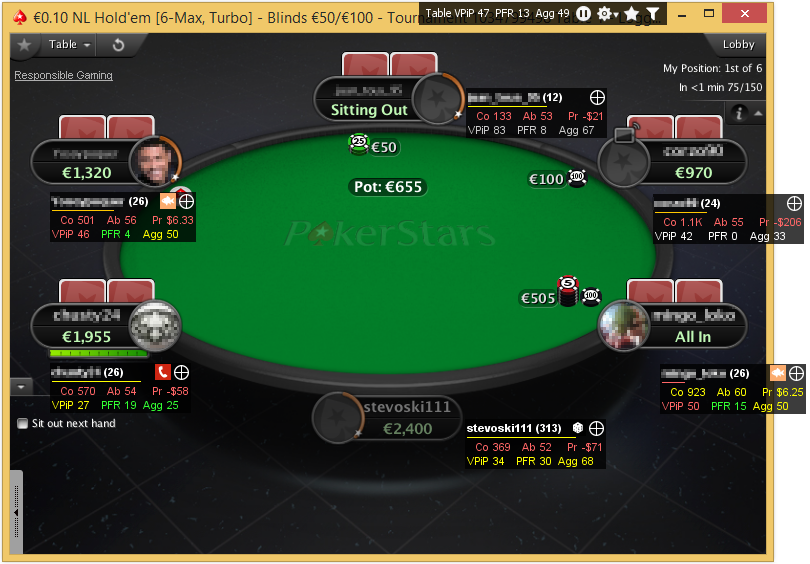
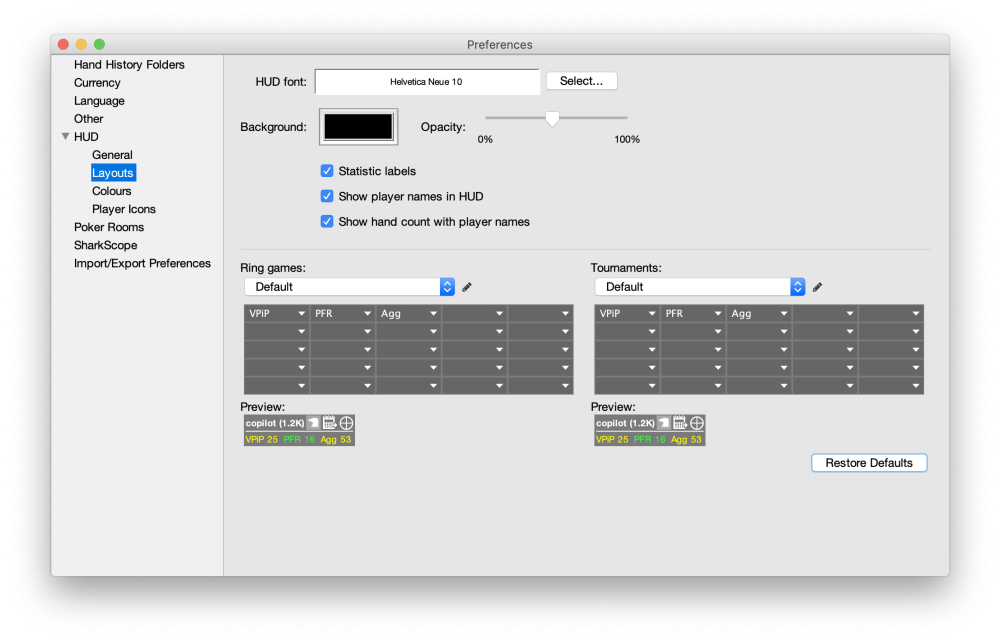
A small panel with selected stats appears next to each player. You can customize which stats it displays, although most players begin with three basic ones.
- VPIP — how often a player voluntarily puts money into the pot preflop. It shows how wide their overall range is.
- PFR — how often they make an open raise or another preflop raise. A large gap between VPIP and PFR indicates a tendency to call passively.
- Agg — postflop aggression: how often a player bets and raises instead of simply calling.
Once you understand these three stats, you can add more specific ones: 3-bet percentage, fold to 3-bet, continuation-bet frequency (c-bet), fold to c-bet, blind-steal attempts, WTSD (the percentage of hands that reach showdown), and others. The software includes more than a hundred stats, any of which can be placed on the panel or kept available for additional detail.
A separate panel in the upper-right corner of the table displays average VPIP, PFR, and aggression values for the entire table. This provides a quick overview of the table dynamics: at a tight table, it often makes sense to widen your opening range from late position, while at a loose, action-heavy table, you should tighten your range and wait for stronger hands. This panel also contains HUD controls and a button for marking the current hand for later review.
Popup: All of a Player’s Stats in One Window
Table space is limited, so the HUD panel normally displays only the most important stats. The rest are available with a click: the panel expands into a popup containing all the statistics collected on that opponent, organized by street and position.
The popup is particularly useful when you face a difficult decision. For example, suppose an opponent makes a large river bet. The panel may show only their overall aggression, while the popup lets you check how often they bluff specifically on the river and how frequently they reach showdown. This is more useful for a beginner than displaying twenty different numbers at the table: the panel remains readable, while detailed information is only one click away.
Player-Type Icons
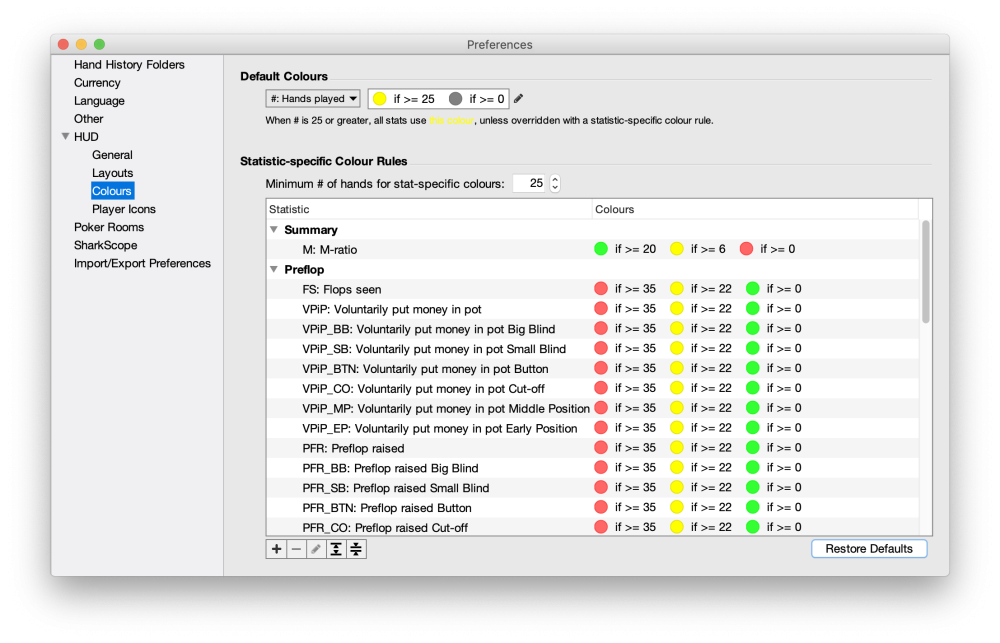
An icon representing an opponent’s playing style can appear over their stats panel. The software automatically assigns each player to one of several categories: rock (very tight preflop), fish (plays too many weak hands), whale (plays almost everything), calling station (calls too much, making bluffs ineffective), gambler (plays many hands and is aggressive postflop), maniac (does not tolerate being reraised preflop), eagle (solid, strong play), or book (predictable, strictly by-the-book play). There are also four additional symbols that you can assign according to your own rules.
The icons do not appear immediately. You can set a minimum hand threshold in the settings, after which the software will classify a player’s style. The logic is simple: over a small sample, any player can appear to be almost any type.
One important limitation is that HUD icons are not displayed on PokerStars or Full Tilt Poker because those rooms impose restrictions on third-party software. The numerical stats still work normally there.
Leak Detectors
A poker leak is a recurring mistake that causes you to lose chips gradually but consistently. It is almost impossible to identify such a mistake from memory: it will not be apparent in a single hand and only becomes visible over a large sample.
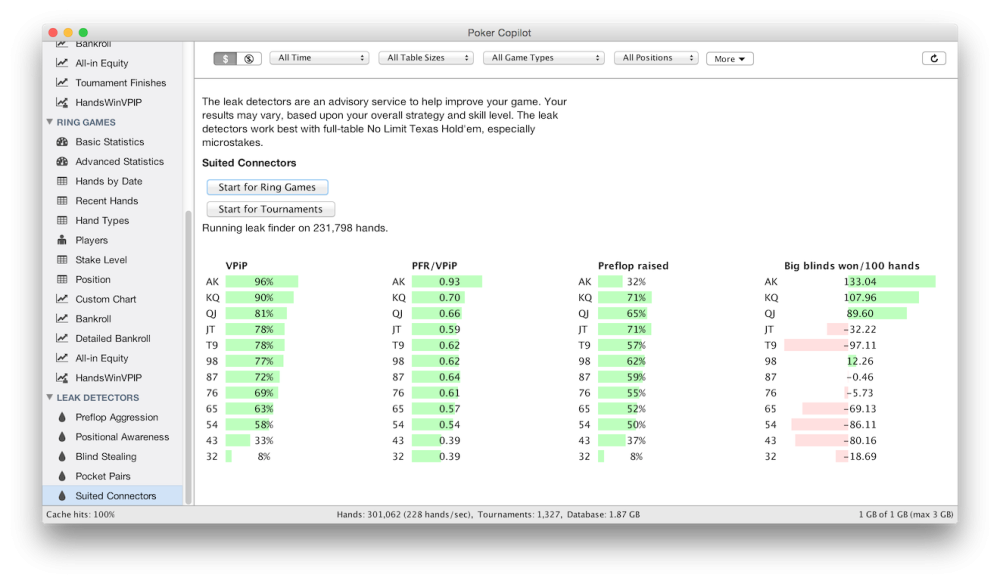
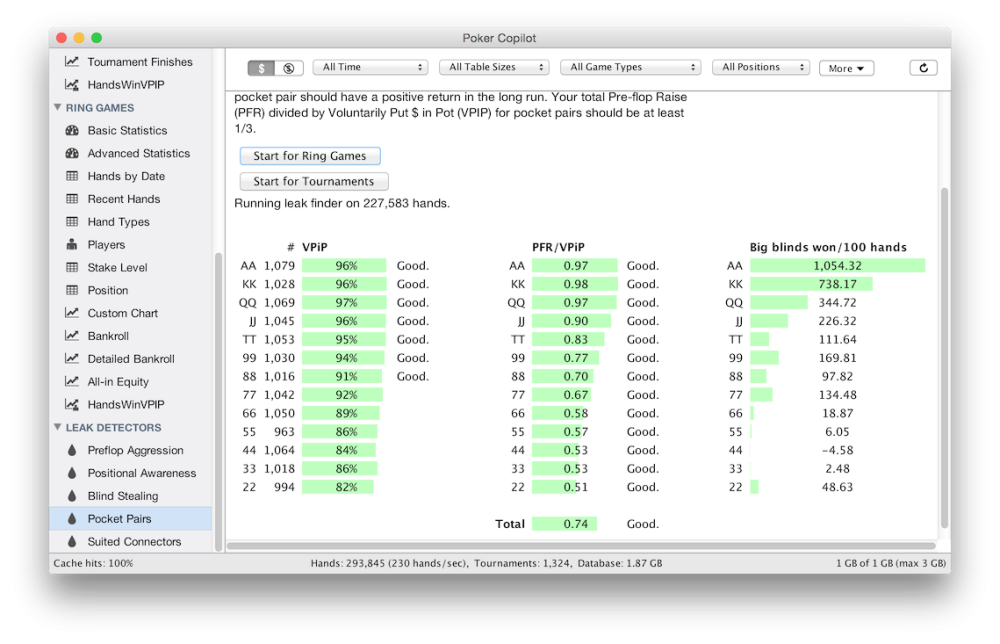
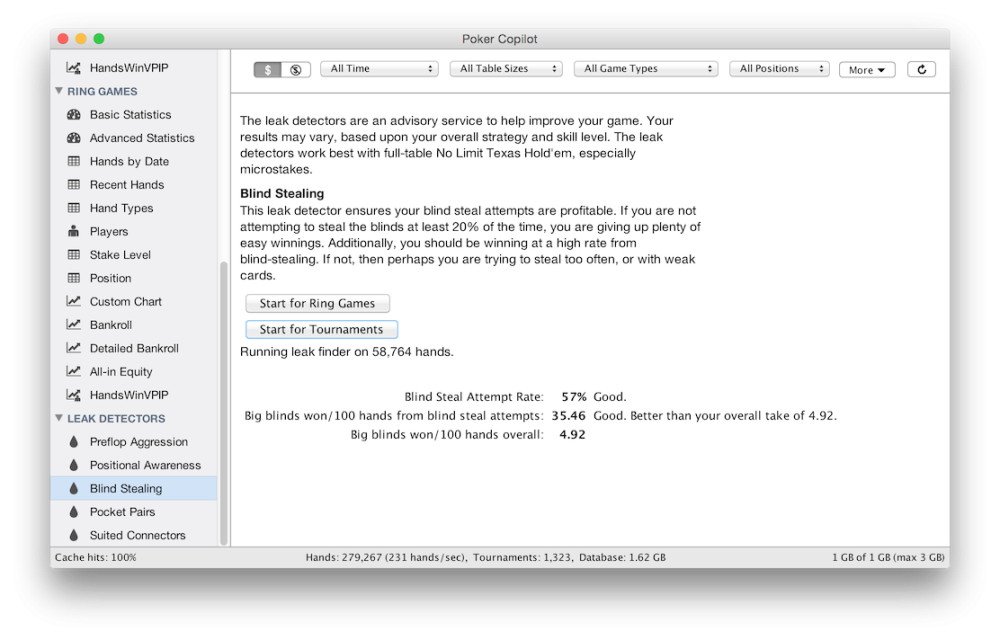
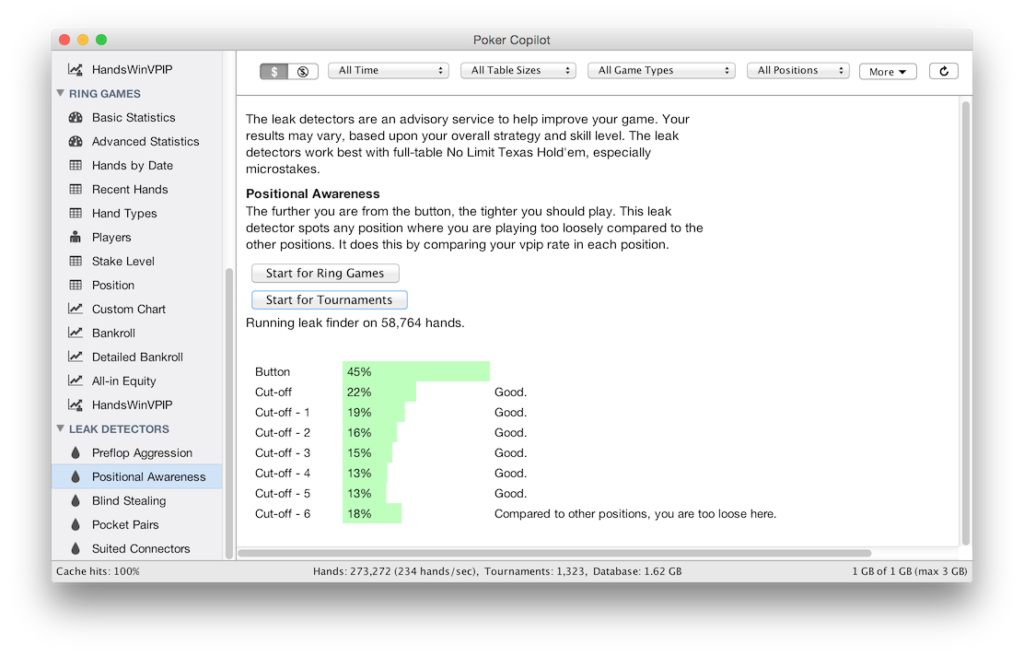
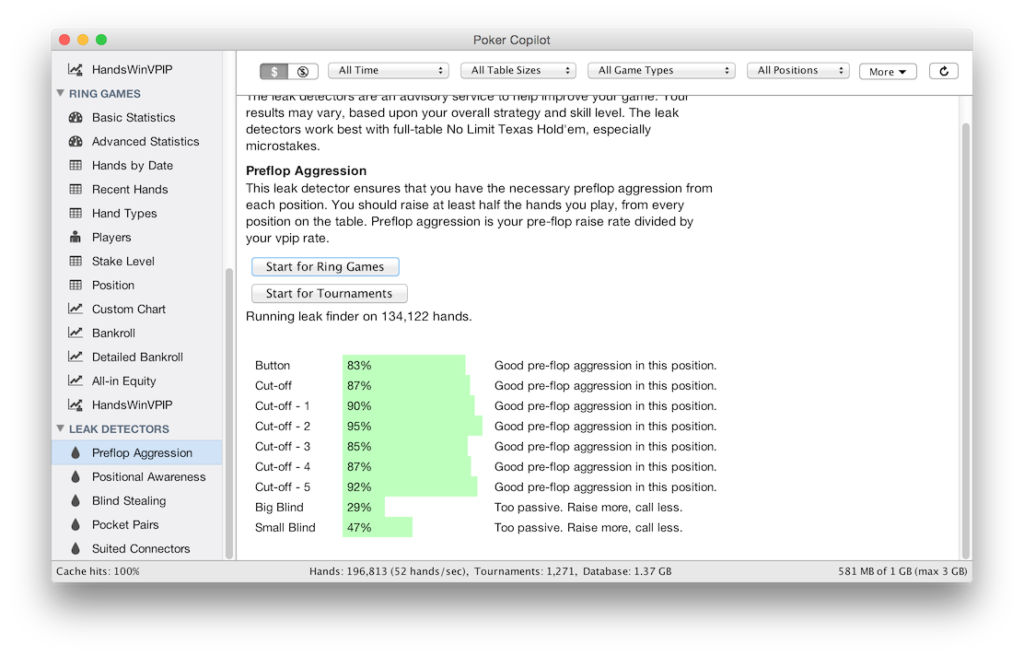
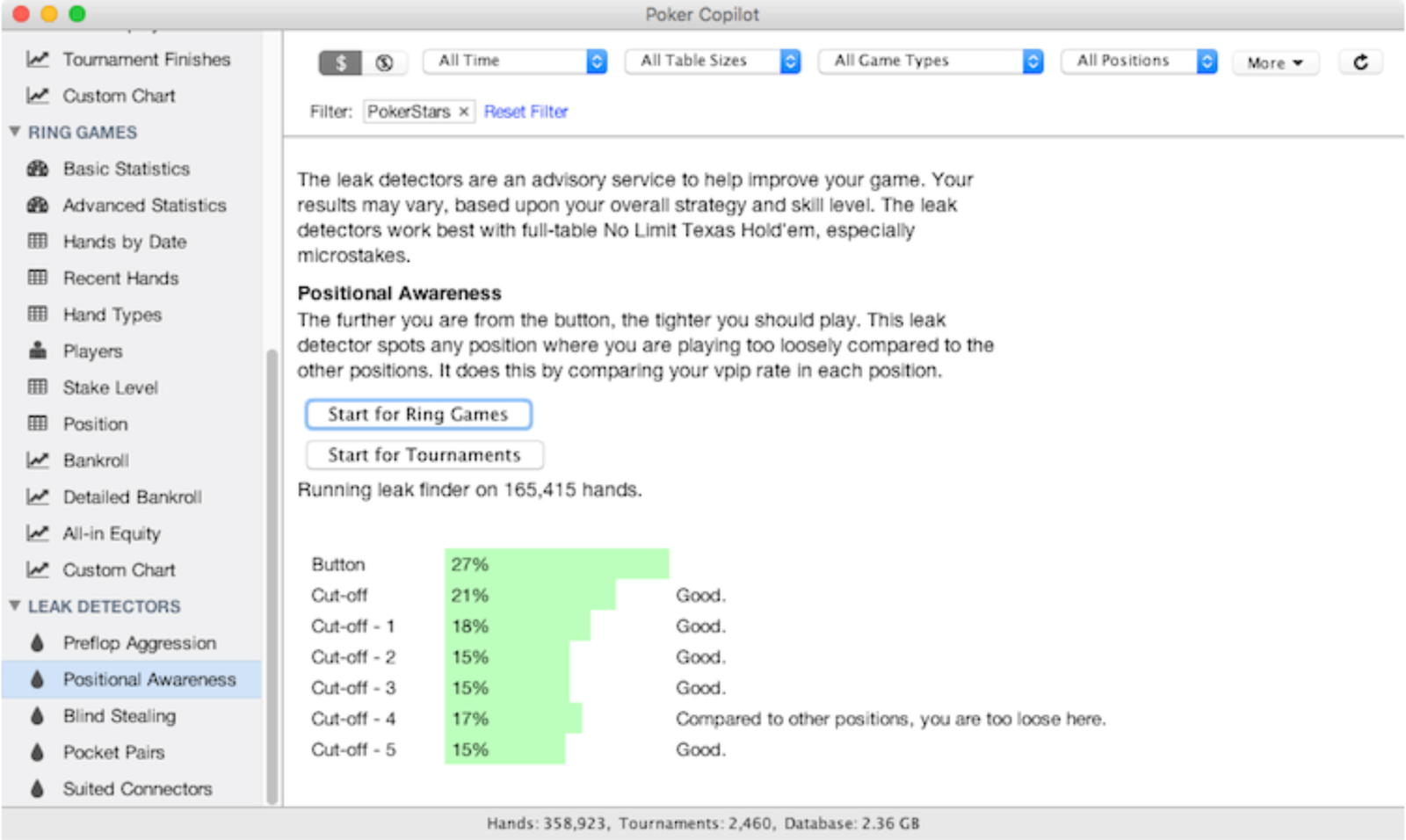
The leak detectors analyze your entire database and review your play in several areas:
- preflop aggression — whether you open hands with a raise often enough instead of calling;
- positional awareness — how strongly your results depend on the position from which you play;
- blind stealing — how often you attempt to take the blinds from the CO, or cutoff, and BTN, or button, after everyone ahead of you has folded;
- pocket pairs — whether you play small and medium pocket pairs correctly;
- suited connectors — whether you play them too often from early position.
Each detector not only identifies deviations from a reasonable benchmark but also gives specific recommendations on what to change. For a beginner, this is more practical than any graph: a graph shows the result, while a detector points to the cause.
Replayer: Reviewing a Hand Step by Step
The built-in replayer runs through any hand in the database step by step, both forward and backward. It displays the current probability of winning at every stage, showing how it changes when players fold and when community cards are dealt.
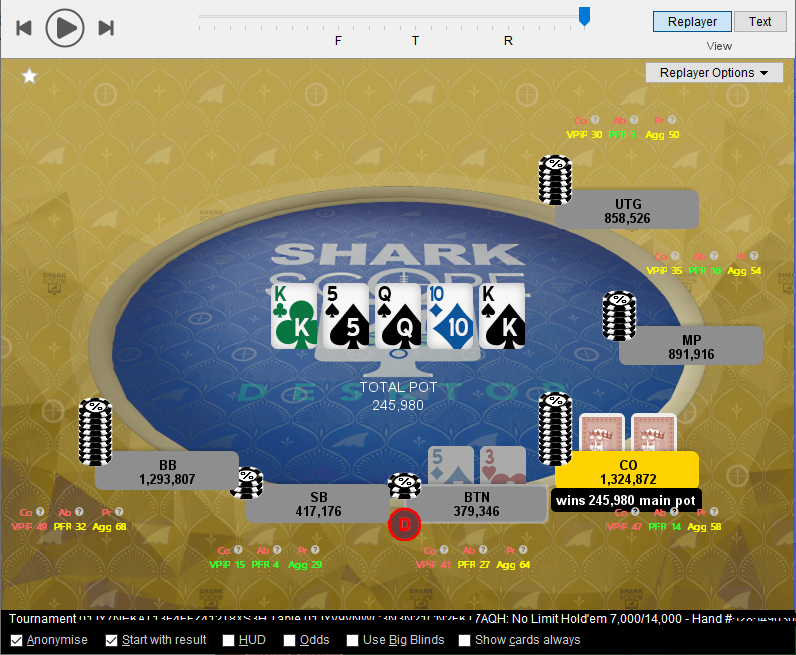
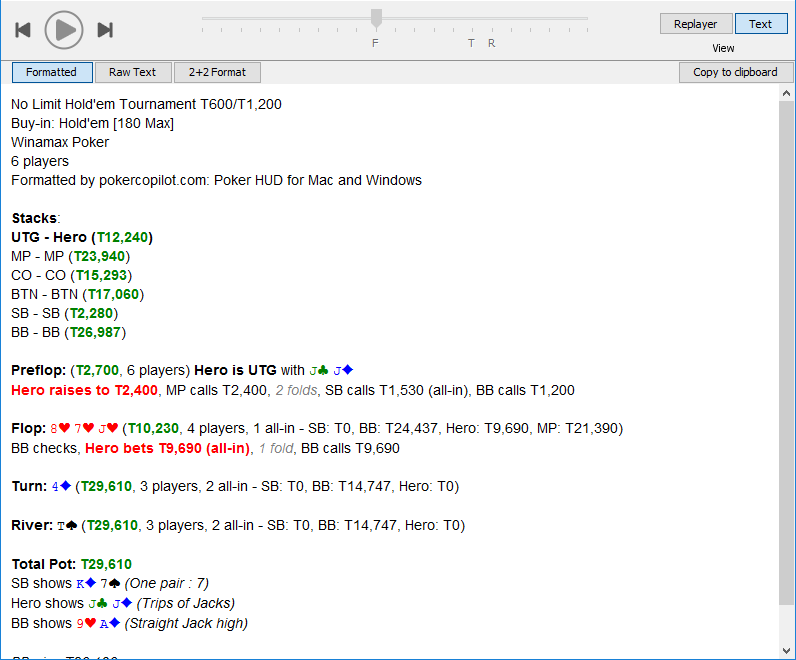
The replayer is the main tool for reviewing a session. You can mark a difficult hand while playing using the dedicated star button and the list of recent table hands in the HUD panel, then study it calmly after the session.
You can record a reviewed hand as a video and send it to a coach or friend. You can also copy it as text formatted for popular poker forums.
AI Hand Analysis
The replayer can analyze a completed hand using a language model trained on poker data. The analysis follows a clear structure:
- a brief summary of the hand: position, hole cards, board texture, and key actions;
- an overall assessment of how the hand was played using a three-level rating scale;
- an analysis of each individual decision, explaining how closely it aligns with theory and with an exploitative strategy against the specific opponent;
- strategic conclusions: when it makes sense to slow down, when to protect your hand’s value, and when to apply pressure using fold equity.
The analysis is available only after a hand has finished and been saved to the hand history, so it does not provide real-time assistance during play. You should not treat the model’s conclusions as absolute truth; it offers a second opinion on the hand rather than a solver calculation. This feature requires an active SharkScope Silver subscription or higher.
SharkScope Tournament Statistics
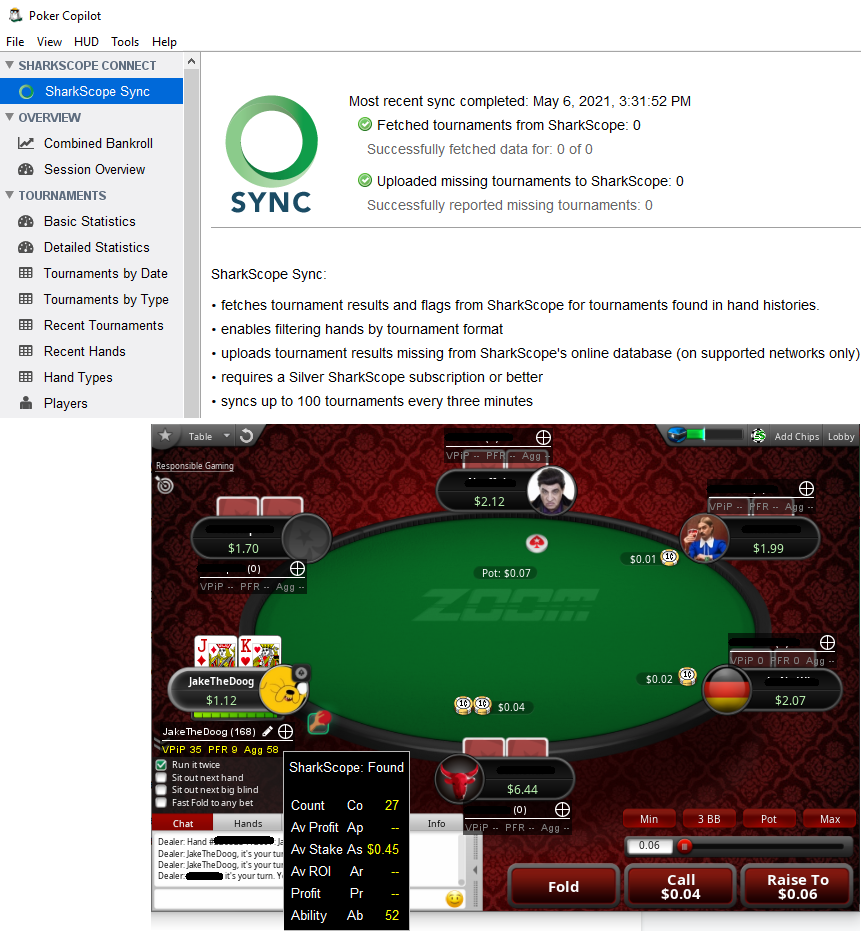
SharkScope is an external tournament-results database that collects data from all major poker sites. Connecting your SharkScope account adds tournament statistics on opponents to the HUD, including how many tournaments they have played, their ROI, and how often they finish in the money.

The advantage is that these numbers are available immediately, before you have built up your own sample against a particular opponent. For tournament players who regularly sit down with unfamiliar opponents, this provides a significant advantage over statistics collected exclusively from their own hands.
Separate SharkScope icons appear alongside the statistics. You can also synchronize tournament results with your database so that reports remain complete even when the poker room has not saved the final tournament summary file.
Reports and Graphs
The main screen organizes your play by session, showing duration, number of hands and tournaments, wins and losses, and hourly earnings. The data is then broken down into separate sections.
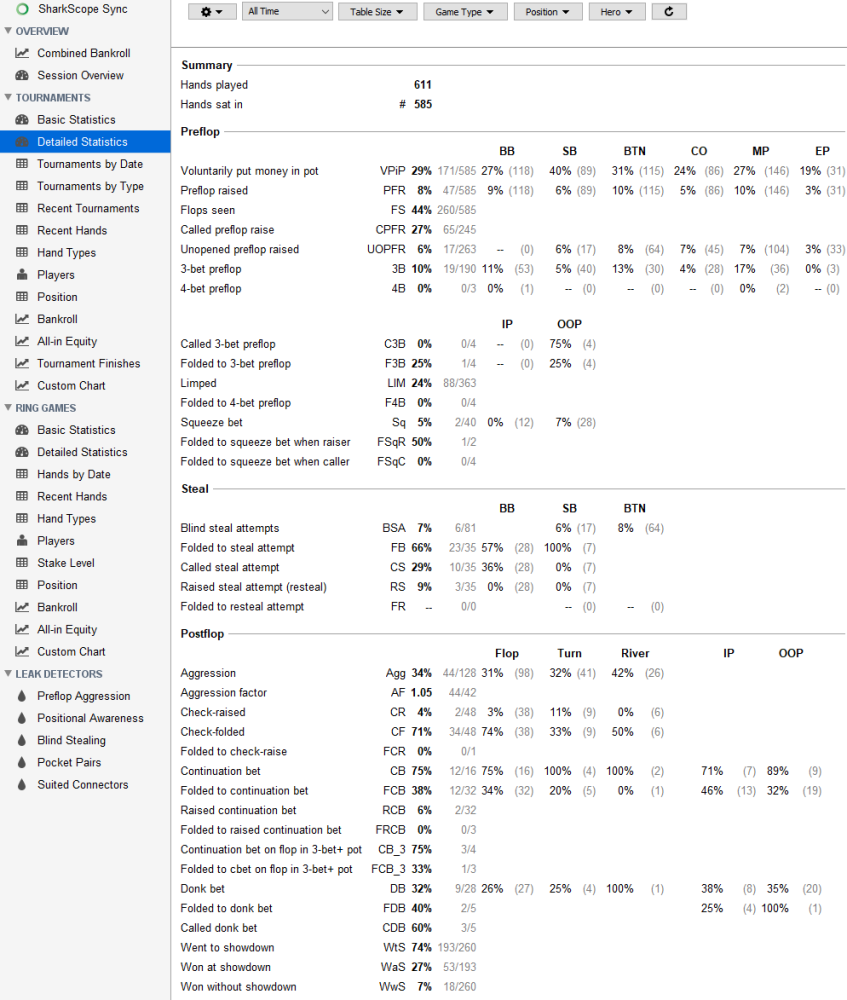
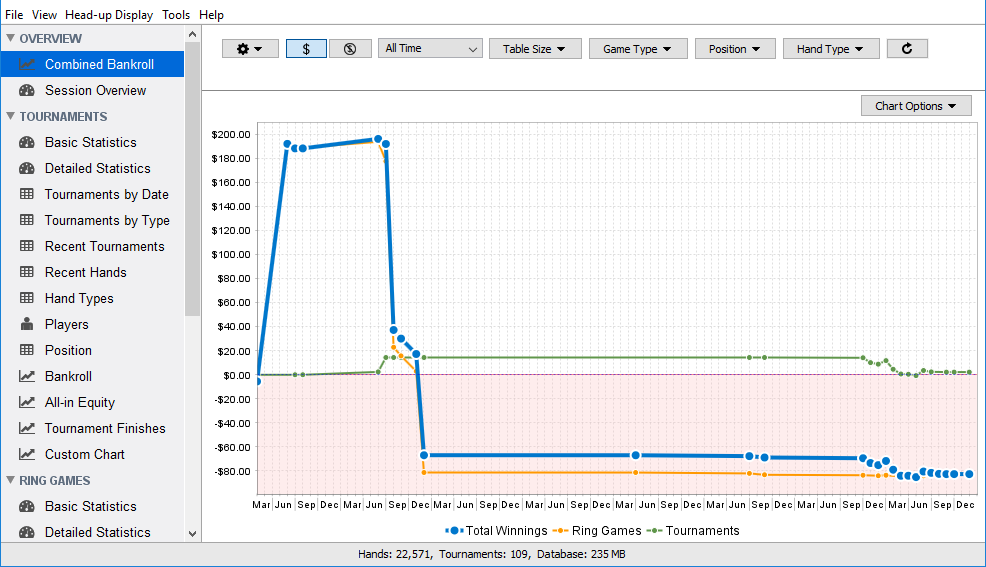
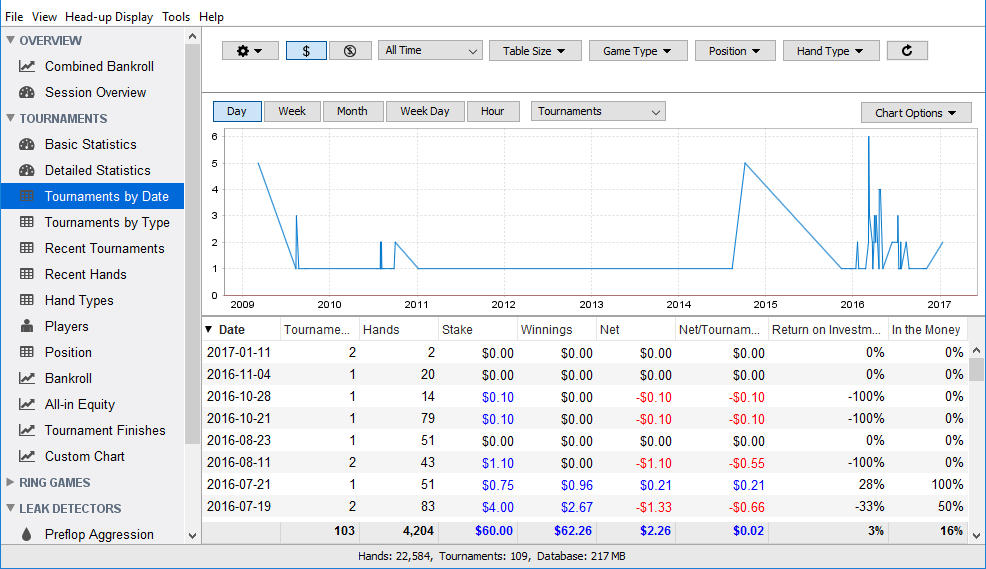
- Bankroll — a results graph over time, divided into showdown and non-showdown winnings, with separate data for cash games and tournaments.
- Stakes and positions — where your results are strongest: on the button, in the cutoff, or in the blinds. This section often reveals that one position is dragging down your overall results.
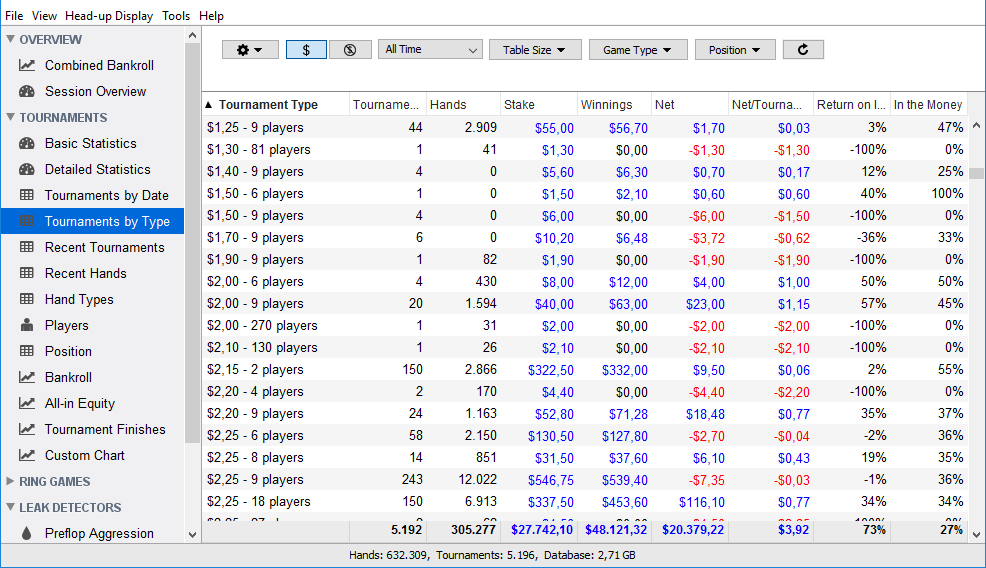
- Tournaments — results by date and type, a list of recent tournaments, and the distribution of finishing positions.
- All-in equity — a comparison between actual results and mathematical expectation. This helps distinguish a run of bad luck from genuine mistakes.
- Players — a profile for each opponent containing all collected statistics and notes.
- Hand types — a breakdown of what happens with specific starting hands.
- Custom graph — a graph built from the stats needed for a particular task.
13×13 Matrix
A separate tool displays all starting hands in a familiar 13-by-13 matrix, color-coded according to the selected stat. It shows how particular hands perform in a specific situation—for example, what happens when you open suited connectors from UTG, or early position, compared with BTN, or the button.
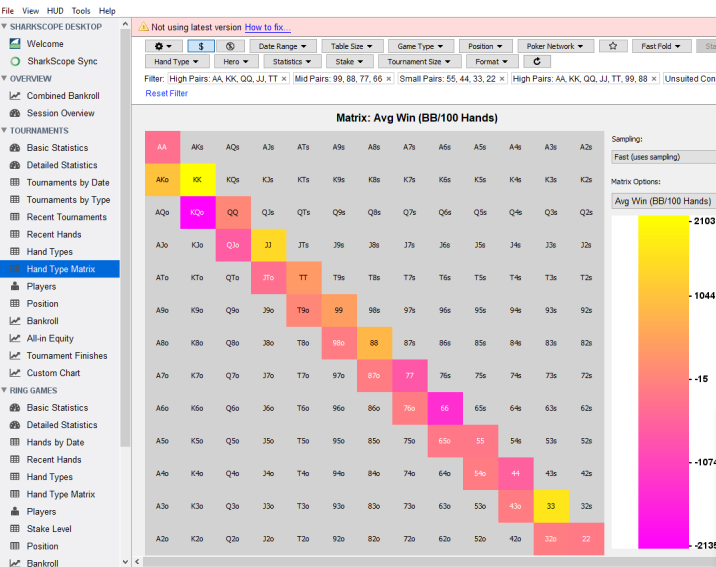
The matrix works together with filters, allowing you to narrow the range of hands down to one specific scenario and examine it separately.
Filters
Filters are what turn a hand database into an analysis tool. The filter panel appears on every screen where it can be used and is customizable: you can expand the list of available filters using the gear icon.
Most filters support multiple selections—for example, you can select five-handed and six-handed cash tables at the same time. There is also a separate statistics filter in which each stat has three settings: “yes,” “no,” and “any.” This lets you select, for example, every hand in which money was voluntarily put into the pot preflop but no 3-bet was made.
You can combine filters without restrictions. A completed filter set can be saved under a custom name and loaded with one click, while the “Reset Filter” link clears everything at once.
Notes, Exports, and Database Maintenance
You can keep notes on every opponent using colored tags and text. These notes will be visible when you encounter the same player at a table again. Data can be exported to external files for analysis in other software. Database maintenance is handled within the application, including backups, resets, and transfers to another computer—even from Mac to Windows and vice versa. Smaller quality-of-life features that become noticeable during long sessions include a dark theme and customizable interface fonts. The interface is available in around fifteen languages.
Compatibility: Formats and Poker Sites
Games and formats. Poker Copilot supports Hold’em and most Omaha variants, including Omaha Hi, five-card and six-card Omaha, Omaha Hi/Lo (without all-in equity calculations for the low half), Big O, and Courchevel. Cash games, tournaments, and sit-and-gos are all tracked in the same way.
Operating systems. Windows 10 and 11, plus macOS 11 and later, with builds for Apple Silicon and Intel. A separate Intel build is available for older versions of macOS. The minimum requirement is 4 GB of RAM, although 8 GB is recommended, along with a processor of at least 2 GHz and no less than one gigabyte of free disk space for the database.
Poker sites. The HUD works on PokerStars and its regional versions, 888poker and its regional versions, Winamax, partypoker regional clients and BetMGM in certain US states, the iPoker network, Winning Poker Network—including America’s Cardroom, PokerKing, and other skins—as well as the Merge Network and Revolution.
Limitations worth knowing about in advance:
- GGPoker and CoinPoker — hand tracking only; the HUD is unavailable at the tables;
- iPoker and Revolution work only on Windows and are not supported on Mac;
- the international partypoker.com client is not supported because the room restricts hand histories, although regional versions are supported;
- PokerStars.NET and PokerStars.BET are not supported because they do not save hand histories to disk;
- 888 clients in New Jersey are not supported because of the room’s policy on third-party software;
- fast-fold games with a full HUD are supported on PokerStars Zoom tables; fast formats at other rooms are not supported;
- the Blitz format is not supported on Winning Poker Network, while processing for double-board hands remains experimental;
- player-type icons are not displayed on PokerStars or Full Tilt Poker.
The list of supported rooms can change for any tracker as poker sites update their clients and third-party software policies. Before purchasing, it is worth checking your site against the current compatibility list and testing it during the trial period.
Getting Started
The initial setup consists of a few steps.
- Download the build for your operating system from the official website and install it normally.
- Request the free trial when you first launch the software. You only need an email address; no payment card or account registration is required.
- Enable saving hand histories to disk in your poker client. The software explains which settings to change and checks them through the diagnostics window.
- In the Poker Copilot settings, select the folder where the poker room stores hand-history files. If you play at several rooms, add their folders one at a time.
- Set your preferred seat and make sure it is the same in both the poker client and Poker Copilot. Otherwise, the HUD panels will appear next to the wrong players.
- Play or import several hundred hands so that the statistics begin to have meaning, then set minimum hand thresholds for icons and color highlighting.
During your first few days, it is sensible to display only VPIP, PFR, and aggression on the HUD panels and check everything else in the popup. Once you can interpret those three stats automatically, you can expand the selection shown at the table.
Pricing Plans
The software is sold through a one-time payment for each major version, with no annual subscription. Updates within that version are included in the price. Before purchasing, you can use all features of the highest-tier plan free for 14 days.
The plans differ primarily in the stakes they allow. The entry-level plan is designed for micro stakes, the mid-tier plan for low stakes, and the highest-tier plan removes stake restrictions while adding advanced leak detectors, custom statistics and reports, and integration with the SharkScope tournament database. Every purchase includes one month of SharkScope Silver, which is required for AI hand analysis. One license works on two computers belonging to the same owner, and users upgrading from an earlier version can receive a discount by providing their previous order number.
A detailed description of the plans and prices is available on the product page.
Conclusion
Poker Copilot is a beginner-friendly poker tracker. It is not overloaded with settings: the HUD appears on tables automatically, a basic set of stats is configured in advance, and the leak detectors turn raw numbers into specific advice on what to improve. Its one-time payment model and full-featured macOS version make it especially suitable for players who use a Mac and do not want to pay for a tracker every year.
The best approach is to learn the software gradually: begin with three basic HUD stats and regularly review your hands in the replayer, then move on to the leak detectors, filters, and reports. The main limitation should be checked before purchasing: if you primarily play on GGPoker or the international partypoker client, the HUD will not work there. The 14-day trial is the best way to confirm that Poker Copilot meets your needs.

Featured software

Latest posts
-
 Poker Academy Review: Ranges, Solver, and Trainer in One Browser Window Oct 11, 2026
 -
 SmartHand Review: Opponent Stats Before the First Hand Oct 10, 2026
 -
 888Caption Review: A Tool for Fast-Paced Multi-Tabling Oct 9, 2026
 -
 Preflop ICM Solving in GTO Wizard: ICM-Aware Preflop Solutions in Seconds Oct 8, 2026
 -
 Octopi Poker Review: Tournament GTO With Pro Hand Reviews Oct 7, 2026
All the poker software you need, gathered in one place. Exclusive discounts, bonuses, latest news and updates.
Join now