Sharkscope
An online tournament results database that stores the ROI, ITM, average buy-in, and streaks of every nickname and helps gauge an opponent's strength before the first hand. Read full review
Screenshots
Pros & Cons
| Pros | Cons |
|---|---|
| Network coverage | Tournaments only |
| Deep history | Daily search limit |
| HUD at the tables | No HUD on GGPoker |
| Ability rating | Hidden accounts |
| Tournament finder | |
| Mobile apps | |
| Results export |
Description
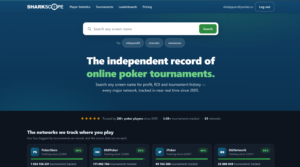
Sharkscope collects the results of online tournaments and sit & gos across dozens of poker networks and stores them in a single database. Entering an opponent’s nickname and choosing a network is enough to see their profit, number of tournaments played, in-the-money percentage, average buy-in, and how their results have changed over the entire tracking period. Rooms don’t hand over this data themselves: the service collects public tournament results that are visible in the lobby once the tournaments finish.
The service’s main purpose is to find out in advance who’s at the table. An opponent with thousands of tournaments and a steady profit calls for one line of play, and a recreational player with a negative ROI calls for a completely different one. For a quick read, each nickname is shown with an Ability rating on a 100-point scale and shark or fish icons, which the service assigns automatically based on the player’s overall numbers.
The service also works for analyzing one’s own game. Results are loaded automatically by nickname, so a report on profit, ROI, and streaks is built without manual tracking. Subscribers get deeper breakdowns: profit by hour and day of the week, stats by tournament type and field size, favorite formats, and the most profitable and most troublesome opponents.
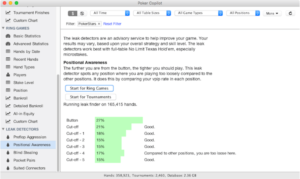
For real-time play, there’s a separate desktop app, Sharkscope Desktop. It displays database stats right on the poker tables as a HUD — a panel of stats next to each player — maintains its own hand database from hand history files, tracks common mistakes in play, and automatically uploads tournaments that didn’t make it into the shared database. The app runs on Windows and macOS, and the iOS and Android mobile apps give access to search and stats from a phone.
One important limitation: the service covers only tournaments, sit & gos, and spins. Cash games aren’t included in the database, and according to the developers’ official position, there are no plans to add them. Analyzing cash tables requires a full-featured tracker that works with hand histories.
Pricing
-
Free access — 5 searches per day, basic stats, no HUD.
-
Bronze — $7 per month. 10 searches per day, advanced search filters, subscriber-only stats, resetting of own stats, AI hand analysis.
-
Silver — $13 per month. 150 searches per day, everything in Bronze, plus the Sharkscope HUD and automatic results sync.
-
Gold — $28 per month. 1,000 searches per day, everything in Silver, plus the HandTracker app, a sit & go video course, tournament export to CSV, JSON, and XML, and time-of-play stats.
-
Platinum — $42 per month. 3,000 searches per day, everything in Gold, plus sharing part of the search quota with one other player and access management for private accounts.
-
Diamond — $84 per month. 6,000 searches per day, everything in Platinum. Designed for teams and high-volume players.
-
HandTracker standalone — $99 one-time, no subscription. Hand tracking and analysis, a HUD based on own hand history, and bankroll reports. Sharkscope database searches aren't included in this option.
A separate line of Pro and Commercial plans provides API access and AI assistant integration; it's aimed at developers of services rather than players.