Lobbyze Review: MTT Schedules from All Poker Rooms in One Window
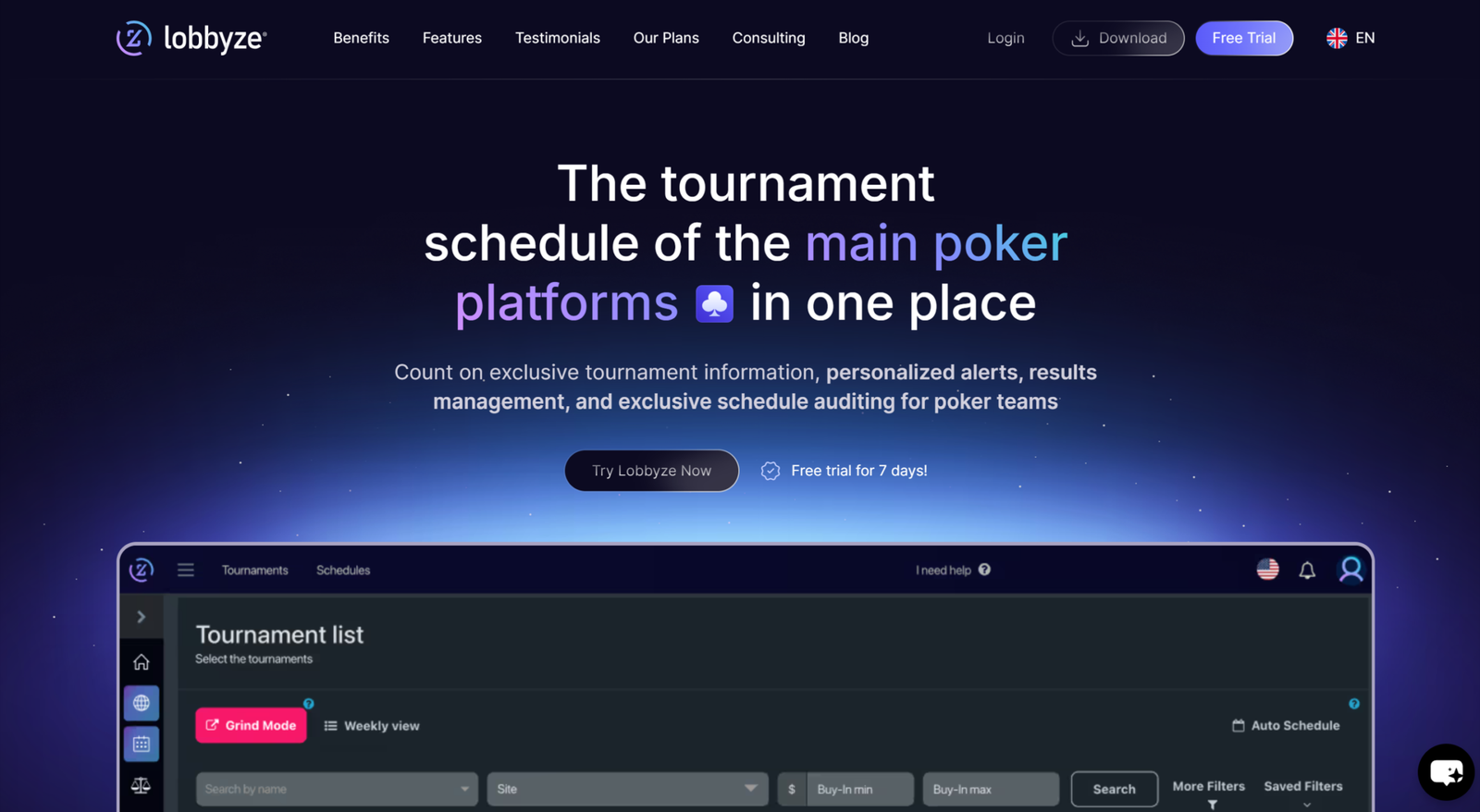
An online tournament begins long before the cards are dealt—at the point when a player decides what to play that day. MTT schedules are spread across poker room lobbies, and each room has its own filters, terminology, and series calendar. A player with accounts on three or four platforms has to keep several clients open, compare tournaments manually, and regularly miss good events simply because the right client was not open at the right time.
Lobbyze handles this exact part of the process. The software connects to the lobbies of twelve poker platforms, retrieves live tournament data, and displays everything in a single list—with shared columns, filters, and sorting options for all rooms. Players can then use this list to build a grid: a set of tournaments they plan to play on a particular day or during a particular week. Completed tournaments are tracked separately and used to generate performance reports.
It is important to define the scope from the outset: Lobbyze focuses exclusively on tournaments. It is not a tracker, HUD, or in-game assistant—the software knows nothing about how your opponents play and does not suggest decisions during hands. Its role covers what happens before you sit down at the tables and after you exit a tournament.
Where the Data Comes From and How the Workflow Works
The software’s workflow is built around three concepts that should be distinguished from the beginning.
Tournament list—a combined table of all MTTs currently running or starting soon on the supported platforms. The data is pulled from poker room lobbies and updated in real time, so the list reflects the current situation rather than a schedule manually compiled a week ago. This is also how Lobbyze provides information that static tournament calendars on third-party websites cannot offer.
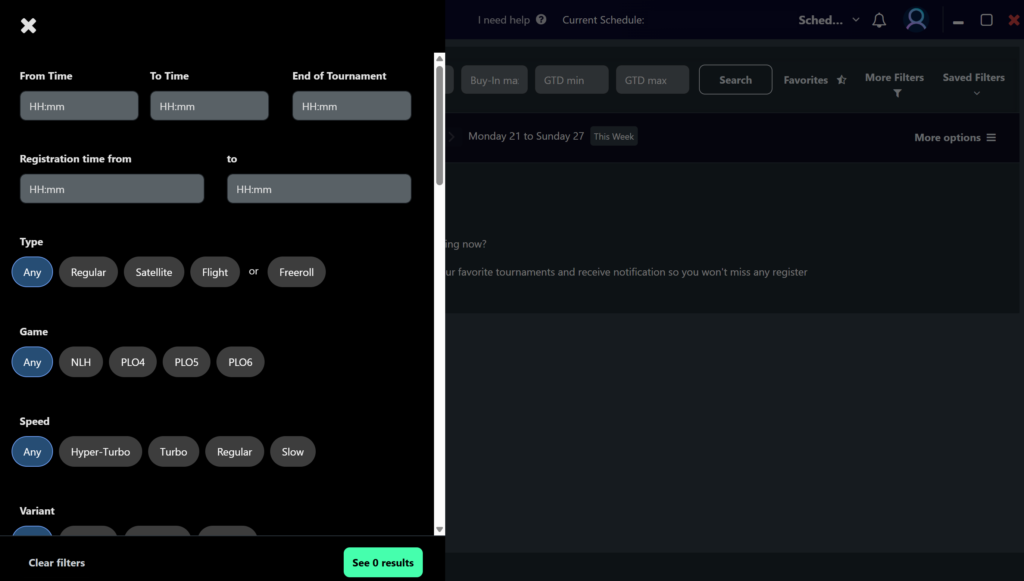
Filter—a saved set of selection criteria. A filter is not a one-time tool: once configured, it becomes a permanent view of the tournament list. Different types of sessions require different filters, so keeping several of them is standard practice.
Grid—the actual plan: selected tournaments arranged by day and time. A grid can be saved a week in advance, and it will automatically reload each following week with the current editions of recurring tournaments.
The resulting workflow is straightforward: configure filters based on your bankroll and preferred formats, use them to select tournaments, add those events to a grid, set reminders for key starts, play the session, and enter the results in the tracking section.
One Tournament List Instead of Five Open Clients
The list is the core of the software. It combines tournaments from twelve platforms, all described using the same fields: buy-in, guaranteed prize pool, format, structure speed, start time, and platform.
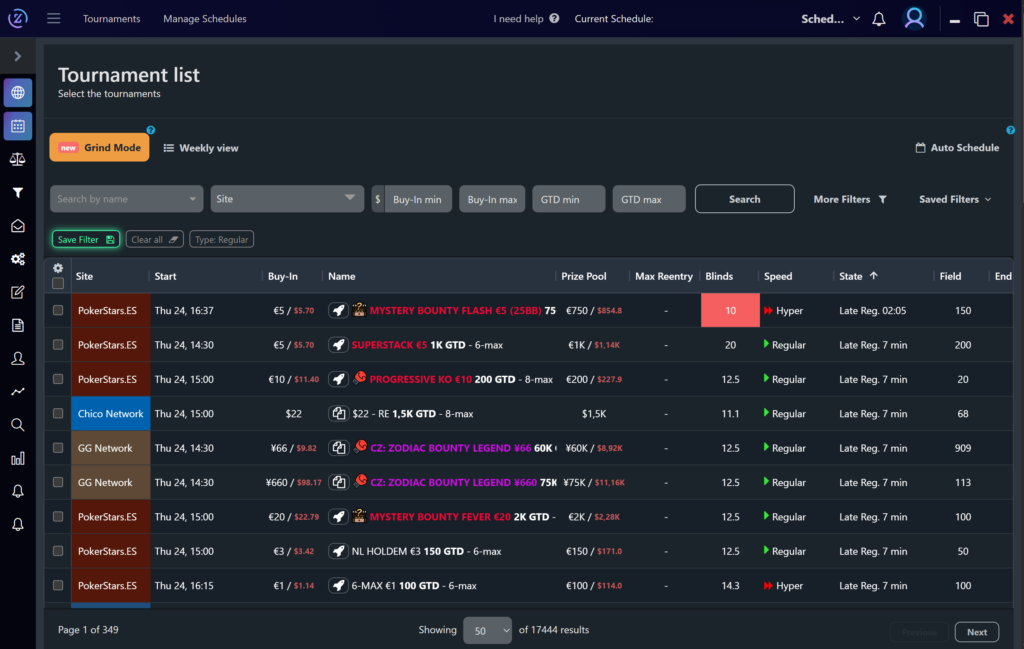
The value of this table goes beyond saving time. Seeing the entire schedule changes the way players select tournaments. Instead of automatically playing at the rooms they are used to, they can choose events based on their actual value: a tournament with a soft field on a less popular platform, a late-night turbo with a decent structure at a regional room, or an overlay on a site they would not normally think to check. All of this remains invisible when schedules are viewed one poker room at a time.
For beginners, there is another, less obvious benefit. Comparing tournaments side by side makes it easier to understand how they actually differ—and why the buy-in alone says little about how long a tournament will take or how tough its field will be.
Data You Will Not Find in a Regular Lobby
Three metrics in the list deserve a closer look because they are what make Lobbyze more useful than a static tournament calendar.
Real-time blind level. For tournaments already in progress, the current blind level is displayed. This directly answers the question of how many big blinds your starting stack will actually contain if you enter during late registration: the higher the level, the fewer big blinds you receive and the closer the game is to push/fold mode. In practice, this is the main factor when deciding whether to enter or whether it is already too late.
Estimated tournament end time. The software estimates when a tournament is likely to finish. This metric is useful when planning the length of a session: entering a slow-structured tournament with a large guarantee an hour before the end of your available playing time will almost certainly mean playing at an inconvenient hour or abandoning the tournament.
Number of remaining players. This shows how far the tournament has progressed and how large a field it attracted. Combined with the guarantee, it can help identify an overlay—a situation in which the collected buy-ins do not cover the advertised prize pool and the poker room makes up the difference. An overlay is a rare situation in which a player’s edge increases regardless of skill, so missing these tournaments can be costly.
Filters: Configure Them Once and Keep Using Them
A filter can be built using conditions based on any field in the list. A typical setup might include buy-ins within a bankroll-appropriate range, knockout and Mystery Bounty formats only, platforms where the player has accounts, start times within the player’s available playing window, and tournaments with guarantees above a certain amount.
The key point is that this set of conditions is saved. Instead of a sea of thousands of tournaments, the list becomes a short selection that is easy to review.
A useful practice is to keep several filters for different types of sessions. A weekday evening requires tournaments that will finish before late at night. Sundays call for a separate filter for weekly majors. During a major series, it makes sense to create a filter that displays only its events. Each filter takes minutes to configure but can save hours over the course of a season.
For beginners, filters also encourage discipline. A predefined buy-in range prevents them from entering tournaments that are too expensive for their bankroll and removes the main source of impulsive decisions: seeing a large guarantee in the lobby.
The Grid and Automatic Grid Building
Selected tournaments are added to a grid—a plan for a session or an entire week. The grid presents them clearly and includes sorting options, making it easy to see how tournaments are distributed over time and where overloads occur, such as periods when too many tables start simultaneously.
A saved weekly grid reloads automatically. Regular tournaments repeat from week to week, and the software inserts their current editions on its own, so there is no need to rebuild the plan from scratch.
Grids can also be generated automatically. Based on the specified filters and preferences, the software suggests a set of tournaments that meet the criteria, eliminating the need to review the entire list manually every time you plan a session.
This tool also makes a useful routine possible: spending thirty minutes planning at the beginning of the week instead of making disconnected decisions throughout the grind. Several priority tournaments can be locked in ahead of time, with the remaining slots filled according to the situation on the day of play.
Reminders: Blind Level and Late Registration Notifications
Lobbyze reminders are not limited to tournament start times. Notifications can be configured for a specific blind level, a set number of minutes before late registration closes, and other events.
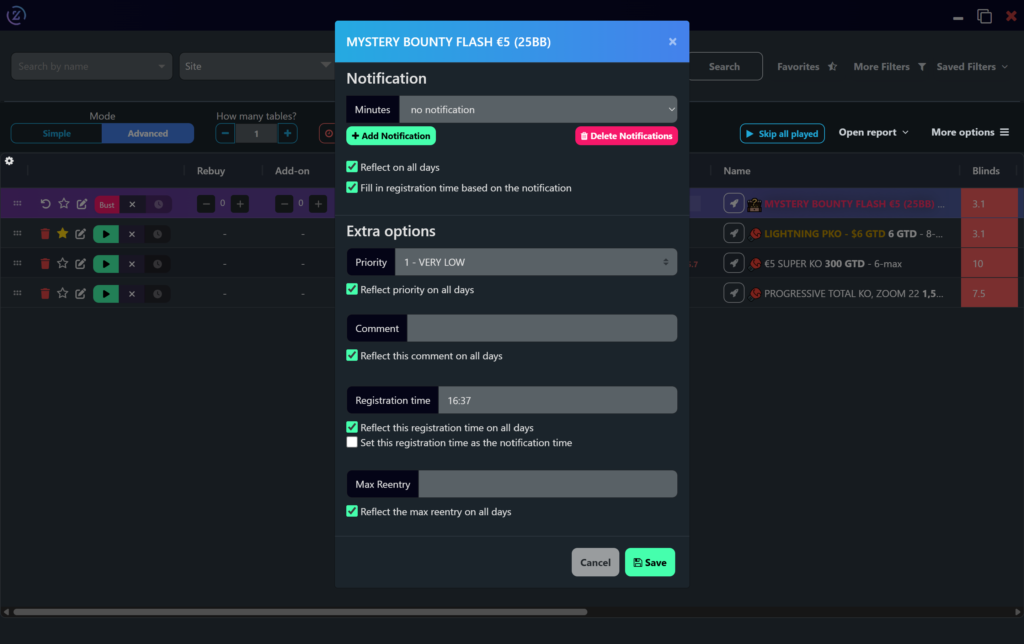
This distinction is important. A standard alarm set for the tournament’s start says nothing about when late registration will close—which is exactly the deadline players most often miss because the window closes while they are busy playing a hand at another table. A blind-level notification solves a related problem: it allows players to enter a tournament at the exact point they planned rather than at a random time.
A reminder includes a link to the tournament lobby. Clicking a tournament’s name in the list opens its lobby on the poker room’s website, where the player only needs to confirm registration.
Results Tracking and Reports
Completed tournaments, buy-ins, and prize money are recorded in the financial tracking section. This data is then used to generate reports.
The key metrics are standard for tournament statistics. ROI (return on investment) measures the return on money spent on buy-ins as a percentage and is the main measure of MTT profitability. ITM (in the money) is the percentage of tournaments in which the player cashed. ABI (average buy-in) shows the average level at which the player is actually competing.
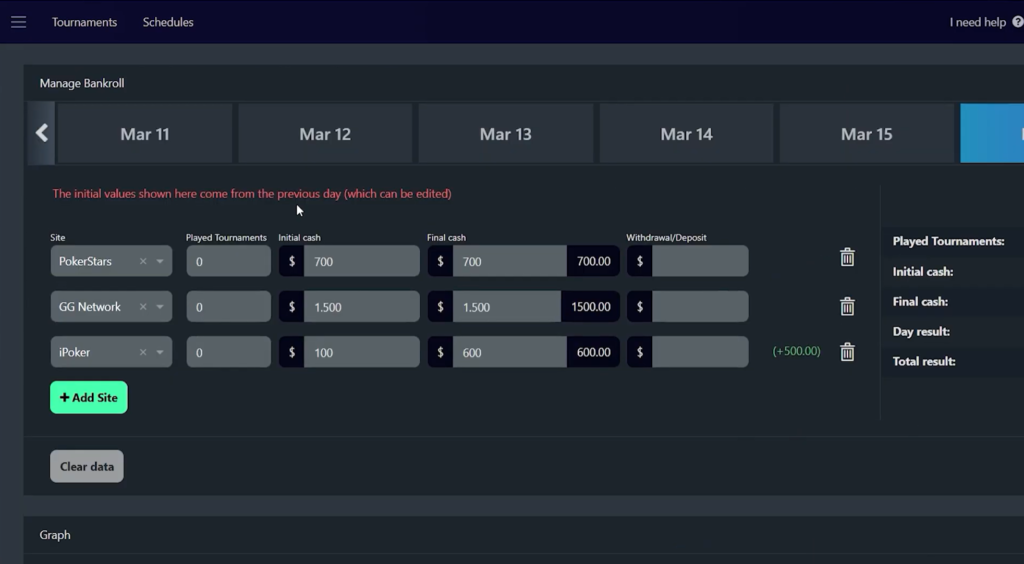
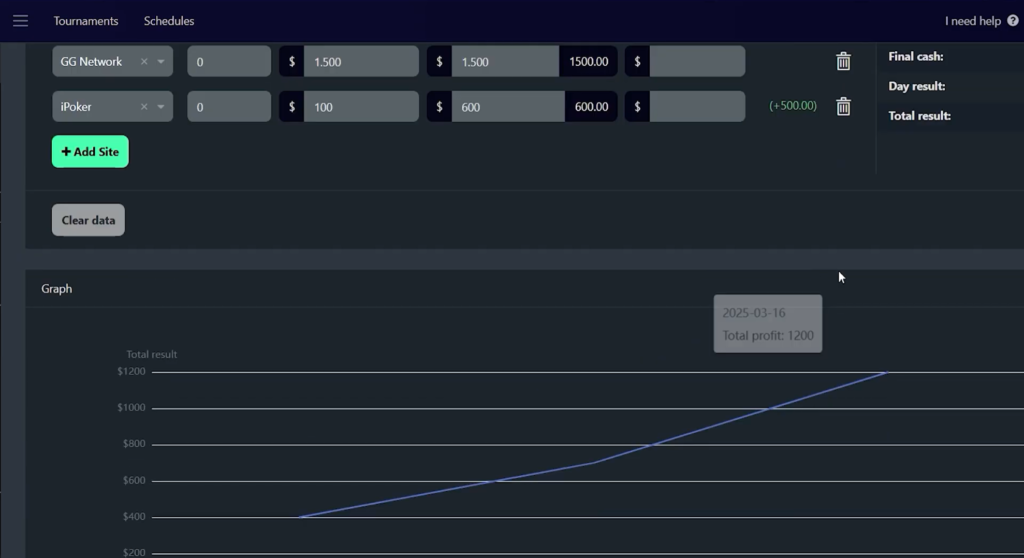
Report breakdowns provide more insight than a single overall figure. Profit can be viewed by day of the week, buy-in range, format, structure speed, and platform, while a graph tracks cumulative results over a selected period. This can reveal patterns that are not visible on an overall graph: a positive ROI in knockout tournaments on one network and consistent losses in the same format on another, poor results on certain days of the week, or the buy-in range in which performance is strongest.
For beginners, the value of this section is that it moves the assessment of their game from feelings to numbers. The impression that “turbos are not going well” is either confirmed by the sample or turns out to be the result of a few unsuccessful evenings.
Team Mode
A separate set of features is designed for poker teams and staking operations.
A manager can create a centralized schedule and distribute it among team members, with tournament selection automated using the same filters. Schedule auditing checks whether players followed their assigned plans: SharkScope data is used to generate a report on tournaments played outside the approved schedule. Team management is supplemented by consolidated reports and analytics.
The audit feature relies on SharkScope—an external service that collects tournament results based on player screen names. This feature will not work without data from SharkScope.
Individual players do not need the team section, but it is useful to know that it exists because part of the interface is designed specifically for these scenarios.
Compatibility: Formats and Platforms
Game types and formats. Multi-table tournaments only. Cash games, Spins, and sit-and-gos are outside the software’s scope.
Poker platforms. Data is collected from twelve platforms: PokerStars (including PokerStars.ES), GG Network, partypoker, 888poker (including 888poker.PT), iPoker, Chico Network, WPN Network, Winamax, WPT Global, Bodog, CoinPoker, and Suprema Poker. The developers continue to expand the list of supported platforms.
Quick access to tournament lobbies. The official website states that opening a tournament by clicking its name works on PokerStars.com and PokerStars.ES, with support for other sites planned. Affiliate sources mention a broader list that includes partypoker and WPN, so this point is worth confirming before purchasing.
Supported environments. The software is available as a desktop application for Windows and macOS, with separate builds for Apple Silicon and Intel. The website also offers a Linux download option. In addition, the platform can be accessed through a browser via its web app, using the same account.
Interface and website languages. The official website is available in several languages, including Russian, English, Portuguese, Spanish, French, and Italian.
Limitations. The software does not collect opponent statistics, display a HUD, or assist with gameplay at the tables. Results in the tracking section are entered by the player, and automatic importing from hand histories or trackers is not among the advertised features.
Getting Started
Getting started takes just a few steps.
- Create an account and activate the trial period—seven days of full access are available without linking a payment card.
- Download the application for your operating system from the official website or open the web version in your browser.
- Select the platforms where you have active accounts, reducing the tournament list to events you can actually enter.
- Create your first filter: a bankroll-appropriate buy-in range, preferred formats, and the time window when you are available to play. Save it.
- Use the filtered list to build a grid for your next session and set reminders for key events—especially the closing time for late registration.
- Enter your results after the session and review your first report.
It makes sense to learn the software in stages. During the first few days, the list and a single filter are enough. Reports and a weekly grid can be added later, once there is enough data.
Pricing Plans
There are three plans, and the only difference between them is the maximum buy-in of the available tournaments: Micro covers buy-ins up to $6, Small up to $22, and Full has no restrictions. All plans include the same features, and each license is intended for one user. Annual billing reduces the monthly cost by roughly half. There is also a seven-day trial with full access and a custom team plan that includes multi-user access and schedule auditing.
A detailed description of the plans and prices is available on the product page.
Conclusion
Lobbyze handles the part of tournament poker that takes place away from the tables: finding tournaments, planning sessions, and tracking results. For beginners, its main benefit is not the time saved but the discipline it encourages. A filter with a predefined buy-in range keeps players within their bankroll limits, reminders prevent them from missing late registration, and reports show where they are genuinely getting results and where it only feels that way.
The best approach is to learn the software gradually: start with the tournament list and one practical filter, then add the grid and reminders, and only move on to reports afterward—they become meaningful only once there is a sufficient sample of tournaments. Do not expect the software to provide gameplay advice: it can help you choose a tournament, but you will still have to play the hands yourself.

Featured software

Latest posts
-
 Poker Academy Review: Ranges, Solver, and Trainer in One Browser Window Oct 11, 2026
 -
 SmartHand Review: Opponent Stats Before the First Hand Oct 10, 2026
 -
 888Caption Review: A Tool for Fast-Paced Multi-Tabling Oct 9, 2026
 -
 Preflop ICM Solving in GTO Wizard: ICM-Aware Preflop Solutions in Seconds Oct 8, 2026
 -
 Octopi Poker Review: Tournament GTO With Pro Hand Reviews Oct 7, 2026
All the poker software you need, gathered in one place. Exclusive discounts, bonuses, latest news and updates.
Join now