Holdem Resources Calculator Review: ICM Calculator and Solver for In-Depth Preflop Analysis
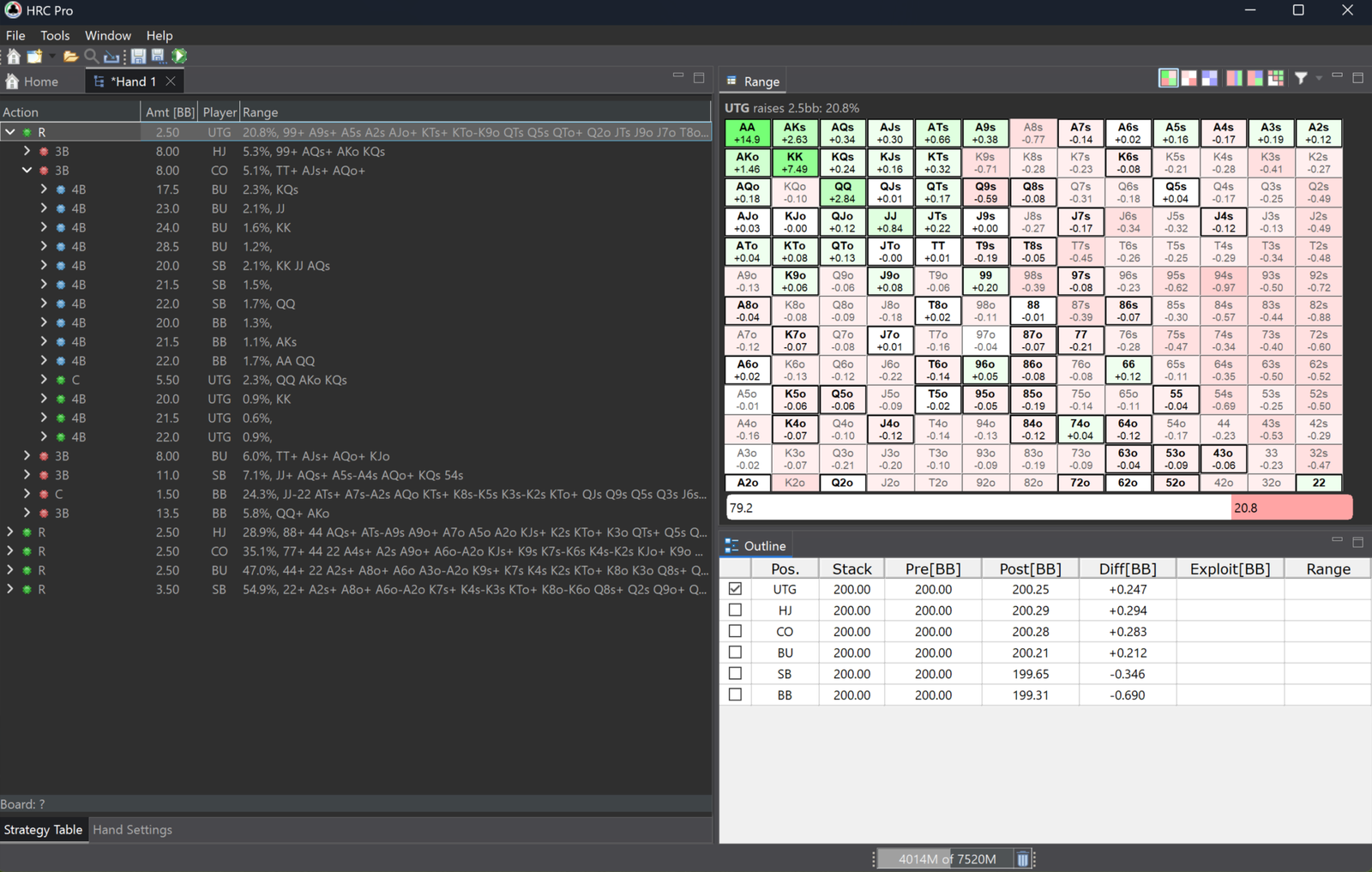
Holdem Resources Calculator, or HRC for short, is a solver for no-limit hold’em. A solver is a program that works out a strategy close to equilibrium on its own: one where no player in the hand can change how they play and start winning more. What comes out is not advice along the lines of “fold this hand”, but a full picture — which hands enter the pot from each position, which get bet, which get called, and which go in the muck.
The program specialises in preflop and in tournament spots where the value of a chip is not the same as the value of money. That is exactly why HRC has long been the standard tool for studying the late stages of tournaments: final tables, the bubble, short stacks. Cash game and deep-stacked calculations are available too, and the postflop model makes it possible to judge what happens to a hand after the flop.
What is Holdem Resources Calculator useful for?
Every calculation in the program is built from three parts, and understanding those three parts clears up almost every question a newcomer has.
The first part is the setup. It specifies the number of players, their stacks, the blinds and antes, and for a tournament the payout structure as well. This is the description of the exact moment being studied.
The second part is the game tree. The tree is the list of all actions allowed in the calculation: which sizings are available for an open-raise, whether limps and cold calls are permitted, and how far the betting runs. Full hold’em with every possible bet size cannot be solved, so solvers work with a simplified version of the game. From this follows a simple rule: the result is always exact for the tree that was defined, and useful in practice to the extent that this tree resembles the real game.
The third part is the equity model — the model that decides what a won pot turns into: chips, tournament money, or money including the bounties paid for eliminating opponents. The same hand with the same stacks is solved differently depending on the model chosen, and this is one of the program’s central ideas.
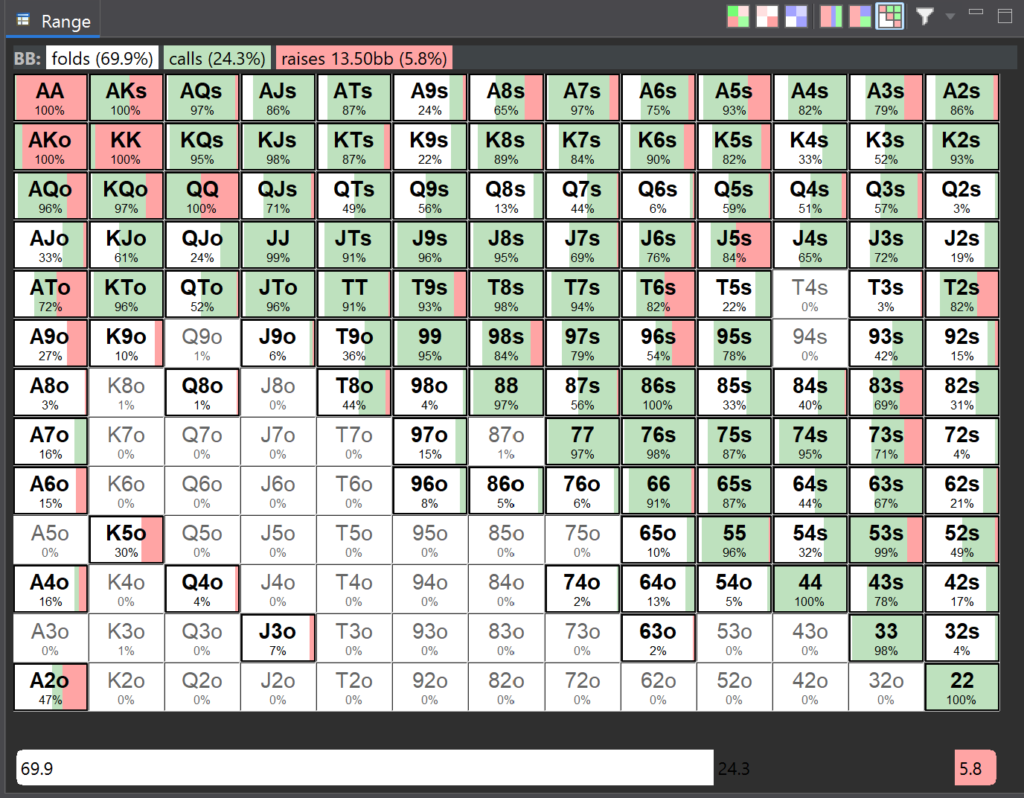
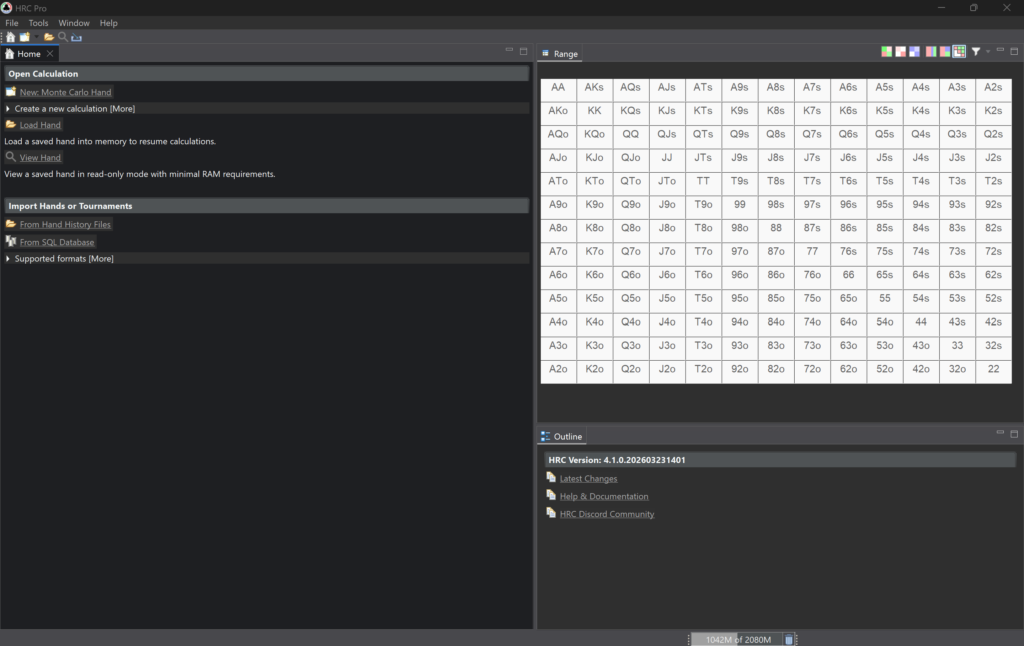
Once all three parts are set, the calculation begins. The program plays through the tree many times over, refining the strategies step by step until they stop changing noticeably. The result appears as a grid of 169 cells — the familiar starting hand chart, where each cell is coloured according to the available actions.
Equity models: chips, ICM and everything else
This is the part of the program that matters most to a beginner, and it is where learning it should start.
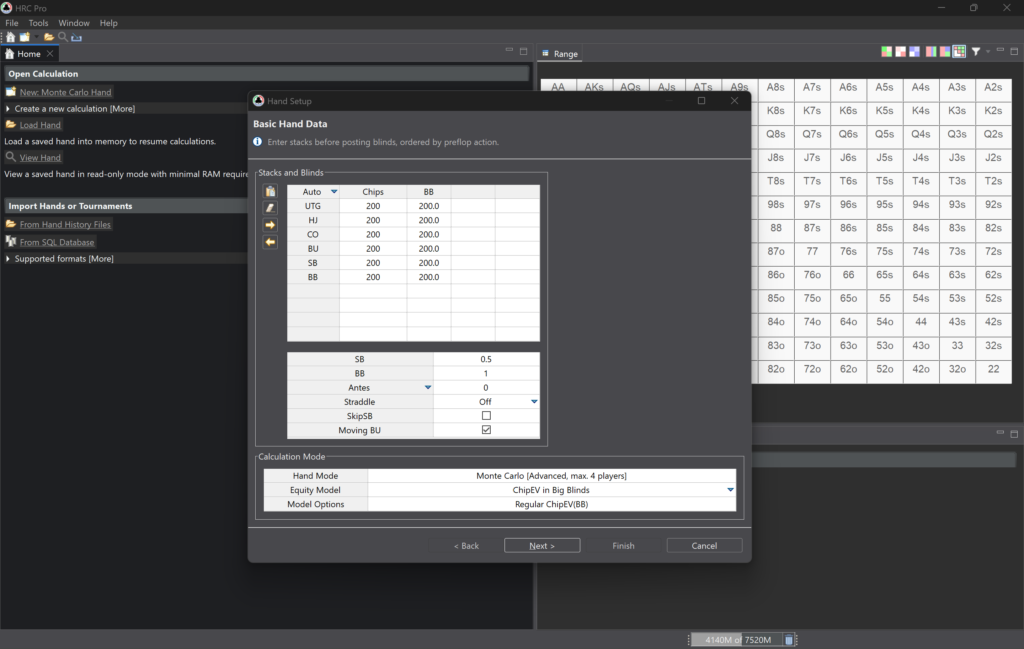
Chip calculations (chipEV) assume the goal is to maximise the number of chips won. This model fits cash games and the early stages of tournaments, where the money is still far away.
ICM converts a stack of chips into a share of the prize pool. The point of it is that doubling a stack does not double its tournament value: a chip won is worth less than a chip lost. In practice this forces noticeably more caution wherever elimination is on the line — above all on the bubble and at pay jumps.
The multi-table tournament mode (MTT ICM) solves the same problem for large fields. A classic ICM calculation cannot be performed exactly when hundreds or thousands of players are still seated, so the program uses an approximation whose deviation from the exact value is around 0.01% in most spots. All it needs is the stacks at the active table plus a general picture of the field and the payout structure.
FGS (Future Game Simulation) additionally simulates the next few hands. It gives a more accurate estimate in spots where what happens immediately after the current hand matters — for example, when the blinds are about to reach a short stack.
For a beginner the practical conclusion is simple: run the same spot first in chips and then under ICM, and compare the resulting ranges. The difference between them is precisely the “tournament caution” that gets talked about constantly but is rarely seen in actual numbers.
Bounty tournaments: KO and PKO
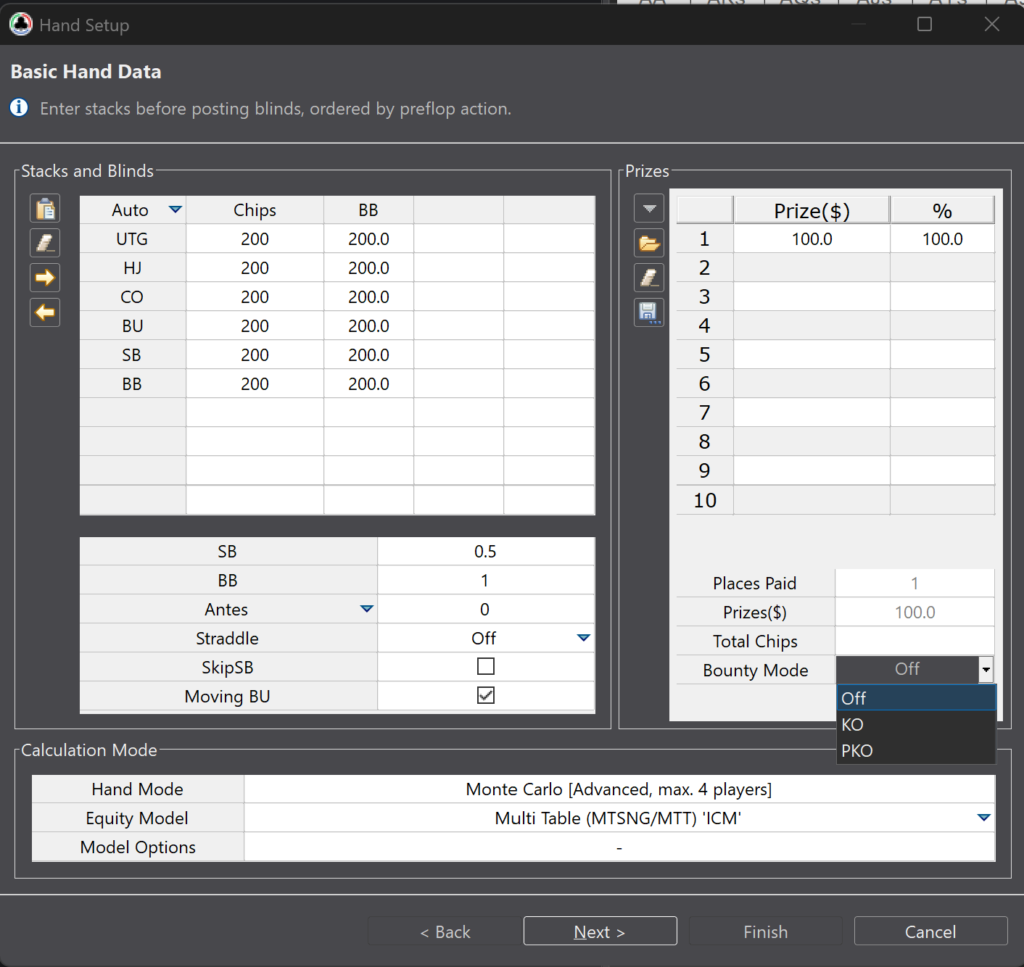
The program supports tournaments that pay for knocking players out: regular KO events, where the bounty is fixed, and progressive PKO events, where part of the bounty is paid out immediately and part is added to the winner’s own bounty. The hand setup asks for a player’s total bounty and the portion of it paid on elimination — which is exactly how those figures are normally displayed in poker room clients.
This changes the picture considerably: in a bounty tournament it pays to get involved against a short stack more often, because there is a reward at stake on top of the chips. The program calculates that extra value explicitly rather than by feel.
Setting up the spot: stacks, positions, blinds
Stacks are entered in big blinds or in chips, the number of players is picked from a list, and the button can be moved around the table with a single click — handy when the same spot needs to be run quickly from different positions. Antes are supported, including the big blind ante, as are straddles, which the calculation treats not as a raise but as one more blind.
Payout structures live in a separate manager: presets for common formats, custom structures, import from files. A structure set up once does not have to be entered again for every calculation.
The game tree: bet sizes and permitted actions
Tree configuration is where mistakes happen most often, so it is worth getting to grips with straight away.
Bet sizes are entered as short expressions: 2.5bb means a raise to 2.5 big blinds, 3.0x a raise to three times the previous bet, 75% a bet of 75% of the pot, and all-in a bet of the entire stack. Several sizes are listed separated by commas. An increment per limper or cold caller can be specified separately: an entry such as 2.5bb + 1bb means the open is increased by one big blind for every opponent already in the pot. Sizes in big blinds are more convenient for open-raises, while pot fractions or multipliers suit 3-bets, 4-bets and 5-bets, since those bets are always measured against the previous action.
There are two configuration modes. The simple one sets common sizes for every position and works well for short stacks, where the choice mostly comes down to shoving or folding. The advanced one allows separate sizes per position — a different open from UTG than from the button, for instance, along with separate sizings for in-position and out-of-position 3-bets.
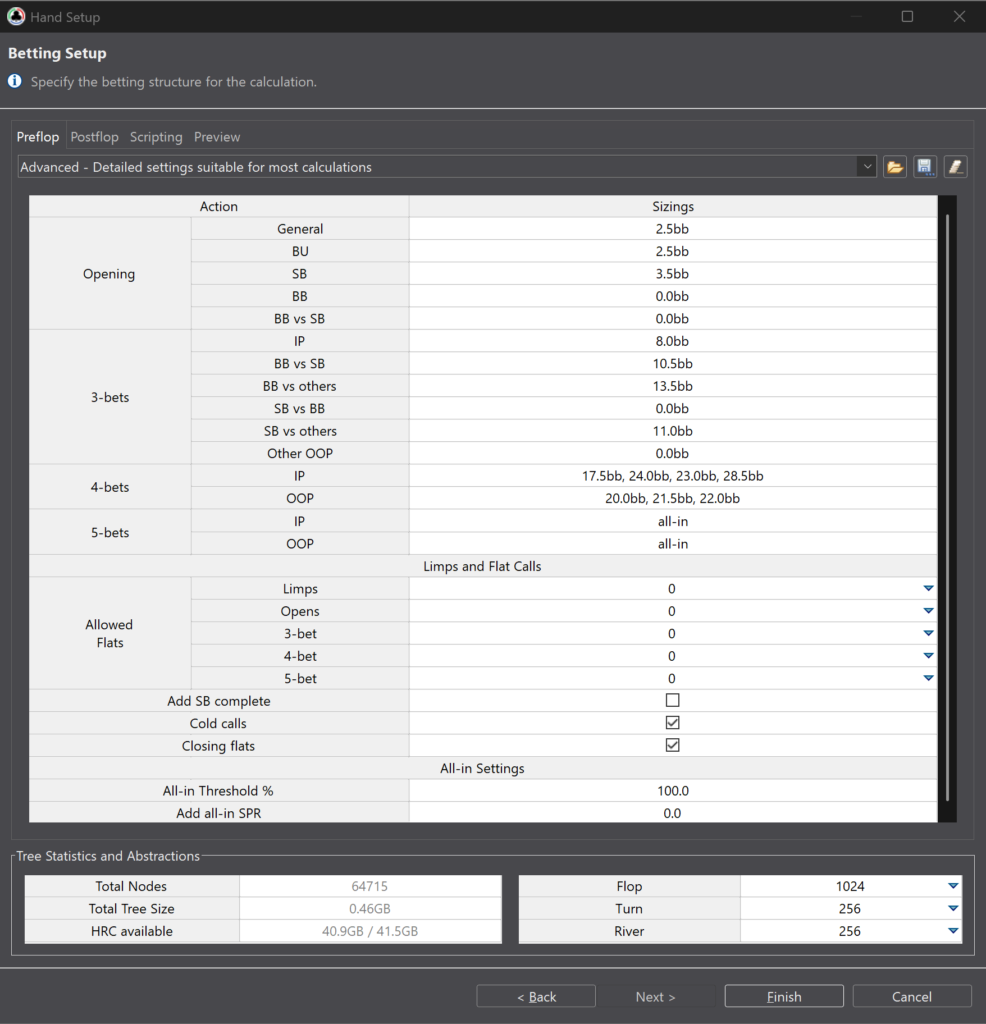
A separate block of settings governs how many players are allowed to enter the pot by calling. The more cold calls and limps are permitted, the more multiway postflop pots appear — and the faster the tree grows. Special cases are configured on top of that: whether the small blind may complete, whether a player who has not yet entered the pot may call a 3-bet, and whether a call that closes the action is always allowed.
Two all-in thresholds are useful as well: the first replaces a regular raise with an all-in when the raise exceeds a set share of the effective stack, and the second automatically adds the all-in as an option once the stack-to-pot ratio drops below a set value. Both exist to stop the tree spending nodes on bets that leave a token amount behind.
One more setting is easy to overlook: the maximum number of active players in the pot. This limit is applied before the other rules — as soon as it is reached, all remaining players are forced to fold. A sensible value is two higher than the number of calls permitted against an open, otherwise the blinds end up thrown out of the hand before they ever act.
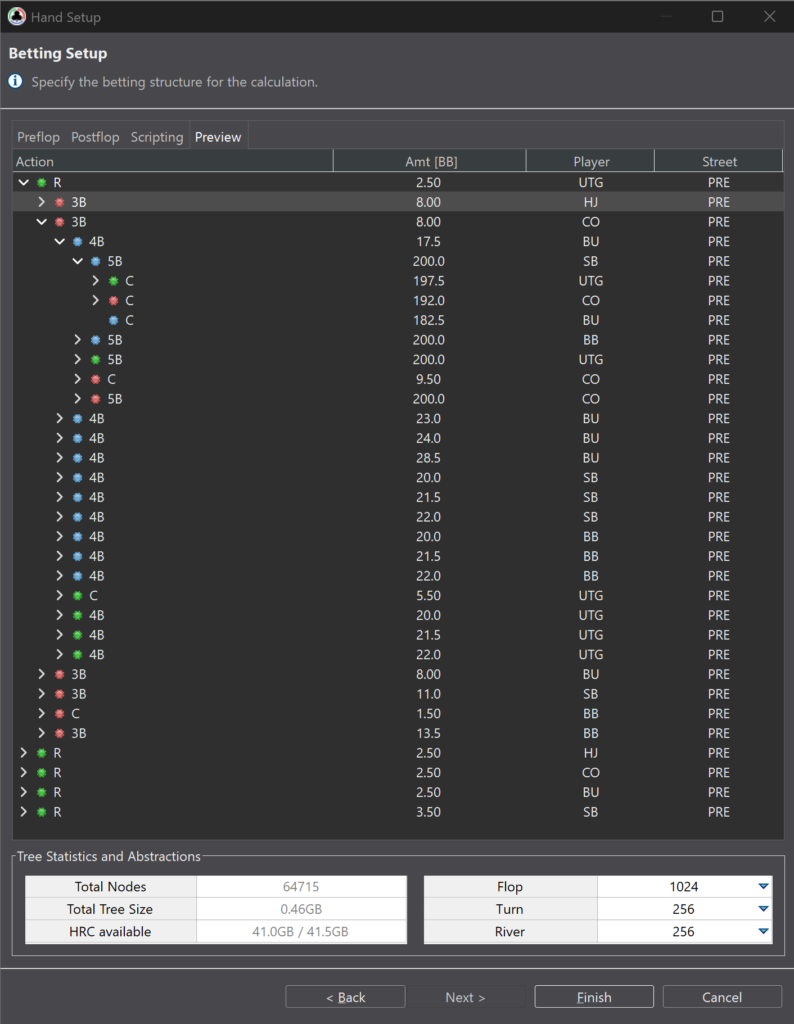
The resulting tree can be checked on the preview tab, which updates with every change to the settings and shows exactly which lines will make it into the calculation.
Postflop: why a preflop solver needs it
Here is the idea worth taking on board: postflop play in this program exists first and foremost not for the sake of postflop strategy, but for correct equity realisation. Equity realisation is how much of its share of the pot a hand actually collects after the flop. Small pairs and suited connectors, for example, hold decent equity in theory against strong ranges, but realise it poorly out of position. With postflop switched off, the program assumes everyone simply turns their cards face up after the flop, and the calling ranges come out implausibly wide.
The main postflop setting is geometric bet sizing. A geometric line is a series of bets that are equal as a share of the pot and bring stacks exactly to all-in by the end of the hand. The program picks the option closest to the percentage entered, based on the current stack-to-pot ratio. Separate sizes can also be set for flop bets, for raises, for the c-bet and for the donk bet, and donk bets can be restricted or banned outright — which shrinks the tree noticeably.
Another way to keep a calculation within reason is to specify the street on which betting stops, separately for pots with different numbers of players. Multiway pots can be solved only to the flop, for example.
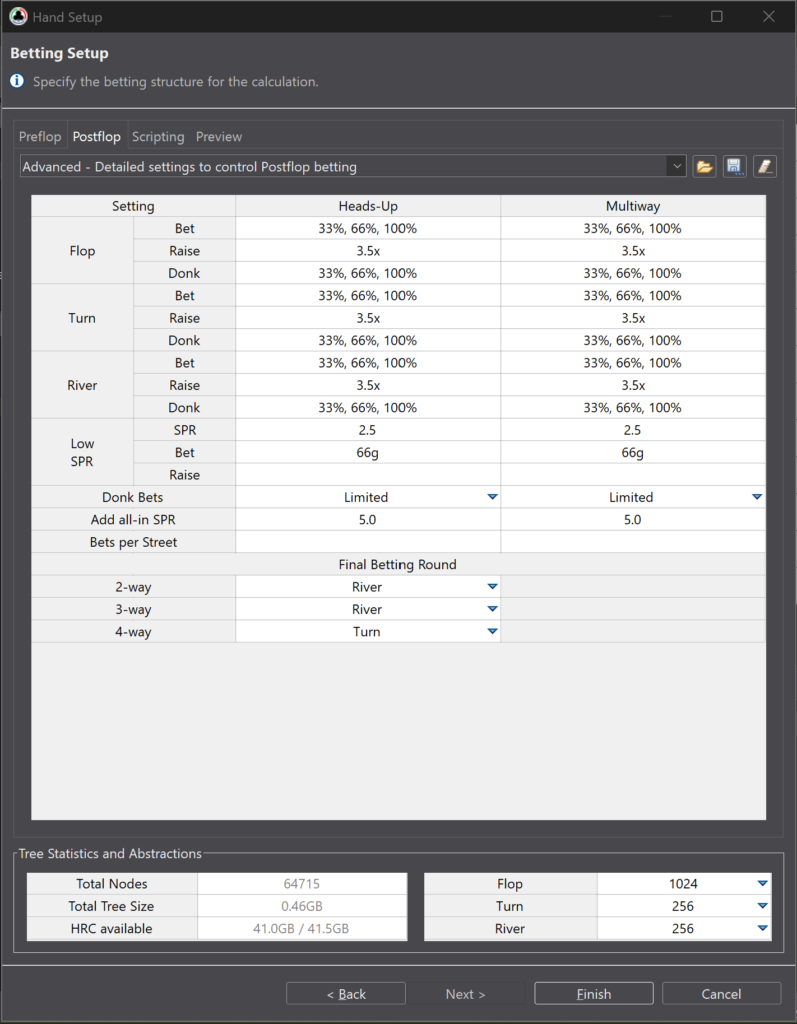
The accuracy of the postflop part is governed by the size of the abstractions, sometimes called groups or buckets. The program merges similar hands into groups to make the calculation feasible at all: the more groups, the sharper the picture and the heavier the calculation. On the Classic tier the number of groups is fixed at 256, which is enough for short and medium stacks. On the Pro tier the value is adjustable up to 16,384, and it makes more sense to increase the number of groups on the flop than on the turn and river: the flop has the strongest influence on preflop ranges, and raising flop abstraction inflates the tree the least.
Standalone postflop calculations
Beyond the postflop model inside a preflop calculation, the Pro tier offers standalone postflop solutions. The sequence runs like this: pick the line in question inside a finished calculation, specify a particular board — a flop, and a turn or river if needed — and the program solves the strategy for that board, taking the players’ ranges from the preflop solution.
Solution quality is controlled separately, with options ranging from full suit awareness to heavy simplification. The practical benefit is that ranges do not have to be carried across to another solver by hand — they come from the same calculation where the tournament model and the stacks were defined.
How the calculation itself runs: Monte Carlo and the convergence indicator
Calculations use the Monte Carlo method: the program plays out random situations inside the defined tree over and over and refines the strategies gradually. A short preliminary run happens as soon as a hand is created, but a full result requires launching the full calculation.
How ready the result is shows up in the CI convergence indicator. It measures how much the preflop strategies have shifted recently: the lower the value, the more settled the picture. As a rough guide, below CI 10 the opening ranges and the main responses to them are already reliable, below CI 5 almost every spot is reliable, and values around 2–3 are needed only for building reference charts, where the exact selection of hands in mixed strategies matters.
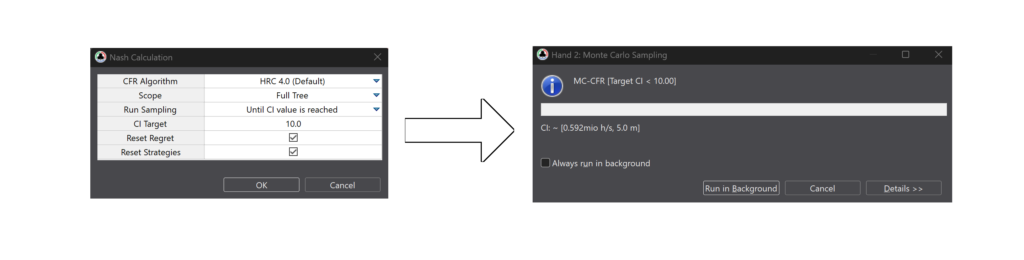
A calculation can be stopped at any point without losing the result and continued later — progress is saved along with the hand. There is also a targeted mode: solving a selected subtree. It exists for rare lines that converge slowly during a general run. The logic goes like this: first the whole tree is run to rough accuracy so that the ranges of the early positions are at least plausible, then a specific node is picked — say, the small blind’s response to a cutoff open — and only that node is solved. Worth remembering: in this kind of calculation every preceding action is treated as fixed and will not be recalculated.
Locks: testing hypotheses and punishing opponents’ mistakes
An equilibrium strategy answers the question of how to play against a strong opponent. But most of the profit in real games comes from deviations, and the program has two mechanisms for studying them.
Node locking is the manual fixing of a strategy at a specific point. The range is edited by hand, after which the rest of the tree is recalculated. This is how hypotheses of the “what if the button opens half as wide” variety get tested.
A frequency lock fixes not specific hands but the frequency of an action. It is enough to state that an opponent bets 60% of the time, for instance, and the program works out the necessary adjustment itself. This approach works postflop too and is far more convenient in spots with three or more available actions. When setting it up, at least one action must be left free, otherwise the solver has nothing to work with, and the calculation must be restarted with accumulated data cleared — otherwise the lock will not take effect.
The practical value for a beginner is obvious: the typical mistakes in micro-stakes tournaments are well known — 3-betting too rarely, folding to c-bets too often, limping too wide. Model one of those mistakes and what appears is not the abstract advice to “play wider” but a concrete range that profitably punishes it.
Reviewing your own play: hand import and quick analysis
The program can pull played hands from history files, from the clipboard, and directly from PokerTracker 4 and Holdem Manager 2 databases — the database connection is set up once in the program’s settings.
Once imported, the list of hands can be run through quick analysis. The program picks out the suitable spots itself and marks the result: one mark means the decision matched the equilibrium one, another that the decision was close to zero in value, a third that the decision looks like a mistake. What remains is to open the flagged hands and see what the range should have been.
For a beginner this is the shortest route from “the program calculated something abstract” to “here is my mistake in this specific hand”. Bear in mind that history import is built around tournaments; cash spots are usually entered by hand, though rake is handled correctly.
What the results show
The main screen is the starting hand grid, coloured by action. Display modes can be switched: pure strategy, the value of each action compared with folding, its value compared with the best alternative, and combo share. Below the grid runs a bar showing action frequencies, and hovering the cursor brings up detailed information on an individual hand.
Bubble factors and risk premiums deserve a mention of their own. A bubble factor shows how many times more expensive losing chips is than winning them in a given confrontation: a value of 1 means an ordinary chip game, while higher values mean that entering the pot requires an equity cushion. This is the clearest way of explaining to a beginner why a strong hand sometimes gets folded on the bubble.
There is a detailed breakdown of an individual line as well: the program calculates the value of the chosen line and collects statistics along it — VPIP, PFR, c-bet frequency, fold to c-bet, check-raise, donk bet, non-showdown winnings. These are the same figures trackers display, so a solver’s solution is easy to line up against opponents’ real stats.
Sharing calculations and exporting
A saved calculation can be opened in viewer mode without a licence — it is a separate lightweight file format. For study purposes this is convenient: a coach sends over a finished solution, and the student opens it in the same program and works through it without paying for a subscription.
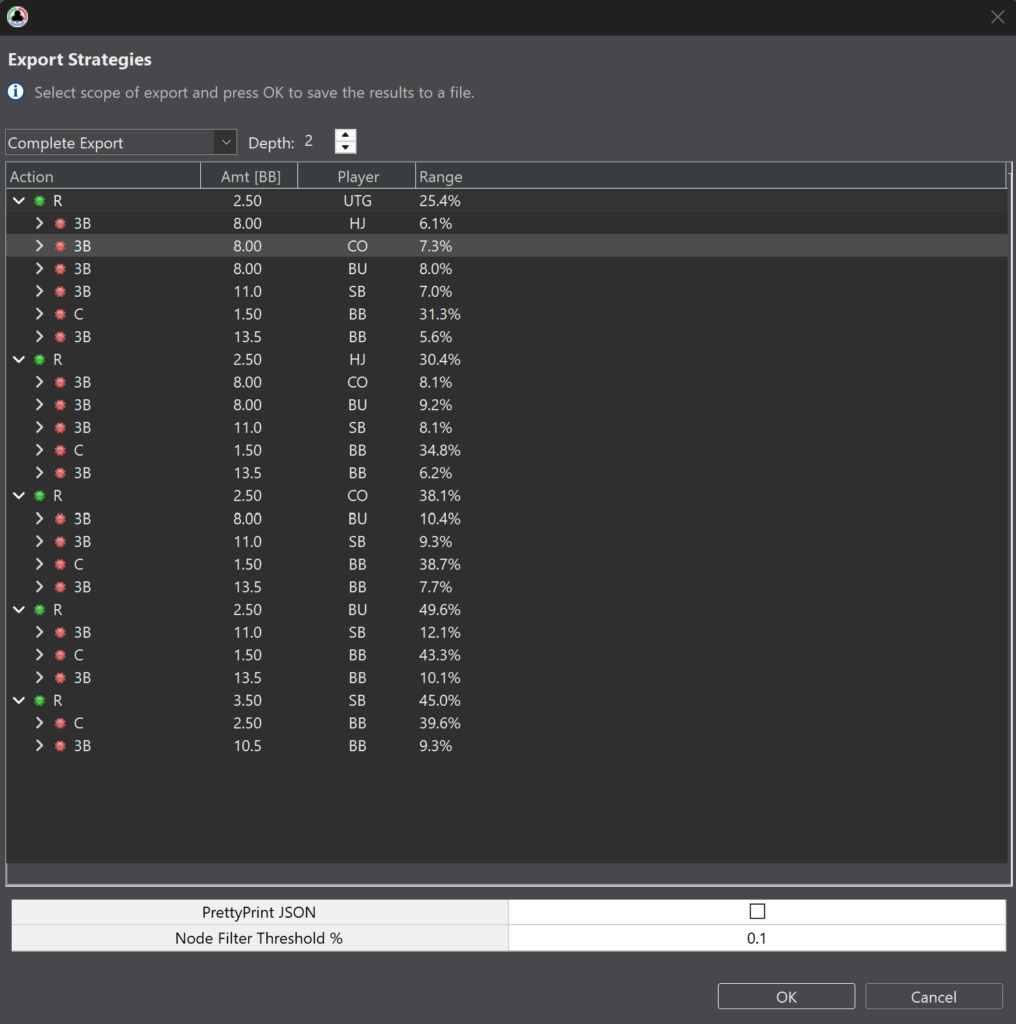
Strategies export to text and spreadsheet formats, a node can be exported to a postflop solver together with ranges and tournament model data, and ranges can be passed to third-party trainers. One further option is generating a synthetic hand history from a finished solution: the program effectively plays itself using the calculated strategy, and the resulting hands can be loaded into a tracker and examined with the usual reports.
Scripted tree building
For non-standard problems, the Pro tier offers tree building by script. Instead of filling in fields in a dialog, the rules are set by a small program: a bet size can depend on position, on stack depth, or on previous actions, for instance. A beginner has no need for this, but it is useful to know that the ceiling on configuration is not the interface.
Free web tools
Alongside the main program, the developer’s site hosts free calculators: heads-up push/fold tables, an equilibrium range calculator, an ICM tournament equity calculator and a separate calculator for large fields. They do not replace the program, but they make it possible to get a feel for ICM logic before installing anything.
Compatibility: formats and sites
The program runs on 64-bit Windows, macOS and Linux; for Linux there are separate builds for x86 and ARM architectures. On the Windows side, Windows 10 and newer are supported, along with Windows Server 2019 and newer. The key requirement is RAM: it is what limits tree size and abstraction accuracy. By default the memory limit is set as a share of the computer’s physical memory and can be changed in the program’s configuration file if needed; complex calculations usually call for raising it, while leaving headroom for the operating system.
Hand history import is supported for PokerStars, Full Tilt, PartyPoker, PKR, iPoker, Ongame, Cake, Merge, 888, Winamax, Bovada, Winning Network and GG Network formats. Histories from a number of other sites are parsed as well — CoinPoker, PokerBros, Ignition and Chico among them — along with histories converted by trackers; missing formats are added on request to support. A direct connection to PokerTracker 4 and Holdem Manager 2 databases works separately.
One important restriction: the program watches for a running GG Network client and closes automatically if it finds one in the process list, so that a user cannot accidentally break the room’s rules. GG hands can be studied, just not with the client open at the same time.
Another restriction concerns cash games: history import is built around tournaments, so cash spots are entered by hand. Rake is accounted for, including the “no flop, no drop” rule.
Getting started
The start comes down to a handful of steps.
- Download the program from the official site and install it. On Windows, choose an installation path without special characters, or the program may fail to launch; on macOS the first launch requires allowing the application in the security settings.
- Request a free trial key inside the program through the registration menu. The trial runs for 14 days and requires no payment details.
- Build a first simple hand: two or three players, stacks of 10–12 big blinds, the ICM model, a tree with two actions — shove and fold. A calculation like this takes seconds and produces an immediately understandable result.
- Repeat the same hand in chips and compare the ranges. The difference shows what the tournament model contributes.
- Import a few of your own tournament hands and run quick analysis to see your decisions against the equilibrium ones.
- Only then move on to deeper stacks, limps, cold calls and postflop settings — that is where the real work with the tree begins.
It pays to get into the habit of saving successful tree configurations: settings can be exported and loaded back in, and a new calculation can be launched from parameters used earlier.
Tiers
The program comes in two tiers. Classic targets short and medium stacks: it caps tree size and fixes the accuracy of the postflop model, but fully covers push/fold and standard tournament spots up to roughly 30 big blinds. Pro removes the tree size cap, raises postflop accuracy, and adds standalone postflop calculations, scripted tree building and the option to extend an existing tree with new actions.
Billing is available monthly, every three months or annually, and also as a one-time key with no auto-renewal; upgrading from the lower tier to the higher one is possible at any time, and the unused remainder of the paid period is credited towards it. The trial period covers the Classic tier, while the 14-day refund window allows the higher tier to be tried out. A detailed breakdown of tiers and prices is given on the product description page.
The bottom line
HRC is not a trainer handing out ready answers but a working tool that insists the problem be stated precisely before it produces a solution. For a newcomer to online poker its main value is that it puts numbers on things that otherwise have to be taken on trust: why the bubble calls for tighter play, why a short stack pushes towards all-in, why some hands call well while others only bet.
The sensible way to learn it is gradually: start with simple push/fold spots and a single equity model, then add model comparisons and reviews of your own hands, and only then move on to tree configuration, postflop abstractions and locks. In that order, each new setting shows up once its purpose is already clear — and the program turns from complicated into predictable.

Featured software

Latest posts
-
 Poker Academy Review: Ranges, Solver, and Trainer in One Browser Window Oct 11, 2026
 -
 SmartHand Review: Opponent Stats Before the First Hand Oct 10, 2026
 -
 888Caption Review: A Tool for Fast-Paced Multi-Tabling Oct 9, 2026
 -
 Preflop ICM Solving in GTO Wizard: ICM-Aware Preflop Solutions in Seconds Oct 8, 2026
 -
 Octopi Poker Review: Tournament GTO With Pro Hand Reviews Oct 7, 2026
All the poker software you need, gathered in one place. Exclusive discounts, bonuses, latest news and updates.
Join now