FreeBetRange Review: A Browser-Based Preflop Range Builder and Trainer
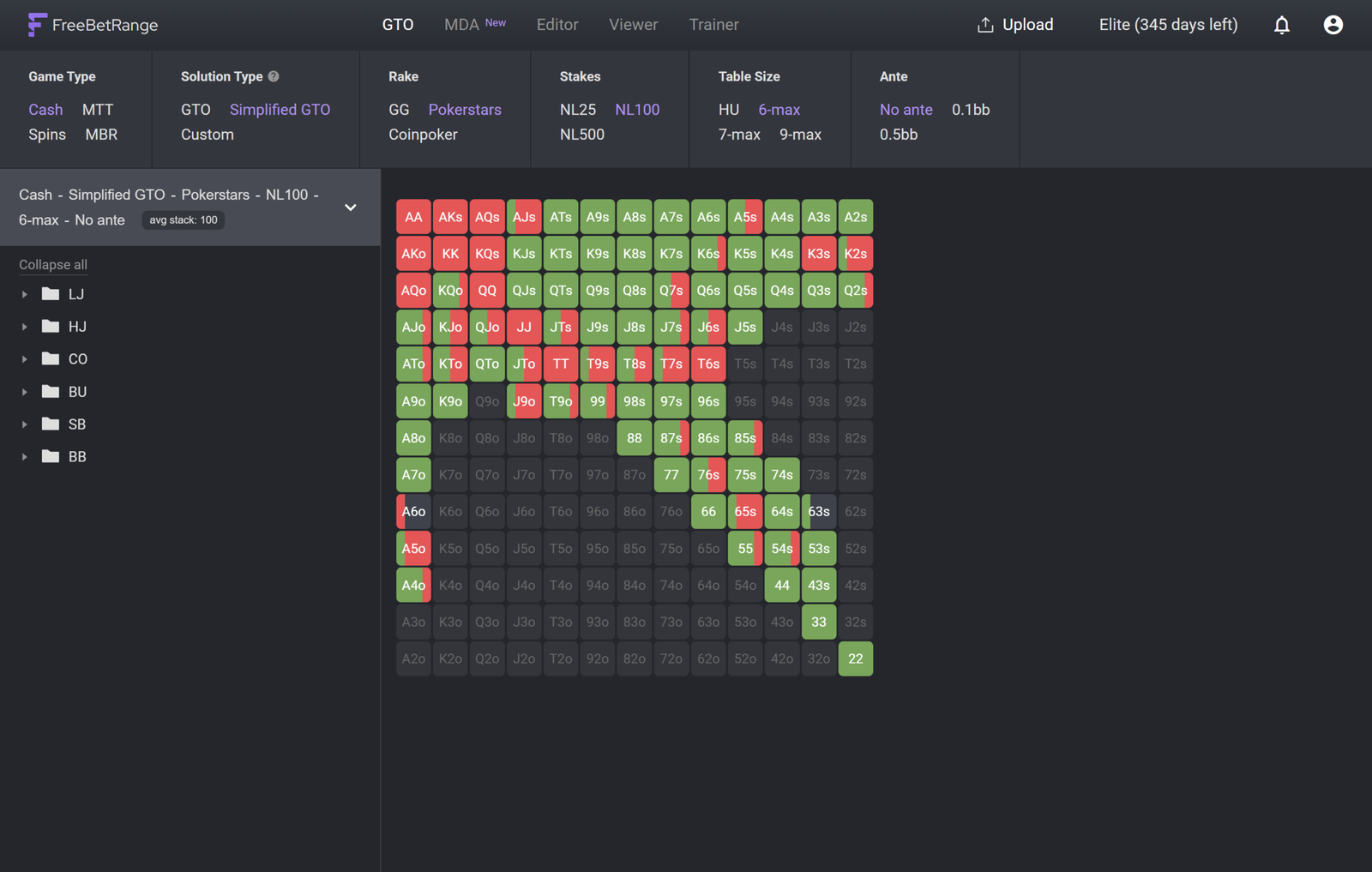
FreeBetRange is a platform for working with preflop ranges. It handles three jobs at once: it provides ready-made solver solutions for standard spots, lets you build and edit your own strategy, and helps you memorize it with a trainer. Everything runs in an ordinary browser — there’s no software to install, just an account to create.
For a beginner this is especially convenient, because preflop is the most structured part of poker. The number of situations is finite, and almost every one of them has a correct answer that can be learned once and then applied automatically. This is where it makes sense to start working on your game: preflop mistakes carry forward and turn into expensive mistakes on later streets.
How exactly does FreeBetRange help players?
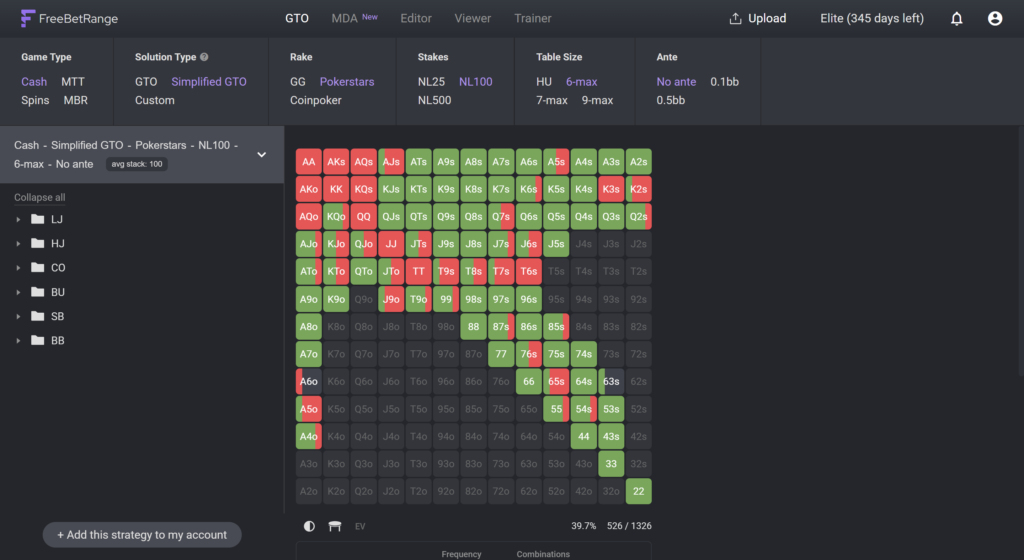
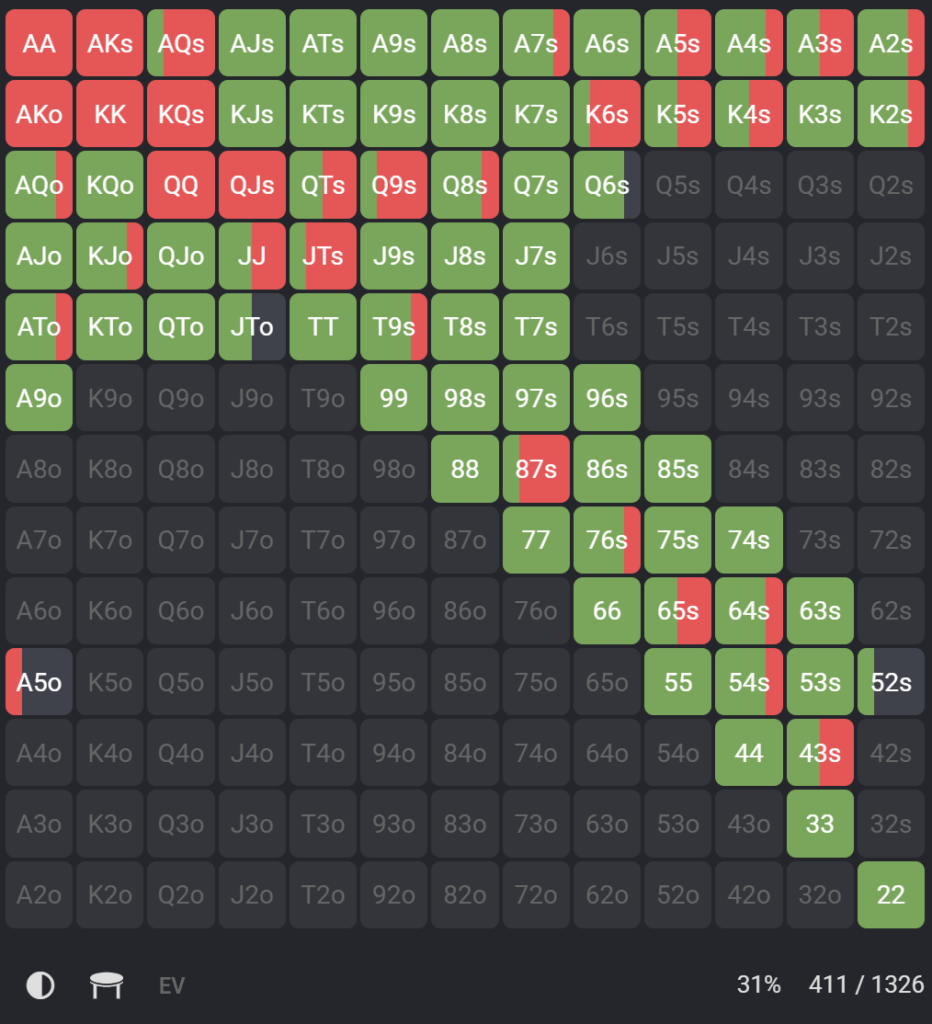
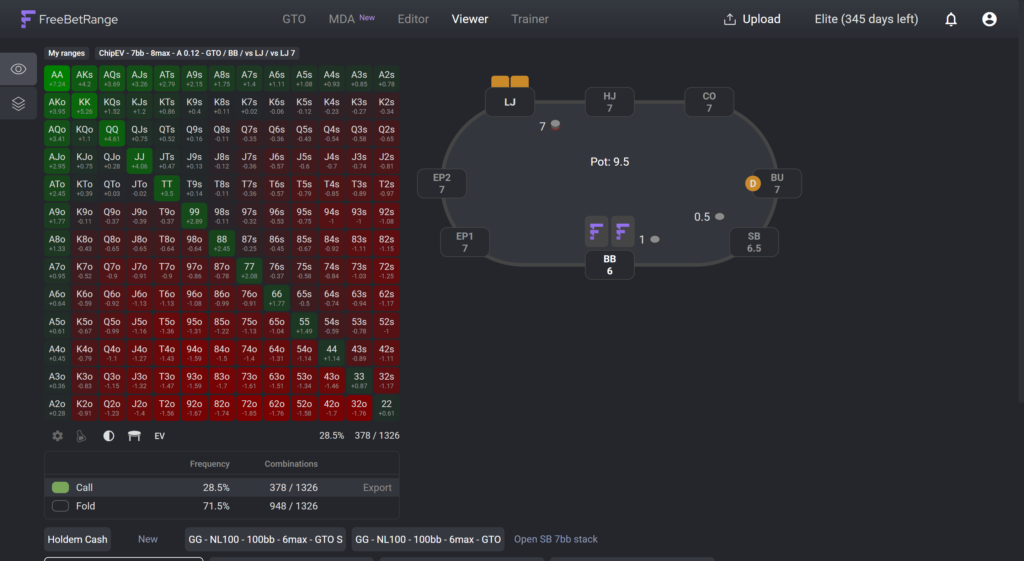
The basic unit here is a range. That’s the set of hole cards a player takes a given action with in a specific spot. A range is shown as a 13×13 grid: pairs run down the diagonal, suited hands sit above it, offsuit hands below. Colored cells show what to do with a hand, and the color corresponds to the action — raise, call, or fold.
Ranges are organized into a strategy tree. This is a nested folder structure that mirrors the flow of a hand: first the format and stack depth, then the position, then the action, then the response to an opponent’s action. For example: 100 big blind cash game → CO → open-raise → defense against a 3-bet from the BTN. Moving through this tree, you can look up the strategy for any point in a hand.
A separate concept is the mixed strategy. Sometimes the solver suggests playing the same hand in different ways — raising 60% of the time and calling 40%, for instance. A cell like that is shaded in two colors at once, and the proportion of each color reflects the frequency. To hit those frequencies in game, you use a randomizer: a generator that produces a random number from 1 to 100 and tells you which action to pick in the current hand.
All five sections of the app work with the same strategy tree. The library provides ready-made trees, the editor changes them, the viewer displays them, the trainer tests you on them, and the MDA section adds a separate tree — the strategy of real opponents.
GTO Library: Ready-Made Solver Solutions
A solver is software that calculates the optimal strategy for a given spot. Solving a preflop tree takes time and a powerful computer, so in FreeBetRange those calculations have already been run in advance and gathered into a library.
Solutions are split up by format. For cash games there are filters by rake structure (GG, PokerStars, CoinPoker), by stake (NL25, NL100, NL500), by table size (heads-up, 6-max, 7-max, 9-max), and by ante size. For multi-table tournaments you can choose between ChipEV and ICM, table sizes from heads-up to 8-max, and various antes. Spin & Go solutions for heads-up and three players are listed separately, along with Mystery Battle Royale tournaments broken out by stage and by limped and non-limped variants.
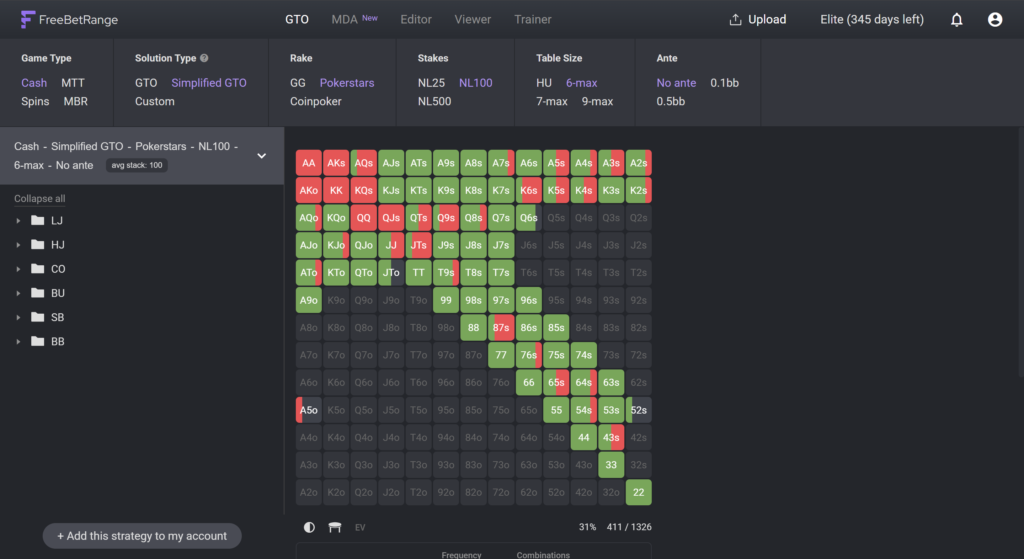
One important filter is the solution type. The GTO option contains the raw solver output with exact frequencies — a cell might be shaded in a 37/63 split, for example. The Simplified GTO option has the same ranges but with frequencies rounded to 25, 50, and 75%. The strategic difference is almost imperceptible, while a range like that is far easier to remember and apply. A beginner is well advised to start with the simplified solutions and come back to the raw ones later, once the basics have sunk in.
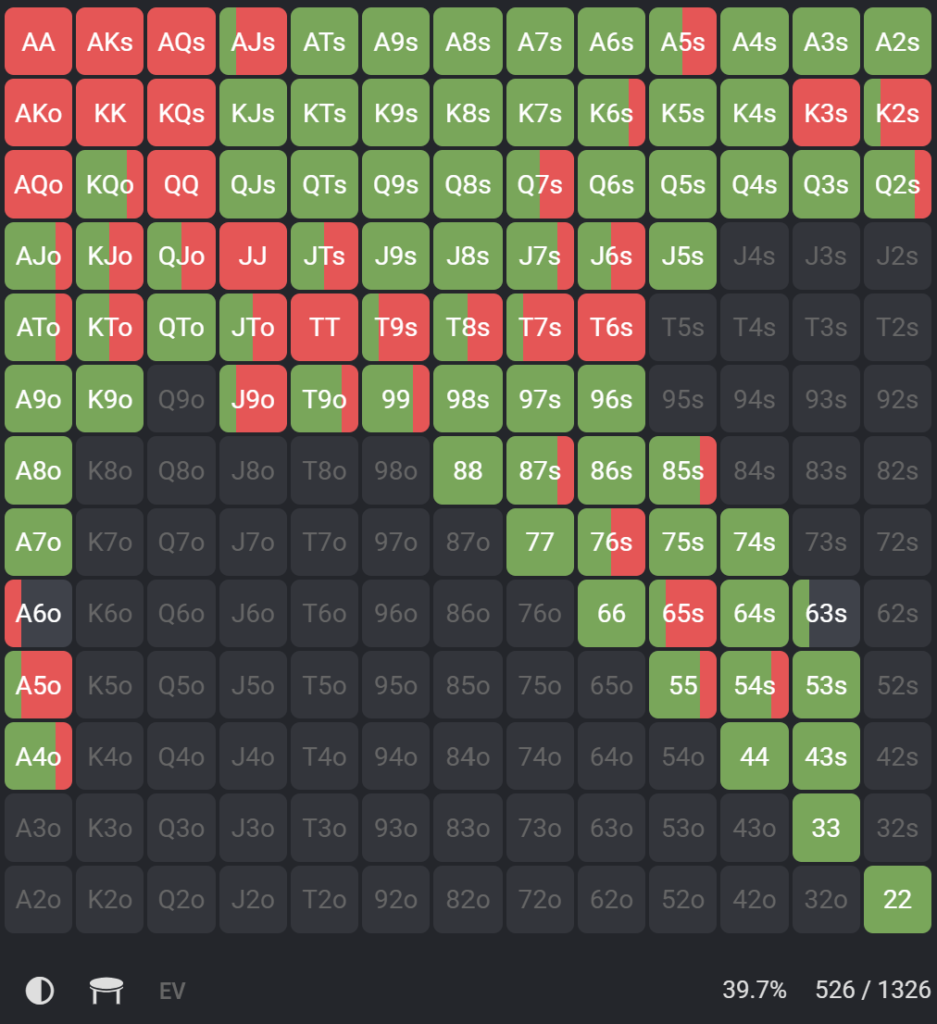
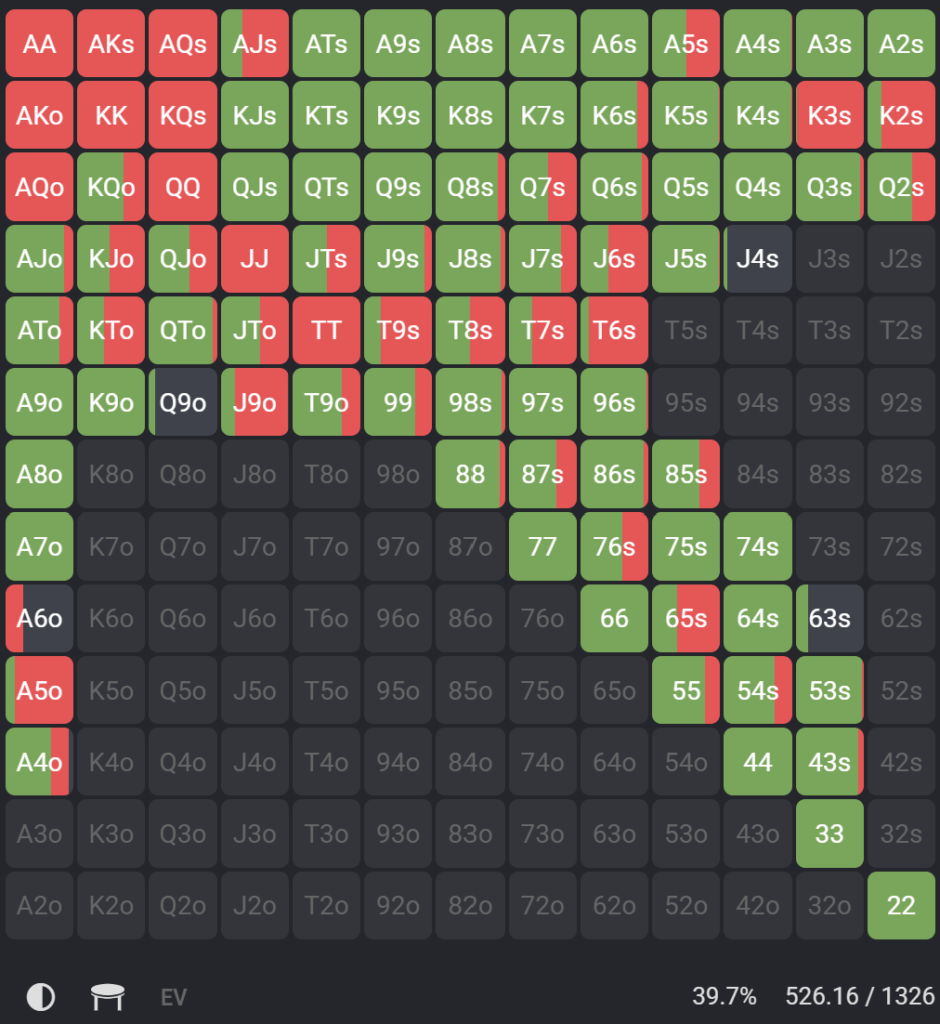
There’s a third type as well: Custom. These are prepared range sets from poker schools and coaches, where a GTO base has been supplemented with exploitative adjustments for real games. Packages like these are useful when what you need isn’t a theoretical reference but a working strategy for a specific format.
Any solution can be added to your account with a button in the corner of the screen. After that it’s available in the editor, the viewer, and the trainer, so you can study it, change it, and drill it. There’s one restriction: the number of ranges in an account depends on your plan, and once you hit the limit, older solutions have to be deleted.
The calculations for the library were run on the HoldemResources Calculator solver with input from professional players and coaches in each discipline. Full access to the entire library — more than 100,000 ranges — comes with a paid plan; the free plan offers a limited selection of spots.
MDA: The Ranges Real Opponents Play
MDA is the section for population ranges — in other words, real statistics on how opponents actually play in a particular type of game. The ranges are built from an analysis of more than 300 million cash game hands from recent years, and the data set is refreshed every six months.
The point of the section is that GTO describes an ideal player, not your opponent. Real opponents deviate from that ideal, and weak players deviate enormously. Knowing those deviations lets you play exploitatively — adjusting to the specific mistakes of the player pool instead of sticking to a one-size-fits-all strategy.
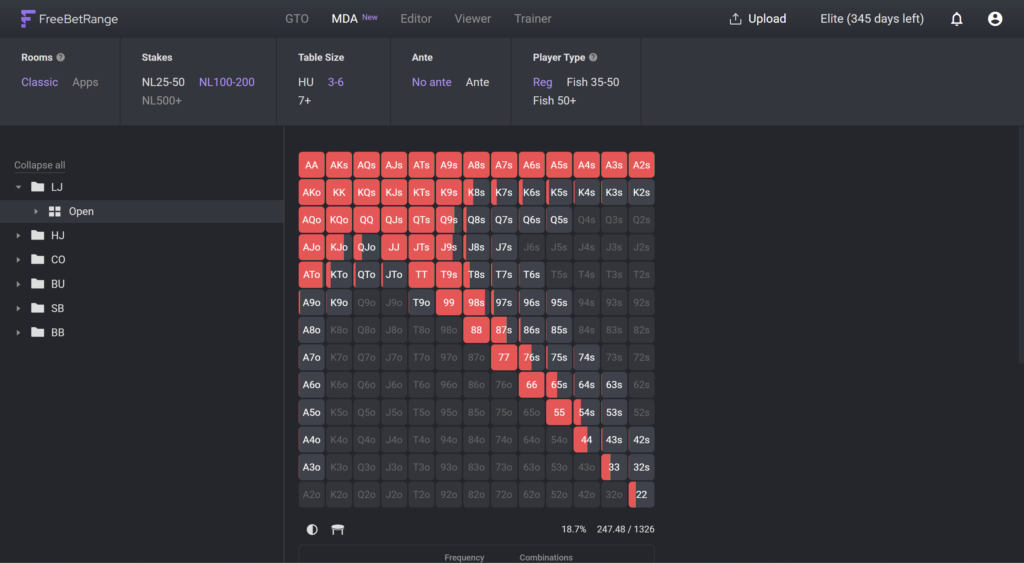
Filters let you narrow the sample down to games like yours:
- Sites — “Classic” for the major rooms (PokerStars, GG, WPN, 888, iPoker) and “Apps” for club apps (PokerBros, PPPoker, X-Poker). The rooms are grouped into two buckets on purpose: it makes the sample larger and the ranges more accurate.
- Stakes — NL25–50, NL100–200, NL500 and up.
- Table size — heads-up, three to six players, seven or more.
- Ante — with and without.
- Player type — reg, weak player with a VPIP of 35 to 49, and very weak player with a VPIP above 50.
That last filter is the key one. The difference between a reg’s range and a weak player’s range in the very same spot is often enormous, and that’s exactly what you want to be factoring into your decisions.
It’s also worth understanding where ranges like these come from. Raw showdown data is distorted: some hands reach showdown more often than others, and folded hands aren’t visible at all. So showdowns are used only as one signal among several, and the final ranges are reconstructed statistically, corrected for that bias and checked for combinatorial consistency.
A range from any point in the tree can be copied to the clipboard with one button and moved into the FreeBetRange editor or into an external solver, where a counter-strategy can be calculated against it.
The MDA section is available on the Elite plan. On the free plan, one range is open as a sample: an LJ open at NL25–50.
Viewer: Studying the Strategy
The Viewer is the section where strategy is studied visually. It replaces the usual PDF charts and screenshots: instead of flipping through files, you move through the tree with navigation buttons and the hand grid updates automatically.
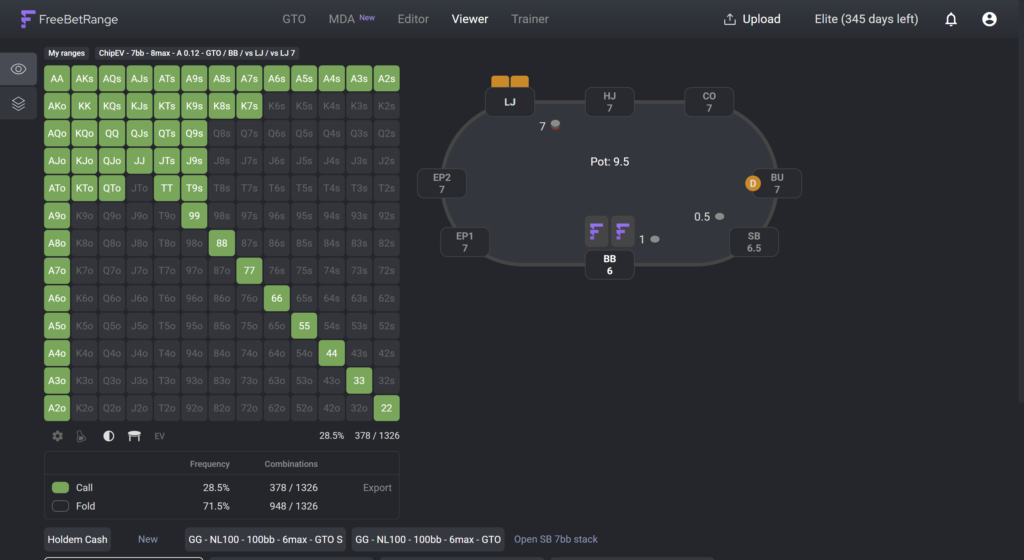
Next to the grid is a table diagram for the selected spot: how many players are in the hand, which position is yours, and which actions have already been taken. This helps you keep the context in view — you see not only “which hands” but “in which situation.”
The EV matrix can be turned on separately. Equity and expected value aren’t the same thing: EV shows how much a specific hand brings in on average in the chosen spot when played correctly. This view explains why certain hands are played as a mix: their EV across different actions is nearly identical, so the choice between them doesn’t change much.
Multi-view lets you open up to six ranges in a single row and compare them side by side. This is the fastest way to spot a pattern instead of memorizing every situation separately. The classic example is BB defense against opens from each of the five positions: you can see at once how the defending range narrows as the opener moves closer to early position.
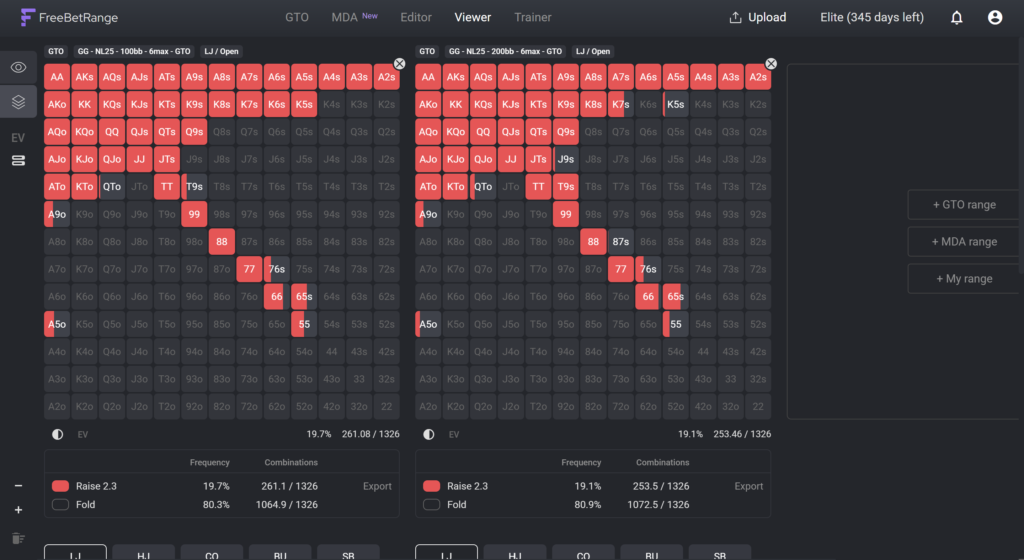
The viewer settings switch between horizontal and vertical layouts. A paid plan adds a randomizer right under the grid (auto-refreshing on a timer or when the range changes), custom colors for individual ranges and folders, and extended display options — element order and hiding ranges from earlier levels of the tree. The section adapts to the screen size and works fully on a phone or tablet.
Trainer: Range Drills
Knowing a strategy and applying it at the table are two different things. The trainer closes exactly that gap.
Drills are organized into exercise sets. Several sets for your chosen format are created automatically when you register, but you can also build your own: give it a name and pick the ranges you want, up to a hundred in a single set.
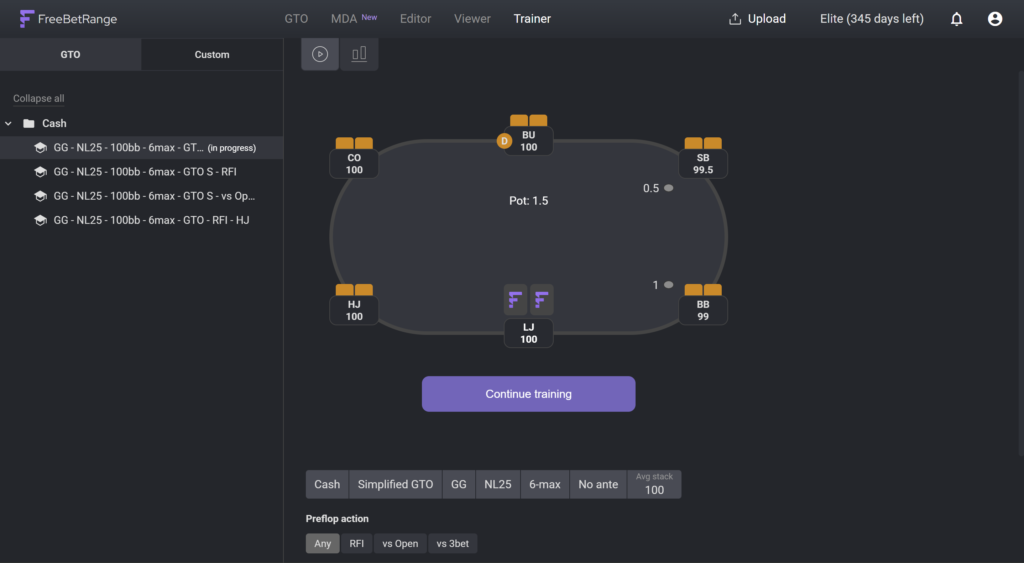
Classic mode recreates play at the table. The app deals two hole cards and asks you to choose an action. A correct answer lights the table frame green and the next hand comes immediately; a mistake turns it red and the drill pauses to show you the right answer.
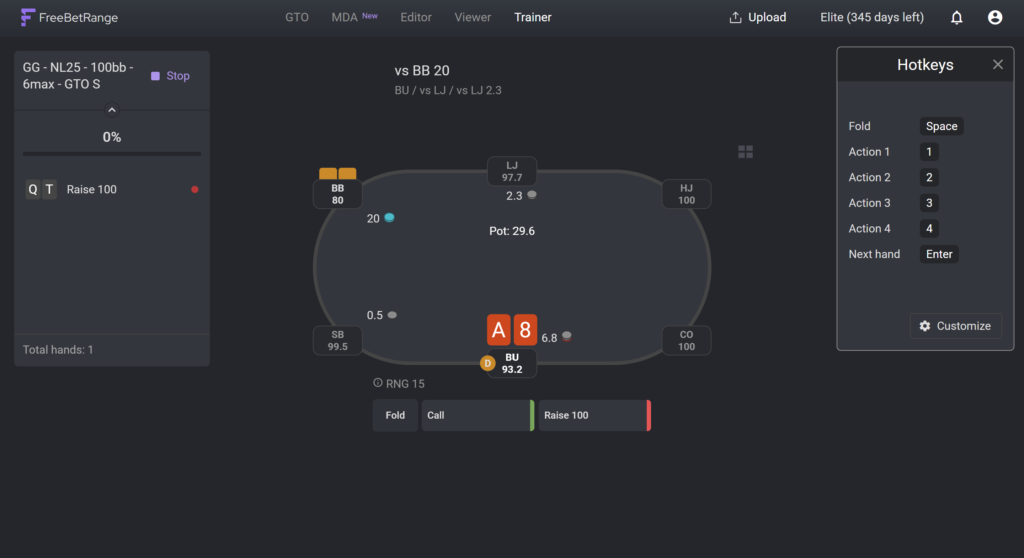
There’s an important setting here: hand coverage. If the cards dealt are completely random, most decisions turn out to be obvious, since the overwhelming majority of hands are simply folded. Coverage lets you restrict the pool of hands that get dealt — leaving only the borderline ones like K8s, 76s, or 65s, for example. For ready-made ranges the coverage is already configured automatically, but it can be changed so you can focus on the hands that give you the most trouble.
The randomizer works for mixed cells. With it off, any of the actions in a cell counts as correct. With it on, the correct answer is the one the current random number points to. If AKo is played 50% as a 4-bet and 50% as a call against a 3-bet, then with a number of 83 the correct answer is the call. At first this logic feels confusing, but it’s exactly what trains you to respect frequencies instead of picking whichever action feels comfortable.
Range drawing mode works differently: the app names a spot, and you have to fill in the entire hand grid from memory. After you hit the check button, incorrect cells are marked with red dots and the original range can be opened alongside for comparison.
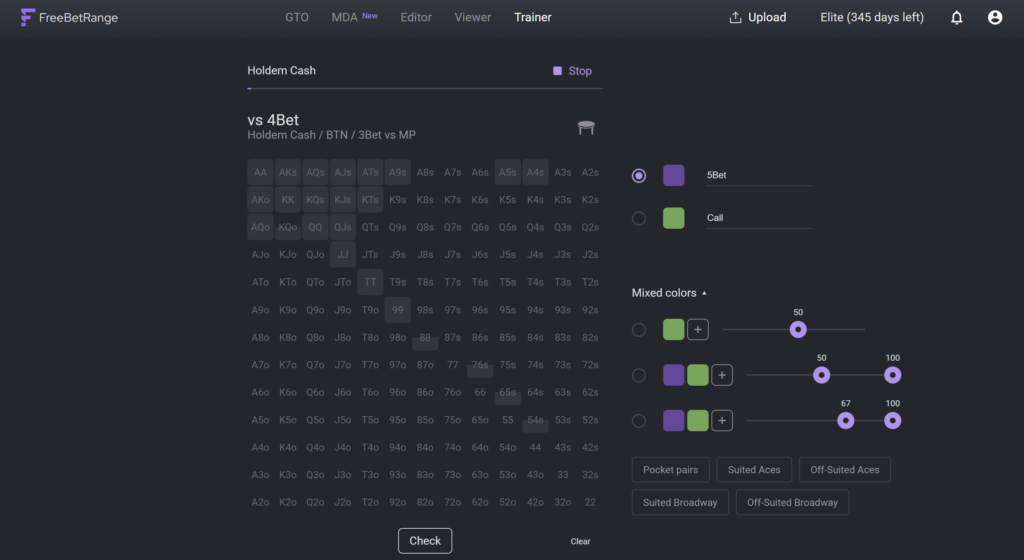
This mode is more economical with your time — one pass covers an entire situation rather than a single hand. It also trains you to think in ranges rather than in individual hands, which matters for understanding strategy as a whole. Classic mode stays closer to real play, though, so it’s worth alternating between the two.
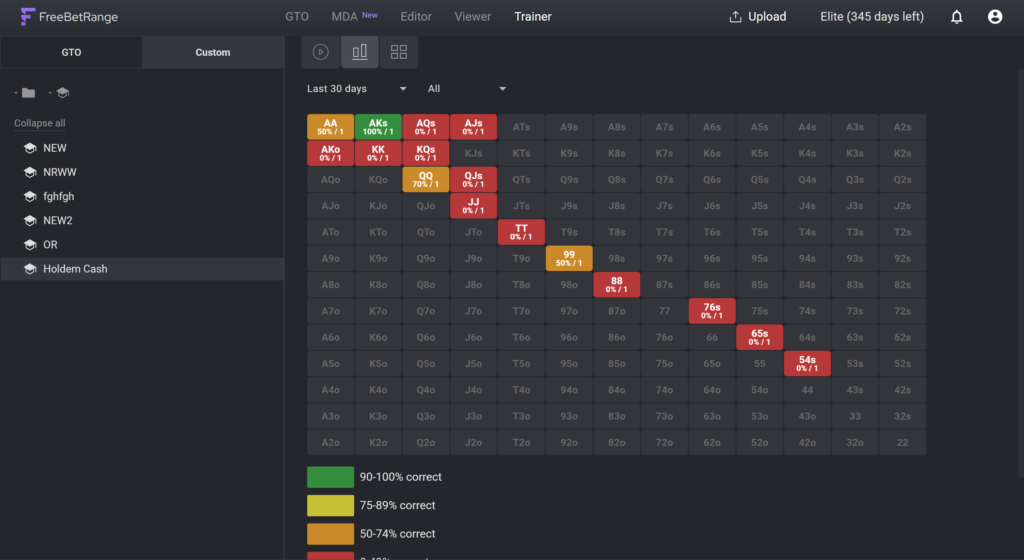
Progress shows up in the statistics, broken out by mode and by individual hand. A heat map shows how often a specific hand came up and how accurately it was played. That makes it clear which cells in a range have only been learned in theory.
The trainer is fully adapted for phones, so a short warm-up before a session takes a few minutes anywhere.
Editor: Building Your Own Strategy
The editor is where strategies are created and edited. A strategy here means a specific configuration of folders and ranges.
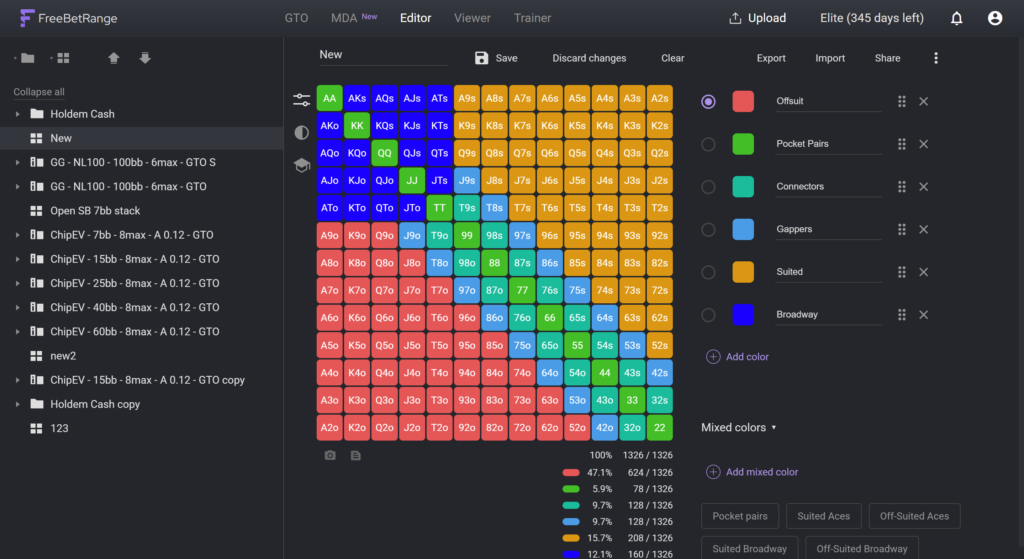
The structure is built by hand and follows the logic of a hand of poker: a folder for the format, inside it a folder for stack depth, inside that folders for positions, and inside those the ranges themselves. This kind of organization matters more than it seems: a tidy tree makes it fast to find the spot you need later, both in the viewer and in the trainer.
Each action gets its own color. Colors can be used not only for their obvious purpose but also as markers — one color for hands you always open, say, and another for hands you open only when there’s a weak player in the BB. A paid plan gives you up to forty colors and weighted cells, meaning cells that are partially filled, which is the technical foundation of mixed strategies.
Continuations of a line are set up as subordinate ranges. Under an opening range you create a nested range for “vs a 3-bet from MP,” specifying which color it continues from — a particular one or all of them at once. This lets you build complete branches of a hand rather than a collection of disconnected charts.
Folders and ranges can be cloned to speed things up. A ready-made solution from the library can be copied whole so you can edit the copy without touching the original, and similar ranges — defense against a 3-bet from different positions, for instance — can be created by copying and then adjusting. Folders and ranges are dragged with the mouse, and a note can be attached to any range explaining why a particular adjustment was made.
Import, Export, and Sharing Ranges
The app isn’t isolated from other tools. Ranges transfer over from Equilab, Flopzilla, Flopzilla PRO, PioSolver, Simple Preflop, HoldemResources Calculator, and GTO Wizard: in the original program the range is copied as text, then pasted into the import window in FreeBetRange with a color and an action name selected. Multiple lines — raise, call, push — are imported into the same range one after another.
For HRC solutions there’s a bulk import: an entire tree transfers at once, with no need to copy each spot by hand. A separate feature handles configuration export and import — the whole strategy along with its training sets is exported as a single file and passed to a student, a coach, or a study partner. Any individual range can be turned into a link with one click and sent to a messenger app or a forum.
The Elite plan supports uploading your own hand history. You upload an archive of hand history text files (up to 200 MB), specify your screen name, and the app builds a range tree reflecting how you actually played. Processing runs at roughly a million hands per ten minutes. Where there’s enough data, you see real ranges; where there isn’t, you just get a matrix of the hands you played. The resulting tree is available in the editor, the viewer, and the trainer, so your own play can be compared directly against the solver solution. The developers have flagged this feature as experimental.
Compatibility: Formats and Sites
Supported games and formats: no-limit hold’em in cash games, multi-table tournaments, Spin & Go, Mystery Battle Royale, and 6+ hold’em (short deck). The format is chosen when a range is created and remembered by the app.
Device requirements are minimal: a modern browser and an account. Nothing is installed, so the operating system is irrelevant — the app works on Windows, macOS, and Linux, as well as on Android and iOS phones and tablets. The viewer and the trainer are fully adapted for small screens. For convenience, the site can be installed as an app, in which case it launches from your desktop or home screen with one tap and opens without any browser chrome. Data is stored in your account and syncs between devices automatically.
The main limitation isn’t technical but legal. Many poker rooms prohibit the use of any assistance during play, and that applies not only to apps but to Excel tables, PDF files, and even printouts on the table. The developers note that site rules differ and recommend refraining from using charts in game wherever that isn’t permitted. The sensible approach for a beginner is to learn ranges in the trainer between sessions rather than peeking at them at the table.
The second limitation is one of scope: the app covers preflop only. Analyzing the flop, turn, and river requires a separate tool.
Getting Started
Getting going comes down to a few steps.
- Register. An account is created with an email address or through a Google account. There’s nothing to download.
- Choose your main format. Right after registration you’re asked what you play — cash, tournaments, or spins. Based on that choice, appropriate ranges built on simplified GTO solutions are loaded automatically, along with ready-made training sets. The format can be changed later, and the new ranges are added to the ones you already have.
- Get familiar with the viewer. It’s worth walking through the strategy tree and seeing how ranges change with position and stack depth. Multi-view helps most of all here.
- Run your first drill. It’s smart to start with one narrow set — only open-raises, say, or only BB defense — and get comfortable with it before taking on the next one.
- Make your own adjustments. Once the basics have sunk in, you can clone a ready-made folder and start editing the ranges for your own conditions: stake, rake, and table composition.
All of these steps are available on the free plan, so you can get to know the platform at no cost. The only thing to keep in mind is the daily trainer limit: 50 hands and 5 ranges per day.
Pricing
The free plan has no expiration date and isn’t a trial period — you can use it as long as you like. It lets you work with two-color ranges without weights, gives you a limited set of spots in the GTO library, and allows up to 50 hands and 5 ranges per day in the trainer; the account holds up to 5,000 ranges.
The Pro plan removes the training limits, opens full access to the GTO library, provides up to forty colors and weighted cells, adds viewer customization, bulk import from HRC, and export of your entire strategy as a single file; the storage limit is 10,000 ranges.
The Elite plan adds the MDA section, hand history uploads, and a limit of 25,000 ranges. With monthly billing, MDA export is capped at a hundred ranges per month; with annual billing, it’s unlimited.
There’s also a separate plan for teams and poker schools, with a shared dashboard for managing students and volume discounts. There are no lifetime licenses: all plans work as subscriptions, and if one is canceled, the ranges stay in the account while access to the plan’s features is closed off until payment resumes.
A detailed breakdown of plans and prices is on the product description page.
The Bottom Line
FreeBetRange covers all of your preflop work in one place: ready-made solver solutions, statistics on real opponents, an editor for your own strategy, and a trainer for memorizing it. For a beginner, the value is that the platform doesn’t just show you the correct ranges — it makes you learn them, and that’s exactly what turns theory into results at the table.
It’s best picked up gradually. A sensible sequence: start with the simplified GTO solutions for your format, then drill regularly on one narrow set of spots, then look for patterns in multi-view, and only after that move on to your own adjustments and work with population ranges. Trying to take it all in at once usually ends with nothing sticking at all.

Featured software


Latest posts
-
 Poker Academy Review: Ranges, Solver, and Trainer in One Browser Window Oct 11, 2026
 -
 SmartHand Review: Opponent Stats Before the First Hand Oct 10, 2026
 -
 888Caption Review: A Tool for Fast-Paced Multi-Tabling Oct 9, 2026
 -
 Preflop ICM Solving in GTO Wizard: ICM-Aware Preflop Solutions in Seconds Oct 8, 2026
 -
 Octopi Poker Review: Tournament GTO With Pro Hand Reviews Oct 7, 2026
All the poker software you need, gathered in one place. Exclusive discounts, bonuses, latest news and updates.
Join now