OmahaPro Review: GTO Preflop Trainer for PLO4 & PLO5
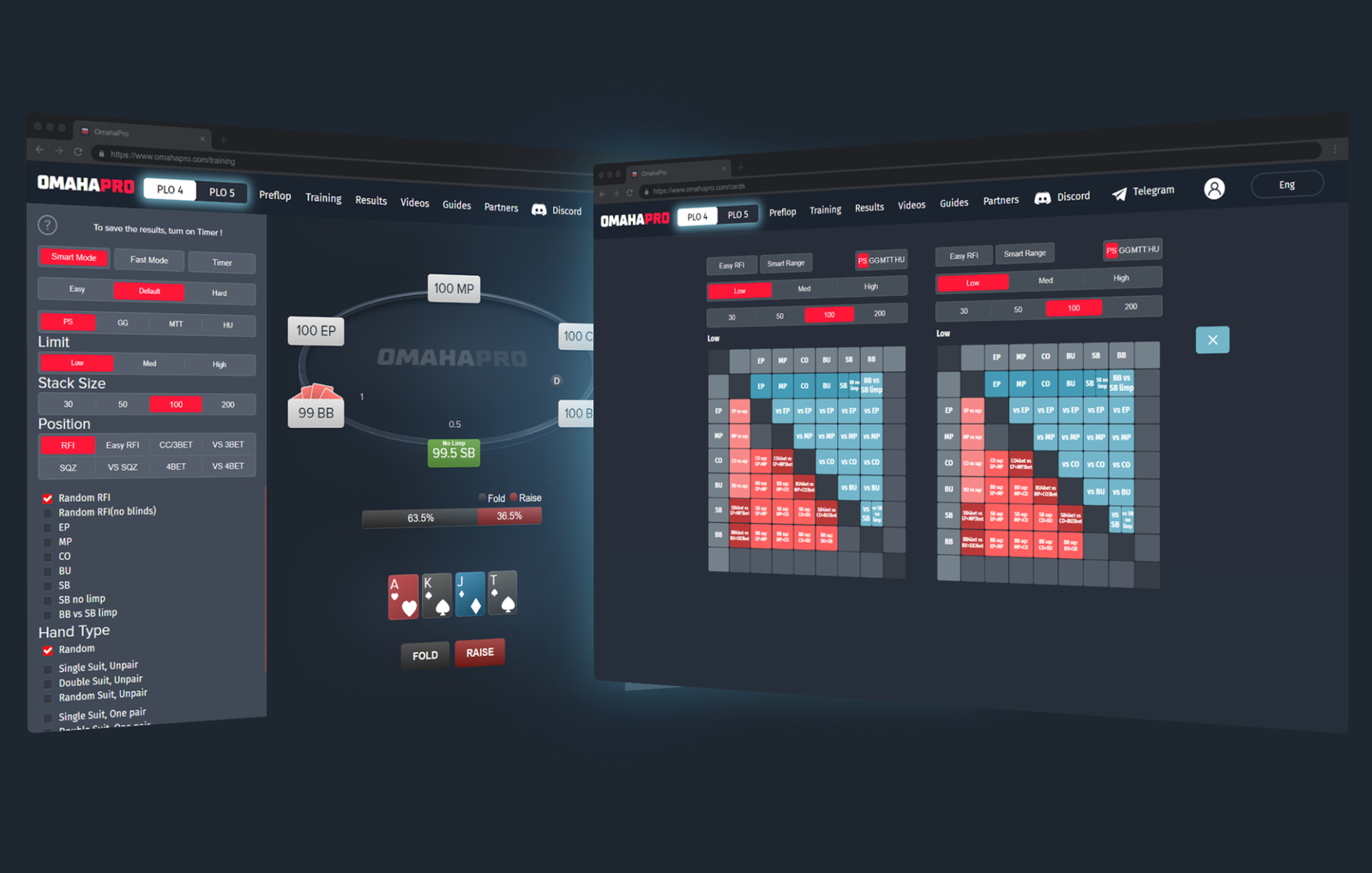
OmahaPro is an online starting-hand trainer for Pot-Limit Omaha. The software focuses on one question and answers it in as much detail as possible: how to play a specific hand preflop. It provides a ready-made GTO solution for the selected game conditions, as well as a dedicated training mode that helps you practice these decisions until they become automatic.
The problem the software solves is even more important in Omaha than in Hold’em. Hold’em has 1,326 starting-hand combinations, which can be reduced to a single 13×13 matrix that a beginner can learn in a couple of evenings. In Omaha, players are dealt four or five cards, and the number of starting-hand combinations exceeds 270,000. You cannot memorize them as a list or keep a matrix of that size in front of you—you need a system that organizes this volume into understandable groups. That is exactly what OmahaPro does.
It is also important to clarify the software’s limitations: it does not connect to poker rooms, maintain a database of played hands, or provide real-time assistance. It is a study environment designed for work between sessions.
How the Software Is Structured
The workflow is divided into three modules, and it is worth understanding how they fit together from the outset.
Preflop is the range reference tool. You enter the conditions of the hand, and the software displays a ready-made solution: which hands should be raised, called, or folded from each position.
Training is the practice module. It uses the same ranges in reverse: the software deals you a hand and waits for your decision, then shows how closely it matches the optimal strategy.
Results is the statistics module. It tracks your training results and shows where you are improving and where you are not.
The logic is simple: first study a range in the reference tool, then practice it in the trainer, and finally use the statistics to identify which situations require another look at the first step.
The website also includes instructional videos covering both main modules, a section with guides, and access to a community Discord chat for subscribers, where specific spots are discussed.
Ranges Tailored to Specific Game Conditions
Before viewing the hand matrix, you specify the conditions of the hand. This is not a formality: Omaha ranges depend on the game conditions much more heavily than Hold’em ranges do.
First, you select the game type—cash game or tournament. You then choose the stakes and effective stack, meaning the smaller of the stacks actually involved in the hand. This determines how much money can be won or lost. Finally, you select the rake structure, with PokerStars and GGPoker options available.
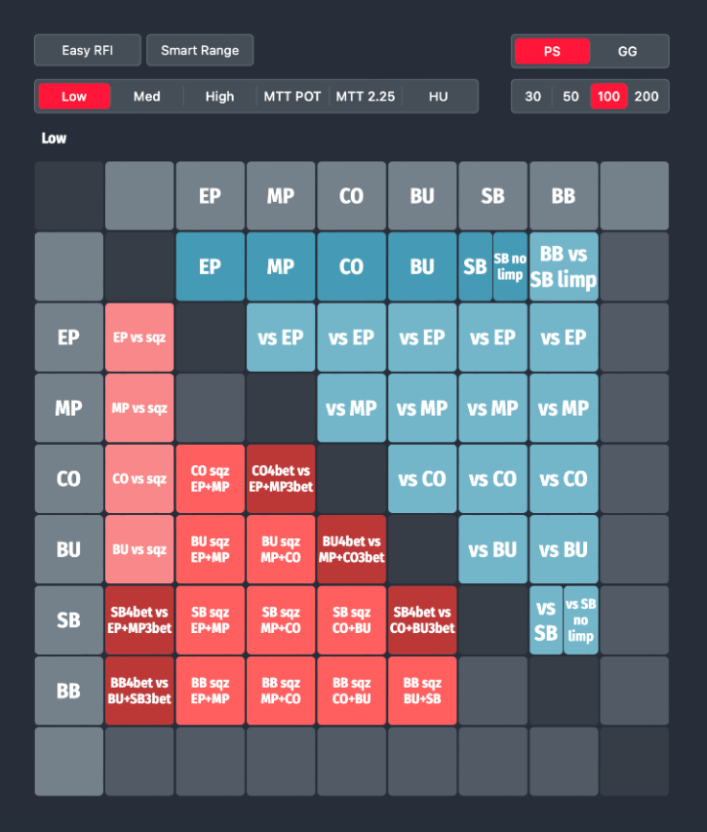
The final setting deserves an explanation. Rake is the fee a poker room takes from the pot. Omaha pots grow quickly and are often contested by several players, so rake has the greatest impact on marginal hands—those that are only slightly profitable. The higher the rake, the tighter the opening range should be. A decision that is correct in one poker room may be unprofitable in another, so the software provides separate range sets for these scenarios.
All calculations are designed for six-handed tables, the format in which most online Omaha games are played.
How to Read the Spot Map
Once you select the game conditions, the software displays a table diagram divided into two sections. One covers heads-up pots, where only two players remain in the hand, while the other covers multiway pots involving three or more players.
This distinction is fundamental. A range that is profitable against one opponent becomes considerably tighter against two or three: the pot must be contested by more players, and the likelihood that someone holds a stronger hand increases. This effect is particularly pronounced in Omaha, where hand equities run closer together than in Hold’em. Beginners who carry a heads-up range over into a multiway pot will lose money consistently.
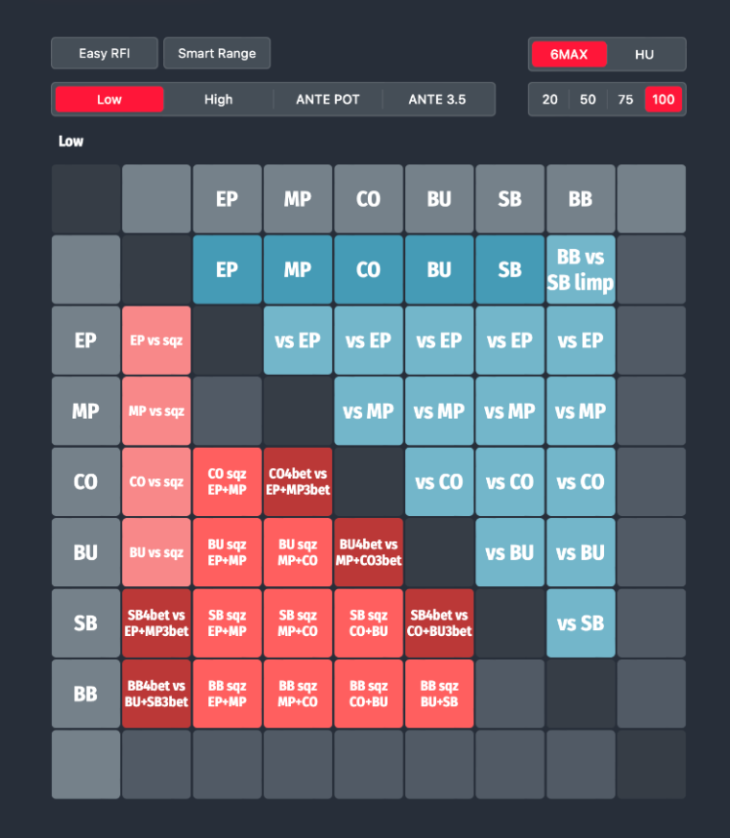
Next, you select a position: UTG, or early position; MP, or middle position; CO, or cutoff; BTN, or button; SB, or small blind; or BB, or big blind. For each position, the software displays action percentages—what proportion of hands should be opened with a raise and what proportion should be folded. This figure is useful in its own right because it immediately shows how wide the position should be played.
The Starting-Hand Matrix
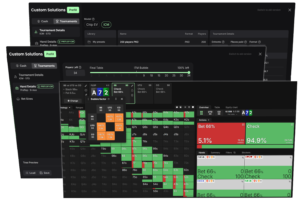
The main screen is a matrix containing every type of starting-hand combination. To use it effectively, you need to understand how the hands are grouped.
Hands are divided into paired and unpaired groups, then further categorized by suit structure:
- single-suited—two cards of the same suit, providing one possible flush draw;
- double-suited—two pairs of suited cards, providing two possible flush draws and representing the most valuable suit structure in Omaha;
- rainbow—all cards are of different suits, with no flush potential;
- monotone—three or four cards of the same suit; contrary to what beginners might expect, this is a weak structure because the additional cards of the same suit block your own outs.
Single-suited hands are further divided into favorable and unfavorable suit combinations. When the highest card is suited, the resulting flush is more likely to be a winner.
The matrix cells are color-coded according to the recommended action. Empty cells represent impossible combinations. Hands that should always be folded from the selected position are also clearly marked. This is intentional: it allows beginners to see not only the top of the range but also its lower boundary. In practice, this boundary causes the most mistakes. Strong hands are obvious to almost everyone, but it is difficult to judge where a range ends by sight alone.
Selecting a specific hand opens a detailed view showing every suit variation of that combination and the recommended action for each one. You can also see how the decision changes depending on your position relative to the opponent—the range for responding to a raise will differ depending on whether you are in position or out of position.
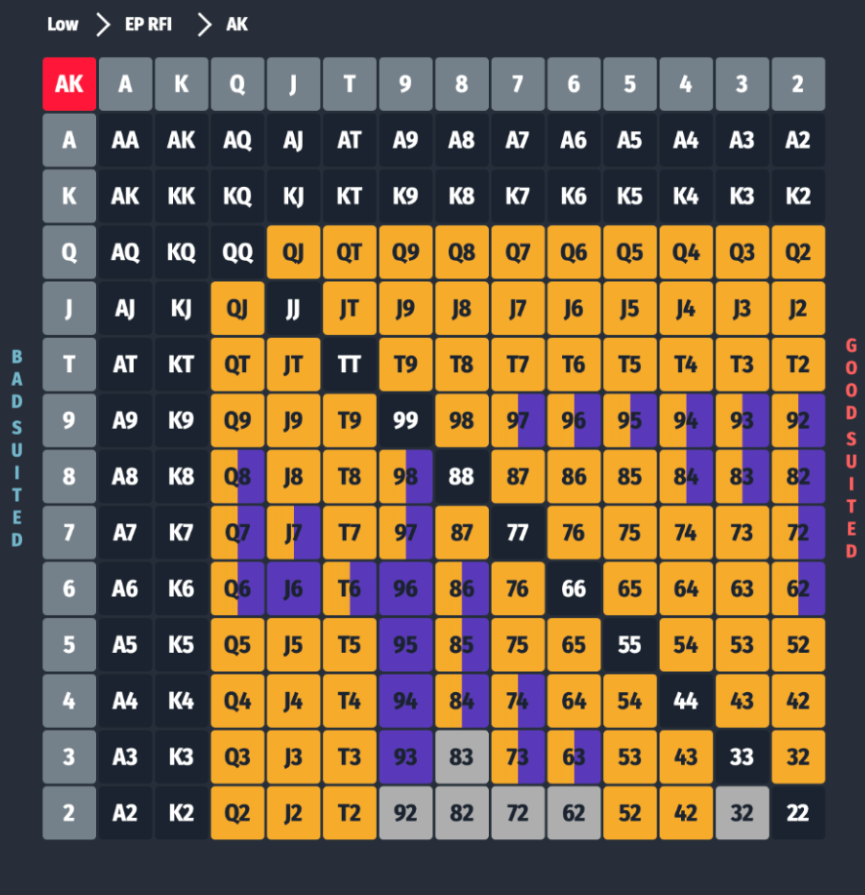
Display toggles also allow you to view the range either with suit information or without it when you only need the broader picture.
Comparing Two Spots on One Screen
One feature that sets OmahaPro apart from basic range reference tools is the ability to display two different spots side by side and compare them directly.
The practical value is clear. By comparing an opening range from early position with one from the cutoff, you see more than the abstract idea that “later means wider”—you see the exact hands added to the range as your position improves. Comparing one stake with another or one poker room with another shows how rake trims the bottom of the range. Comparing a 40-big-blind stack with a 100-big-blind stack reveals which hands lose value when playing short. In Omaha, these are primarily connected hands that rely on flopping strong combinations.
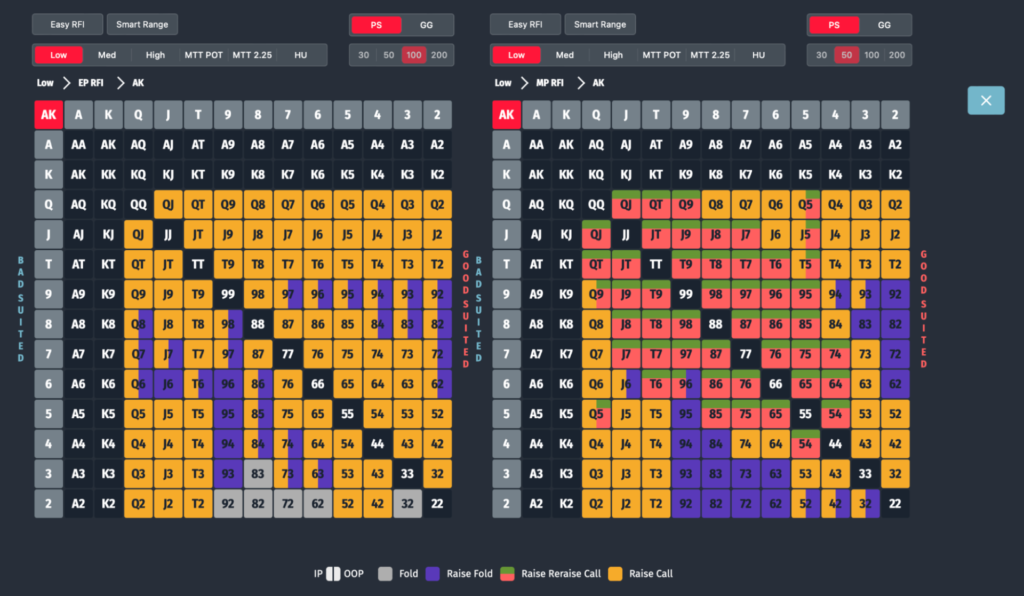
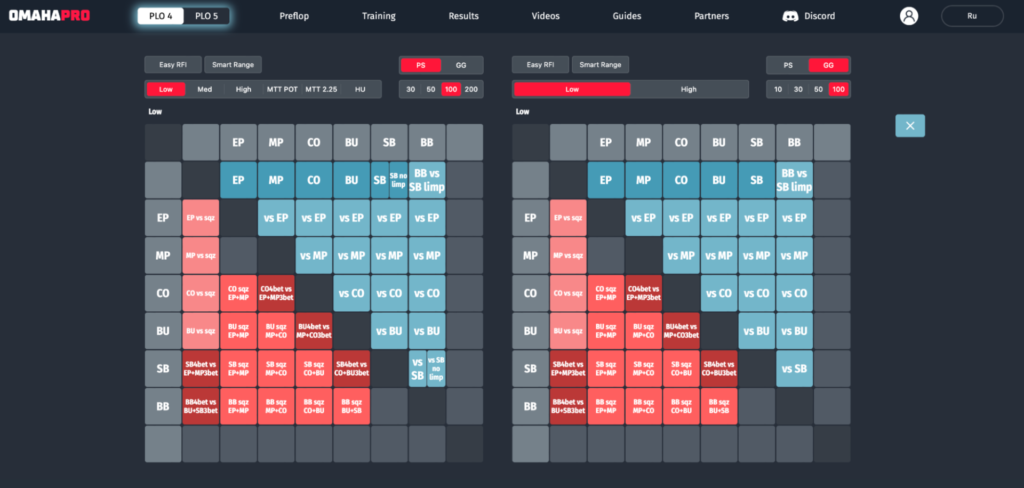
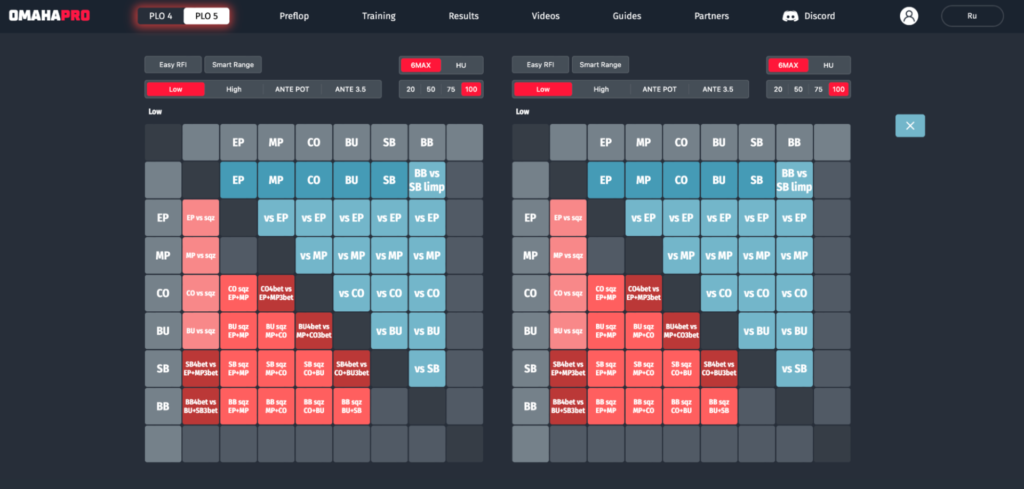
This type of comparison explains the underlying logic rather than merely presenting the result. For beginners, it marks the transition from memorizing ranges to understanding where they come from.
Training: Decide First, See the Answer Later
The reference tool provides knowledge; the trainer turns that knowledge into a skill. In the Training module, you specify the practice conditions—stacks, stakes, positions, and starting-hand types—after which the software begins presenting you with spots.
The table layout mirrors a poker client: your seat is always at the bottom center, just as it is in a poker room. It is a small but useful detail, as the habit of identifying your position visually transfers directly to real tables without any adjustment. Stacks are displayed in big blinds rather than monetary amounts, teaching you to think in the correct units.
After you choose an action, the software shows more than a simple “correct” or “incorrect” result. It displays the EV of every option—the expected value of each decision, meaning its average long-term profit or loss. Alongside EV, it shows the hand’s weight: the percentage of the time the optimal strategy plays that hand in a particular way. This is important for understanding GTO. Some hands use mixed strategies, so there is no single “correct” answer for them. The mistake is not taking one particular action but systematically deviating from the correct frequency.
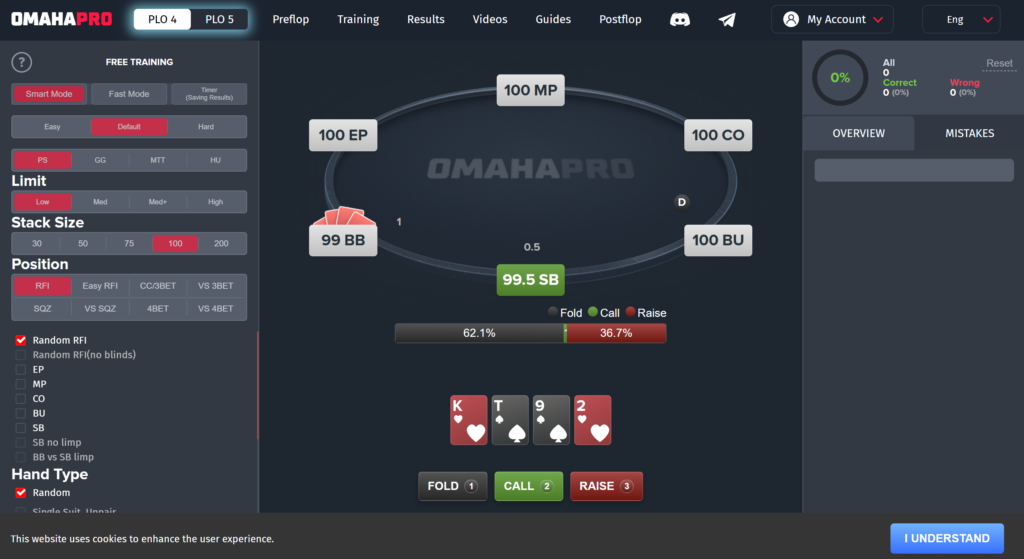
The full range is available directly from the training screen, so there is no need to leave the trainer and return to the reference tool. This makes reviewing a mistake immediate and contextual: you see not only the correct action for the hand but also where it sits in relation to neighboring hands.
Smart Mode and Revisiting Mistakes
The trainer includes a Smart Mode that changes the nature of the practice session.
First, it removes obvious hands that should never be played. Without this filter, a significant part of each training session would be spent mechanically folding clear trash. The decision may be correct, but it teaches you nothing. Removing these obvious hands increases the concentration of useful repetitions.
Second, it focuses on mistakes. If you make an incorrect decision, the software will randomly present that hand again later and continue bringing it back until you answer correctly. Repeated hands are marked: first with one warning symbol, then with another when they return again. This creates targeted practice for weak areas instead of moving evenly through the entire range.
For beginners, this is a key part of the software. Omaha mistakes are rarely random—they usually cluster around a single misunderstood principle. A mode that repeatedly returns to those exact hands exposes the underlying issue faster than general practice does.
What the Statistics Show
The Results module summarizes your training history using several metrics: your best result of all time, your average result over the past 30 days, the total number of answers, and your longest streak of correct decisions.
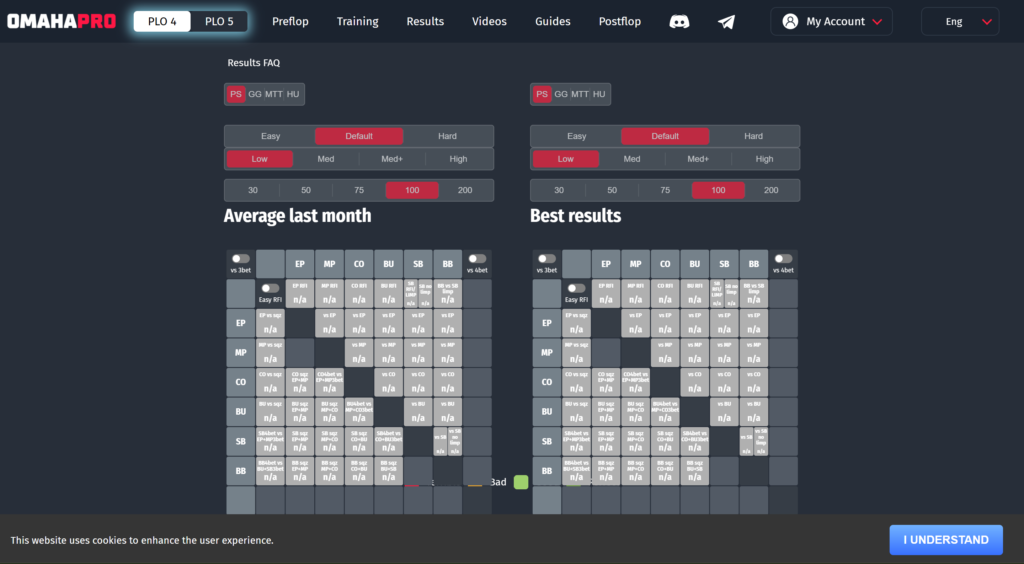
These metrics should be read together. Your best result shows your ceiling, while your 30-day average reflects your actual current level; the gap between them indicates inconsistency. The total number of answers represents the amount of work completed, as range training improves primarily through repetition. Your longest streak is a measure of concentration and can reveal when fatigue has set in and the training session is no longer productive.
Compatibility: Formats and Platforms
The software supports two forms of Pot-Limit Omaha: four-card Omaha (PLO4) and five-card Omaha (PLO5). Calculations are available for both cash games and tournaments, and all tables are six-handed.
Two rake structures are available: PokerStars and GGPoker. Players on other poker sites must select the structure that most closely matches their games while understanding that it will not be an exact match.
The software runs entirely in a browser. There is nothing to install, and it is equally accessible on Windows and macOS computers and on Android and iOS mobile devices. The interface is adapted for smaller screens, so you can train on your phone. The interface language can be switched between Russian and English.
The limitations should also be stated clearly. The software covers preflop play only and does not calculate postflop solutions. It does not connect to poker clients, provide a HUD, or maintain a database of played hands—separate tools are required for those tasks. PLO4 and PLO5 are sold separately, and access to one does not unlock the other.
How to Get Started
The first steps can be summarized as follows:
- Register on the software’s website. This unlocks the free plan, which provides limited access to PLO4 but is sufficient to evaluate the interface and workflow.
- Select a format—PLO4 or PLO5—depending on the game you play.
- Configure the Preflop module to match your games: select the game type, stakes, effective stack, and the rake structure closest to your poker room.
- Study the ranges for one position. The cutoff or button is a sensible place to start because the ranges are wider and their logic is easier to see.
- Switch to Training with the same conditions, enable Smart Mode, and practice the position until your results become consistent.
- Review your statistics in Results and return to the reference tool for spots where your percentage of correct decisions remains low.
Do not try to learn everything at once. Ranges vary across stack depths and rake structures, and attempting to keep all of them in mind simultaneously is counterproductive. It is more effective to master one set of conditions that closely matches your regular games and expand your coverage later.
Before your first training session, it is worth watching the instructional videos on the website. They cover both main modules and save time you would otherwise spend learning the interface on your own.
Pricing Plans
Subscriptions are purchased separately for each format. The free plan provides limited access to PLO4 without range comparison or EV displays. The paid plans unlock the complete feature set and are available for PLO4, PLO5, or both formats as a bundle. The bundle is considerably cheaper than purchasing two separate subscriptions, while annual billing reduces the monthly cost.
A detailed description of the plans and prices is available on the product page.
Conclusion
OmahaPro addresses a narrow but fundamental challenge for Omaha beginners: it transforms an overwhelming number of starting-hand combinations into a system that can realistically be understood and remembered. Its division into a reference tool, trainer, and statistics module creates a clear learning cycle, while tying ranges to stack depth, stakes, and rake structure teaches players from the outset to evaluate decisions in the context of their own games rather than in isolation.
You should not expect the software to do more than this. Postflop play, analysis of your own hands, and opponent statistics all fall outside its scope. However, preflop play is the foundation of Omaha, and choosing the wrong starting hand can cost more than most mistakes made on later streets.
The best way to learn the software is gradually: mastering one position under one set of conditions is more valuable than briefly reviewing every range at once.

Featured software
Latest posts
-
 Poker Academy Review: Ranges, Solver, and Trainer in One Browser Window Oct 11, 2026
 -
 SmartHand Review: Opponent Stats Before the First Hand Oct 10, 2026
 -
 888Caption Review: A Tool for Fast-Paced Multi-Tabling Oct 9, 2026
 -
 Preflop ICM Solving in GTO Wizard: ICM-Aware Preflop Solutions in Seconds Oct 8, 2026
 -
 Octopi Poker Review: Tournament GTO With Pro Hand Reviews Oct 7, 2026
All the poker software you need, gathered in one place. Exclusive discounts, bonuses, latest news and updates.
Join now