Monker Solver Review: Equilibrium Solutions for Multiway Pots and Omaha
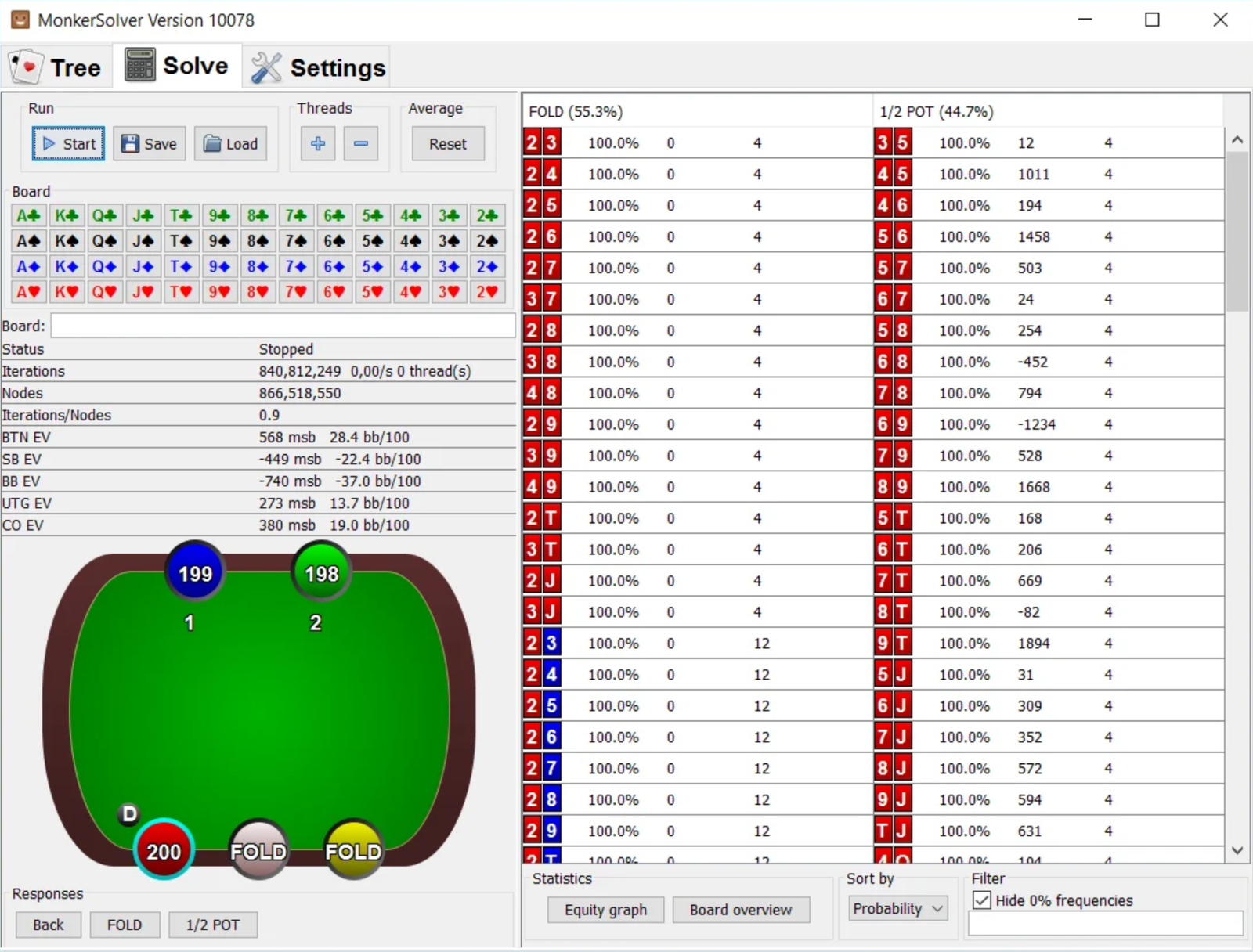
Monker Solver is a program for calculating poker situations using game theory. Programs like this are called solvers: they do not tell you what move to make at the table. Instead, they calculate an optimal strategy for a specific situation in advance, allowing you to study it away from the tables and learn the underlying patterns.
Most solvers calculate postflop situations between two players. Monker Solver handles a broader range of tasks: pots involving three or more players, calculations starting from any street, and both Omaha and Omaha Hi-Lo in addition to Hold’em. It can also solve the entire preflop game tree—not just one situation, but the complete tree of opens, 3-bets, and 4-bets for a specified stack depth.
What Exactly Does the Program Calculate?
The program revolves around three concepts that you need to understand before going any further.
A game tree describes every possible action in a situation: the number of players involved, the street where the calculation begins, the starting stacks and pot size, and the bet and raise sizes allowed on each street. The user defines the tree manually. The program does not rely on a ready-made template; it calculates precisely the scenario you give it.
A range is the set of hands with which a player reaches a particular situation. A separate range is assigned to each player—for example, a button opening range and the big blind’s defending range against that open.
Equilibrium is the result of the calculation. The program repeatedly plays through the tree against itself, adjusting the strategies toward more profitable decisions each time until they stop changing significantly. The resulting strategies are structured so that no player can benefit by deviating from them unilaterally. This is what is known as game theory optimal play.
One important feature of the calculation is that the program brings the strategies to a stable state but does not display a separate numerical value showing how far the solution still is from being perfect. Instead, you have to monitor whether the frequencies have stopped changing. This differs from some other solvers, where accuracy is expressed as a specific value.
Game Tree Builder
Building a scenario starts with selecting the game—Hold’em, Omaha, or Omaha Hi-Lo—and the number of players. You then specify the street where the calculation begins, each player’s stack, and the pot size at that point.
Allowed bet sizes are defined separately for each street: for example, a half-pot bet and a pot-sized bet on the flop, two bet sizes on the turn, and a bet and raise on the river. The more sizes you allow, the closer the calculation is to real play—and the longer it takes. In practice, most trees use two or three sizes per street.
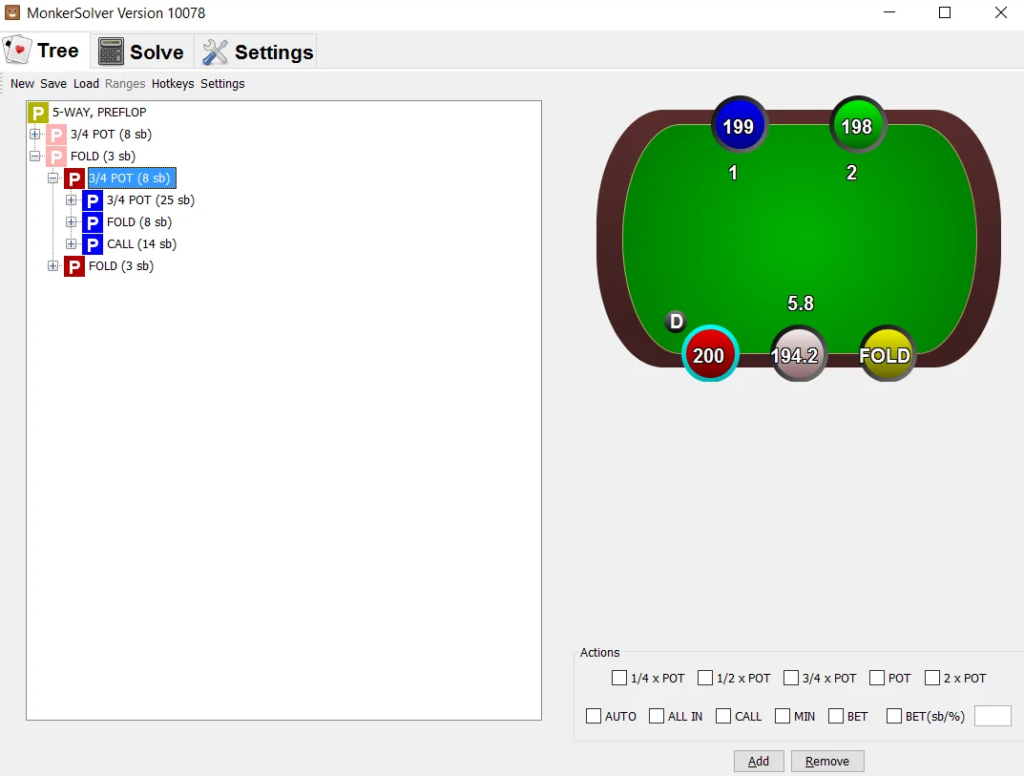
Practical benefit: you can build a tree that matches your games precisely. Bet sizes used in a particular poker room, actual stack depths, and rake are all included in the calculation instead of being taken from someone else’s template.
Why this matters for beginners: it is easier to start with simple trees containing one or two bet sizes. They solve quickly, and their underlying patterns are easier to see than those in a complex structure with dozens of branches.
Pots With Three or More Players
This is the feature for which most users buy the program. Trees can be built for any number of players, allowing Monker Solver to calculate situations that a conventional solver simply cannot model: three players seeing a flop after a cold call, hands played against a limper, and situations where one player has already folded while two others continue.
Practical benefit: you can see just how much the presence of a third player changes the strategy. Betting ranges become narrower, bluffs become considerably less frequent, and some lines that are standard heads-up are no longer profitable.
Why this matters for beginners: multiway pots are common at the micro stakes, especially in Omaha, yet very few solved strategies are available for them. Studying even a handful of common spots can significantly improve your understanding of how to play in three-way pots.
Omaha and Omaha Hi-Lo
The program supports four-card Omaha and Omaha Hi-Lo in the same way that it supports Hold’em, using the same trees and calculation modes. This is a rare combination: most solvers either support Hold’em only or are limited to heads-up games.
The challenge with Omaha is that it has orders of magnitude more possible deals. Each player receives four cards, which dramatically increases the number of combinations. Omaha calculations are therefore more demanding, and without simplifying the problem, even an average spot will not fit into the memory of a typical computer. The next section explains how this simplification works.
Abstraction: Fitting a Calculation Into Your Computer’s Memory
Abstraction is a way to reduce the size of a problem. The program combines hands that should be played in roughly the same way into groups, which it calls “buckets,” and all hands within a group use the same frequencies. The idea is that if two hands would be played identically anyway, nothing is lost by grouping them together.
Settings are configured separately for each street: how many hand-strength groups to create on the flop, turn, and river, and how much detail to use when accounting for board texture. More groups produce a more accurate result but require more memory and time. The settings show an estimate of the RAM required for the current tree before you start, so you do not have to run a calculation blindly.
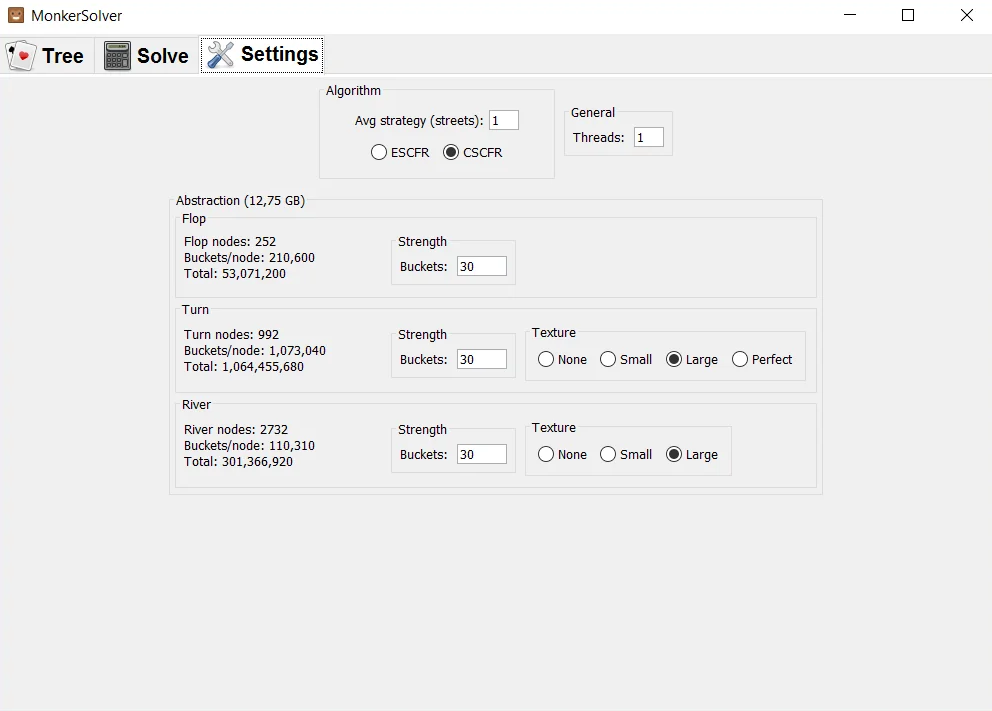
Practical benefit: you can calculate the same situation twice—first with a coarse, fast calculation to understand the overall picture, and then in greater detail when you need precise frequencies for specific hands.
Why this matters for beginners: abstraction settings are the main factor separating “the calculation finished in ten minutes” from “the calculation could not start because there was not enough memory.” It is worth learning how they work before anything else.
Reading a Completed Solution
Results are displayed as a hand matrix. For each hand, you can see how often it bets, calls, or folds, as well as the expected value of each action. Expected value (EV) is the average result of an action if the situation is repeated many times. Comparing the EV of two actions shows how important the choice between them is.
Frequencies are displayed in two forms: a mixed view, where a hand is split between several actions, and a sampled view, where each hand is assigned one action in the appropriate proportion. The second format is easier to memorize.
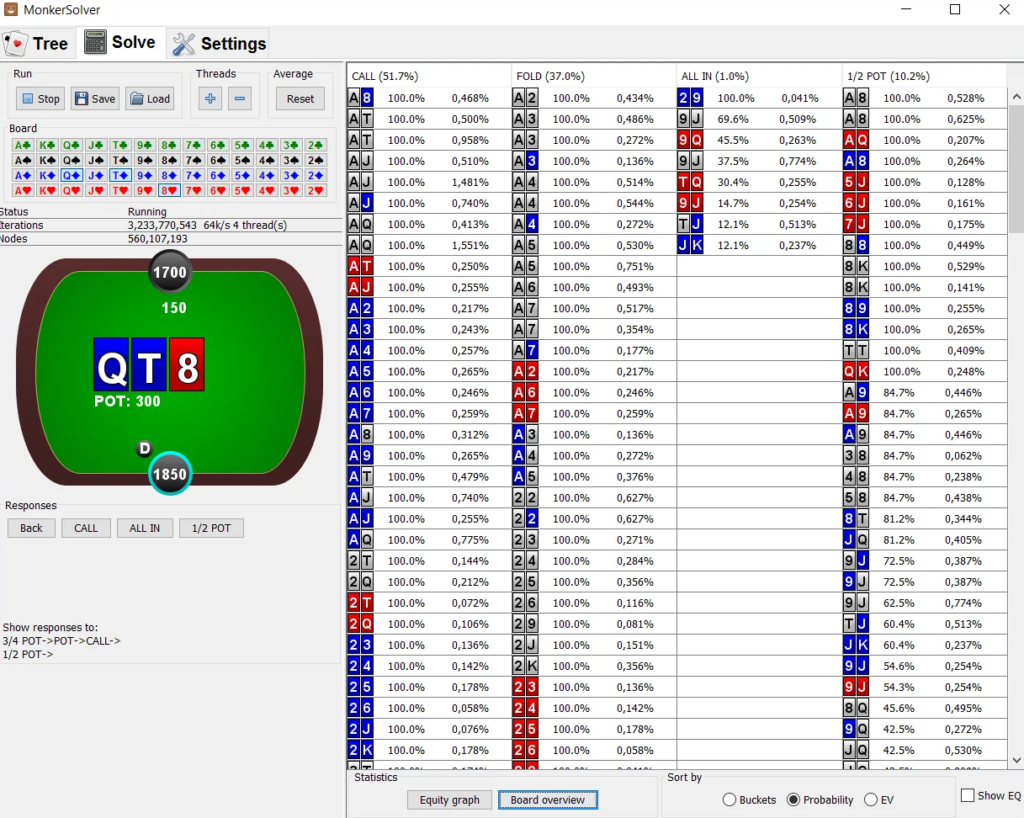
The program also includes a filter bar with its own syntax. For example, you can select only single-suited hands or only unpaired hands and see how that specific group plays. The syntax takes some getting used to, but these filters are what turn a table of frequencies into understandable rules such as “hands of this type continue, while hands of that type fold.”
Practical benefit: instead of memorizing hundreds of individual hands, you identify groups that behave similarly and only need to recognize the relevant group while playing.
Board Overview: A Summary Across Multiple Flops
A separate mode calculates a situation across a set of boards rather than on a single board and combines the results into one table. This lets you see how betting frequency and sizing change when moving from dry to connected boards or from paired to rainbow boards.
Practical benefit: patterns such as “bet almost always and use a small size on these boards, but bet rarely and use a large size on those boards” become immediately visible, without manually reviewing dozens of separate calculations.
Why this matters for beginners: no one recalls exact percentages while playing. What players remember are rules based on board types, and a summary table is the shortest route to identifying them.
Complete Preflop Solving and the Range Viewer
Preflop is calculated as an entire tree rather than as a single situation: opens from every position, responses to those opens, 3-bets, 4-bets, and blind defense for a specified stack depth, rake structure, and ante structure. These are the program’s most demanding calculations. Large preflop trees require tens or hundreds of gigabytes of RAM, so they are generally run on a rented server rather than a home computer.
A completed preflop solution can be exported to MonkerViewer, a free program for viewing ranges. No license is required: simply create a free account, download the viewer, and select the folder containing the exported ranges. You can switch between positions and lines within the viewer and configure the action colors manually.
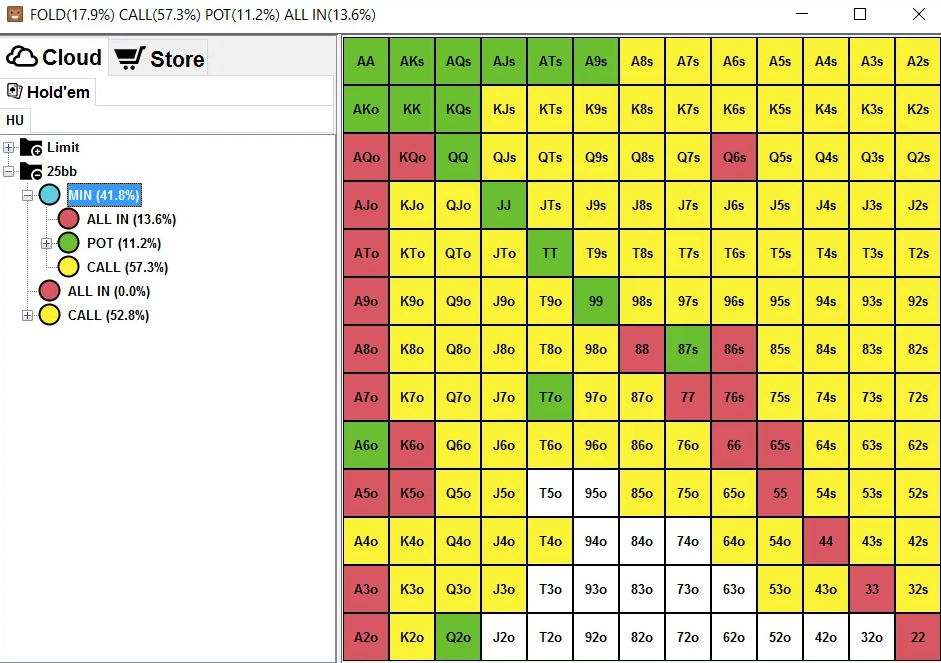
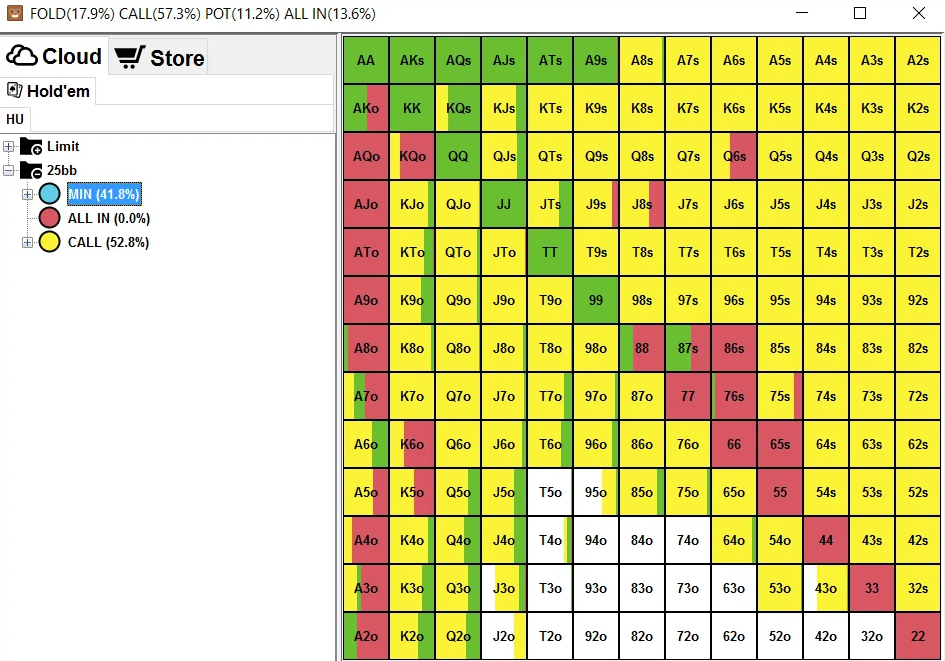
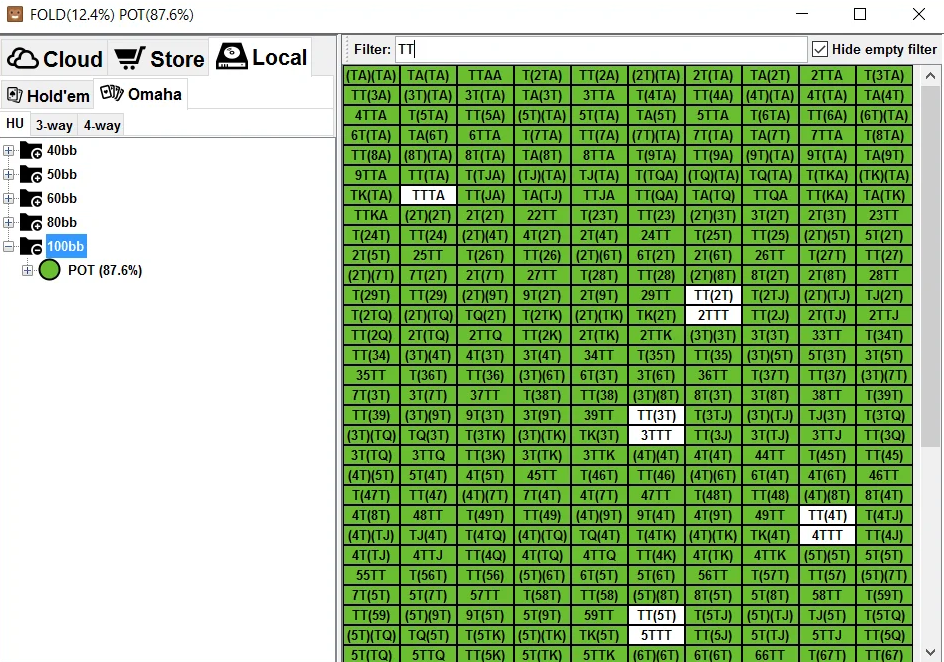
Practical benefit: the demanding calculation is performed once, after which you can use the result in a lightweight program that opens in seconds.
Why this matters for beginners: preflop ranges are the most valuable part of your study. You only need to calculate them once and can then refer to the completed tables whenever necessary.
Solving Against a Specific Opponent
In addition to equilibrium strategies, the program can be used to find counterstrategies. Some frequencies in the tree are locked manually, and the solution is recalculated against this deliberately suboptimal opponent behavior. This allows you to examine how to punish tendencies such as folding too often from the blinds or defending too widely on the flop.
Practical benefit: you can see not only “how to play correctly,” but also “how to play against a common mistake”—the primary source of profit at lower stakes.
Why this matters for beginners: you should explore this mode only after you understand standard equilibrium solutions. Otherwise, you will have no baseline against which to compare the result.
Compatibility: Formats and Poker Sites
The program supports Hold’em, four-card Omaha, and Omaha Hi-Lo. Calculations can begin on any street, from preflop to the river, and include any number of players, with available memory being the only limitation.
The program is installed on your computer and does not connect to poker rooms: it does not read hand histories or display anything over the tables. It runs on 64-bit Windows and macOS. The minimum requirement is 8 GB of RAM, although the size of the calculations you can run is ultimately determined by the amount of available memory, while speed depends on the processor’s clock speed and number of cores. A 64-bit version of Java is required.
One important restriction applies to using the program during play: poker rooms, including PokerStars, explicitly prohibit real-time assistance based on precomputed solutions. The program is intended for study between sessions.
Completed solutions are saved in the program’s proprietary calculation file format and can be opened on another licensed computer. Preflop ranges can also be exported in the viewer’s format. Several third-party programs can read these exports, so your calculated ranges are not locked inside a single application.
How to Get Started
The first steps are straightforward.
- Create a free account on the developer’s website and install 64-bit Java if it is not already installed on your computer.
- Download the program and run it in free mode, which allows you to calculate turn and river situations. This is enough to learn how to build trees and read the results.
- Build your first simple tree: two players, the river, and one bet size. This calculation takes only a few minutes and demonstrates the program’s entire workflow.
- Move on to the flop and add a second bet size, keeping an eye on the estimated memory requirement in the abstraction settings.
- When you need three-player flop calculations, complete preflop trees, and the ability to save large calculations, purchase the full license.
- For demanding preflop calculations, rent a server with plenty of memory. Trees of this size generally will not fit into the memory of a home computer.
The learning curve is also worth mentioning: the interface is designed more like an engineering tool, with no guided prompts or tutorials. Your first calculations will largely be about learning how the program itself works, and that is completely normal.
Pricing
Payment is one-time, with no subscription. The free mode is available without a purchase and is limited to turn and river calculations. The MonkerViewer range viewer is free and does not require a license. The full version removes restrictions on streets and the number of players and can be activated on two computers.
A detailed description of the plans and prices is available on the product page.
Conclusion
Monker Solver is a tool for players who need solutions that are difficult to obtain elsewhere: pots involving three or more players, Omaha and Omaha Hi-Lo, and complete preflop trees. In return, the program demands patience while learning it and substantial computing resources for large calculations.
It is best to learn the program gradually: start with the free mode and river calculations, then move on to two-player flop spots, followed by multiway pots and preflop. This approach helps you understand how the program works before you need to consider purchasing a license and renting a server.

Featured software

Latest posts
-
 Poker Academy Review: Ranges, Solver, and Trainer in One Browser Window Oct 11, 2026
 -
 SmartHand Review: Opponent Stats Before the First Hand Oct 10, 2026
 -
 888Caption Review: A Tool for Fast-Paced Multi-Tabling Oct 9, 2026
 -
 Preflop ICM Solving in GTO Wizard: ICM-Aware Preflop Solutions in Seconds Oct 8, 2026
 -
 Octopi Poker Review: Tournament GTO With Pro Hand Reviews Oct 7, 2026
All the poker software you need, gathered in one place. Exclusive discounts, bonuses, latest news and updates.
Join now