DTO Poker Review: Simplified GTO Strategy with a Training Bot
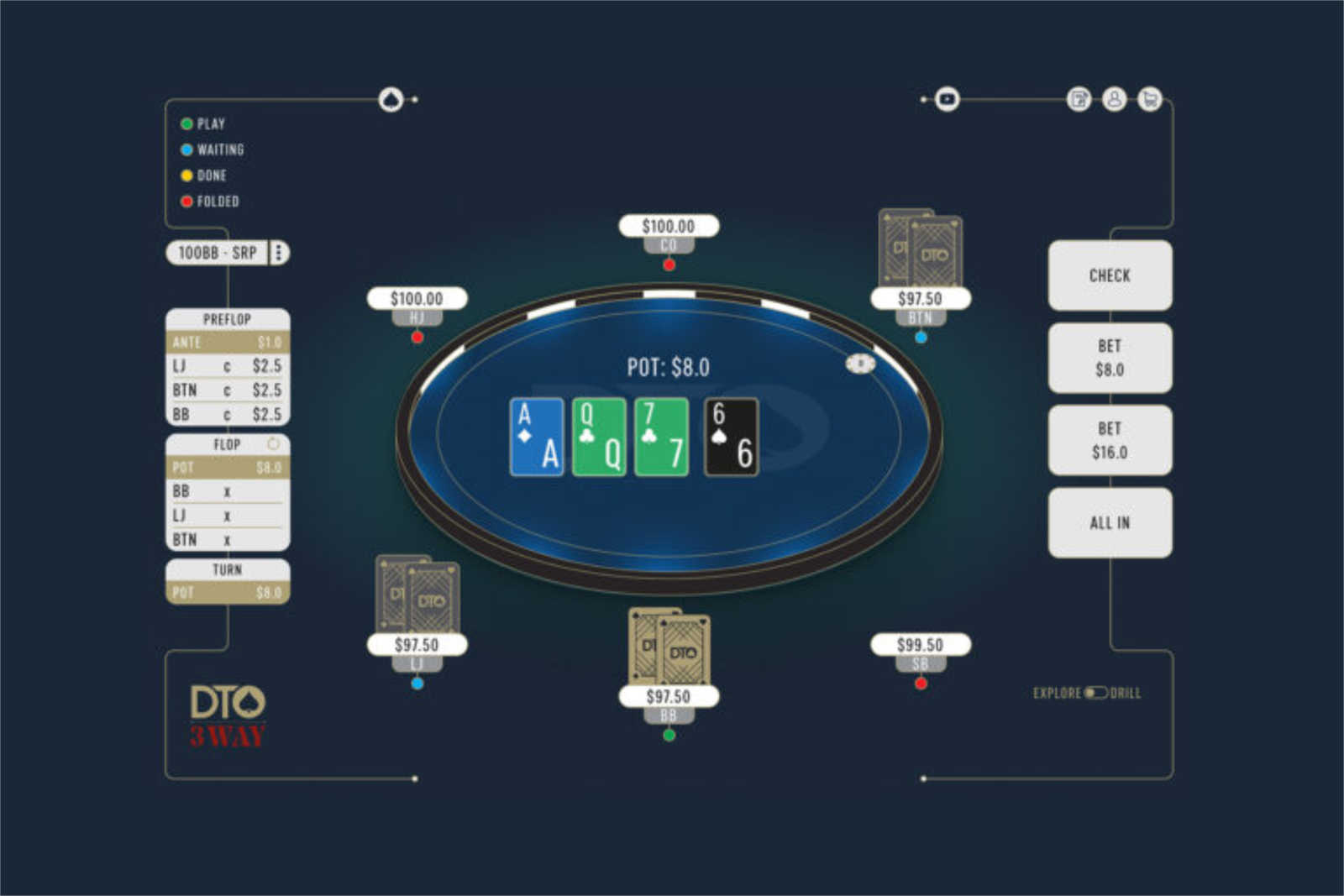
DTO Poker is a platform for studying theoretically optimal play in no-limit hold’em. GTO (game theory optimal) refers to a strategy that opponents cannot gain an edge against, no matter how they adjust. These strategies are calculated by specialized programs called solvers, and their output usually looks like an enormous table of frequencies showing how often each specific hand should bet, call, or fold. Reading these tables is difficult, and applying them at the table is even harder.
DTO Poker addresses this exact problem. Its precomputed solutions are not simply available for viewing: the platform presents them as hands that you play against a bot, then immediately tells you how closely your decisions matched the optimal strategy. The platform was created by professional tournament player Dominik Nitsche and developer Markus Prinz; the product is legally owned by DTOPoker LTD, which is registered in Edinburgh.
What the Platform Includes
DTO Poker includes two tools that complement each other.
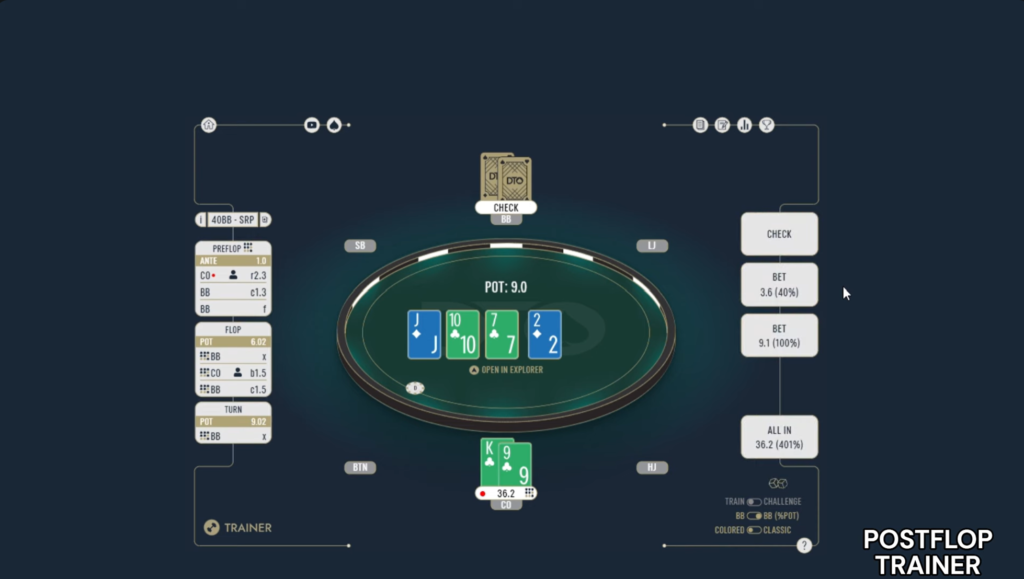
The first is Trainer. It provides a poker table where you are dealt hands from a selected spot and play against a bot following a precomputed solution. Your task is to make your own decisions; after each hand, the platform shows the optimal strategy and how far your play deviated from it.
The second is Explorer. You do not need to play anything here: you configure a situation manually, and the platform displays the complete range strategy on any board. This mode is designed for reviewing hands you have already played and determining what you should have done.
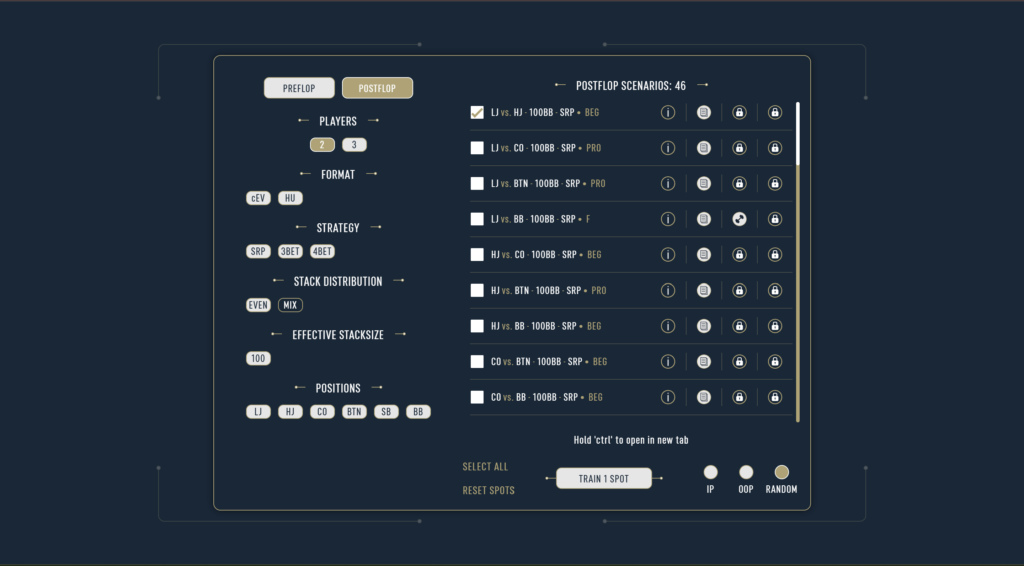
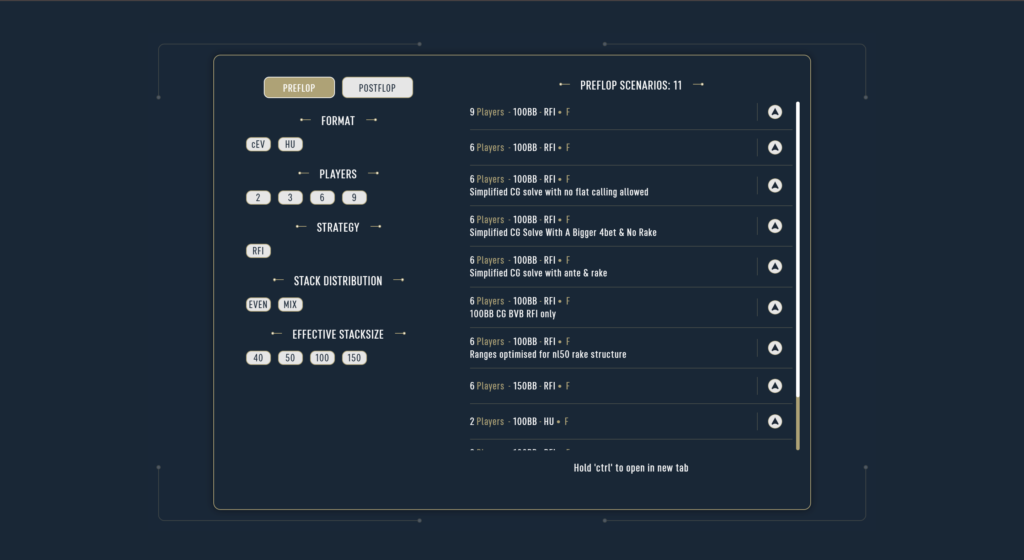
It is also important to understand how the platform is divided. The tournament product (DTO Tournament) and cash game product (DTO Cash) are independent products with separate subscriptions, sets of spots, and login websites. Players who use both formats will need two subscriptions.
Key Concepts Behind the Platform
Before examining the features, it is worth defining several terms that appear throughout the platform.
Spot refers to a specific situation defined by a set of parameters: effective stack size, player positions, and pot type. One example would be “45 big blinds, CO versus SB, single-raised pot.” All of the platform’s content is divided into spots, and the subscription plans differ primarily in how many spots they unlock.
A single-raised pot (SRP) is a pot in which there was only one open-raise preflop, or an open-raise followed by a cold call. A 3-bet pot is a pot in which an open-raise was followed by a 3-bet. These two pot types play very differently, so they are separated in the list of spots.
EV (expected value) is the average value generated by a decision when the same situation is repeated an infinite number of times. If folding is worth two big blinds less than calling, the fold is said to lose two big blinds of EV. This is how the platform measures the cost of a mistake.
ICM (independent chip model) is a method of converting tournament chips into monetary value. Near the money and final-table payouts, chips no longer have a constant value: eliminating an opponent increases the payout for every remaining player, so risking your stack becomes more costly and optimal play becomes more cautious. Solutions that account for ICM and those based only on chip EV (cEV) are calculated separately and appear as different sets of simulations on the platform.
An aggregated report summarizes strategies across many boards, grouped by characteristics such as paired, monotone, or high-card boards. An individual hand shows one specific solution, while an aggregated report reveals patterns that you can remember and apply at the table.
Simplification as the Core Principle
This is the platform’s defining feature, and it is worth understanding before anything else.
A solver’s complete solution for a single situation is almost always impractical for humans: three to five bet sizes on every street and mixed frequencies such as “check 45%, bet one-third of the pot 32%, and bet two-thirds 23%.” Memorizing this is impossible, while improvising something “roughly solver-approved” inevitably leads to mistakes.
DTO Poker teaches simplified game trees. Bet sizes that add little EV are removed from the solution, leaving a strategy with fewer branches and more straightforward decisions. The developers claim that this results in minimal EV loss compared with the complete solution while producing a strategy that players can realistically remember and execute accurately at the table. For cash games, the platform specifically emphasizes that it uses the continuation bet size with the highest EV—a bet made by the player who raised preflop.
According to the developers, all solutions have been reviewed by strong tournament professionals. The platform is endorsed on its website by Manig Loeser, Steffen Sontheimer, and Yuri Dzivielevski.
This approach is convenient for beginners: instead of learning a table of probabilities, they study an understandable set of rules that they can immediately test in Trainer.
Trainer: Playing Hands Against a Bot
Training works much like a regular poker game. You select a spot, receive a hand, and make your own decisions until the end of the hand while the bot follows the precomputed solution.
The spot settings define the scenario itself, including stack size, position, and pot type. In the cash game product, each spot includes more than 300 different flops. As a result, the same boards do not keep repeating, and you cannot simply memorize the “correct answer” for a particular board—you have to understand the underlying logic.
You receive feedback after each hand. The amount of detail depends on your subscription plan, which is an important consideration: the lower-tier plans provide only a basic correct-or-incorrect assessment without any numbers. Detailed feedback showing the exact amount of EV lost and the optimal frequencies for each action is available only with the highest-tier plan for each product.
The difference between these two feedback modes is significant. Solvers often use mixed strategies: the same hand in the same situation might bet half the time and check the rest. In such a case, the basic assessment may simply mark one of two similarly valuable options as incorrect. Nor does it distinguish between a mistake that costs one-hundredth of a blind and one that costs four blinds. Detailed feedback shows the cost of each decision, providing useful material for improving your game: you can see which mistakes are harmless and which ones genuinely damage your win rate.
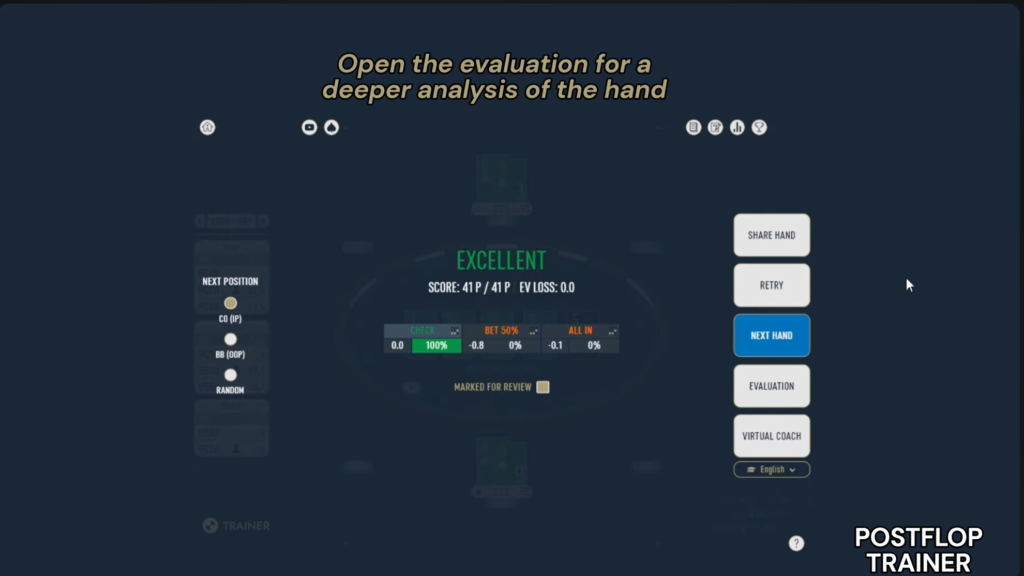
Range Viewer is available alongside the feedback. It shows how every other hand in the range plays at the same point in the game tree, not just the hand you were dealt. This feature changes how you study: rather than learning only what to do with one specific hand, you begin to understand why the structure of your range calls for that action.
Statistics are collected automatically. Results are broken down by position, street, and spot, with averages and a hand history also available. Each spot has its own leaderboard where you can compare your results with those of other platform users. For beginners, this is a simple way to identify which situations are objectively weaker than the rest and decide what to focus on during the next training session.
Another Trainer feature is Virtual Coach. Built on a language model, it explains in plain language why your action was a mistake and what considerations support the optimal decision at that point. The feature is available to subscribers. It is important to understand how it works: it provides an explanation based on an existing solution rather than performing a separate calculation. It is therefore best treated as a helpful guide to the underlying logic, while the solution and its frequencies remain the definitive reference.
Explorer: Reviewing Your Own Hands
Explorer is the other half of the platform and reverses the training process: instead of asking the platform to “deal me a situation,” you ask it to “show me the strategy for a situation that has already happened.”
You configure the situation manually by selecting the stack size, positions, pot type, and board. The platform then displays the strategy for the entire range, including what each hand does and at what frequency. This is the standard way to review a hand after a session: recall the spot, locate it in the library, and compare your decision with the platform’s solution.
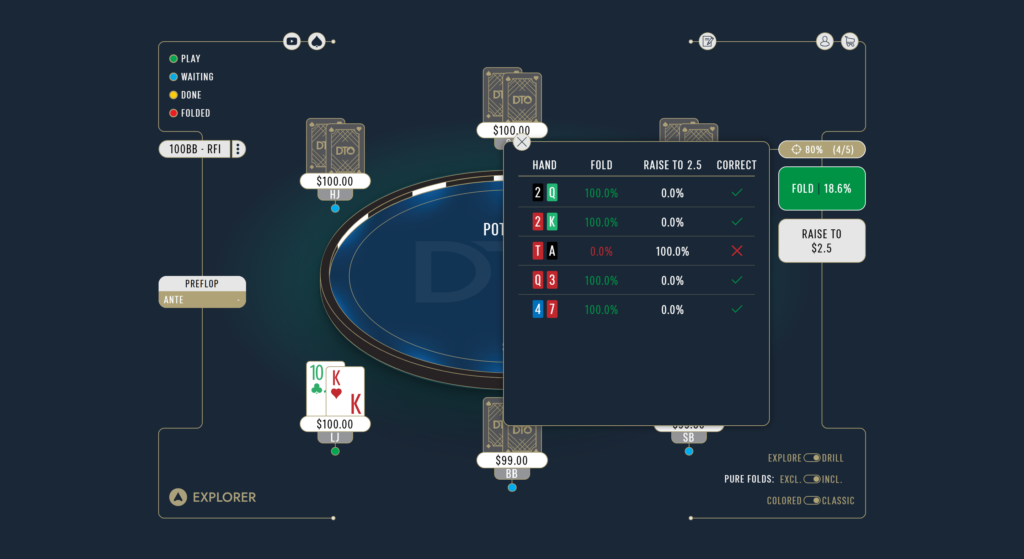
Explorer also includes a preflop drill mode. The platform presents a series of preflop situations, and you choose your actions until the ranges become automatic.
Three features of the solution library are worth highlighting.
The first is three-way spots: postflop situations with three active players. Few similar tools offer them because calculating these situations is much more demanding than solving heads-up play, even though three-player pots occur frequently in real games.
The second is postflop solutions that account for ICM. Most tools use ICM only for preflop situations such as push/fold decisions, whereas DTO Poker also includes postflop play near the money and other significant payout stages.
The third is aggregated reports. These make it possible to identify patterns across groups of boards rather than analyzing every flop individually. They are available with the highest-tier plan.
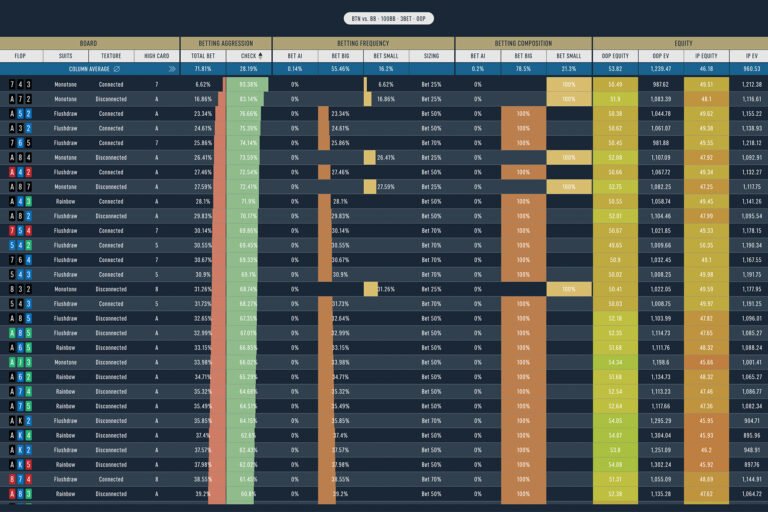
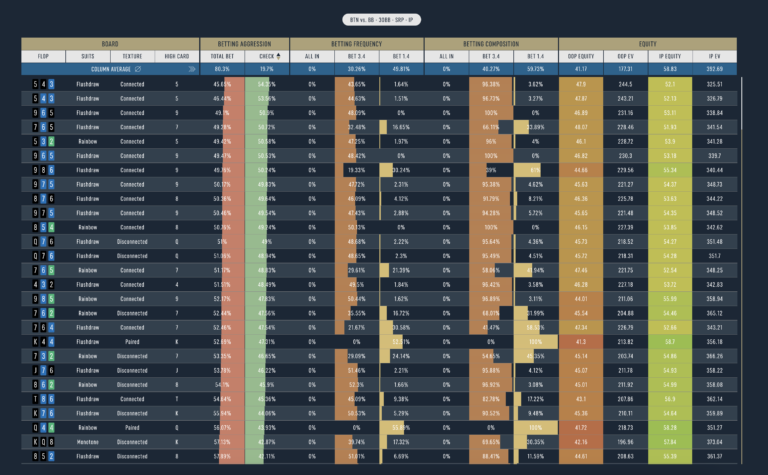
One important limitation is that Explorer works only with a library of precomputed solutions. You cannot configure and calculate an arbitrary custom situation because the platform does not include its own solver. The Explorer library is limited even on the highest-tier plan: it includes 200 heads-up and 25 three-way postflop spots.
Supported Formats and Platforms
The range of poker variants is narrow and clearly defined: the platform supports only no-limit hold’em. Omaha, short deck, and other variants are not available.
The tournament product covers multi-table tournaments and sit-and-gos, including short, medium, and deep stacks, nine-handed tables, uneven stack sizes, ICM near the money, heads-up play, and limping strategies. According to the app store listings, the library includes more than 100 million precomputed tournament and sit-and-go situations.
The cash game product covers six-max and heads-up tables, including different rake structures. This is an important detail because rake levels significantly affect optimal ranges at the micro stakes. Deep-stack and straddled games are listed on the website as planned rather than currently available.
The platform runs in a browser, making it available on Windows, macOS, and Linux without a separate desktop program, as well as through iOS and Android apps. The iOS app requires version 14 or later; on Macs with Apple silicon, it runs as a mobile app. The tournament product is available both in a browser and on mobile devices, while the website lists the cash game product as browser-based.
The ability to train on your phone is more than a token feature. The hands are short, so ten minutes of practice while traveling can add up to a meaningful amount of training.
The platform also states that it is intended exclusively for educational purposes and is not connected to real-money play. It is a trainer rather than an in-game assistant: it does not provide advice during live play or interact with poker clients.
How to Get Started
Getting started involves just a few steps.
You do not have to install anything: simply open the website for the relevant product and create an account. You can also install the mobile app from the App Store or Google Play, with your progress linked to your account.
The free tier does not expire or require payment. It unlocks all preflop solutions and unlimited training in a small number of postflop spots with basic feedback. There is no trial period offering full access to the higher-tier plans, so the free tier is the only way to try the platform.
A sensible study plan begins with preflop play. Opening ranges, blind defense, and 3-bet situations are where beginners lose the most, and this content is available for free. The preflop drills in Explorer help turn these ranges into automatic decisions more quickly than studying tables.
Next, focus seriously on a single postflop spot in Trainer. Playing one hundred hands in one spot helps you understand its patterns, whereas spreading one hundred hands across ten spots teaches you very little. Once the free spots are no longer enough, you can subscribe to the lower-tier plan for the relevant product.
Finally, decide in advance whether you need exact EV figures. If your goal is simply to become familiar with GTO logic, the basic feedback is sufficient. If you want to find and fix specific leaks, you will need the highest-tier plan, which should be taken into account when planning your budget.
Subscription Plans
DTO Poker uses separate subscriptions for its tournament and cash game products. If you play both formats, you will need two subscriptions. Each product also has a free tier that does not expire.
The tournament product offers three paid plans that differ in the number of available spots and preflop simulations. The highest tier also unlocks Explorer, aggregated reports, and detailed feedback showing the exact EV lost. The cash game product is simpler, with two paid plans. Its highest tier adds heads-up and three-way situations, Explorer, and the same detailed feedback. For both products, an annual subscription costs the equivalent of ten monthly payments.
The main limitation to understand before subscribing is that the exact amount of EV lost and the optimal frequencies are available only with the highest-tier plan for each product. On every other plan, the feedback is limited to whether a decision was correct.
A detailed description of the plans and prices is available on the product page.
Conclusion
DTO Poker is most useful for tournament players who want regular decision-making practice rather than in-depth solver research. Its strengths include a free preflop library, a low entry price, a genuine focus on simplified strategies that humans can execute, and three-way and ICM postflop solutions that are rare among tools in this category.
Its limitations are equally clear: it supports only hold’em, offers a narrow selection of cash game spots, cannot calculate custom situations, and reserves exact EV feedback for the highest-tier plan.
The best way to learn the platform is gradually: first drill the free preflop content until your decisions become automatic, then study one or two postflop spots on a lower-tier plan, and only afterward expand the library. This approach develops an understanding of range structure rather than a collection of memorized answers—and that is what turns training volume into real results at the table.

Featured software

Latest posts
-
 Poker Academy Review: Ranges, Solver, and Trainer in One Browser Window Oct 11, 2026
 -
 SmartHand Review: Opponent Stats Before the First Hand Oct 10, 2026
 -
 888Caption Review: A Tool for Fast-Paced Multi-Tabling Oct 9, 2026
 -
 Preflop ICM Solving in GTO Wizard: ICM-Aware Preflop Solutions in Seconds Oct 8, 2026
 -
 Octopi Poker Review: Tournament GTO With Pro Hand Reviews Oct 7, 2026
All the poker software you need, gathered in one place. Exclusive discounts, bonuses, latest news and updates.
Join now