Poker Stack Review: Accurate Bankroll Tracking on iPhone and iPad
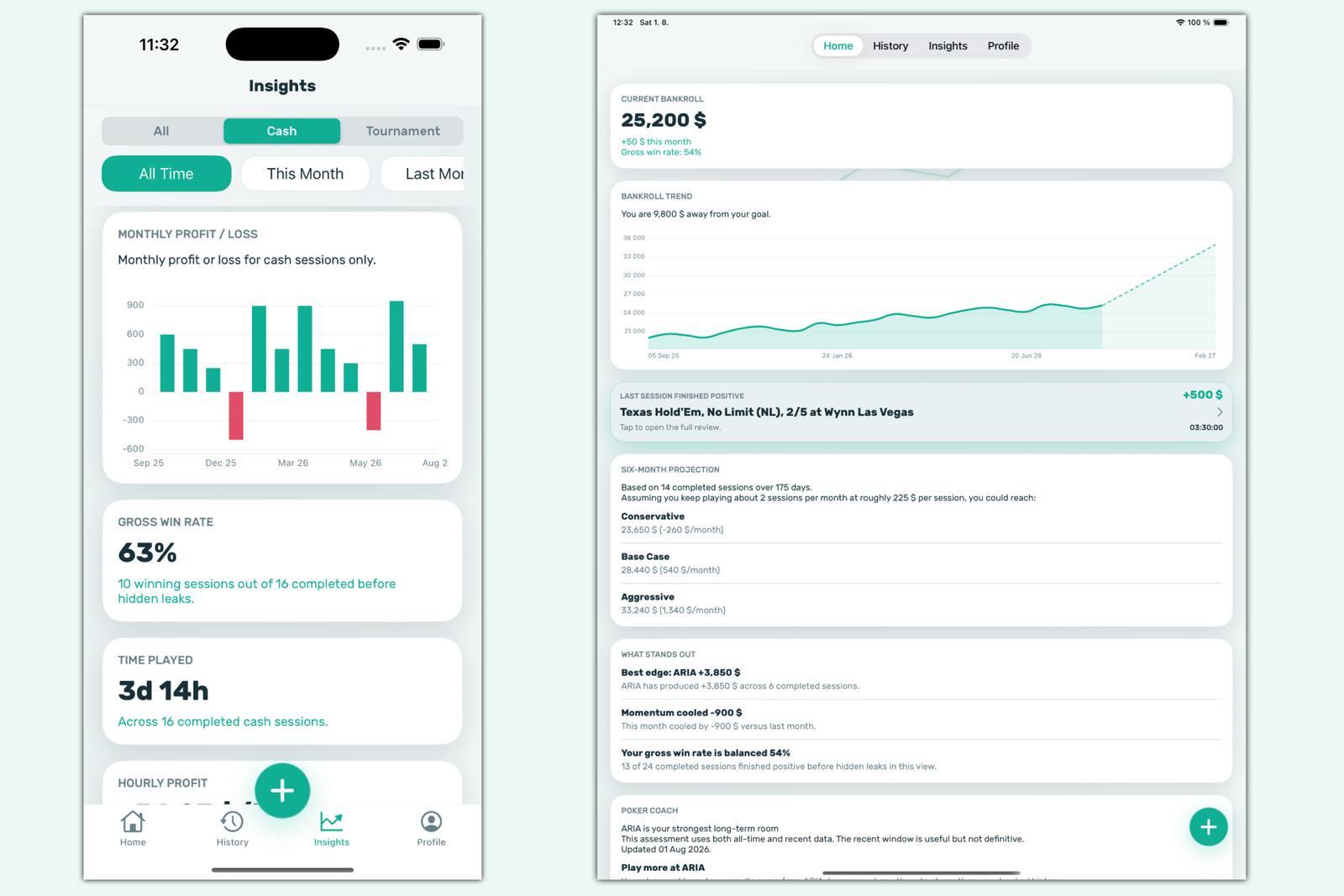
Poker Stack is an app for iPhone and iPad that lets players track their poker sessions and bankroll. A bankroll is the amount of money a player sets aside exclusively for poker, and it determines which stakes they can reasonably play. To manage a bankroll, players need to know how much money they have put into their games, how much they have cashed out, and how much time they have spent playing. Players enter this data into Poker Stack manually, and the app stores it and uses it to calculate statistics.
The app is different from conventional poker trackers that read hand histories and display a HUD with opponents’ statistics. It does not analyze individual hands. Instead, Poker Stack records help answer broader questions: whether poker is profitable over the long run, how much a player earns per hour on average, and which formats and venues are profitable and which are not. This is equally useful for players who play live in casinos or clubs and those who play online.
This kind of tracking is especially important for beginners. Over the short term, poker results depend heavily on luck, while memory tends to retain memorable wins and forget uneventful losing evenings. Recording sessions regularly provides an objective picture instead of relying on impressions.
What Makes Up the Bankroll Picture
The basic unit in Poker Stack is a session. A session is one period at the table, from the moment a player sits down to the moment they leave. There are two types of sessions: cash games and tournaments. Cash game and tournament records are tracked separately, allowing players to evaluate each format independently and compare them.
For each session, the player enters several key figures:
- Buy-in — the amount a player brings to the table in a cash game or the entry fee for a tournament.
- Additional buy-ins — extra money invested during play: topping up the stack in a cash game, or a rebuy (re-entering after elimination) and add-on (purchasing additional chips at a designated point) in a tournament.
- Cash-out — the amount a player leaves the table with or their tournament winnings.
- Time — the duration of the session.
- Context — the venue (club, casino, or poker room), game type, stakes, blinds, and notes.
The app uses this data to calculate the session result and, across multiple sessions, overall statistics and bankroll trends. All graphs and insights are based solely on the information entered by the player, so their accuracy depends directly on consistent record-keeping: a missed session or forgotten additional buy-in will distort the results.
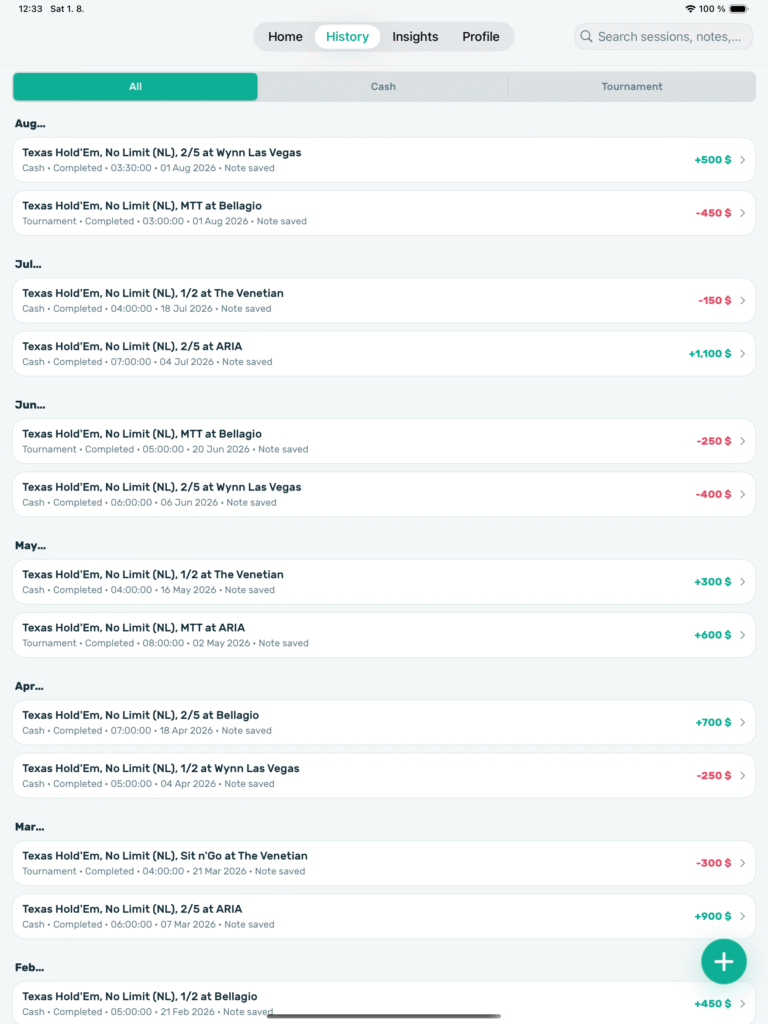
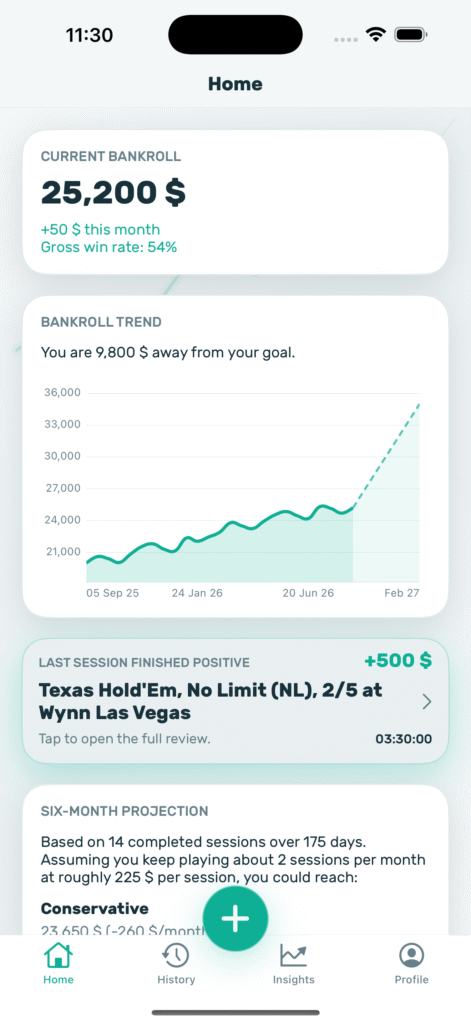
The interface is divided into four main sections: Home (the main screen showing the current bankroll), History (session history), Insights (analytics), and Profile (profile and settings). A new session can be started using the universal “+” button available from any screen.
Entering a Session at the Table
Starting a Cash Game or Tournament
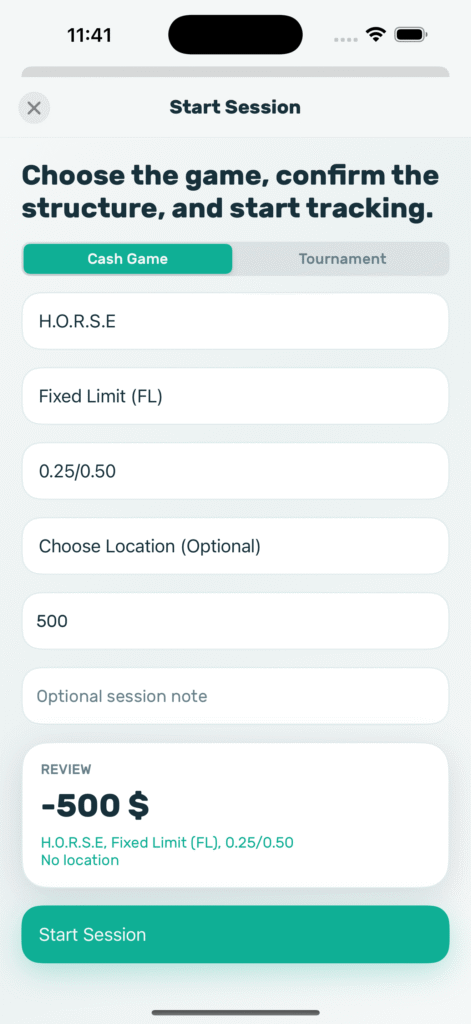
To start a session, tap “+,” select a cash game or tournament, and enter the game structure and buy-in amount. There is no lengthy setup before starting, so players can launch a session right at the table without being distracted from the game for long.
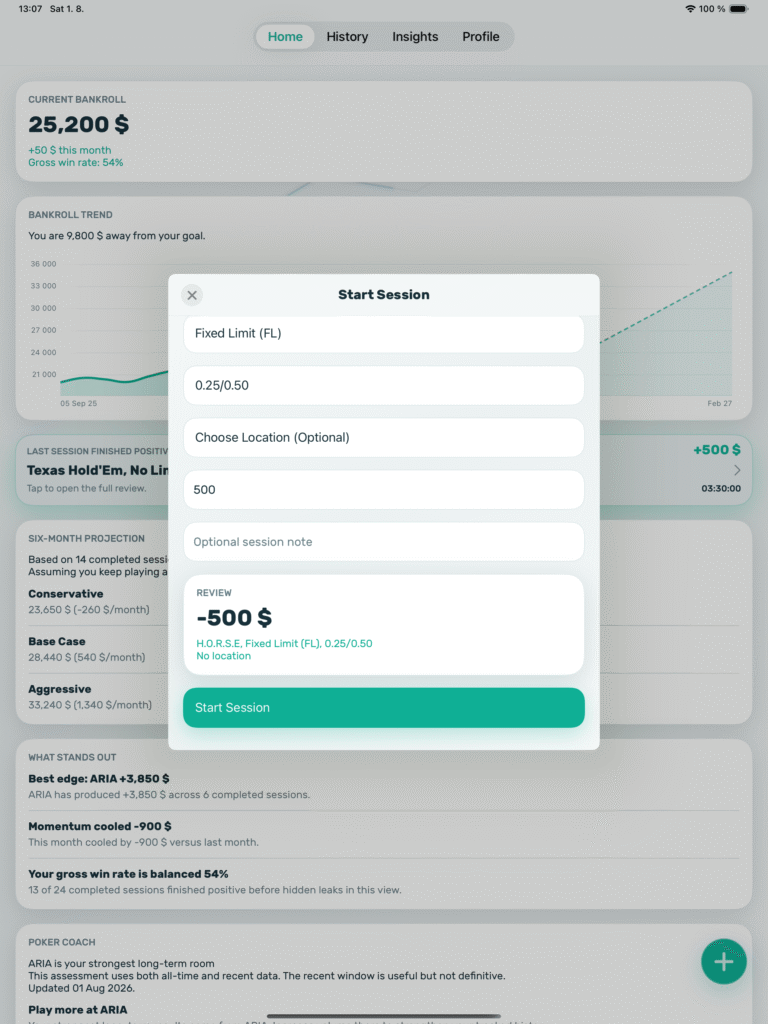
Starting a session when the player sits down and ending it when they leave ensures that playing time is recorded accurately, without having to reconstruct it from memory. This is essential for calculating hourly earnings.
Additional Buy-Ins and Stack Checks During Play
While a session is in progress, the player can add further buy-ins and record their current stack size. A stack check is an interim record of how many chips the player currently has in front of them. It does not end the session, but it makes it possible to track how the game develops. Recording each additional buy-in immediately ensures that the actual amount invested is not forgotten, even if there are several buy-ins.
This is a useful habit for beginners: second and third buy-ins are the ones most likely to be “forgotten” when calculating results mentally, and they are often what turns an evening that seemed break-even into a significant loss.
Pausing and Resuming a Tournament
A tournament session can be paused and resumed later. This is convenient for breaks and multi-day tournaments: there is no need to end the session and create a new one, so the entire tournament remains a single record.
Tracking Expenses
Related costs such as travel, food, dealer tips, and other expenses can be added to a session and deducted from the result. This is especially important in live poker: a player who wins a small amount during an evening but spends a significant sum on a taxi and dinner may actually finish at a loss. When expenses are recorded, the session result reflects the actual net profit or loss.
Ending and Editing Sessions
After the game ends, the player enters the cash-out amount, and the session appears in History. Completed sessions can also be opened and edited there, for example if a mistake was made when entering the data.
Analytics: What Recorded Sessions Reveal
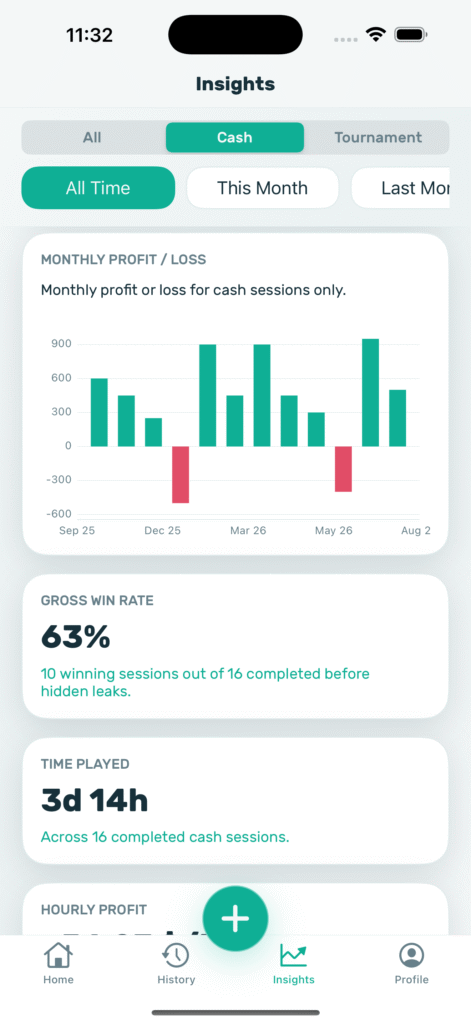
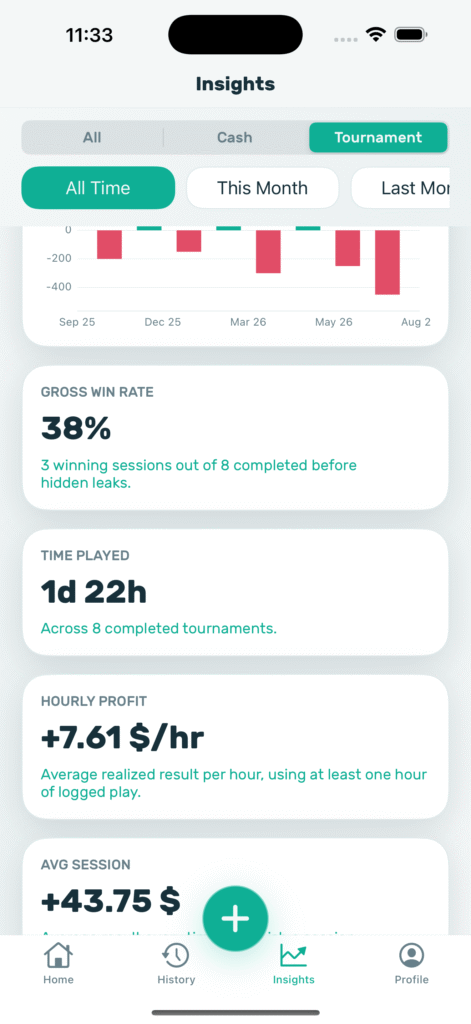
The analytics section is the main reason for keeping these records. It uses the entered sessions to calculate a set of metrics that show how the player is actually performing.
Bankroll and Monthly Profit and Loss
The bankroll graph shows how the amount of money set aside for poker has changed over time. Monthly profit and loss figures are displayed alongside it, helping players identify seasonal patterns and distinguish one bad month from a long-term trend.
Win Rate and Hourly Earnings
Win rate indicates how successful a player’s sessions are overall. Hourly earnings show the average amount earned per hour of play. This hourly figure makes it possible to compare poker with other ways of spending time and determine whether a long session is worth the effort.
In practice, a large win on a single evening can sometimes conceal poor hourly results. The hourly metric balances out these distortions because it accounts for all time spent at the table, including long sessions with no significant result.
Average Results and Streaks
The average result per session shows the typical outcome of one visit to the table. The longest winning and losing streaks help indicate how much results can fluctuate. These figures are useful for beginners: a long losing streak is often a normal part of long-term poker variance rather than evidence that something has “broken” in their game.
Results by Venue
If the player specifies the venue for each session, statistics are calculated separately for each location: a particular club, casino, or online poker room. This helps identify where the player performs best. For example, the records may show that hourly earnings are consistently higher at one club than another. The app does not explain the reasons for this difference, so players will need to investigate them themselves.
Filters
All statistics can be filtered by format (cash games or tournaments) and time period. For example, players can compare their results from the last three months with those from the previous year or view tournaments only without mixing them with cash games.
Bankroll Goal and Forecast
Poker Stack lets players set a bankroll goal—the amount they are aiming to reach, for example before moving up in stakes. The goal remains visible, and the graph shows how close the player has come to achieving it.
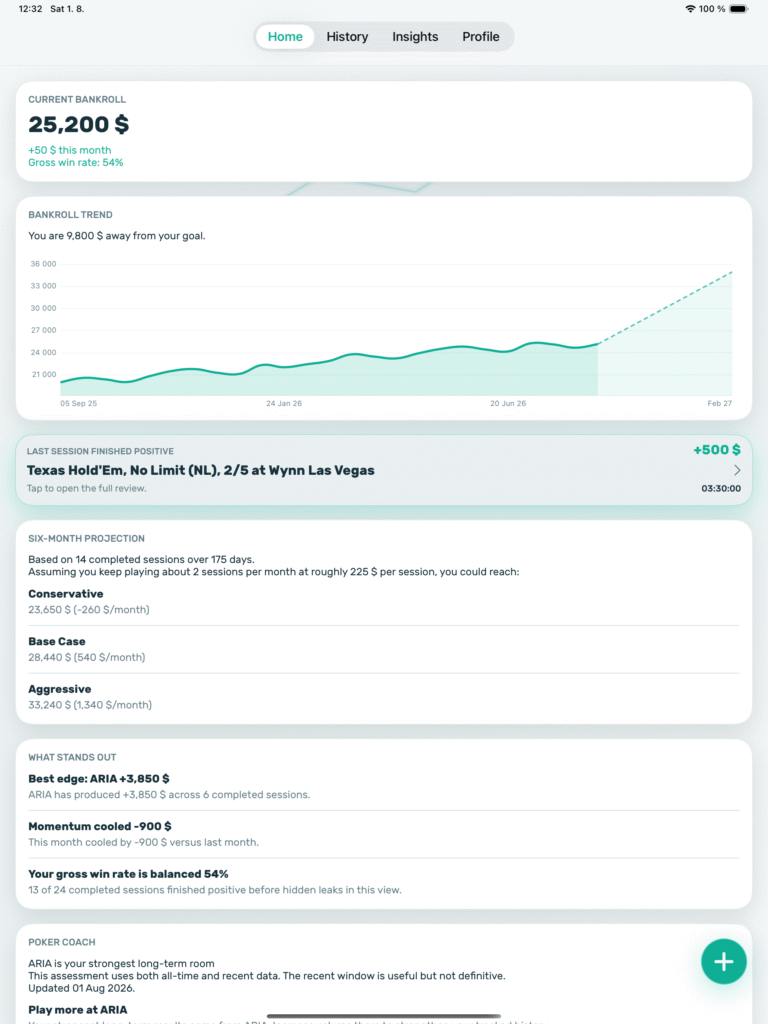
The app also provides a bankroll forecast for the next six months. It is based on previously recorded results, so it should be treated as a reference point rather than a guarantee: future sessions may turn out differently.
Poker Coach: Summaries of Completed Sessions
Poker Coach is an AI-powered module that creates summaries based on the completed sessions entered by the player. A summary is a short written analysis of the results, highlighting patterns in the records and showing where performance is stronger or weaker. Every insight is tied to the player’s own data.
It is important to understand the module’s limitations. Poker Coach does not provide advice on how to play hands during a game and does not promise financial results. Its language is deliberately measured, and some insights require a sufficient number of completed sessions: two or three records are simply not enough to reveal meaningful patterns.
For beginners, these summaries provide a useful outside perspective on their own figures. They can help reveal, for example, that results differ significantly between formats or venues. The decision about what to do with this information remains with the player.
Data Storage and Sharing Results
Backup
Session history is stored on the device. After signing in to an account, cloud backup and record restoration become available. This protects months of session history from being lost if the phone is replaced or damaged.
Session Cards
Session results can be shared as a designed card. Amounts and notes can be hidden before sharing to avoid revealing the size of the bankroll to others. A photo can also be added to the card, either by taking one with the camera or selecting an existing image from the gallery.
Appearance and Languages
The interface supports light and dark themes and is available in eight languages: English, French, German, Spanish, Portuguese, Italian, Dutch, and Turkish. The app also includes reminders and notifications.
Where and on Which Devices Poker Stack Works
- Games and formats. Cash games and tournaments, both live and online. The game type, stakes, and blinds are specified for each session, so the app is suitable for different poker variants.
- Poker rooms. The app does not connect to poker rooms or read hand histories, so it does not depend on which room is used: online sessions are entered in the same way as live ones. The downside is that hand data and opponents’ statistics are not available.
- Devices. iPhone and iPod touch running iOS 15.6 or later, and iPad running iPadOS 15.6 or later. The App Store also lists compatibility with Macs equipped with an Apple M1 chip or later and running macOS 12.5 or above, although the developer has not officially tested the app on Mac.
- Limitations. There are no Android, Windows, or web browser versions. Some features, such as backup, require an internet connection.
Getting Started With Poker Stack
- Download Poker Stack from the App Store on an iPhone or iPad.
- Purchase a Weekly Pass or Yearly Pass in the app: recording and editing active sessions requires a subscription. Apple processes purchases and purchase restoration.
- Sign in to an account to access cloud backup for session history.
- Set a bankroll goal if desired.
- Before the next game, tap “+,” select a cash game or tournament, enter the stakes and buy-in, and start the session.
- During play, add any further buy-ins and expenses. At the end, enter the cash-out amount and a short note about how the game went.
The first few sessions will not provide reliable insights, and that is normal. The value of tracking becomes apparent once there are enough records for random fluctuations to stop obscuring the actual results.
Poker Stack Subscriptions
The app is free to download, but recording and editing active sessions requires a subscription. Two options are available: a weekly Weekly Pass and an annual Yearly Pass. Both renew automatically through the player’s Apple account, and renewal can be canceled in Apple’s subscription settings. There is no monthly plan, so the annual subscription offers better value for ongoing tracking, while the weekly option is suitable for trying the app over several sessions.
A detailed description of the plans and prices is available on the product page.
Who Poker Stack Is For
Poker Stack helps with one specific task: accurately tracking results. Players enter each session themselves, while the app stores the records and calculates relevant metrics, eliminating the need for spreadsheets and manual calculations. For beginners, it is a good way to see the real picture from their very first sessions: how much they have invested, how much they have won, what an hour of play is worth, and where their results are best. The app does not replace hand analysis or opponent statistics, so other tools are needed to review and improve play.
The best way to learn Poker Stack is gradually: begin by simply recording every session with its buy-in, cash-out, and duration; then add expenses and notes; and move on to analytics, goals, and Poker Coach summaries once enough records have accumulated.

Featured software

Latest posts
-
 Poker Academy Review: Ranges, Solver, and Trainer in One Browser Window Oct 11, 2026
 -
 SmartHand Review: Opponent Stats Before the First Hand Oct 10, 2026
 -
 888Caption Review: A Tool for Fast-Paced Multi-Tabling Oct 9, 2026
 -
 Preflop ICM Solving in GTO Wizard: ICM-Aware Preflop Solutions in Seconds Oct 8, 2026
 -
 Octopi Poker Review: Tournament GTO With Pro Hand Reviews Oct 7, 2026
All the poker software you need, gathered in one place. Exclusive discounts, bonuses, latest news and updates.
Join now