Hand2Note Review: A Poker Tracker with an Adaptive HUD and Smart Reports
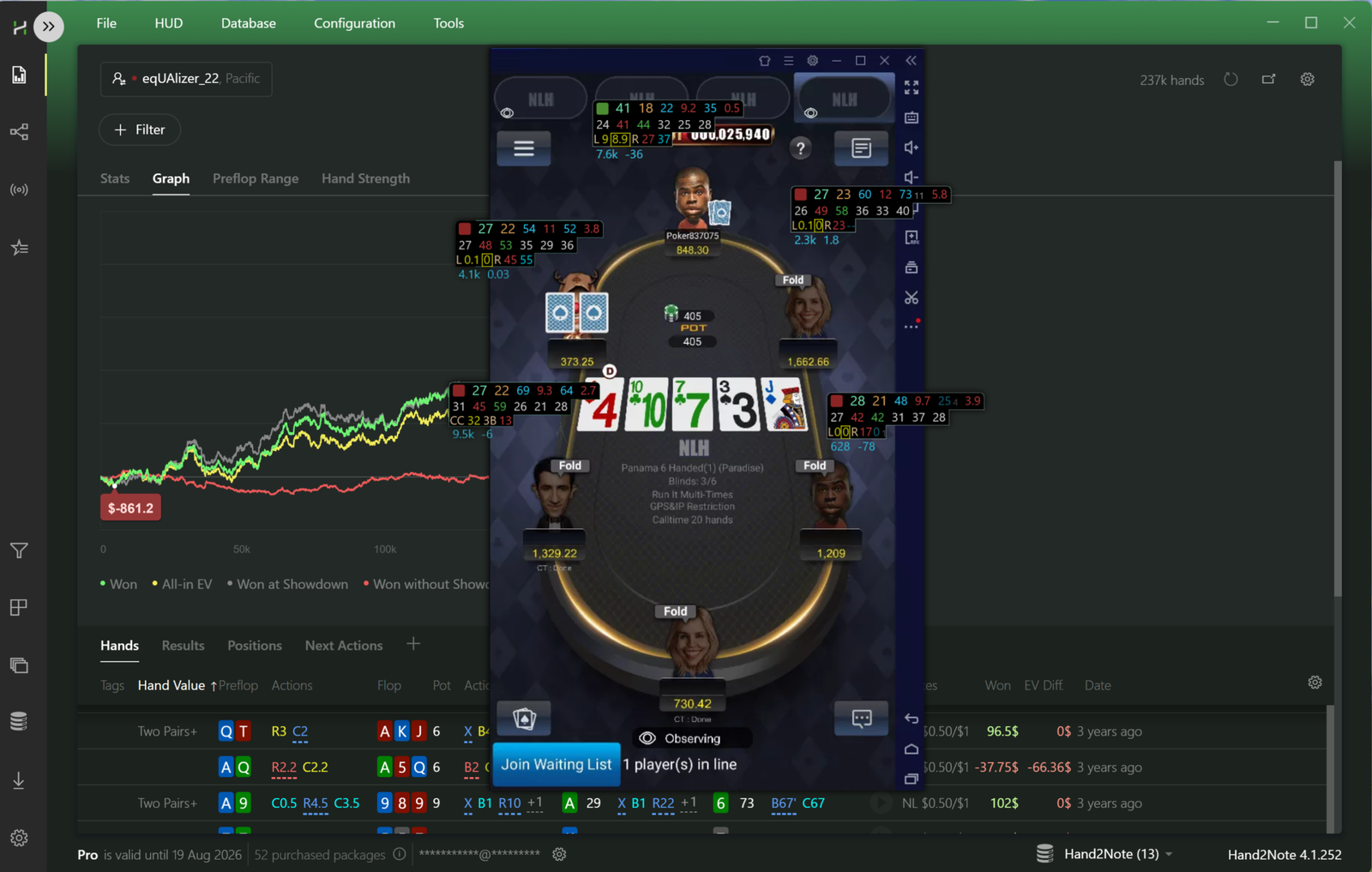
Hand2Note is software for collecting and analyzing poker statistics. Tools like this are called trackers: they read the files a poker client saves after every hand played and turn them into numbers. Those numbers add up to two pictures. The first is how an opponent plays: how often they enter a pot, how often they raise, how they react to a bet. The second is how you play: where you make money and where you regularly lose it without even noticing.
Each picture is needed at a different time. Opponent stats work during play and are displayed over the table as a HUD. Your own stats are needed after a session, when there’s time to work calmly through the reports. Hand2Note covers both jobs in one window and adds a few tools most trackers don’t have: profitability analysis for individual actions, statistics for entire groups of players, and a database of hands from live streams where every player’s cards are visible.
Brief description of Hand2Note as a tool
For every hand played, a poker client writes a text file to your computer — the hand history. It contains everything: who sat in which position, how many chips there were, who bet how much on each street, and who showed down with what. There’s no hidden information in it, only what was visible at the table.
Hand2Note picks up those files and sorts them into its own database. Then the arithmetic begins: the software counts how many times a player found themselves in a given situation and how often they chose each action. The ratio of one to the other is a statistic, or a “stat” for short. VPIP, for instance, is the share of hands in which a player voluntarily put money in the pot; PFR is the share of hands in which they open-raised or otherwise raised before the flop.
Those stats then get used in two ways. During play they’re shown on the table through a HUD — a small panel of statistics next to each opponent. After play, the same stats are gathered into reports, where you can look not at individual values but at behavior across a whole group of situations.
There are only four key concepts worth remembering right away: hand histories (the source files), the database (where it all gets stored), statistics (the calculated numbers), and the HUD (how those numbers appear at the table). Everything else in the software is built on top of those four things.
The HUD: Statistics Right at the Table
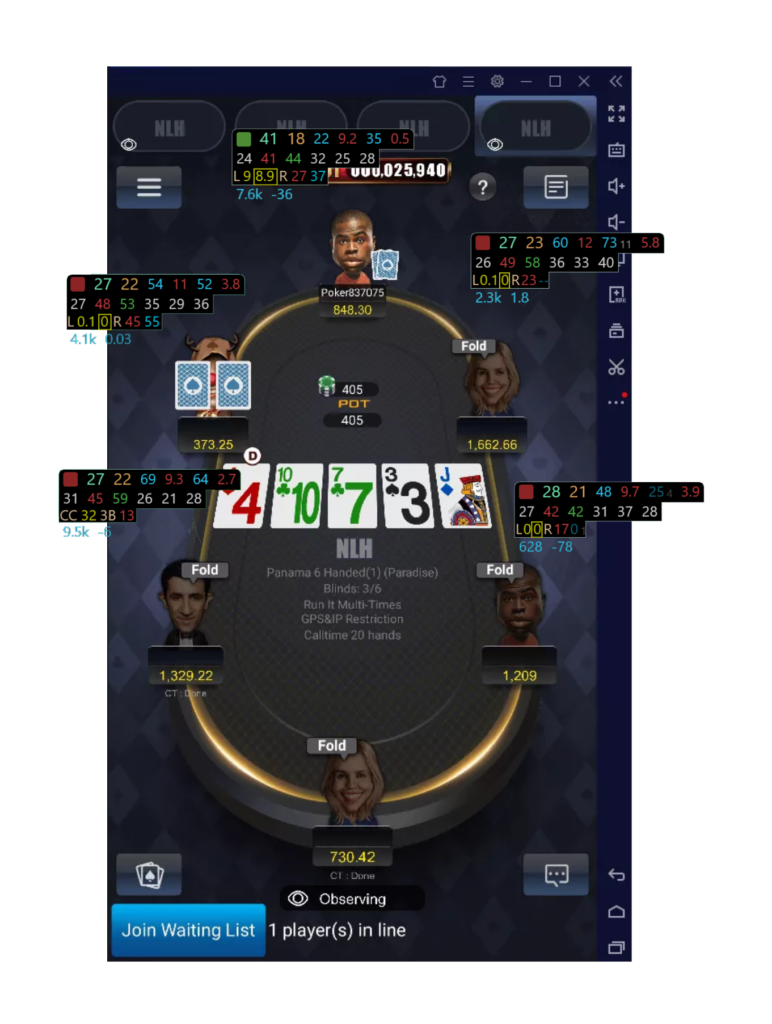
A HUD (heads-up display) is a set of panels with numbers that the software draws over the poker client’s window next to each player. The simplest version is three numbers: VPIP, PFR, and the number of hands played. Even that much is enough to tell a cautious player from someone who plays almost everything.
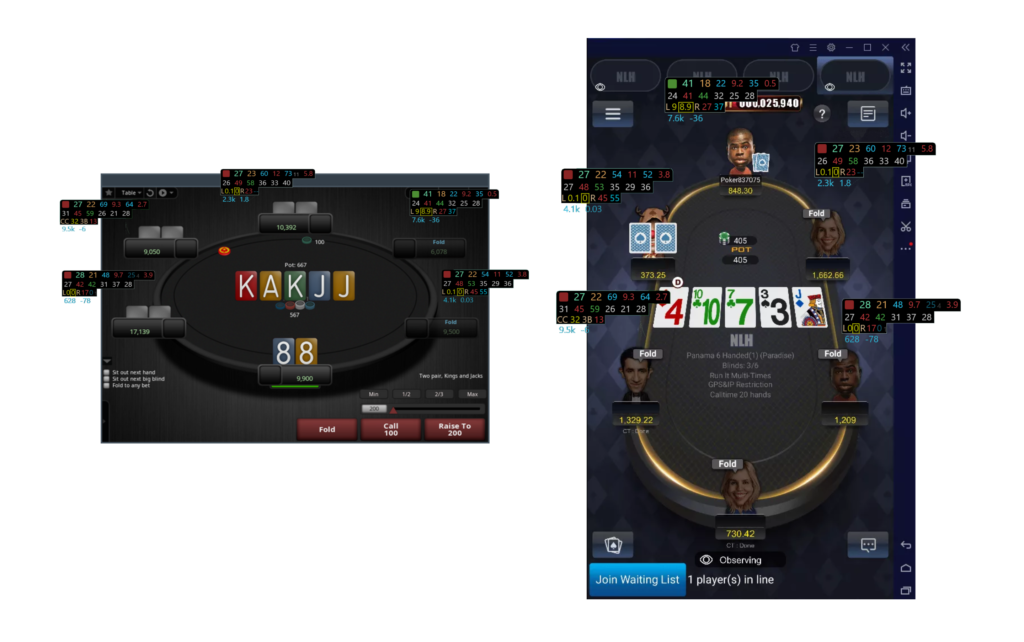
Reading it is straightforward. A VPIP around 13% means the opponent is waiting for strong starting hands only, so entering a pot against them with middling cards isn’t profitable. A VPIP above 40% paired with a high PFR means the player enters pots very wide and aggressively, so you should expect bluffs from them after the flop. This is the foundation everyone starts from.
Three Types of HUD
Hand2Note can display a HUD in three different ways, and the difference between them is the software’s headline feature.
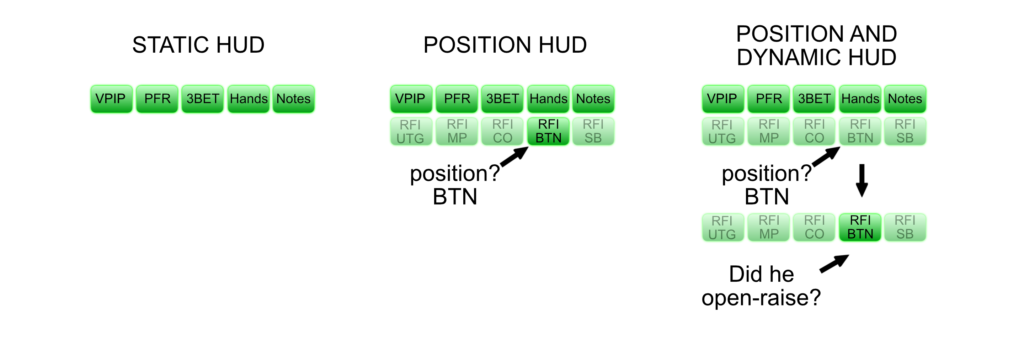
A static HUD is the ordinary version, familiar from any tracker. The same set of stats for every player at the table, regardless of what’s happening in the hand.
A positional HUD shows different stats for different players depending on their position, stack size, or player type. Say you’re sitting in the CO with an opponent on the BTN. The positional HUD will show you not their overall 3-bet percentage but specifically how often they 3-bet from the button against the cutoff. For the players in the SB and BB, the same moment will display their own numbers for those positions.
A dynamic HUD goes further and changes as the hand progresses, reacting to actions already taken. An opponent open-raises from the button, and the panel immediately shows how often they fold to a 3-bet in exactly this situation. If it says 72%, the conclusion is obvious: 3-bet them with a wide range.
The point of the positional and dynamic modes isn’t to show more numbers but to show fewer — the right ones. A HUD can hold hundreds of stats while displaying, at any given moment, only the handful relevant to the current spot. The panel stays compact and can be read in a second.
An important restriction: some sites prohibit these modes. On PokerStars, on the iPoker network, and on Winamax, positional and dynamic HUDs don’t work. The software applies these restrictions automatically, so you can’t break a room’s rules by accident.
Popups: Details on a Single Hover
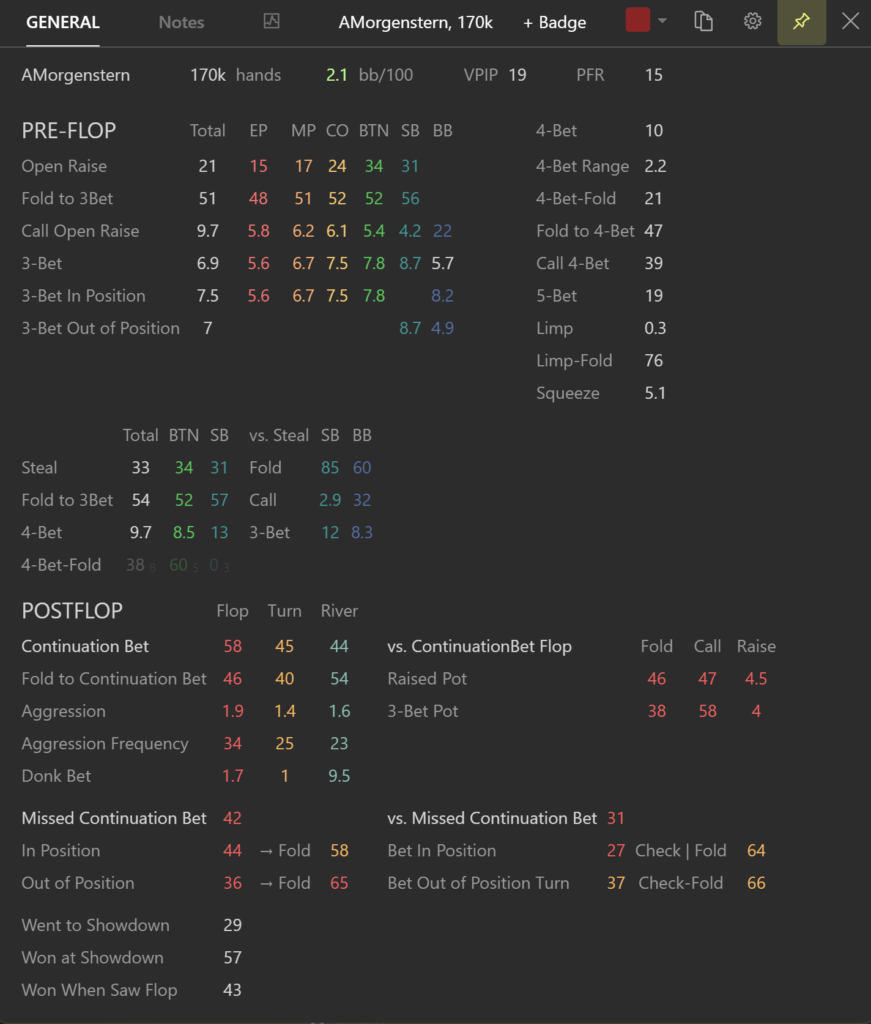
A popup is a window that opens when you hover the cursor over a stat in the HUD. It’s for when one number isn’t enough. Next to a c-bet (continuation bet) frequency, for example, the popup shows what the opponent does next: how often they fold, call, or raise in response to various actions. There’s also a mode that shows a stat against a specific opponent — that is, the numbers they put up against that particular player.
Showdown Indicator and Color Markers
A showdown is the most valuable source of information: you can see an opponent’s cards and work out their logic from them. But when you’re playing several tables, showdowns are easy to miss. The software tracks the ones you haven’t reviewed yet and highlights them in the HUD so you can come back to them. This is especially helpful with players who have just sat down and about whom nothing is known yet.
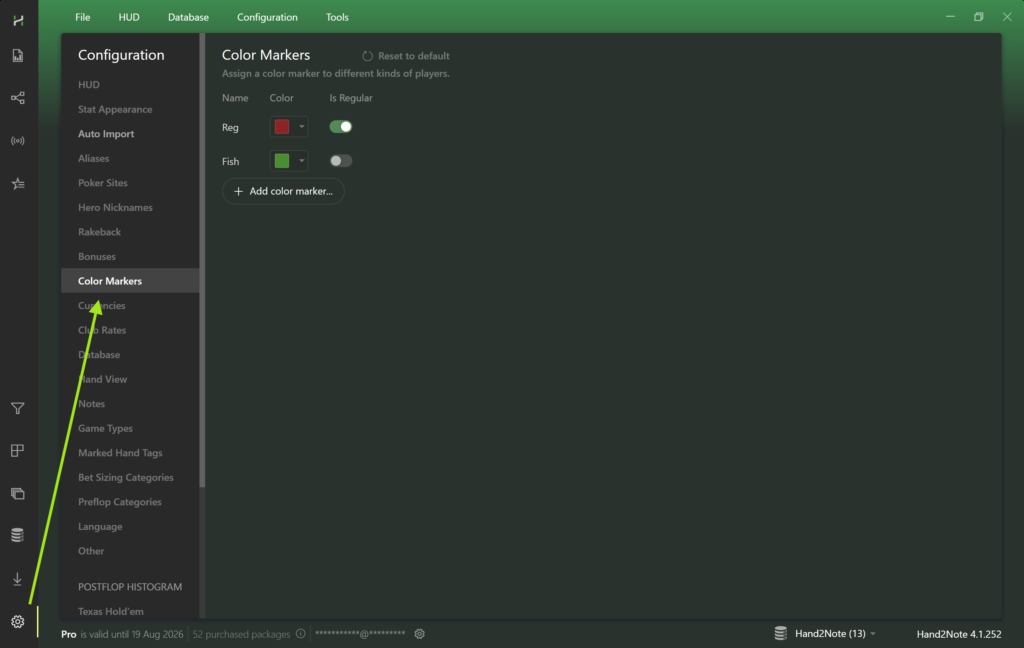
Color markers are labels used to tag players by type. By default, red means a reg and green means a recreational player. Many people use markers differently: tagging opponents with a similar style by hand and then looking at the combined statistics for that whole group. On PokerStars, automatic marker assignment isn’t available, so they have to be assigned manually.
Editors for the HUD, Popups, and Stats
Everything displayed at the table is configurable. There are three editors: the HUD editor handles panel placement, fonts, background, and which stats are shown; the popup editor works the same way but for popup windows; and the stat editor lets you create your own statistic by defining the conditions it counts.
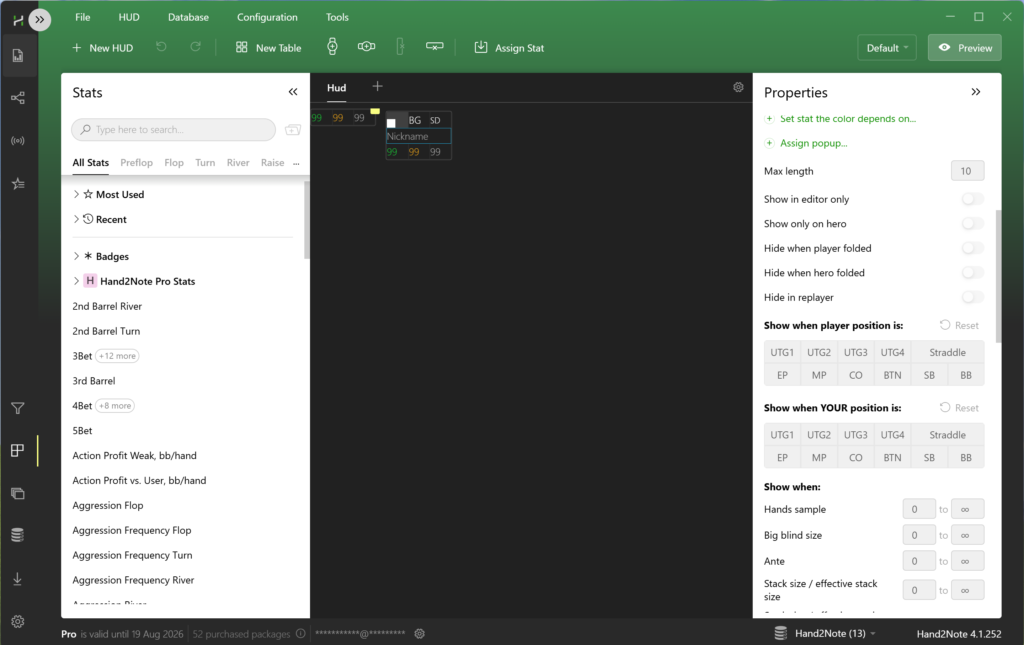
Bulk stat copying deserves a separate mention. Creating the same stat by hand for every pair of positions is many hours of work. Instead, you can copy a finished set and change a single parameter in it: the player’s position, the opponent’s position, or the stack size. The software generates all the variants itself.
A beginner doesn’t need to configure anything from scratch: the HUD works right after installation, and ready-made panel and popup sets can be downloaded separately and plugged in.
Reports: Reviewing Your Own Play
Reports are the second half of the software, the part that works after a session. Here the hand database is examined not by individual opponent but by situation.
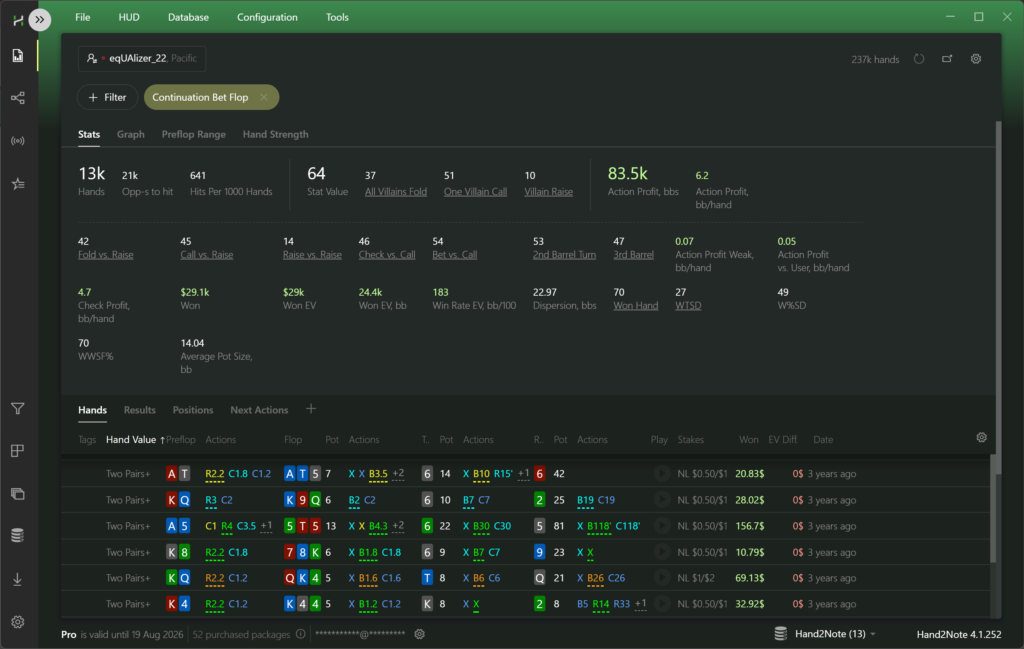
The work starts with a filter. A filter is a condition that selects hands — “c-bet on the flop,” for example, or “3-bet from the small blind against a button open.” As soon as a filter is applied, every stat on screen is recalculated using only the matching hands, and the count of those hands is shown at the top.
Smart Reports
The main problem with any review isn’t a shortage of numbers but a surplus of them. The software solves this by selecting the stats that make sense for the filter you chose. Apply a flop c-bet filter and the screen fills with exactly the stats related to it: how the opponent reacts when their c-bet is raised, how often they keep betting on the turn when a c-bet gets called, and so on. You don’t need to know in advance what to look for — the set of relevant stats is assembled automatically.
Reports You Can Click Through
Reports are interactive. Every stat is a link to the next level of analysis. If you click the missed second barrel stat in a flop c-bet report, the software immediately builds a report around it. Clicking a preflop stat opens a range chart: which hands the opponent called with in that spot and which they raised with, shown on one grid in different colors.
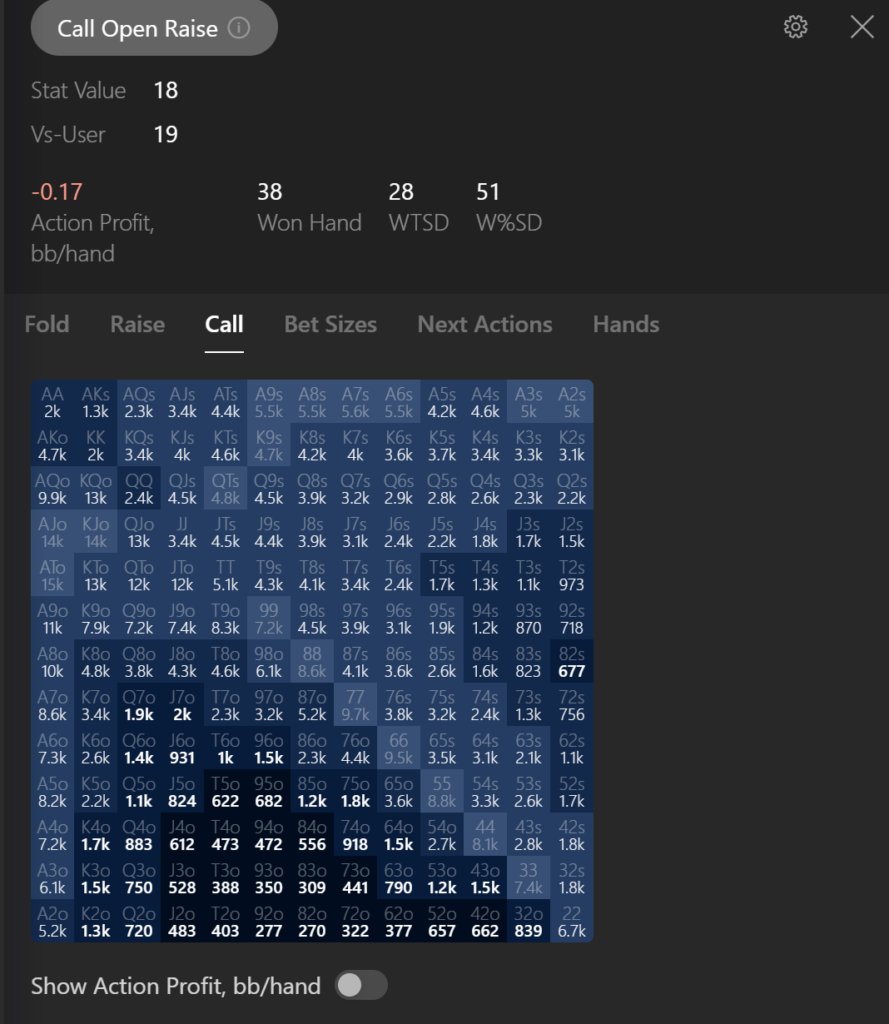
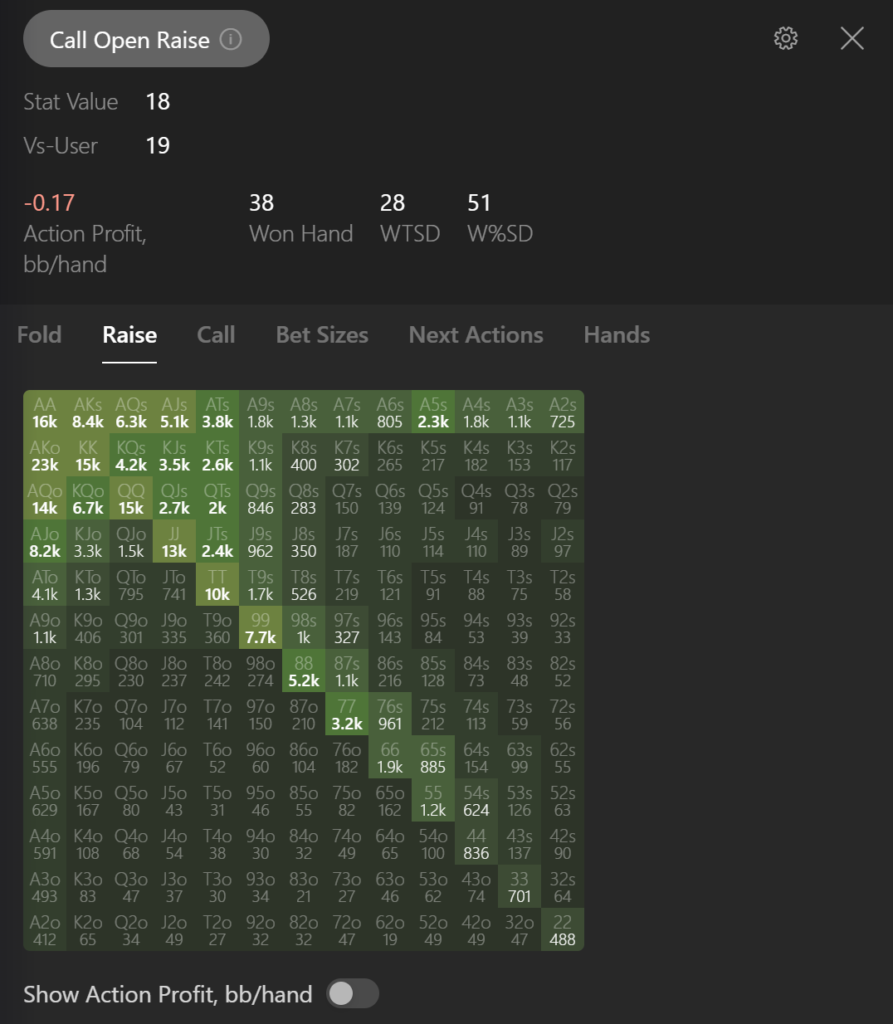
This is a convenient way to test your own assumptions. A typical mistake is to assume that a player who 3-bets from MP against UTG less than 2% of the time holds only QQ+ and AK. The actual chart almost always shows a wider and messier picture.
Custom Filters
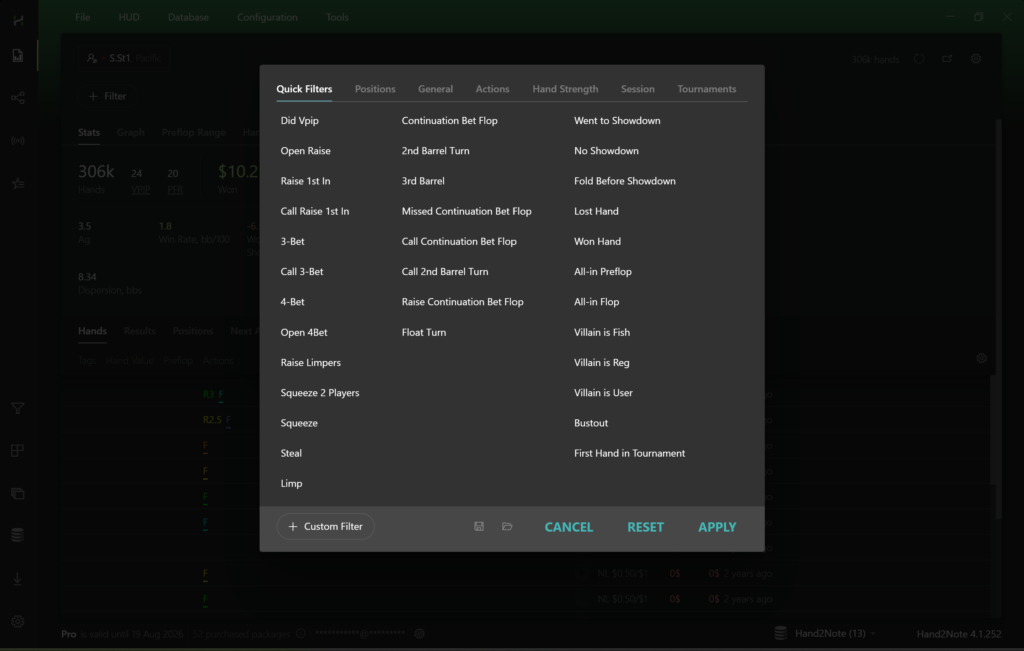
If the ready-made filters aren’t enough, you can build your own: set the number of players in the hand and describe the actions on each street in detail. You might select only the spots where an opponent c-bet half the pot. A filter like that produces an ordinary report with all the usual capabilities. Custom filters are available on the Pro plan.
Action Profit: Where the Money Actually Goes
This is probably the most underrated tool in the software. Action Profit is how much a specific action — a bet, a call, a raise — brings in on average. The math is simple. Pot of 10, bet of 5, everyone folds: the profit on that bet is 10. Pot of 10, bet of 5, an opponent raises and you have to give up: the profit on the bet is −5. A fold always has zero profit, since folding neither gains nor loses anything beyond what’s already invested.
The value here is that this metric can be compared across alternative actions. The workflow goes like this: build a report on flop c-bets and pin a second report next to it on missed c-bets — the spots where the chance to bet was there but no bet followed. Then compare the two reports column by column.
The results of a comparison like that are often surprising. It might turn out that bluff bets with weak hands and draws bring in more than checking, meaning you should be bluffing more often. And at the same time, that checking a strong hand brings in more than betting, meaning at these stakes it’s more profitable to play strong hands slowly. From a game theory standpoint that strategy is unbalanced, but against specific opponents who don’t know how to respond to it, it makes more money. That’s exactly what exploitative play is, and action profit is a way to find grounds for it in your own database rather than in general reasoning.
For a beginner this tool is useful for another reason too: it moves the conversation from the language of “right or wrong” to the language of money. Not “should I c-bet here” but “how much does betting bring in and how much does checking bring in, in my hands.”
Multiplayer Reports: Analyzing the Player Pool
Statistics on a single opponent are almost never enough. Fifty hands tell you nothing about how they play in a rare spot, and a thousand hands on one specific player is rare to accumulate. The solution is to calculate statistics not for one person but for a group.
Multiplayer reports combine data from every player matching the conditions you set: a particular stake, a particular site, a particular range of stat values, a particular color marker. What comes out is a portrait of the pool — how the field you’re about to sit down with plays on average.
The practical benefit here is direct. If the pool at your stake folds to 3-bets noticeably more often than average, you should be 3-betting wider from the very beginning — before you’ve collected any stats on individual opponents. If the field almost never donk bets, then a rare donk bet from an unknown player is a strong signal in itself. Conclusions like these work against every new opponent at once.
Notes, the Replayer, and Small Conveniences
Notes in Hand2Note are more visual than an ordinary text field. A hand can be dragged with the mouse straight into a note about a player — it’s saved there in full, in compact form, so later on it’s clear exactly what was being talked about.
The compact hand representation is a nice touch in its own right: an entire hand fits into a few lines, reads in a couple of seconds, and doesn’t distract you from your other tables. The same representation is used in hand lists and in the showdown indicator.
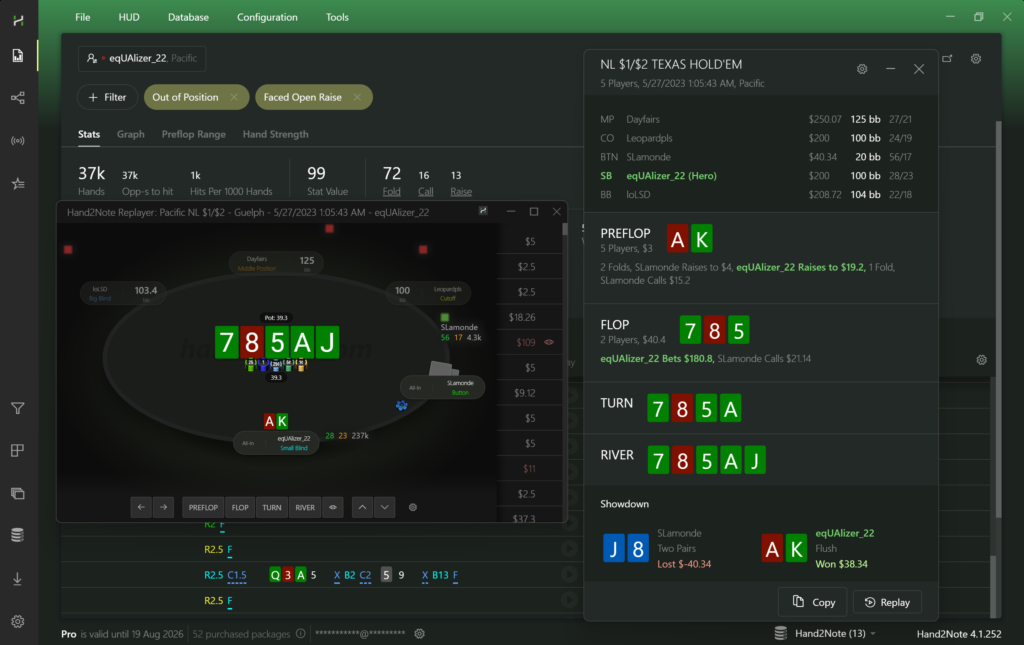
The replayer plays a hand back action by action, with the ability to move forward and backward. There’s also a separate display mode in the vertical format of a mobile client, for people who play in apps.
There are several tools for keeping the database in order as well. Hand tagging lets you mark interesting hands during play and come back to them after the session. Aliases link several screen names belonging to the same person across different sites into a single profile, so their statistics don’t get split apart. Excluding reg-vs-recreational hands helps you calculate stats separately for different opponent types — a player behaves very differently against a strong opponent than against a weak one, and blending that data into one number is often meaningless.
The Live Stream Hand Database
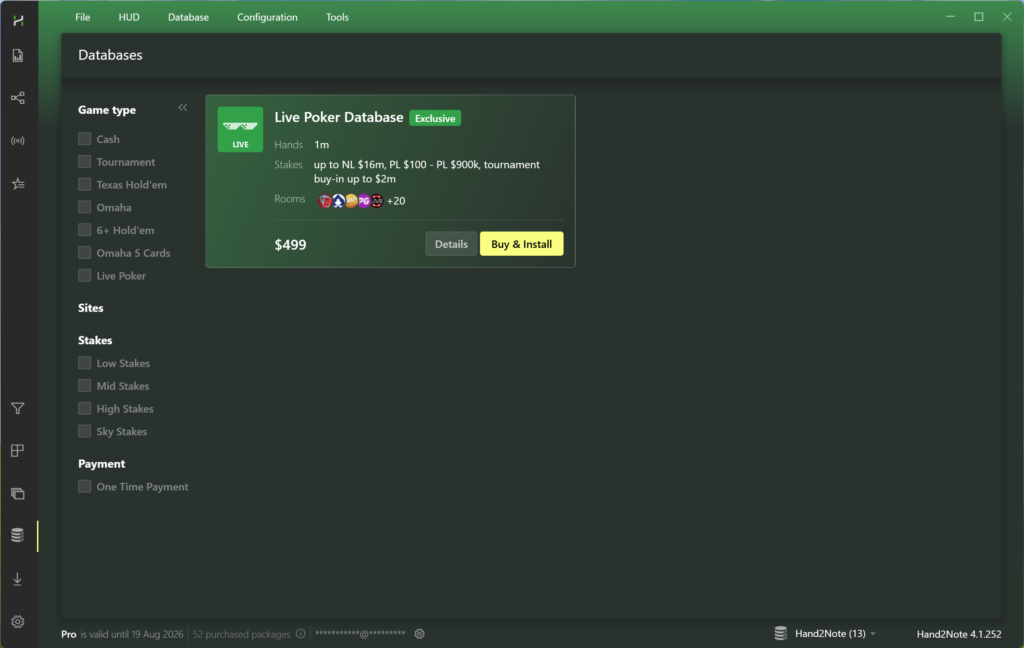
A separate product inside the software is a database of hands collected from live poker streams on YouTube. It holds more than a million hands from roughly 38,000 players across 19 channels, including Hustler Casino Live, Poker at The Lodge, and PokerStars Live. The key feature: every player’s cards are visible, including those who folded. Each hand comes with a link to the exact moment in the source video.
For learning purposes this is a rare opportunity. An ordinary database shows ranges with distortion: cards are only visible at showdown, and everything folded stays unknown. Here you see every hand, so ranges look the way they actually are. You can also practice hand reading: hide the cards, step through the hand action by action, and compare your read against reality.
The database is purchased separately, costs $499, and includes a year of daily updates plus a month of the Pro subscription. A sample — about 5% of the hands — is available for free. It can’t be used during play; it’s meant for review away from the tables, and in that capacity it doesn’t violate poker room rules.
Performance and the Database
The software has its own database engine, designed for large volumes. The stated import speed is over 5,000 hands per second; reports build in seconds, popups open instantly, and the replayer starts with no delay. In practice that means a database of several million hands stays workable: you don’t have to clean it out or split it up for the sake of speed.
For a beginner this matters less now than it will later. A database grows constantly, and a tracker that starts lagging at the second million hands will have to be replaced along with all the settings you’ve accumulated.
Compatibility: Formats and Sites
Games. Texas hold’em, short deck (6+ hold’em), Omaha, and five-card Omaha.
Formats. Cash games, tournaments, spins, and sit-and-gos.
Sites. More than fifty poker sites and apps are supported: PokerStars, GGPoker, 888poker, iPoker network partner rooms, BetOnline, the WPN network, Winamax, PokerBros, PPPoker, PokerKing, Red Dragon, UPoker, WePoker, Adda52, and others.
Mobile apps. The HUD works in mobile apps through an Android emulator — software that simulates a smartphone on your computer. LDPlayer is recommended, and Nox is supported as well. Hand2Note runs in the main operating system, connects to the emulator, and draws the HUD over its window. Some apps, PPPoker among them, also have a regular desktop client.
Operating systems. Windows, plus macOS with separate builds for Apple Silicon and Intel processors. Android emulators for mobile apps run on Windows.
Known limitations. GGPoker doesn’t permit a HUD, but it provides hand histories on request through support, and those can be imported and reviewed after play. On PokerStars, the iPoker network, and Winamax, the following are disabled: positional and dynamic HUDs, automatic color markers and icons, graphical range charts (the underlying data remains available as text in popups), and some stats tied to hand strength. All of these restrictions switch on automatically and only in play mode: in the replayer after a session, the HUD and popups work without any cuts. The software itself appears on the official approved-software lists of most major sites, since it doesn’t suggest decisions in real time.
Getting Started
Getting going comes down to a few steps.
- Download the installer from the official site — the Windows or macOS version — and install the software. The trial period starts on its own.
- Import your hand histories. You can import an entire folder, individual files, or an existing database from another tracker — PokerTracker 4, Holdem Manager 2 and 3, DriveHUD 2, and PostgreSQL server databases are supported.
- If you don’t have hand histories yet, turn on the test database with the button in the start window and look around using the sample data.
- Set up automatic import. In your poker client, enable hand history saving and note the folder; then, in the Hand2Note settings section, add that same folder as the auto-import folder. After that, your statistics will update on their own as you play.
- Launch the poker client. The HUD appears over the tables automatically.
Two conditions account for most cases where nothing works: the poker client’s language has to be English, and the Hand2Note folder should be added to your antivirus exclusions. It’s worth playing your first sessions with the simplest set of stats — VPIP, PFR, and hand count — and only then moving on to more complex panels.
Support answers in chat around the clock, and there’s a detailed manual, a forum, and a community on Discord and Telegram.
Pricing
The software runs on a subscription. There’s a free 14-day trial with access to nearly every feature, minus custom report filters and with the database capped at 5 million hands.
After that there are two plans. Learner is aimed at micro stakes: a database of up to 200,000 hands, cash games up to $0.25 big blinds, tournaments with buy-ins up to $20 + $2, and no custom report filters; everything else, including the HUD on all sites and mobile apps, is available. Pro removes the restrictions entirely: any stakes and formats, an unlimited database size, custom filters, and the full set of pool analysis tools. You can move from Learner to Pro at any point, and the remaining paid time is credited automatically.
A detailed breakdown of plans and prices is on the product description page.
The Bottom Line
Hand2Note is a tracker that works equally well during play and after it. At the table it gives you opponent statistics in exactly the amount the current situation calls for. After a session it gives you reports that tell you what to look at, plus an action profit tool that shows your leaks in money rather than in impressions. Pool analysis is a distinct benefit for a beginner: it lets you play sensibly against unfamiliar opponents from the very first hand.
There’s a lot here, and trying to learn all of it at once isn’t wise. A sensible order: start with a simple three-stat HUD and the habit of importing your hands; after a couple of weeks, reports on your most common spots; then action profit; and only then building your own panels and stats. Approached that way, the software helps from day one, and the complex tools come online once you have both the accumulated data and a reason to use them.

Featured software

Latest posts
-
 Poker Academy Review: Ranges, Solver, and Trainer in One Browser Window Oct 11, 2026
 -
 SmartHand Review: Opponent Stats Before the First Hand Oct 10, 2026
 -
 888Caption Review: A Tool for Fast-Paced Multi-Tabling Oct 9, 2026
 -
 Preflop ICM Solving in GTO Wizard: ICM-Aware Preflop Solutions in Seconds Oct 8, 2026
 -
 Octopi Poker Review: Tournament GTO With Pro Hand Reviews Oct 7, 2026
All the poker software you need, gathered in one place. Exclusive discounts, bonuses, latest news and updates.
Join now