Deepsolver Review: A Browser-Based Solver That Calculates in Seconds
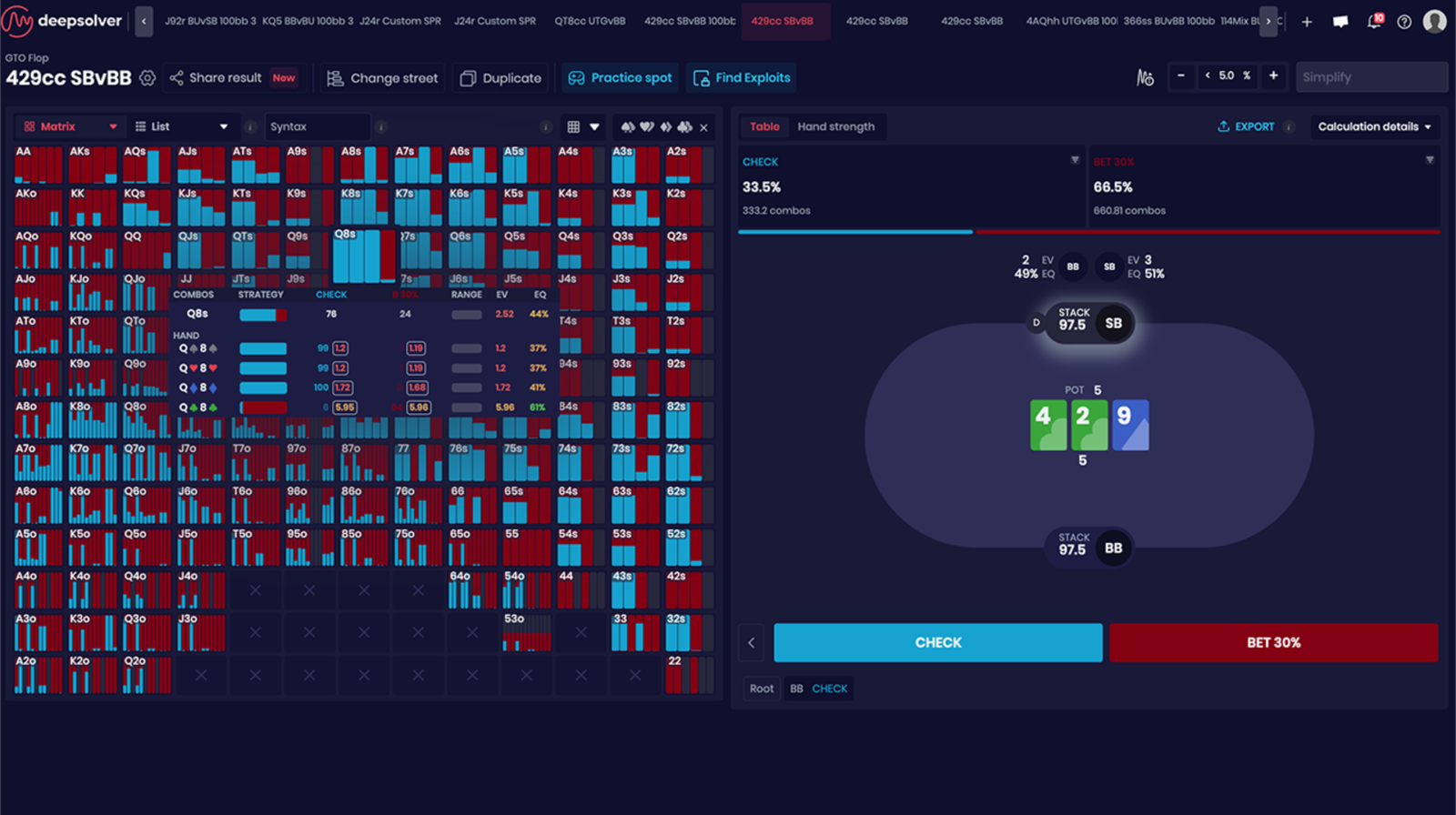
Deepsolver is a tool for studying optimal strategy in no-limit hold’em. It belongs to the solver category: tools that mathematically calculate an equilibrium strategy for a specific situation— which hands to bet, call, or fold and at what frequencies so that an opponent cannot exploit the strategy. This is known as GTO (game theory optimal) strategy.
The key difference between Deepsolver and traditional solvers is that it does not need to be installed and does not require a powerful computer. Everything runs in a browser, while calculations are performed on the developer’s servers. Users simply configure a situation and receive a complete strategy within seconds, including frequencies, EV estimates for each action, and clearly color-coded ranges.
The software handles two main types of tasks. The first is reviewing your own play: seeing how theory recommends playing a specific hand and identifying where your decision at the table differed from the optimal one. The second is preparing for specific opponents: modeling their common mistakes and calculating a strategy that exploits them.
How the Software Works
A traditional solver builds a game tree covering all three postflop streets—flop, turn, and river—and processes it until the strategy converges. A tree maps every possible action by both players: each bet, raise, and fold creates a new branch. The more bet sizes the tree contains, the wider it becomes and the more time and resources it takes to solve. This explains the hardware requirements of previous-generation solvers, which may need tens or even hundreds of gigabytes of RAM.
Deepsolver works differently. It combines the traditional CFR algorithm (counterfactual regret minimization, a method that repeatedly refines a strategy by analyzing the “regret” associated with unsuccessful actions) with neural networks. The neural network estimates how the rest of the hand will play out, so the software only needs to solve one street at a time rather than the entire tree. The result is a calculation that takes seconds instead of minutes or hours.
This approach has a direct consequence that is important to understand in advance: you cannot view the entire tree at once, with every possible turn and river listed together. Each subsequent street is calculated separately on request. In practice, this does not mean losing data, but following a different workflow: first you study the flop, then run the turn you are interested in, and finally the river. Each calculation takes a few seconds. For the same reason, you cannot lock a river strategy and see how that changes play on the turn—the feedback between streets is not calculated.
The developer measures solution accuracy using a metric called Nash Distance, which represents deviation from a perfect equilibrium: the closer it is to zero, the more accurate the strategy. In tests covering 720 situations with different ranges and boards, the average value was 0.59%.
Custom Solutions: Where Every Calculation Begins
The software’s main module is Custom Solution. This is where you configure the situation you want to analyze: player positions, effective stack, pot size, board, and both players’ ranges.
There are two ways to configure a situation. The first is the traditional form-based interface with fields, which is convenient for players who have already used solvers and know exactly which parameters they need. The second is a visual interface that displays a virtual table and lets you configure the setup directly. The result is the same, so the choice comes down to personal preference.
One limitation is worth knowing from the outset: Deepsolver calculates heads-up postflop situations. This is a standard limitation among solvers—hands involving three or more active players postflop cannot be solved. The software does not calculate preflop play itself, but instead uses the built-in range library described below.
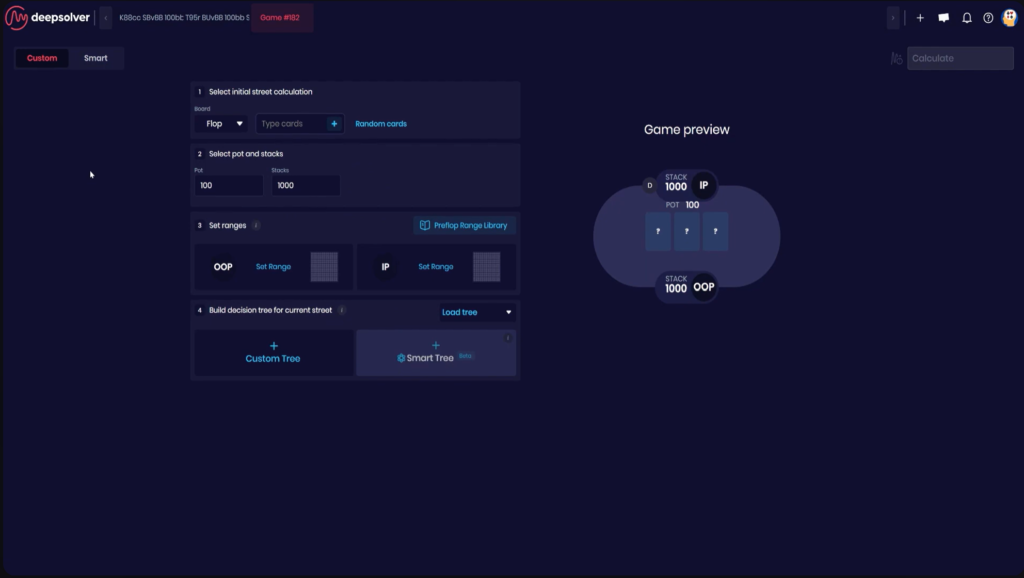
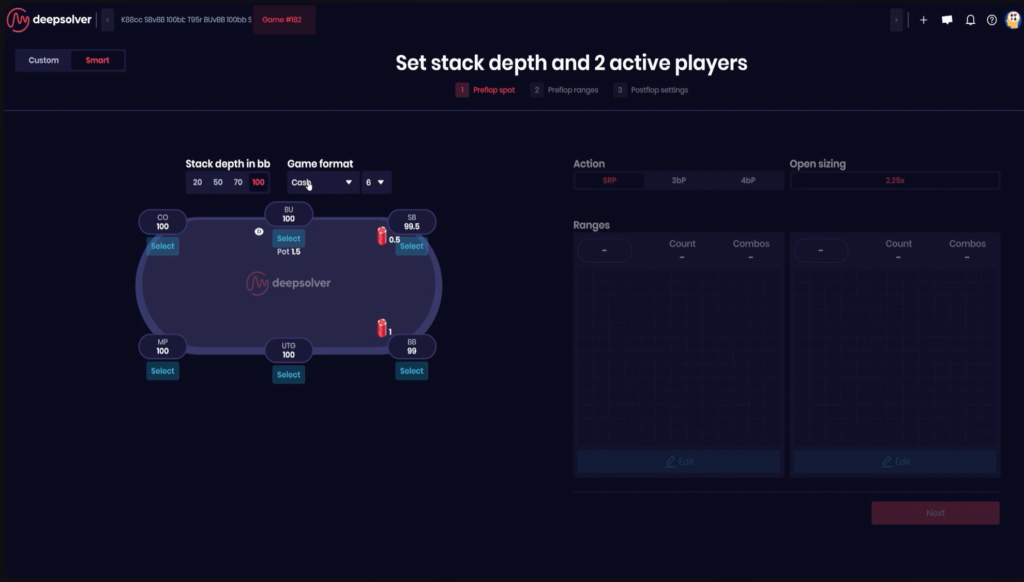
For beginners, the module is valuable because it allows them to test any assumption they may have. If you think a smaller continuation bet would have been better on a dry board, you can configure the situation in a minute and see what theory recommends and exactly how much EV the alternative decision loses.
Library Ranges Instead of Manual Input
Every postflop calculation begins with the hands each player reaches the flop with. Entering these ranges manually takes time, while purchasing separate range packs can be expensive. Deepsolver includes a library of ready-made preflop ranges: simply specify who opened and who responded, and the software will automatically load balanced ranges.
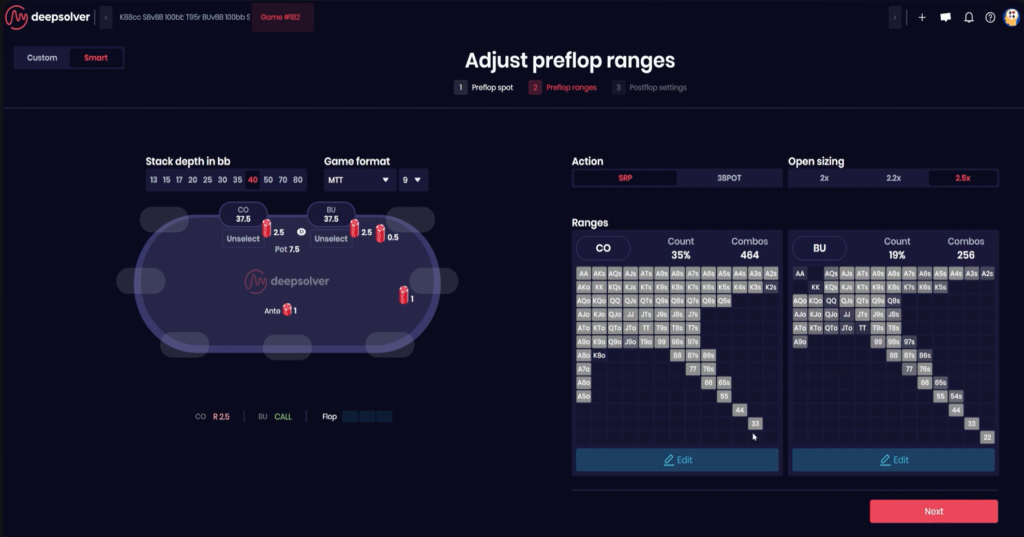
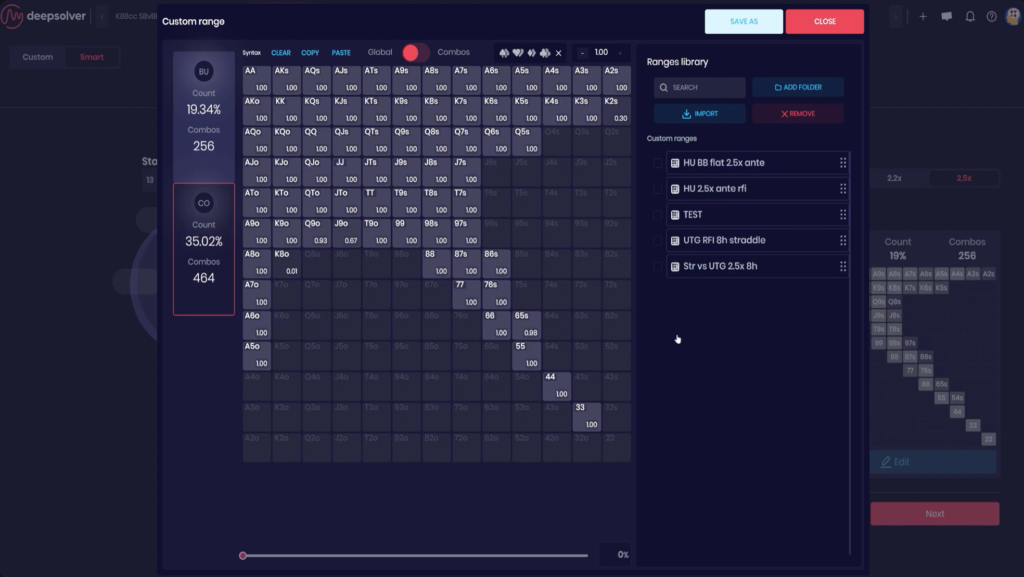
This is one of the most useful features for beginners because it removes the need to understand preflop theory before starting to study postflop play. A scenario in which the BTN, or button, opens and the BB, or big blind, defends can be set up in two clicks, after which you can move straight to analyzing the flop.
These ranges are not permanently fixed. Any of them can be edited manually—for example, if you know that an opponent defends the big blind significantly wider than recommended. This lets you calculate a strategy against the actual player pool at your stakes rather than an abstract opponent.
Bet Trees: Automatic or Manual
Deciding how many bet sizes to include in a calculation is something beginners often struggle with. Too many sizes make the calculation cumbersome and difficult to read, while too few produce an overly simplified strategy.
Smart Tree Builder handles this with one click. For the selected flop, the software suggests two bet sizes for each player—the sizes that its tests most frequently found to be among the most profitable across different stacks and ranges. These are not guaranteed to be the best sizes for that exact combination of stack and range, but rather a weighted estimate. Even so, they are convenient for study because you do not have to guess where to begin.
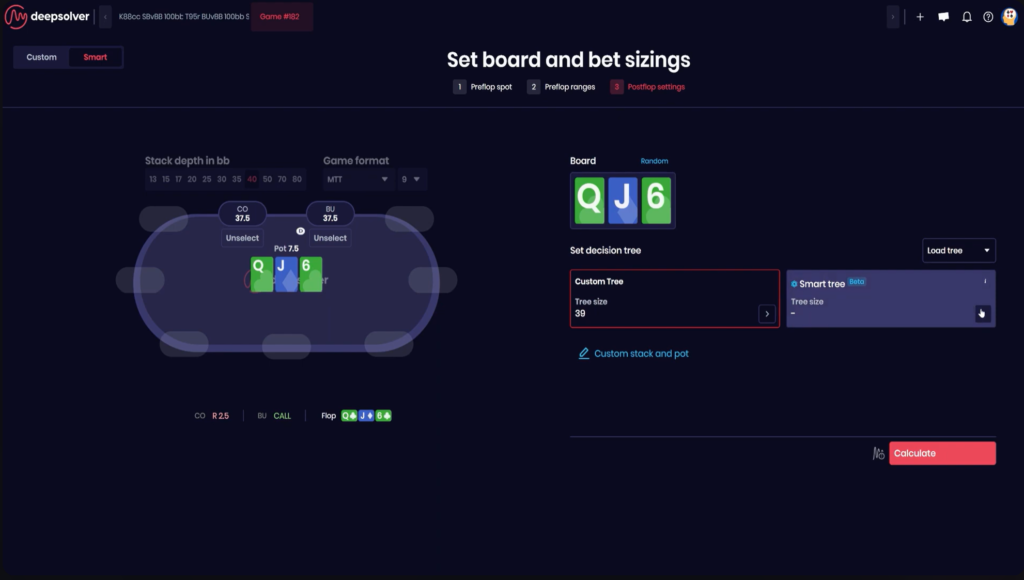
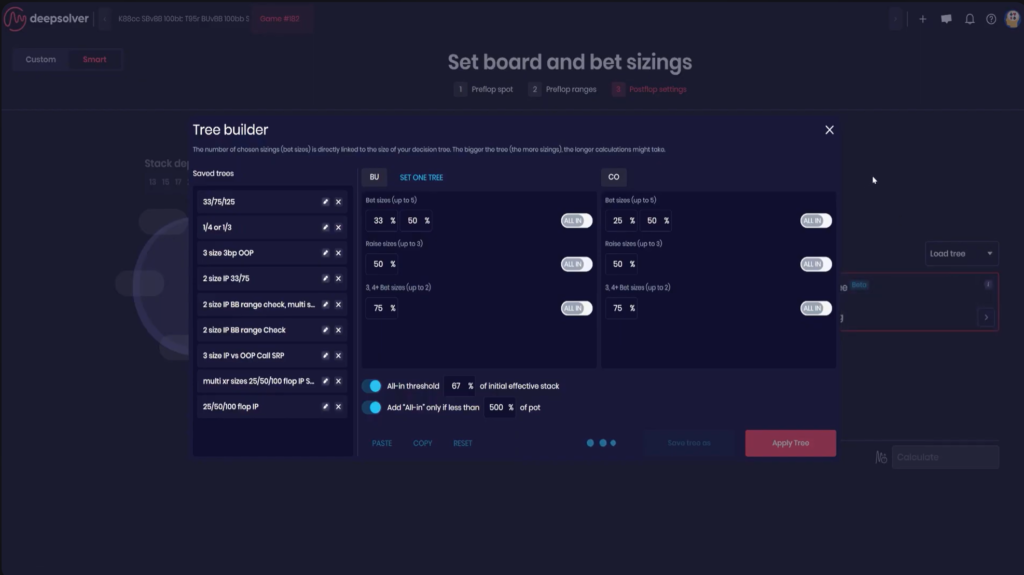
A fully manual mode is also available. It lets you specify any bet and raise sizes, either as percentages of the pot or in chips, and build the tree exactly as required. A practical starting point is to use two sizes per street. It makes sense to expand the tree later, once you have specific questions about specific lines.
The Results Screen: How to Read a Strategy
Once the calculation is complete, the solution screen opens. It consists of several interconnected sections.
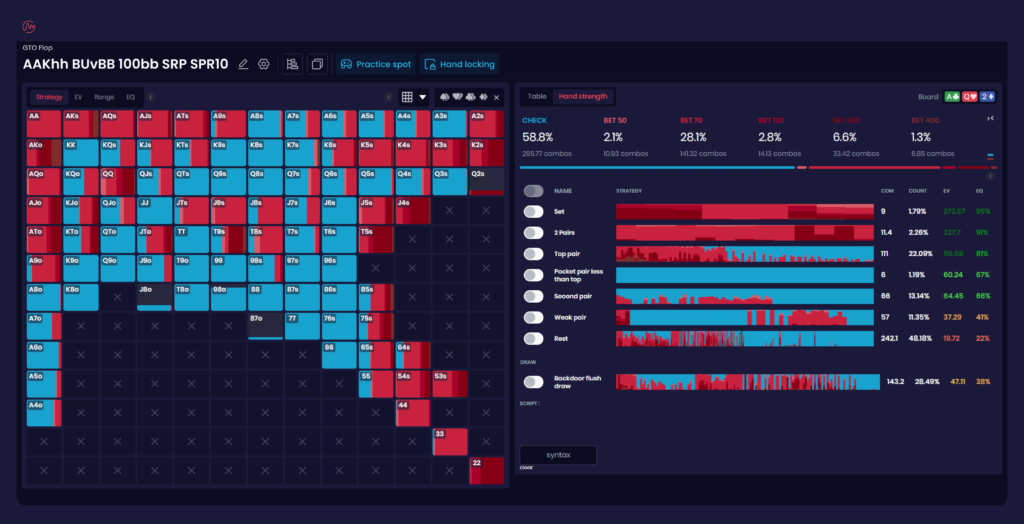
The 13×13 hand matrix is a table containing every starting-hand combination. Each cell is color-coded by action, showing what proportion of the combinations bets, calls, or folds. The colors can be customized, as can the card design and font size.
The action summary displays overall frequencies: how often the entire strategy bets, checks, or folds at this point, as well as the average value of each action. Profitability is expressed as EV, or average expected winnings in chips.
Hand-strength grouping divides the range into intuitive categories such as top pair, middle pair, flush draw, gutshot, combo draw, and so on. For beginners, this is the fastest way to understand the underlying logic: instead of memorizing hundreds of individual hands, you can see that draws bet on this board while weak pairs check.
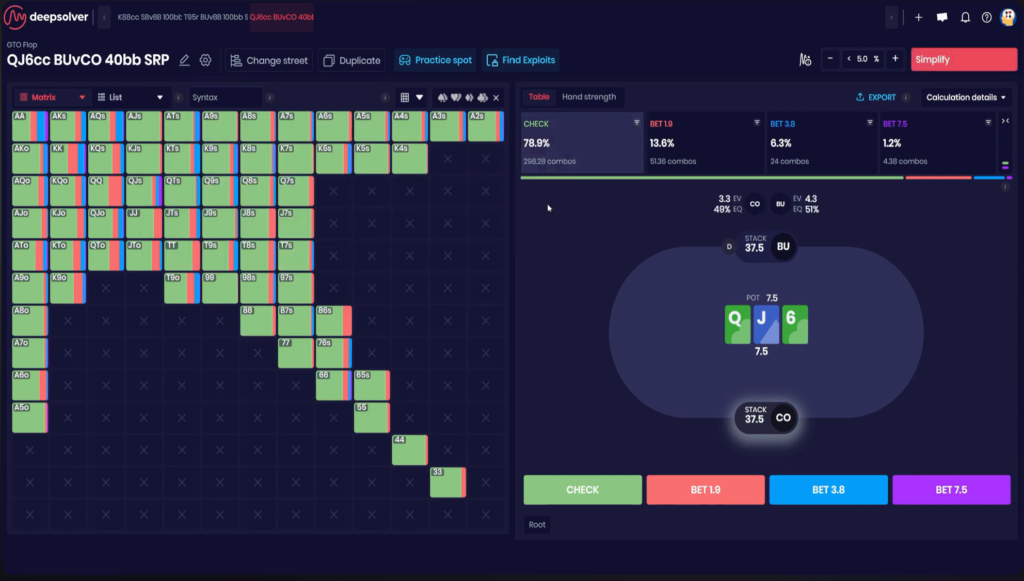
One detail on the results screen often raises questions. In the trainer, an action with formally higher EV may sometimes be marked as incorrect. This is because solver frequencies converge to the correct values faster than EV estimates, so frequencies are considered the more reliable guide: if the software recommends an action at any frequency, that action is acceptable.
Aggregate Reports: Strategy Across Hundreds of Boards
An individual calculation answers a question about one specific flop. In actual play, however, it is more important to understand broader patterns and how strategy changes with board texture.
An aggregate flop report calculates the selected situation across a large set of boards and summarizes the results in a single table. It shows the textures on which the aggressor bets almost the entire range, where the strategy switches to a large size, and where most hands check. This is how you build a practical game plan that can be applied at the table without having to remember individual calculations.
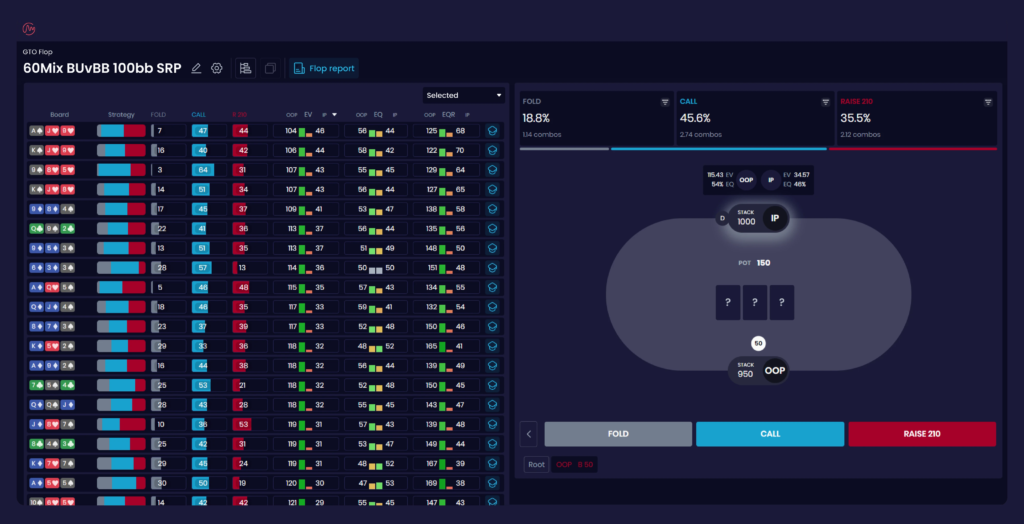
The runout report works in a similar way for later streets. It shows which turns and rivers benefit each player and what the overall strategy looks like on those cards. This helps explain why one card sharply improves the defender’s position while another allows the aggressor to keep applying pressure.
Both reports are included in the higher-tier plan.
Playing Against a Specific Opponent: Node Locking
An equilibrium strategy assumes that your opponent also plays perfectly. That is almost never the case at real tables, where most profit comes from exploiting other players’ mistakes.
For this purpose, the software includes node locking, which lets you fix an opponent’s strategy. The idea is to “force” the opponent to play as they do in real life and then recalculate the best response to that behavior.
There are two ways to do this. The first uses predefined profiles: the software offers different opponent archetypes, such as a player who folds too often to bets or, conversely, an excessively aggressive player. The strategy can be locked to the selected profile with one click. The second method is manual: you assign the desired action frequencies to individual hands or hand groups. For example, you can specify that an opponent makes a large bet with their entire range and see how to exploit it.
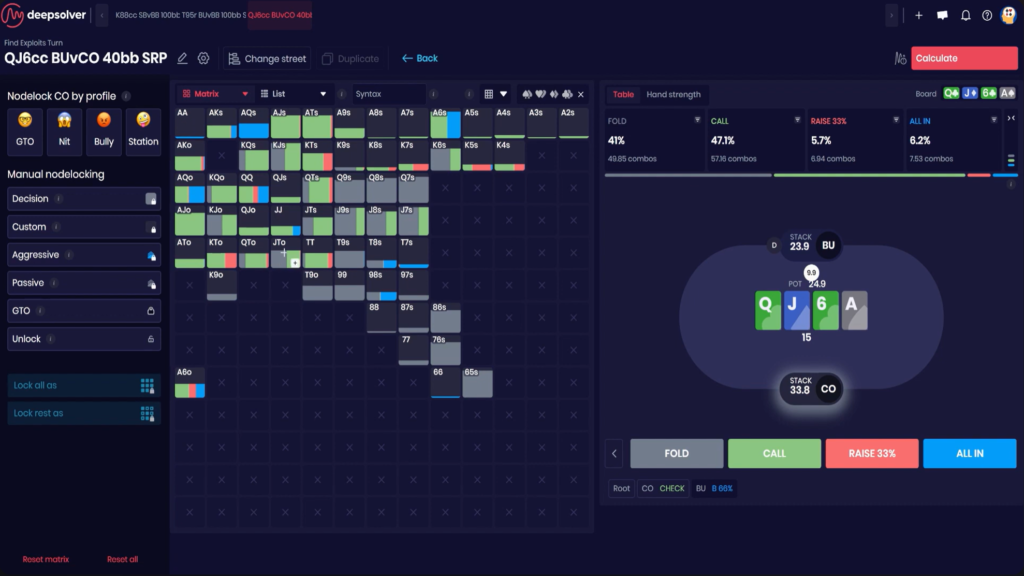
One important detail of manual mode is that if you lock only strong hands, the strategy for the remaining hands will change automatically when the solution is recalculated. Before running the calculation, you should therefore check the matrix to see exactly which hands are marked as locked. This directly determines the question you are actually asking the software.
The resulting exploitative strategy can be compared with the equilibrium strategy to see exactly where they differ and how much EV the adjustment adds. Profile-based opponent strategy locking and automatic exploit detection are available with the higher-tier plan.
The Trainer: Turning Theory Into Instinct
Understanding a solution and learning to make the same decision at the table are two different tasks. For the latter, the software includes GTO Trainer. It presents situations in which you must make decisions independently and then compares your choices with the calculated strategy.
Unlike most trainers, its scenarios are not taken from a library of precomputed solutions. You can practice any scenario, including custom ranges, arbitrary stack depths, specific bet sizes, and particular board textures. The trade-off is that each street is calculated while the hand is being played, so there is a short pause between streets.
Two modes are available. Training mode immediately shows the correct answer and lets you review a mistake on the spot. Test mode provides no hints and evaluates your result at the end, making it closer to real playing conditions, where there is no immediate feedback at the table.
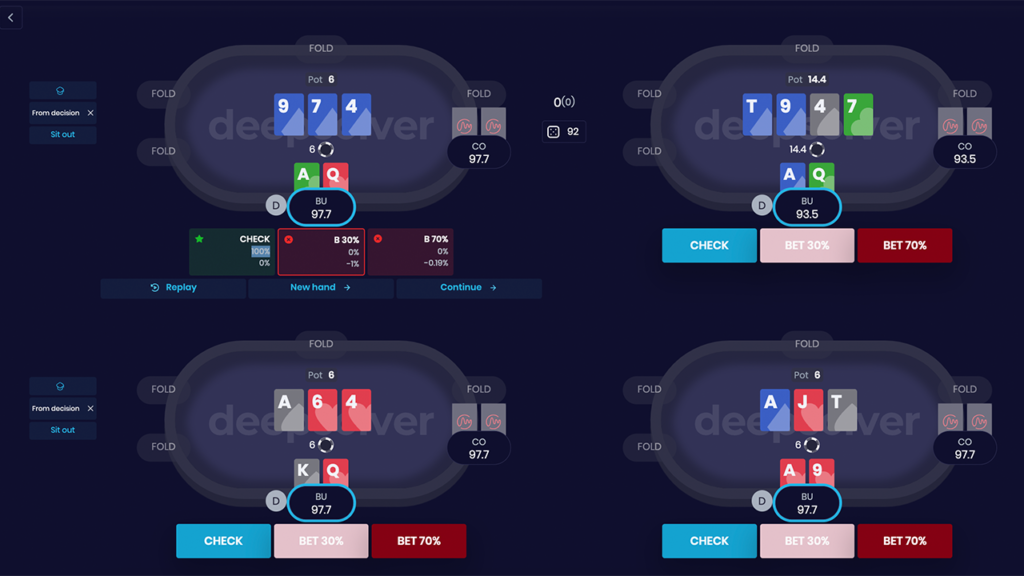
You can practice at several tables at once, with up to four running simultaneously. This is useful for multi-tablers because the skill should be practiced at the same pace at which it will be applied.
There is also a separate mode for playing against a calculated solution, including an exploitative strategy created through node locking. This creates a complete cycle: identify an opponent’s mistake, calculate the response, and practice that response until it becomes automatic.
Policy on Using the Software During a Session
The developer openly opposes the real-time use of solvers and restricts this possibility through the software’s architecture. Entering the parameters and calculating a single street takes at least half a minute, making it impractical within the decision time available at an online table.
The website also provides a Fair Play Check tool. Every calculation is stored on the software’s servers, and users can check whether a particular board has been calculated during the previous seven days, including the exact UTC time. If both the board and the time match an online hand, the result and its verification ID are sent to the poker room’s security team. The developer states that it is prepared to provide data to poker rooms during investigations.
For regular users, this means two things: the software is intended exclusively for off-table study, and using it during play can be detected and may result in the poker room account being suspended.
Compatibility: Formats and Platforms
Deepsolver runs entirely in a browser. Nothing needs to be installed, and the operating system does not matter—all you need is a modern browser and an internet connection of at least 10 Mbps. Mobile devices are not supported.
The supported game is postflop heads-up no-limit Texas hold’em. Tournament and Sit & Go situations can be analyzed by configuring stacks, ranges, and pot sizes to match tournament conditions, but the software does not perform separate ICM calculations. Omaha and short deck were not supported when this article was prepared, although the developer lists them as planned features.
The software is not connected to any poker room and does not integrate with poker clients. It is a study tool, not an overlay for use at the table. Ranges and hands are supported in common formats, allowing you to transfer work from other programs to Deepsolver and vice versa.
It is also worth noting that hand-history import with automatic analysis is listed as a feature in development. The plan is for the software to select ranges and build a tree automatically from uploaded hands. However, you should not treat this as a currently available feature.
How to Get Started
Getting started takes just a few steps.
First, register on the website and activate the free trial. It lasts two days and provides full access. You can cancel the subscription during the trial. Calculations are unavailable without an active subscription or outside the trial period.
Second, complete the short introduction. New users are greeted by built-in onboarding with tutorial videos, while the website has a separate video section covering quick starts for Custom Solution, aggregate reports, GTO Trainer, and exploit detection. The developer also offers an individual introductory session and in-app support chat.
Third, run your first custom calculation. A sensible way to begin is to choose a situation you encounter frequently, such as a flop continuation bet in a raised pot, load ranges from the library, build the tree with Smart Tree Builder, and study the result by hand-strength groups rather than individual hands.
Fourth, transfer those conclusions to the trainer. One or two situations practiced until the correct decisions become automatic will provide more value at the table than a dozen calculations reviewed only briefly.
One useful technical detail is that some browser extensions can interfere with the software. If the interface behaves unexpectedly, the developer recommends opening it in incognito mode.
Pricing Plans
There are two subscription options. The lower-tier plan includes unlimited calculations and unlimited trainer use, Custom Solution, the preflop range library, Smart Tree Builder, strategy comparison, and playing against a solution. The higher-tier plan adds aggregate flop and runout reports, automatic exploit detection based on opponent profiles, strategy simplification, priority in the calculation queue, and VIP support.
Priority in the queue is not merely a marketing feature: all solutions are calculated in real time on shared servers, so launching a calculation may take longer than usual during peak hours.
Subscriptions can be paid monthly or annually, with the annual option being significantly cheaper per month. A free two-day trial provides access to all features. A detailed description of the plans and prices is available on the product page.
Conclusion
Deepsolver is a good entry point for anyone who wants to start working with solvers without investing in expensive hardware or learning how to configure resource-intensive software. Calculations take seconds, situations are configured in a browser, and the ready-made preflop range library and automatic tree building eliminate much of the setup work that typically causes beginners to struggle.
The limitations are also straightforward: hold’em only, heads-up postflop spots only, and no way to view the entire tree at once, since each street must be calculated separately.
The best approach is to learn the software gradually. Start by analyzing several common situations from your own play and reading the results by hand-strength groups. Then move on to aggregate reports to identify patterns across board textures rather than focusing on isolated calculations. Only after that should you explore node locking and prepare strategies against specific opponent types. Following this order ensures that each new module builds on something you already understand instead of becoming another collection of unfamiliar numbers.

Featured software

Latest posts
-
 Poker Academy Review: Ranges, Solver, and Trainer in One Browser Window Oct 11, 2026
 -
 SmartHand Review: Opponent Stats Before the First Hand Oct 10, 2026
 -
 888Caption Review: A Tool for Fast-Paced Multi-Tabling Oct 9, 2026
 -
 Preflop ICM Solving in GTO Wizard: ICM-Aware Preflop Solutions in Seconds Oct 8, 2026
 -
 Octopi Poker Review: Tournament GTO With Pro Hand Reviews Oct 7, 2026
All the poker software you need, gathered in one place. Exclusive discounts, bonuses, latest news and updates.
Join now