WinamaxCaption
A multi-tabling utility for Winamax that arranges tables, assigns betting hotkeys, and shows a HUD with pot odds and SPR, speeding up play across tables. Read full review
Screenshots
Pros & Cons
| Pros | Cons |
|---|---|
| Flexible bet scripts by filter | Winamax only |
| Table highlighting with dozens of rules | Windows only |
| Free access up to NL10 | No built-in opponent-stats database |
| One-month unrestricted trial | Requires reconfiguring the client for the tool |
| Playground mode for weaker PCs | |
| Flexible tags and color thresholds in the HUD |
Description
WinamaxCaption is a helper tool for players running several tables at once on Winamax. Instead of clicking into each table by hand and re-entering a bet size on every single hand, the tool takes over the routine actions and leaves the player with just one decision: act or skip.
At its core are hotkeys and bet scripts. A hotkey performs a standard action with a single key press or mouse click: check or fold, call, bet or raise, sitting out ahead of the big blind, opening a repeat table of the same format, calling up the replayer, and other table-management operations. A bet script, meanwhile, fills the bet field in advance with the right size — calculated as a formula based on pot size, the opponent’s bet, or the number of limpers or re-raises — so the only thing left to do is hit the action button.
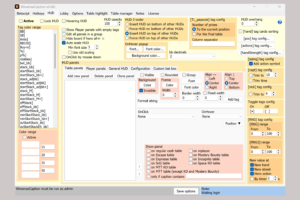
A separate module is the on-table information HUD. It displays the blind level, pot odds for calling and pushing, stack-to-pot ratio (SPR), effective stacks, tournament data, and other in-game figures that a player would otherwise have to keep in their head or calculate on the fly. Values can be color-coded by threshold range so the important numbers stand out immediately. Table highlighting itself — as a border or a fill — is configured separately, based on dozens of conditions: whether it’s your turn to act, whether you’re sitting out, whether the pot or stack is large, and how many seconds are left to decide.
The tool is built for playing a large number of tables at once, including Winamax’s lightweight Playground mode, which puts less strain on weaker computers. Automatic activation brings to the front exactly the table where action is needed right now, and decides on its own which of several tables demanding attention at the same time is more urgent based on the time remaining.
It’s worth understanding that WinamaxCaption doesn’t keep a hand history or collect opponent statistics the way poker trackers do: it’s a utility for table management and situational prompts, not a database on opponents. For statistics, players typically use it alongside separate services that look up player information.
Pricing
-
Free access with no time limit: at NL10 and below, as well as in tournaments with a buy-in of up to €3.
-
Trial period: one month of full access at any stakes, activated on request within the tool.
-
Full license: $30 USD per year, with early renewal available — any days remaining on the current license are added to the new term.