Simple Preflop Holdem Review: GTO Preflop Strategies for Any Table
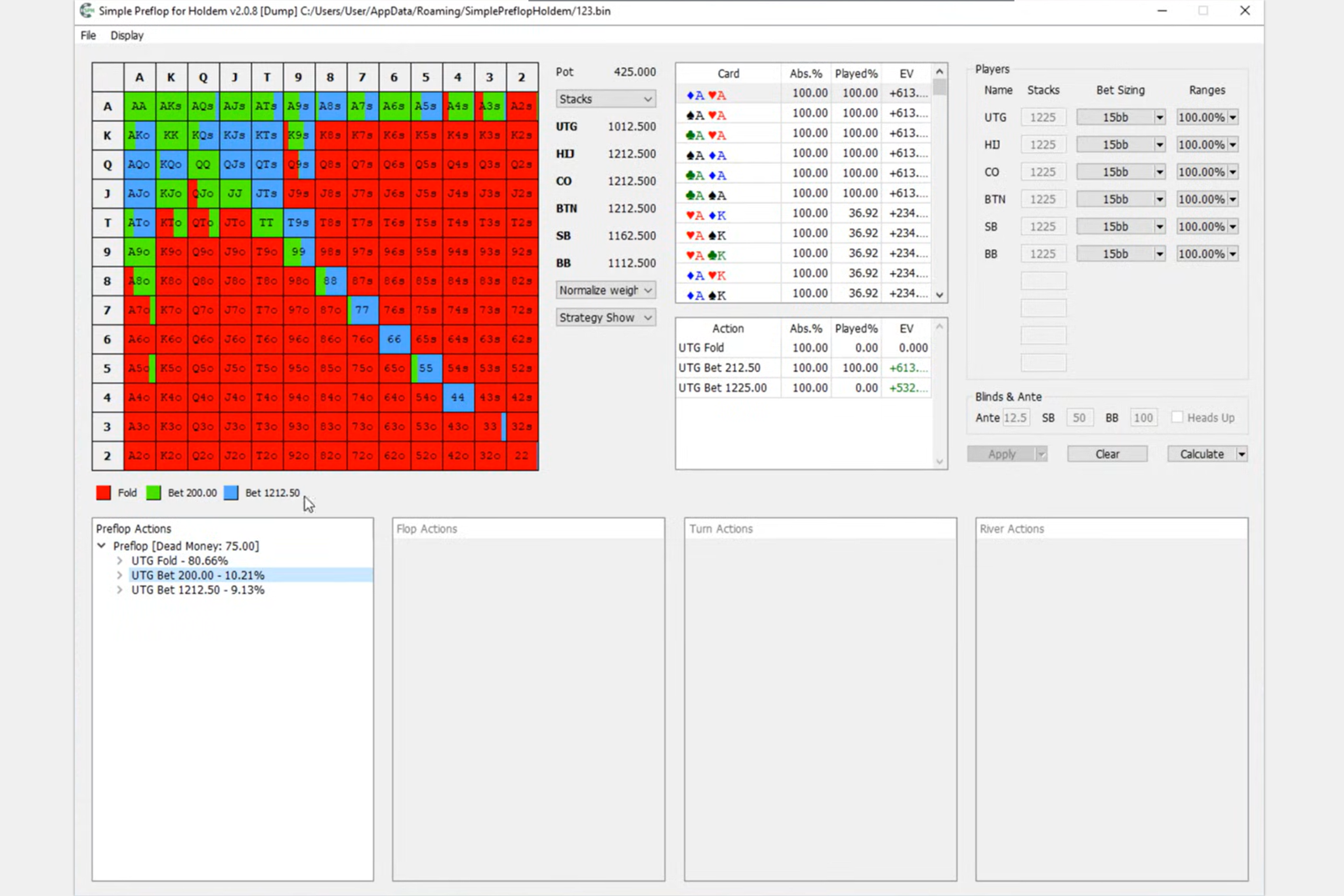
Simple Preflop Holdem is a preflop solver for Hold’em—a program that calculates optimal game-theory strategies for play before the flop. The user defines the situation: the number of players at the table, their stack sizes, the available bet sizes, and either the rake or tournament payouts. The program uses these inputs to build a game tree and find an equilibrium—a set of strategies in which no player can benefit by changing their strategy independently.
The output consists of familiar preflop ranges calculated for specific conditions: your poker room, rake structure, stack depths, and format. This is especially valuable when ready-made ranges do not fit the situation, such as with unusual stack sizes, ICM tournament spots, knockout tournaments, straddled games, or multiway pots.
Simple Preflop Holdem was developed by the Simple Poker team—the same team behind Simple Postflop, Simple 3-Way, and Simple GTO Trainer. The program runs locally on the user’s Windows computer.
What Goes Into a Preflop Calculation
To use the program confidently, it helps to understand a few basic concepts.
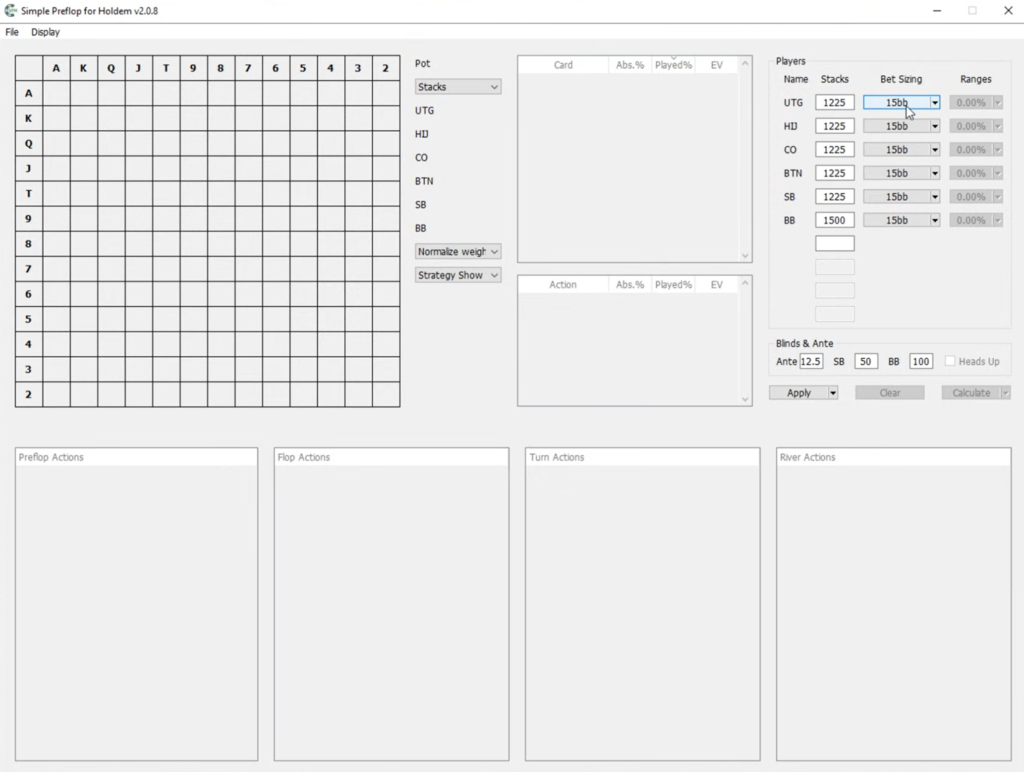
Game tree. This is a map of every possible action at the table: who opens, who responds by raising, calling, or folding, what happens after a 3-bet, and so on. Each decision point in the tree is called a node, while each possible action at a node is called a branch. The more bet sizes and players you include, the larger the tree becomes and the more demanding the calculation is.
Input ranges. These are the sets of hands with which each player enters the pot. By default, everyone starts with the full set of 169 starting hands, and the program determines which hands to play and how to play them. Ranges can also be entered manually—for example, when calculating a defense strategy against a known opening range.
Postflop abstractions. A preflop solution depends on how the hand will play out afterward, so the solver must account for play on the flop, turn, and river. Accurately calculating every street for 6–10 players is beyond the capabilities of any home computer, so postflop play is simplified: similar combinations of hands and boards are grouped together into buckets. Fewer groups mean faster calculations and lower memory requirements, but also a less precise result. The user chooses the level of simplification.
Iterations. The solver finds an equilibrium gradually, repeatedly refining every player’s strategy. Each pass is called an iteration. The longer the calculation runs, the closer the result gets to equilibrium.
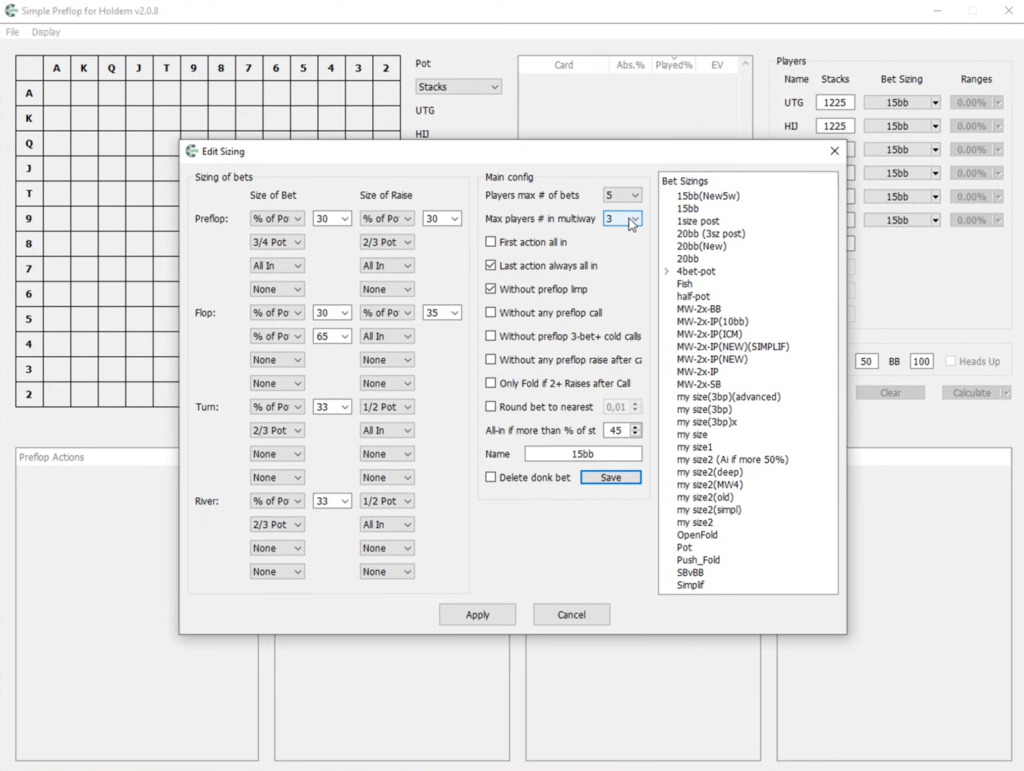
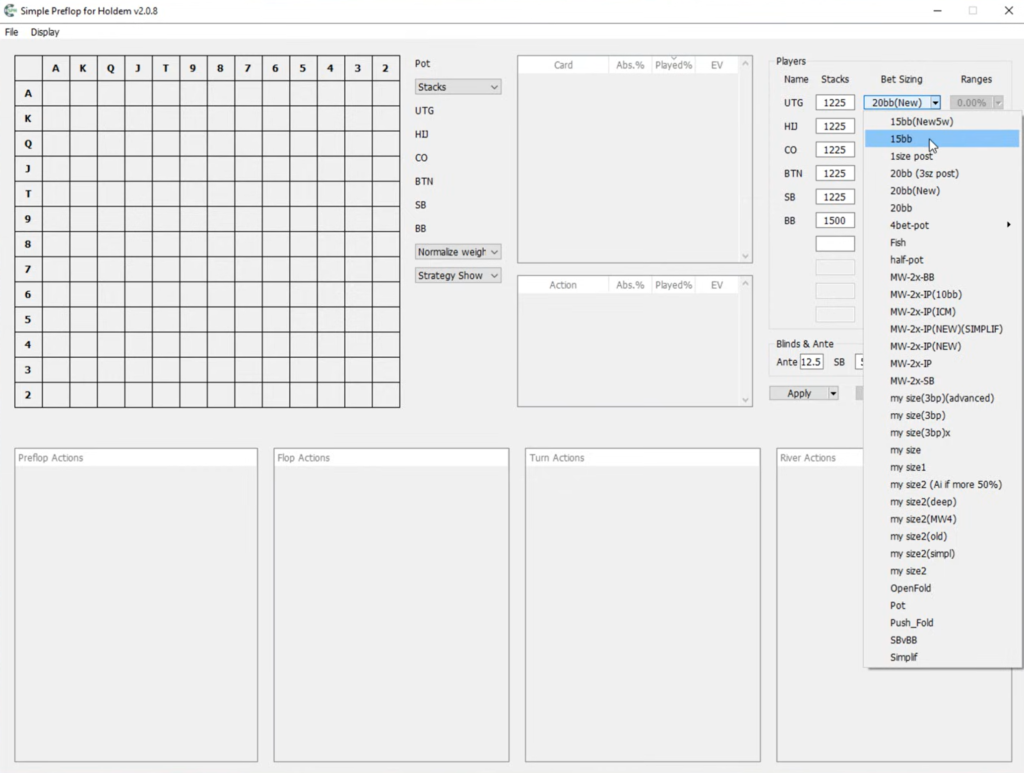
The workflow is always the same: build the tree, choose a calculation model (ChipEV, ICM, or rake), set the abstraction level, run the calculation, and study the result.
Building the Tree: From Bet Sizes to a Complete Structure
You do not have to draw the tree manually, one branch at a time. The user specifies the bet sizes available to each player: the open size, 3-bet size, 4-bet size, and so on. These can be entered as fixed amounts or as percentages of the pot. The program then generates the entire tree from these settings.
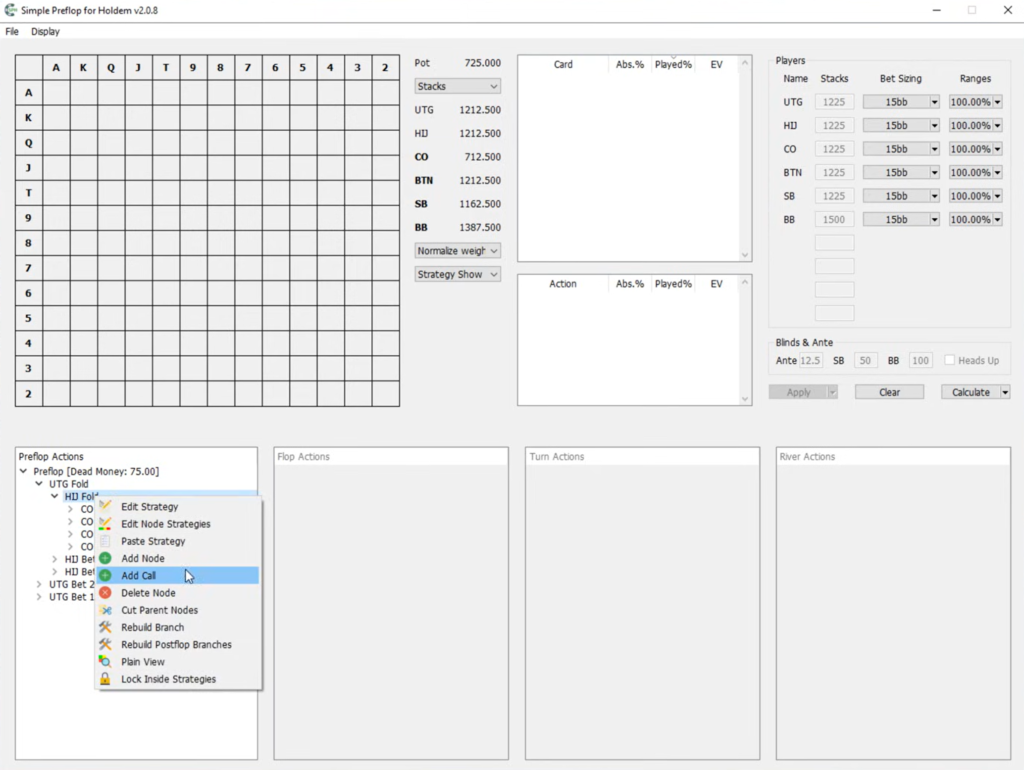
The tree can then be refined:
- Node editing. You can open any node and manually change the available actions and bet sizes.
- Branch rebuilding. The Rebuild Branch option reconstructs the tree within the selected node using new bet sizes without affecting the rest of the structure.
- Simplification filters. Separate settings can remove cold calls against 3-bets and 4-bets from the tree, prevent a player who has already called from raising, or force that player to fold after two or more raises. These restrictions have little effect on the final strategy but reduce the tree considerably.
- Removing unnecessary parent branches. The Cut Parent Nodes feature removes every alternative higher-level branch that does not lead to the selected situation. This allows you to keep only the spot you want to study in the tree.
- Removing rarely used branches. The Pruning Tree feature removes branches within a node that are used less often than a specified percentage in the calculated solution.
The last feature is particularly useful in practice. A typical workflow is to calculate a tree containing many bet sizes with coarse abstractions, remove the sizes that are rarely used, and then recalculate the streamlined tree with greater precision.
The program supports antes and straddles. The straddle is posted by the player seated after the BB (big blind) and is equal to 2 big blinds. For convenience, there are keyboard shortcuts for navigating the tree and an interface mode that enlarges the tree area.
Why this matters for beginners. You can calculate the exact bet sizes used in your games. If players in your pool usually open to 2.5 big blinds rather than 3, ranges calculated for a 3-big-blind open will be inaccurate. Building your own tree solves this problem.
Calculation Models: Cash Games, Tournaments, and Knockouts
The same hand plays differently in a cash game and a tournament, so Simple Preflop Holdem offers several calculation models.
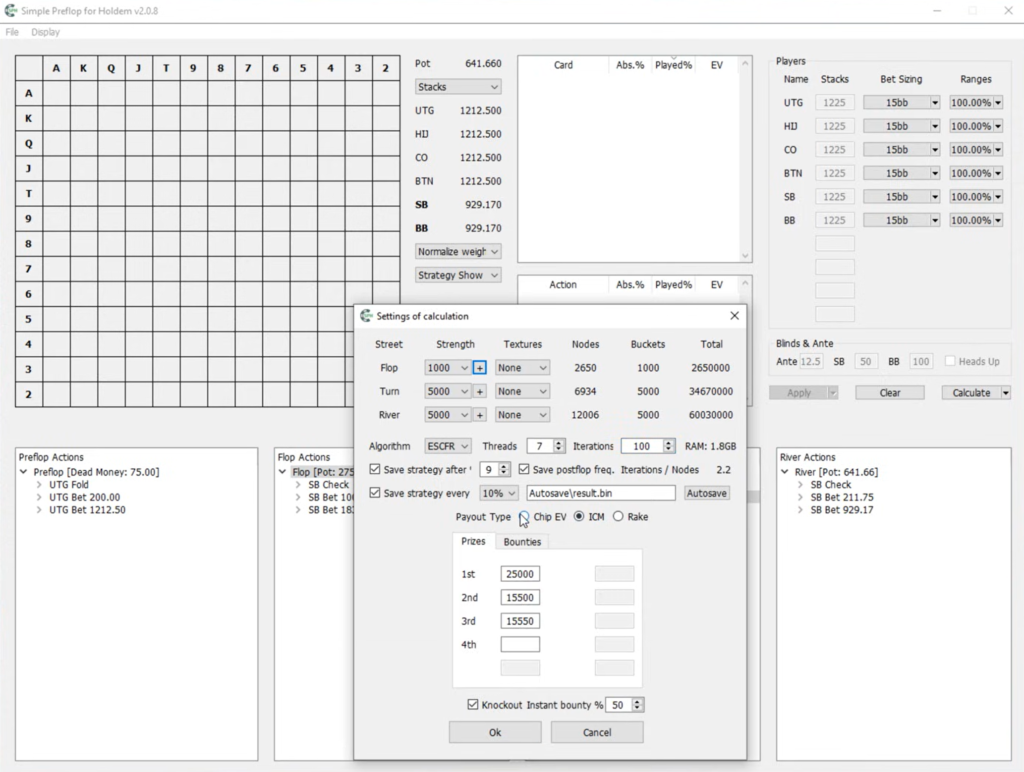
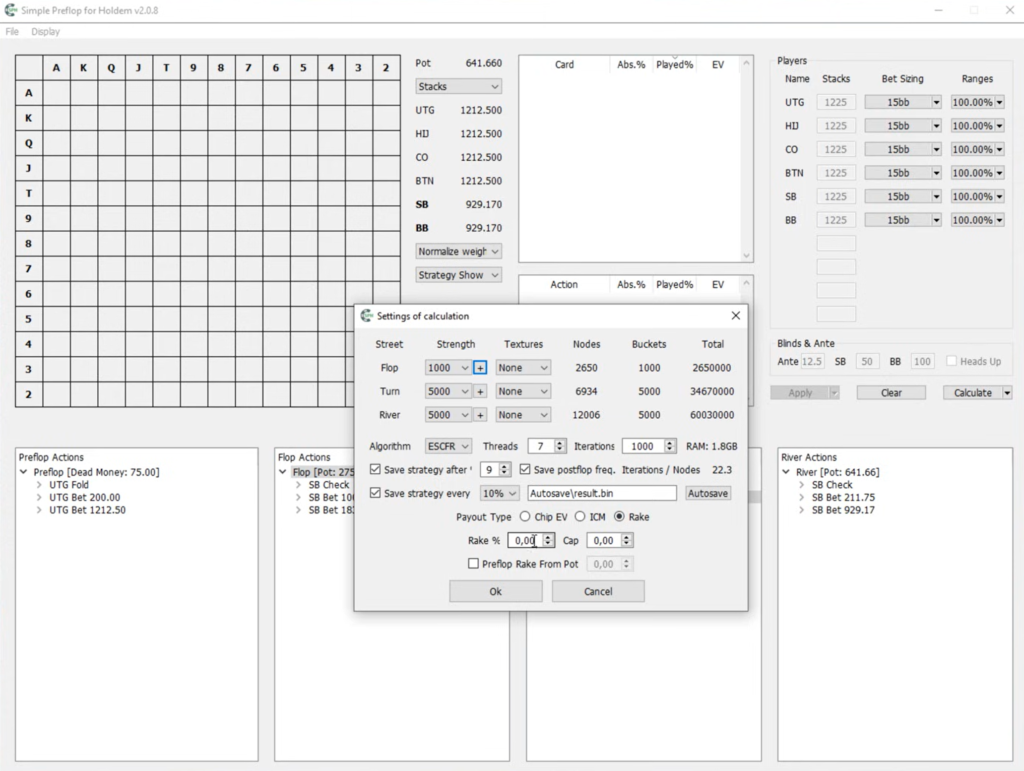
ChipEV. This is the standard model in which value is measured in chips: a chip won is worth exactly as much as a chip lost. It is suitable for cash games and early tournament stages when the money is still far away.
Rake. For cash games, the program can account for rake in two ways. The first uses a standard percentage of the pot and a cap—the maximum amount of rake taken from one hand. The second is designed for poker rooms that take rake preflop once the pot exceeds a certain size. To use it, select the Preflop Rake From Pot option and enter the threshold. For example, on the GG Network, the threshold is 2.5 big blinds if the tree is built in big blinds. Rake has the greatest effect on small pots, influencing how widely players should defend their blinds and call opens.
ICM. The Independent Chip Model converts players’ stacks into real monetary value based on the payout structure. In a tournament, losing an entire stack costs more than winning the same number of chips is worth, so ICM strategies are considerably more cautious. The user enters the payouts for each finishing position, and the program calculates strategies that account for them.
Knockouts. Within the ICM model, you can enable the Knockout option to calculate bounty tournaments, where players receive rewards for eliminating opponents. You specify the share of the bounty paid when a player is eliminated—100% for regular bounty tournaments and 50% for standard progressive knockouts—as well as each player’s bounty. Elimination rewards widen calling ranges against short stacks, and the program shows exactly how much they should expand.
In addition to No-Limit Hold’em, the program can calculate Fixed Limit Hold’em by building a tree with fixed bet sizes.
Why this matters for beginners. You can see how the value of the same hand changes depending on the format. For example, the calculation clearly demonstrates why a hand that is an easy call against an all-in in a cash game may become a fold on the tournament bubble.
Postflop Abstractions and Memory Requirements
Running a preflop calculation for 6–9 players is one of the most resource-intensive tasks in poker software. RAM is the main constraint because the entire tree, together with its simplified postflop model, must fit into memory.
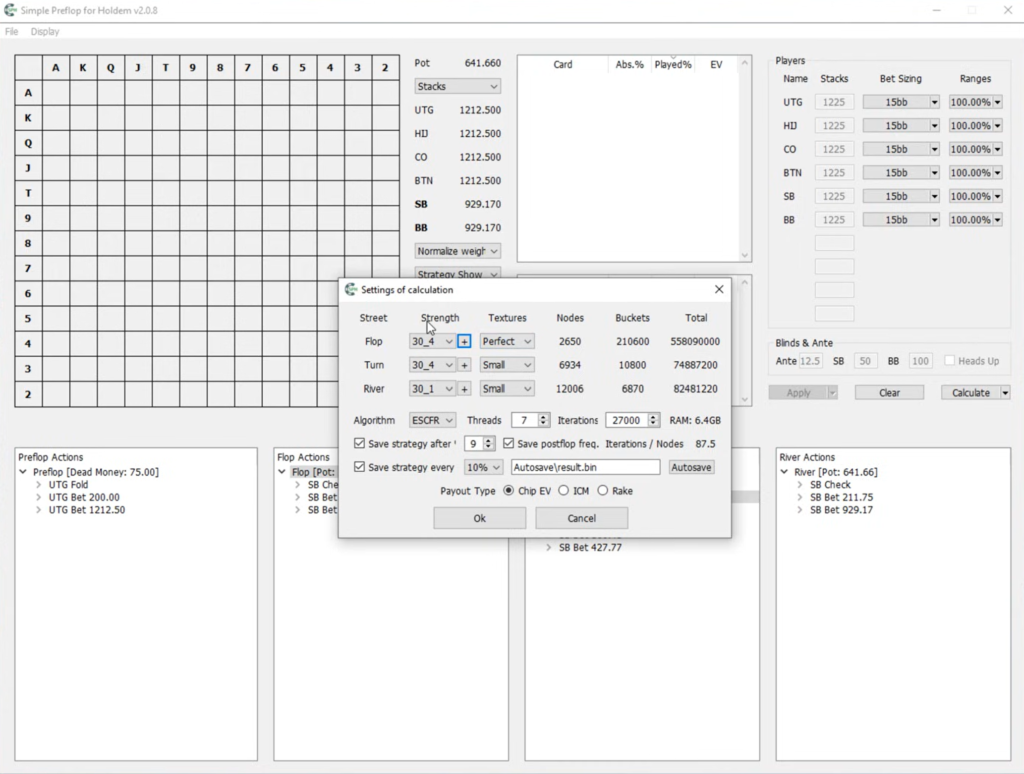
To manage this trade-off, the program lets you choose abstractions for each street. Ready-made bucket sets can be downloaded directly from the calculation settings window by clicking the “+” button. They are available in different sizes, such as 500 or 1,000 groups for the turn and river. Bucket sets are built from every possible combination of boards and hands, providing good accuracy with moderate memory requirements. Larger bucket sets produce more accurate results but require more RAM.
Before starting, the program shows how much memory the calculation will require with the selected settings. If this exceeds your computer’s capacity, you have two options: choose coarser abstractions or calculate the tree in separate parts.
Calculating a tree in parts is based on a simple observation: the EV of folding does not depend on what happens afterward. Therefore, if you want to calculate an opening strategy from UTG (under the gun), you can leave fold as the only available action for the remaining players in the branch where UTG folds. This drastically reduces the size of the tree without affecting the opening strategy you need. This approach makes it possible to calculate most important spots even on a computer with 16 GB of RAM.
The program uses every CPU thread available in the system and supports more than 64 threads, so calculation speed depends directly on your computer’s processing power.
Why this matters for beginners. It helps you understand why one tree can be calculated in minutes while another does not fit into memory. It is best to start with small trees—two or three players and one or two bet sizes—and coarse abstractions, then gradually increase the complexity.
Managing Calculations
During a calculation, the program displays the number of completed iterations and processed nodes, along with an estimate of the remaining time. Several useful tools are available:
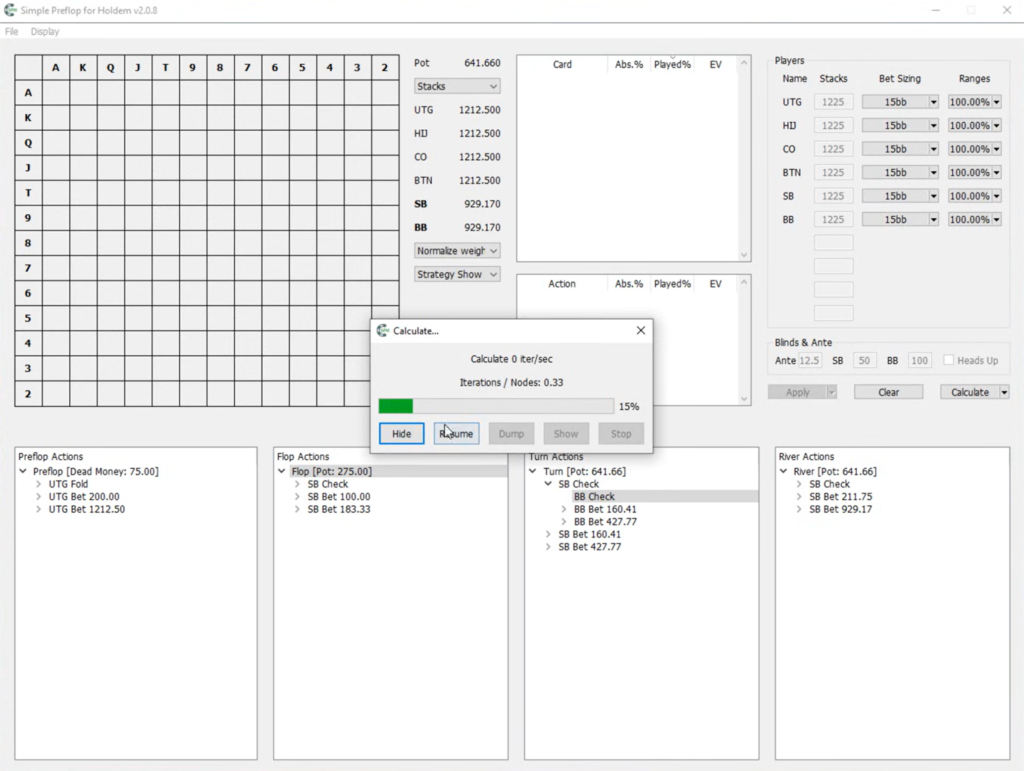
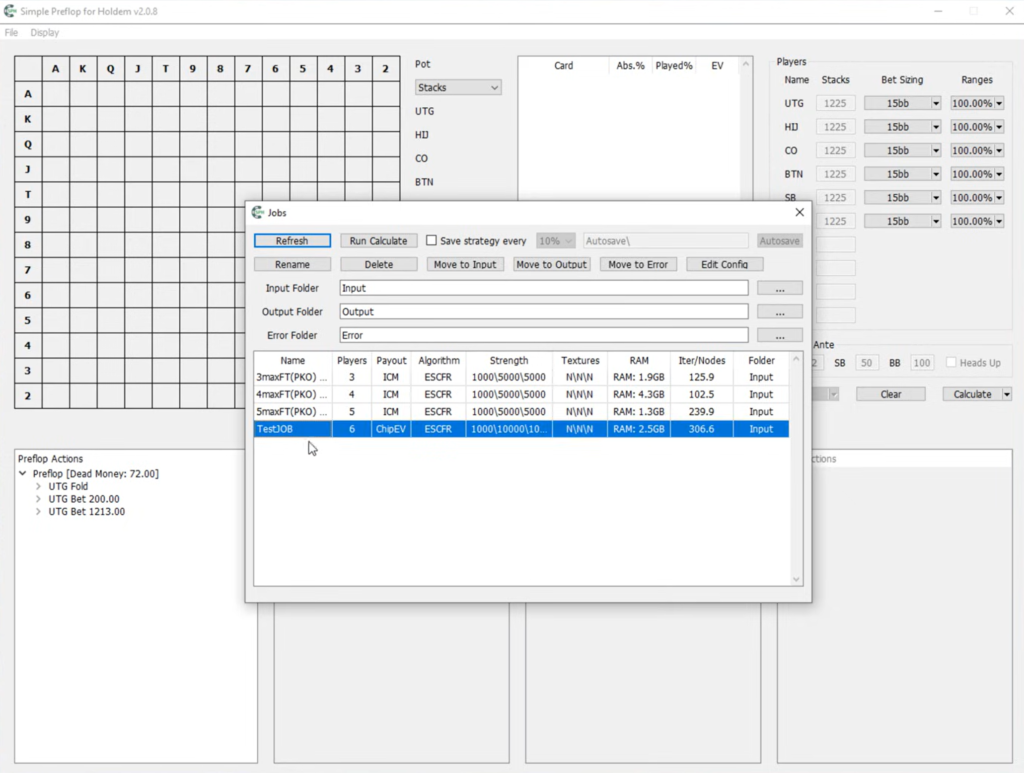
- Previewing progress. The Show button displays the current state of the solution without stopping the calculation. This allows you to confirm that the tree was built correctly without waiting for a lengthy calculation to finish.
- Pausing. The Pause and Resume buttons temporarily suspend the calculation, for example, to free up the processor for other tasks.
- Creating a dump. The Dump button saves the complete state of the calculation to disk. You can then stop the calculation, open the dump later through File → Open Dump, and continue from the same point. This is useful for lengthy calculations that cannot be completed in a single session.
If the solution still contains strange results—for example, if a hand with a higher calling EV ends up folding—the calculation usually has not run for long enough and should be continued.
Viewing Results: Strategies, EV, and Equity
After the calculation, each branch of the tree can be opened as a 13×13 matrix, where every cell represents one hand: pocket pairs, suited hands, and offsuit hands. For every hand and action, the program displays the action frequency, EV, and equity. The solution can be viewed in several ways:
- Strategy View — shows how often each hand folds, calls, or raises. If a hand uses a mixed strategy—for example, 80% 3-bet and 20% call—the cell is divided into colors in the corresponding proportions.
- Played View — shows how much of each hand reaches this point in the tree. This represents the player’s actual range in the given situation.
- EV View — a heat map of expected value that shows which hands are profitable and which are played at close to zero EV.
- Plain View — a simplified display from which ranges can be copied easily.
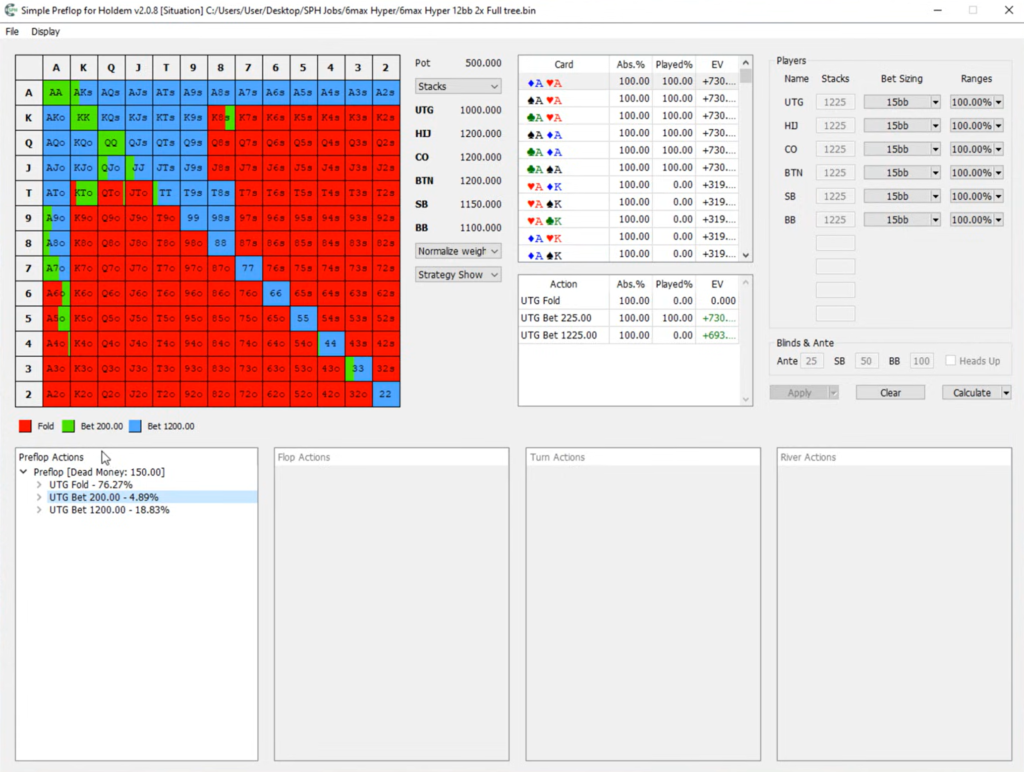
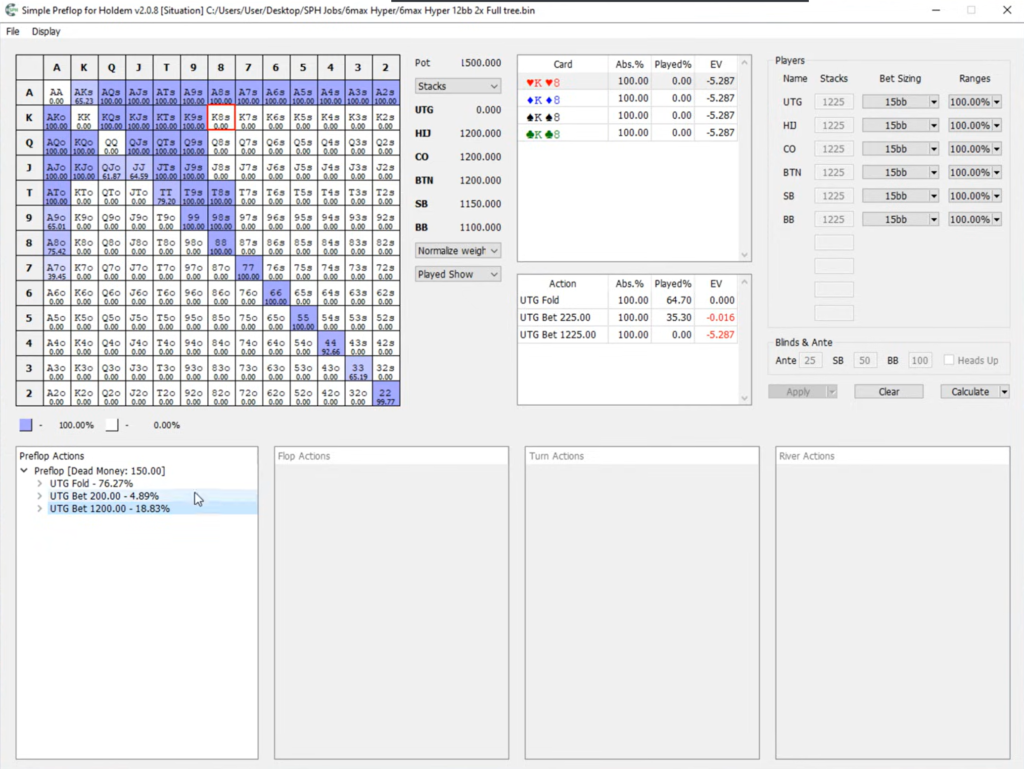
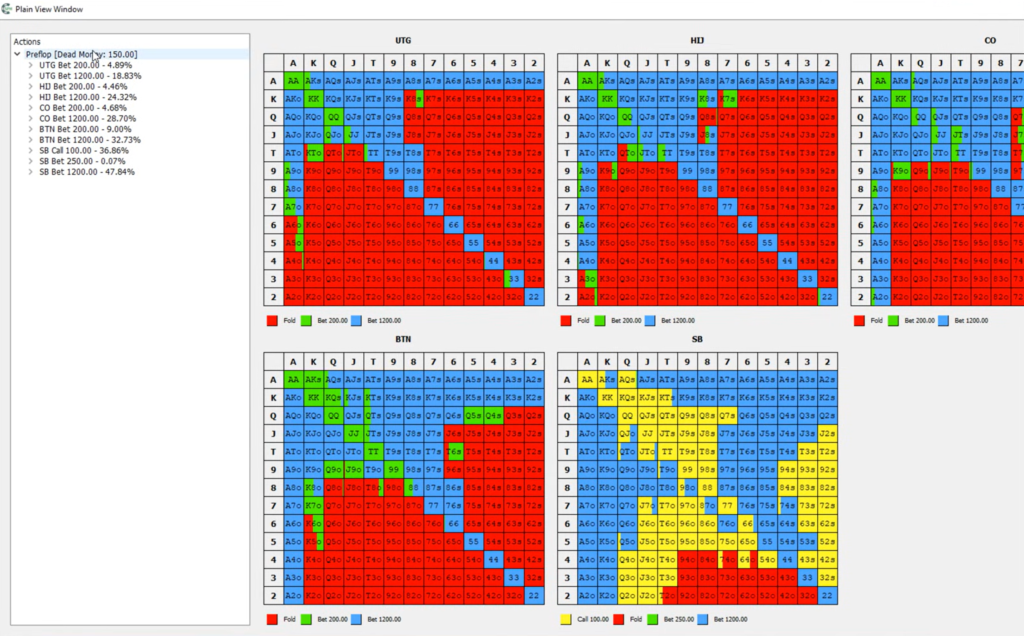
The report metrics describe the overall characteristics of the solution. Players can use this data to assess how widely or tightly the spot is played.
The strategy can be rounded, for example, to pure actions—one color per cell—or to 50% increments. Mixed frequencies such as “22% call” are difficult to reproduce in actual play, while rounding makes the range much easier to memorize at a minimal cost in EV.
For easier viewing, you can customize action colors, font colors, and matrix lines. A dark theme is also available through Display → Theme → Dark. Bets in the tree can be displayed either with or without the ante.
The program also displays the postflop tree used in the calculation and its aggregated results—that is, averages across all calculated flops, turns, and rivers.
Why this matters for beginners. Instead of simply memorizing a range, you can understand how it is constructed. EV View clearly shows which hands lie at the edge of the range, and these are the hands players most often misplay.
Locking Strategies: Playing Against a Specific Opponent
An equilibrium strategy assumes a perfect opponent, but real players make mistakes. For these situations, the program supports strategy locking, also known as node locking.
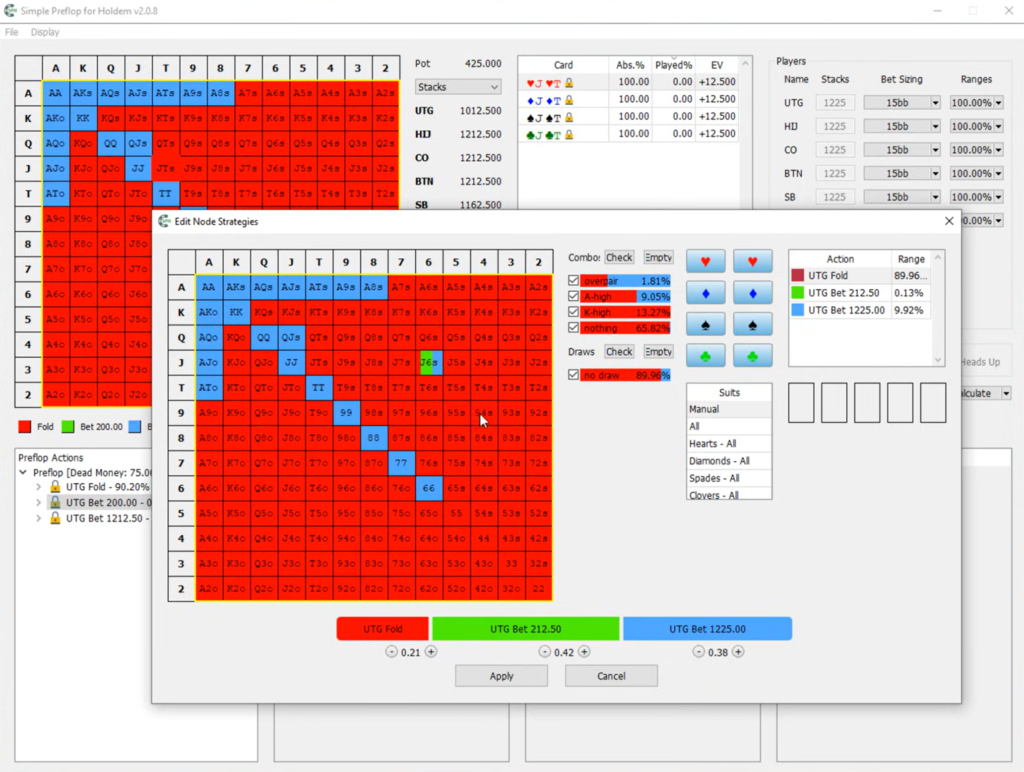
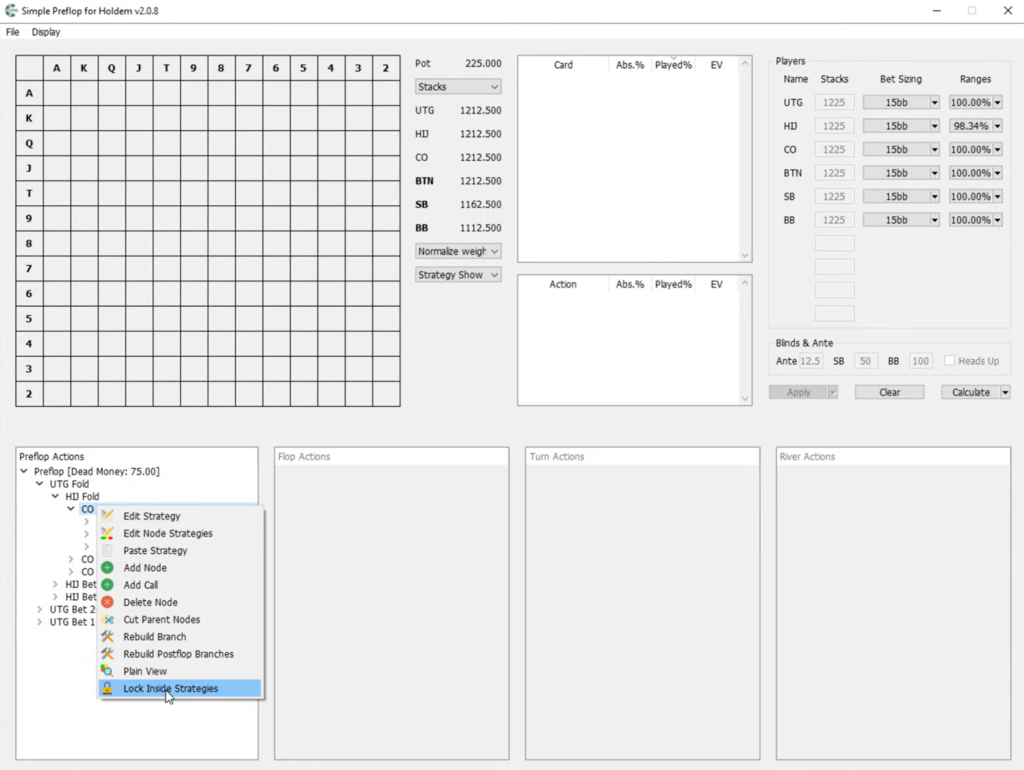
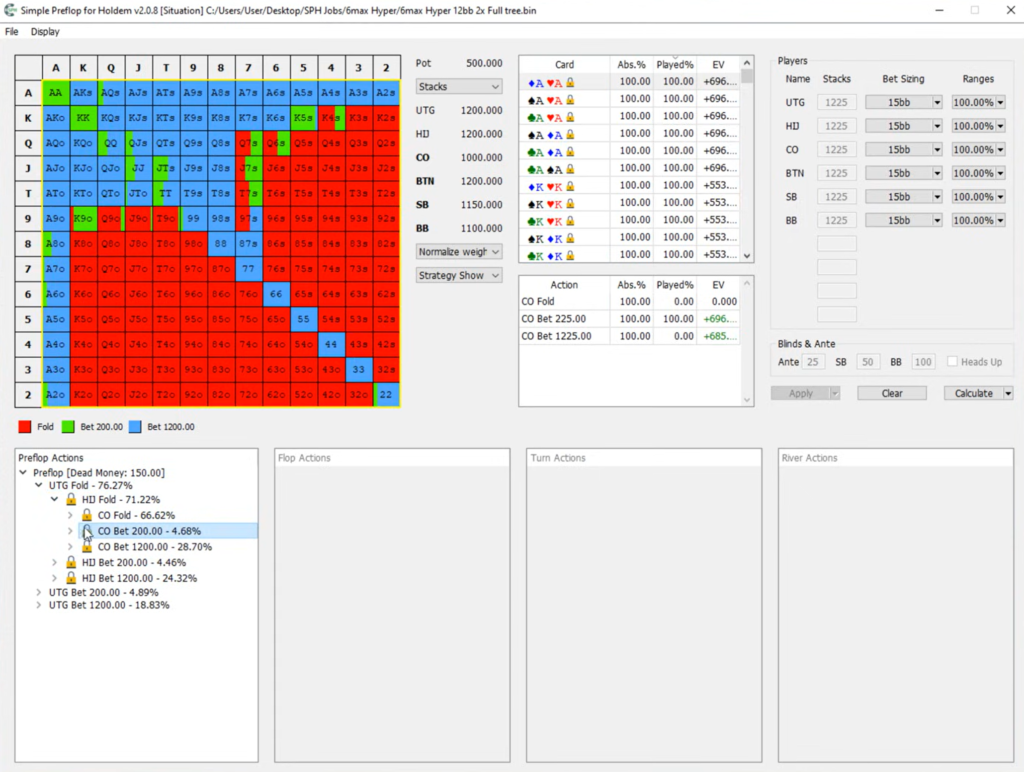
The principle is simple: the user manually defines an opponent’s strategy at the relevant node—for example, specifying that the BB 3-bets much more often than theory recommends. This strategy is locked, and when the solution is recalculated, the program finds the other players’ best responses to it. The result is an exploitative strategy—a way of playing that punishes the specific mistake as much as possible.
You can lock either an individual node or everything within the selected branch using the Lock Inside Strategies option. The Edit Node Strategies feature lets you edit the strategy for every branch of a node simultaneously.
Why this matters for beginners. It provides a clear answer to practical questions such as, “How should I adjust my opening strategy from the CO (cutoff) if the BTN (button) 3-bets too often?” By comparing equilibrium and exploitative strategies, players can see which hands they should add to or remove from their range.
Exchanging Data With Other Programs
Simple Preflop Holdem is integrated into a broader ecosystem of poker tools:
- Ranges. The program accepts ranges in PioSolver and PPT formats, and you can save and reload your own ranges.
- Strategy exports. The Copy Node Strategy option copies the strategy from every branch of a node in JSON format, allowing you to transfer the range to a third-party trainer such as Preflop Hero. Ranges can also be copied from Plain View.
- Moving to postflop analysis. A branch that reaches the flop with two or three players can be opened or saved for Simple Postflop or Simple 3-Way by right-clicking the branch in the tree. The spot can then be calculated on specific boards using the corresponding ranges, stacks, and pot size.
- Precalculated solutions. The program can open files containing previously calculated trees. Third-party training sites and coaches sell preflop solution packs in the Simple Preflop Holdem format, which can be studied without running your own calculations.
- Command line. Solution files can also be opened through the command line, which is useful when working with a large archive of calculations.
Why this matters for beginners. You can connect preflop and postflop study into a single workflow: first calculate the ranges with which players reach the flop, then analyze how those ranges should play afterward.
What You Should Know Before You Start
The program has several characteristics that are worth understanding from the beginning:
- No solution accuracy estimate. The program does not display the solution’s exploitability—how far it is from a perfect equilibrium—so calculation quality must be assessed by the stability of the strategies and the number of completed iterations.
- No hand-by-hand postflop analysis. In Simple Preflop Holdem, postflop play is used only as a simplified model for calculating preflop strategies. Analyzing play on specific boards requires a postflop solver such as Simple Postflop.
- High memory requirements. Complete 6–9-player trees with detailed abstractions require dozens of gigabytes of RAM, so it is sensible to calculate large spots in separate parts.
- Steep learning curve. The interface is designed around trees and abstraction settings, so it is best to begin with the developer’s tutorial videos and simple heads-up spots.
Compatibility: Games and Formats
- Game types: No-Limit Hold’em (NL Holdem) and Fixed Limit Hold’em. Omaha and other poker variants are not supported.
- Formats: cash games with rake, tournaments and SNGs using the ICM model, knockout tournaments including progressive knockouts, and games with antes and straddles.
- Table size: 2 to 10 players.
- Poker rooms: the program does not connect to poker clients and does not run during play. It is an off-table study and analysis tool, so it is not tied to any specific room. The rake structure of a particular room can be entered in the settings.
- Operating systems: 64-bit Windows. The program does not run directly on macOS, but it can be used through Parallels, which runs Windows in a virtual machine alongside macOS, or Boot Camp, which starts Windows as the primary operating system. The program does not run on 32-bit Windows.
- System requirements: an Intel Core i5-class processor, at least 16 GB of RAM, a display with a vertical resolution above 900 pixels, and internet access for license activation.
How to Get Started
- Download and install the program from the official Simple Poker website. The installer is available free of charge.
- Check your computer’s resources. Even without a license, you can build a tree and see how much RAM the calculation will require. This helps you determine in advance whether your computer is suitable for the tasks you have in mind.
- Open a precalculated solution. Before running your first calculation, it is useful to study an existing tree: explore its branches and switch between Strategy View, Played View, and EV View.
- Activate your license through File → License. Internet access is required.
- Calculate your first simple spot. For example, calculate SB (small blind) versus BB with one open size and one 3-bet size using coarse abstractions. A small tree is calculated quickly and helps you understand the settings.
- Gradually increase the complexity: add players, bet sizes, and more detailed abstractions, then move on to ICM, knockouts, and strategy locking.
The developer and community have produced detailed video tutorials for the program, including an extensive tutorial by coach GregXX that is available on the official product page.
License Cost
Simple Preflop Holdem is sold under a single licensing model: a one-year Standalone license for one computer, with no limit on the number of preflop calculations. There is no monthly plan or separate feature-limited tier—the license unlocks the program’s complete functionality. Without a license, the program can be installed for free and used to build trees and study precalculated solutions.
A detailed description of plans and prices is available on the product page.
Conclusion
Simple Preflop Holdem is a tool for players who want to move beyond other people’s ranges and create their own solutions tailored to their format, stack sizes, and rake. Calculations for multiway situations with up to 10 players, ICM and knockout models, support for room-specific rake, and strategy locking cover almost every preflop task in both cash games and tournaments.
The program may seem complicated to beginners at first because working with trees and abstractions takes time to learn. The best approach is gradual: begin by studying precalculated solutions, then calculate simple spots with two or three players, and only afterward move on to complete trees, tournament models, and exploitative strategies. This process provides not only a set of accurate ranges but also an understanding of why every hand is played the way it is.

Featured software

Latest posts
-
 GGPoker Bans Third-Party Poker Software: Five New Security Measures Oct 18, 2026
 -
 Table Wizard Review: Table Organization and Automated Session Analysis Oct 17, 2026
 -
 PeakGTO Review: A GTO Trainer With an ELO Rating System From Jonathan Little’s Team Oct 16, 2026
 -
 GTOBase Review: Ready-Made GTO Solutions and Hand Analysis Oct 15, 2026
 -
 Simple Postflop Review: A GTO Solver for Heads-Up Pots from Preflop to River Oct 14, 2026
All the poker software you need, gathered in one place. Exclusive discounts, bonuses, latest news and updates.
Join now