GTOBase Review: Ready-Made GTO Solutions and Hand Analysis
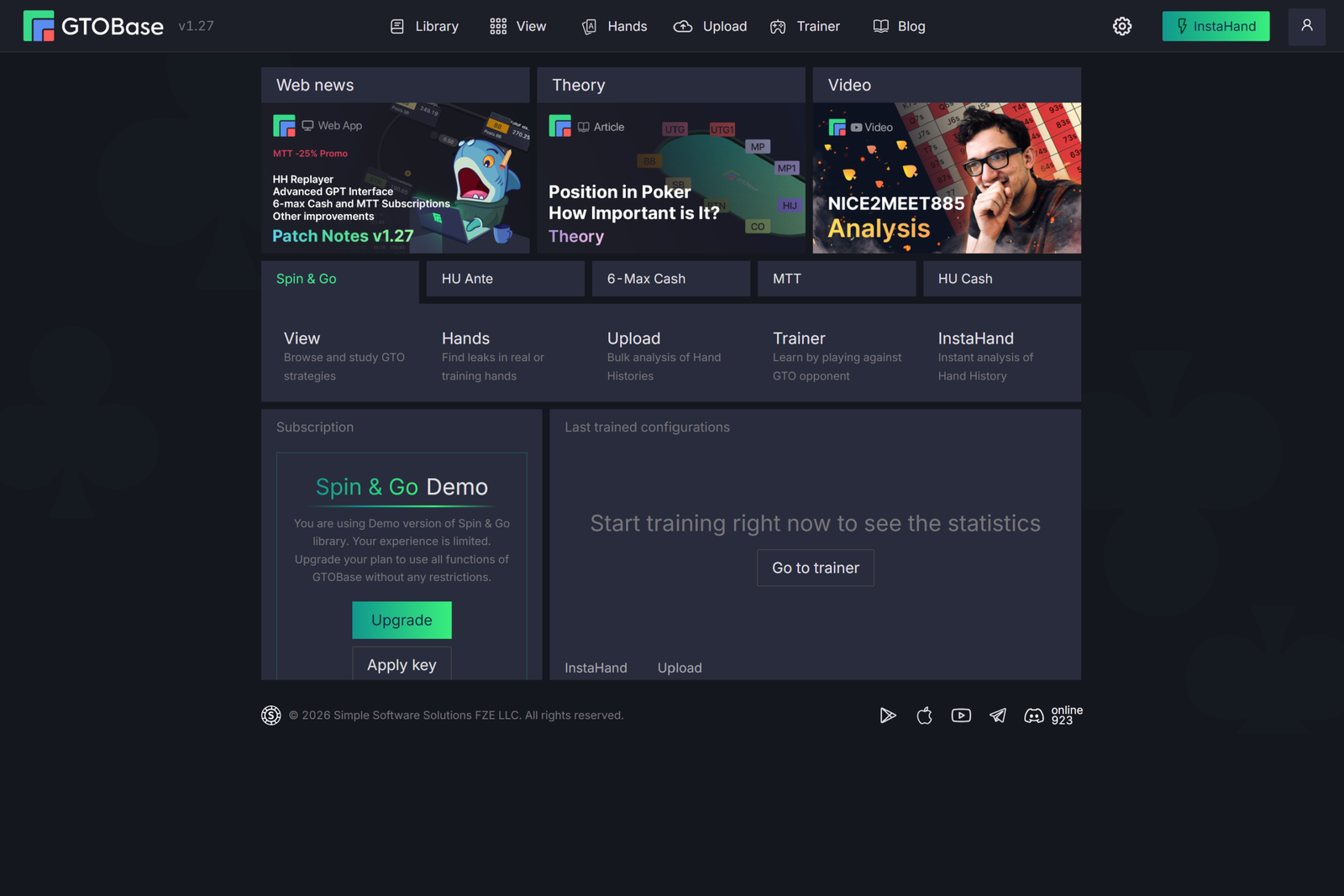
GTOBase is an online application for studying GTO strategy in no-limit hold’em. It includes a large library of precomputed solutions for Spin & Go, tournaments, 6-max cash, and heads-up games, along with tools for working with these solutions: strategy browsing, aggregate reports, a trainer, and analysis of your own hand histories.
The application serves three purposes. The first is study: you can open any situation from the library and see how an equilibrium strategy plays each hand. The second is practice: hands are played against opponents who follow solver calculations exactly, and every decision is evaluated. The third is reviewing your own play: uploaded hands are compared with the solver’s strategy, and reports show where you deviate from optimal play and how much those deviations cost.
Everything runs in a browser, with calculations performed on the developer’s servers, so your computer’s performance does not matter and no installation is required. Mobile apps for iOS and Android are also available and use the same account.
How GTOBase Works: Libraries, Spots, and Game Trees
To use the application confidently, it helps to understand several key concepts.
GTO strategy is a strategy calculated so that an opponent cannot exploit it. Against this style of play, an opponent cannot profit by bluffing too often or folding too often: any deviation from equilibrium loses money in the long run.
A solver is a program that calculates such a strategy. In GTOBase, the solver does not run on the user’s computer: all solutions have already been calculated by SimplePoker’s algorithms, developed by the same team behind Simple Preflop Holdem and Simple Postflop. Preflop solutions were calculated in Simple Preflop Holdem, while postflop solutions were calculated using Simple Postflop algorithms.
A library is a collection of solutions for one poker format. GTOBase has five libraries: Spin & Go, HU Ante, 6-Max Cash, MTT, and HU Cash. Each library requires a separate subscription, while the free plan provides limited access to all of them.
A spot is a specific game situation within a library, such as “BTN vs. BB” in Spin & Go. Each spot has a minimum and maximum effective stack—the smaller of the players’ stacks in the hand, measured in big blinds.
A game tree is a structure containing all possible actions in a spot: opening, 3-betting, calling, and using different bet sizes on each street. The trees in GTOBase were designed by professional players and coaches, so their bet sizes reflect those encountered in actual games. Each point in the tree where someone makes a decision is called a node.
A runout consists of the cards dealt on the turn and river after the flop. According to official information, all 22,100 flops and every possible runout have been calculated for each postflop spot, so you can select any board.
In practice, the workflow looks like this: the player selects a library and spot, specifies the stack, follows the desired action line through the game tree, selects a board, and receives a strategy for every hand at that point. The same solution database is used by the trainer and to analyze uploaded hands.
Solution Libraries: What Each One Includes
Spin & Go
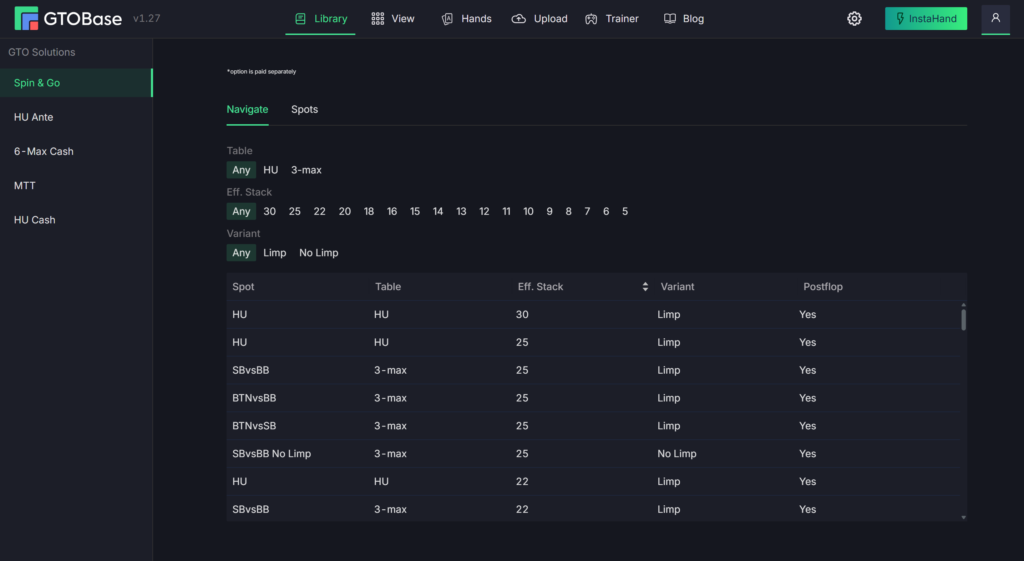
This is the application’s most detailed library, designed for Spin & Go and heads-up hyper-turbo SnG players. It covers the short stacks used in these formats and all postflop runouts.
- BTN vs. BB — stacks from 5 to 25bb;
- BTN vs. SB — stacks from 8 to 25bb;
- SB vs. BB — stacks from 5 to 25bb;
- SB vs. BB without limping — stacks from 5 to 25bb;
- heads-up — stacks from 5 to 30bb.
Both solution browsing and bulk hand analysis are available for this library, and its hand reports include a HUD-style report. For an additional fee, the developer also offers custom HUDs for an individual player or a group, such as a poker school.
HU Ante
This library is for tournament and SnG players who want to improve their late-stage heads-up play. Solutions have been calculated for heads-up games with an ante and stacks from 5 to 40bb. The ante used in the calculations is 12% of the big blind, but uploaded hands with antes ranging from 8% to 15% are rounded and analyzed using the same solutions. Strategy browsing and hand analysis are available.
6-Max Cash
These are 6-max cash solutions covering every street from preflop to river. Postflop play has been calculated in detail for 100bb stacks using PokerStars NL500 rake and a ChipEV model, meaning postflop rake is not factored in. Preflop ranges are available for stacks from 40 to 200bb at different rake levels—NL50, NL100, NL200, NL500, NL1000, and rake-free (ChipEV)—as well as for several open-raise sizes: 2, 2.25, 2.5, and 3bb.
This selection lets you compare how preflop strategy changes as the rake or opening size increases. For comprehensive postflop study, the main spot remains NL500 with 100bb stacks.
MTT
Solutions for 8-max tournaments with stacks from 40 to 100bb and 9-max tournaments with stacks from 10 to 30bb, including the main heads-up postflop situations. The library is available in the strategy viewer, Trainer, and InstaHand. On the pricing page, bulk analysis of uploaded hand histories is listed as an upcoming feature.
HU Cash
A free library for heads-up cash games with stacks from 50 to 100bb. Preflop play was calculated using a rake-free ChipEV model, while postflop play was calculated for every flop. Solution browsing and the Trainer are available, but bulk analysis and InstaHand are not supported.
Strategy Browsing: Matrix, EV, and Equity
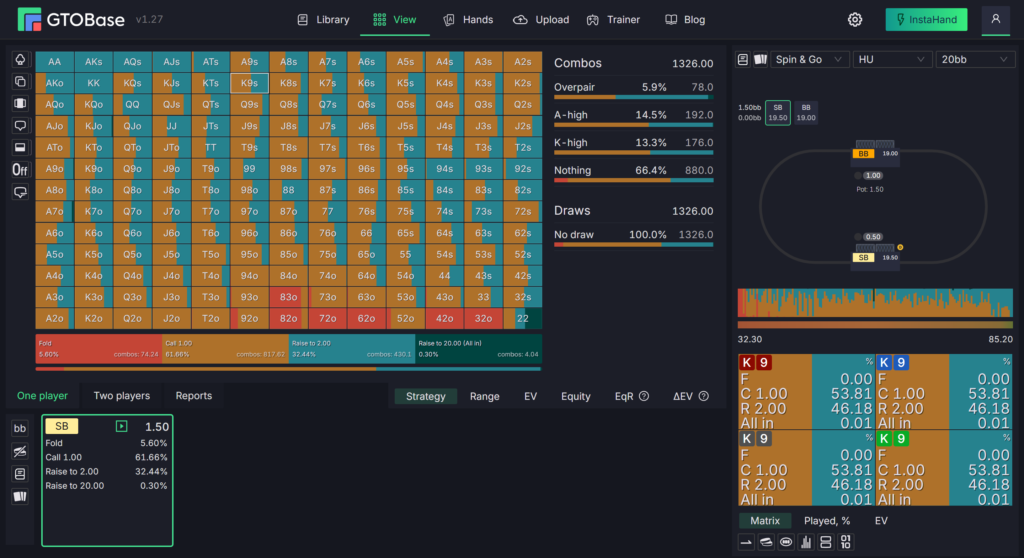
The View section is the main place for studying solutions. At the center of the screen is a 13×13 matrix containing all starting hands. Each cell is divided into action colors in proportion to their frequencies. For example, if two-thirds of a hand’s cell is colored for raising and one-third for calling, the equilibrium strategy raises that hand approximately two times out of three. Below the matrix is a panel showing the action line, which you can use to move to any subsequent node in the tree.
Single-Player Mode
Several views of the same point in the game tree are available for one player:
- Strategy — action frequencies for each hand;
- Range — the range with which the player reached this point, showing which hands remain and at what frequencies;
- EV — the expected value of each hand in big blinds: how much playing that hand wins or loses on average;
- Equity — the share of the pot that a hand wins against the opponent’s range if the hand is checked down to showdown;
- Equity Realization — how much of its equity a hand actually converts into winnings, accounting for position and future betting. A value below 100% means that the hand realizes less than its “raw” equity, while a value above 100% means it realizes more;
- Action EV Difference — the difference in EV between actions, showing how costly it is to choose a less profitable option.
Hovering over a cell opens a tooltip with detailed data for each hand combination. In the detailed matrix, EV, equity, and equity realization are displayed alongside frequencies. On the turn and river, you can quickly switch cards using the keyboard arrow keys without opening the board selection window.
Two-Player Mode
In two-player mode, both players’ ranges are compared side by side: Range Comparison displays both ranges, Equity Comparison shows the equity of each hand against the opponent’s range, and Equity Realization Comparison shows equity realization for both players. This helps you understand who has the range advantage on a particular board and why one side’s strategy might c-bet frequently while the other often defends by calling.
How This Helps Beginners
Strategy browsing replaces guesswork with specific numbers. Instead of asking, “Can I call here?” the player sees how frequently the equilibrium strategy calls, how much EV each action generates, and how the hand differs from adjacent hands. By comparing different hands, the player gradually begins to recognize patterns: which hands bluff, which bet for value, and which give up.
Aggregate Reports: The Big Picture Across Many Boards
Studying every flop individually takes a long time, so GTOBase includes aggregate reports that combine strategies across numerous boards.
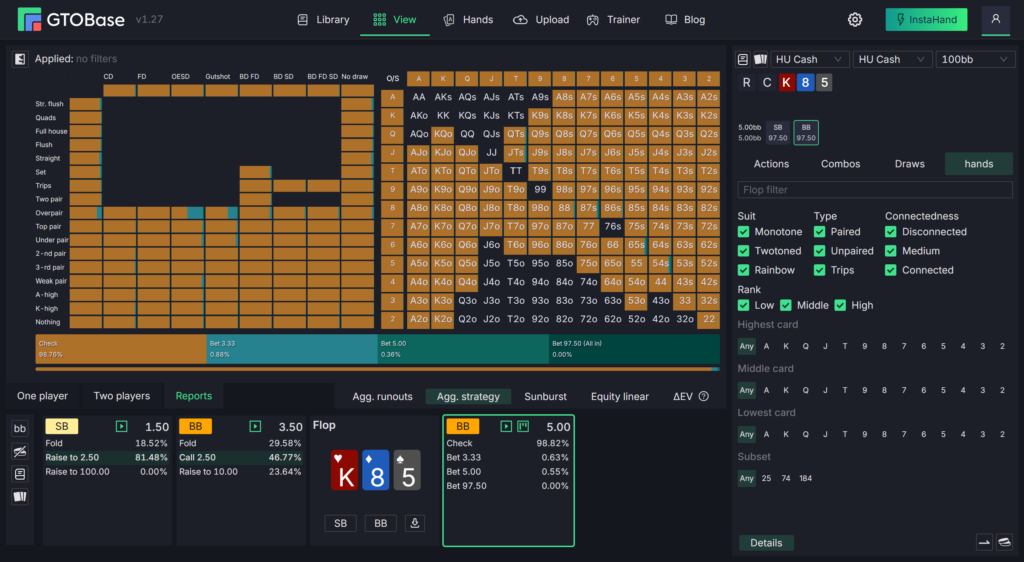
- Aggregated Flop — strategy for all flops in a single table. It includes an overview, a breakdown by made hands and draws (Combos & Draws), and an expanded report with cross-filters (Advanced Cross Filter Report).
- Aggregated Turn and Aggregated River — the same information for every possible turn or river card on the selected flop.
- Aggregated Strategy — compares strategy across different effective stacks and positions. In the 6-Max Cash library, it also compares different rake structures and open-raise sizes.
- Equity Linear Chart — an equity distribution graph where hands are arranged from weakest to strongest, with the shape of the curves indicating which player has the stronger range.
- EV Comparison Chart — compares the EV of two players.
- Full Street Decomposition — a circular chart, also known as a sunburst chart, that breaks down a street’s strategy into actions and then divides those actions into hand groups.
In practice, aggregate reports answer broader questions: which board textures should be c-bet more often, where a small bet is more profitable than a large one, and how turn strategy changes depending on the card dealt. Players draw their own conclusions from these reports, while the application provides the necessary tables and graphs.
GTO Trainer: Playing Against an Equilibrium Strategy
The Trainer section turns library solutions into practical exercises. The player is dealt hands and makes decisions, while opponents respond strictly according to GTO strategy. Every action is evaluated immediately: the application shows whether it matches the solver’s solution and how much EV was lost by deviating.
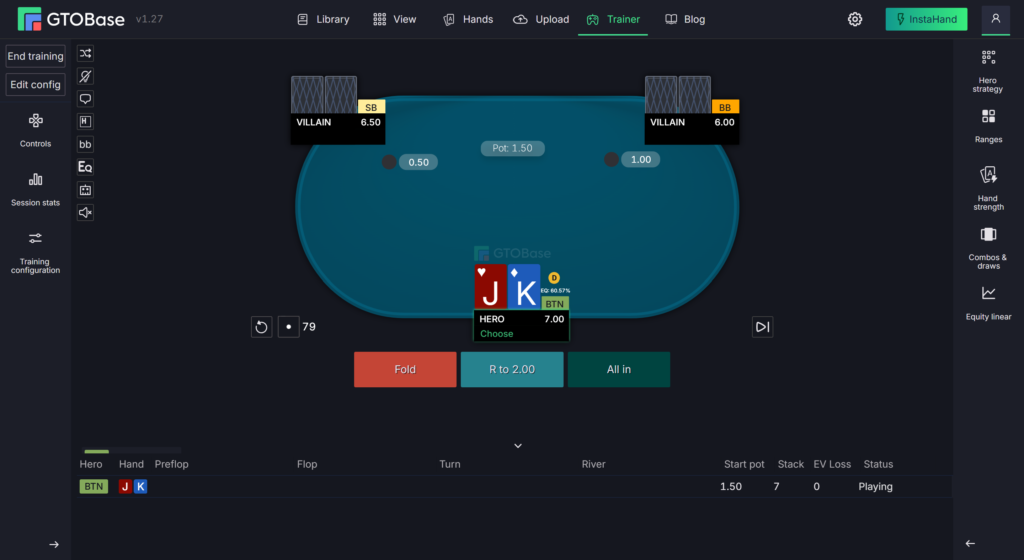
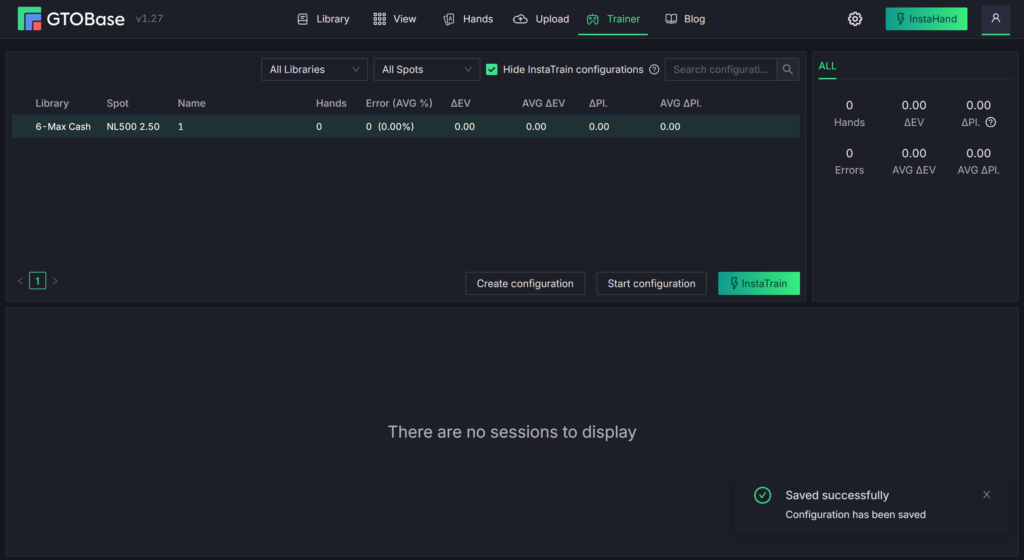
Training can be configured for a specific objective:
- start the hand preflop or directly from a selected postflop node;
- practice a specific street in Street mode;
- restrict the hero’s hands using an initial range (Initial Range Filter);
- select hand strength by equity (Current Equity Filter) or EV (Current EV Filter)—for example, to practice only the strongest 20% of hands in the range or, conversely, marginal hands;
- configure the pause after a hand: always show the result, show it only after a mistake, or never show it to avoid wasting time on extra clicks.

You can save your own groups of settings as separate configurations. Hands played in the Trainer are saved in the session history and included in separate Trainer Hands reports, which show which lines contain the most mistakes.
For beginners, the Trainer is a way to turn knowledge from tables into actual decisions. Seeing a calling frequency in a matrix is one thing; making that decision yourself within seconds is another. Repeating the same spots with immediate feedback helps players memorize the correct actions more quickly.
Analyzing Your Hands: Upload, InstaHand, and Reports
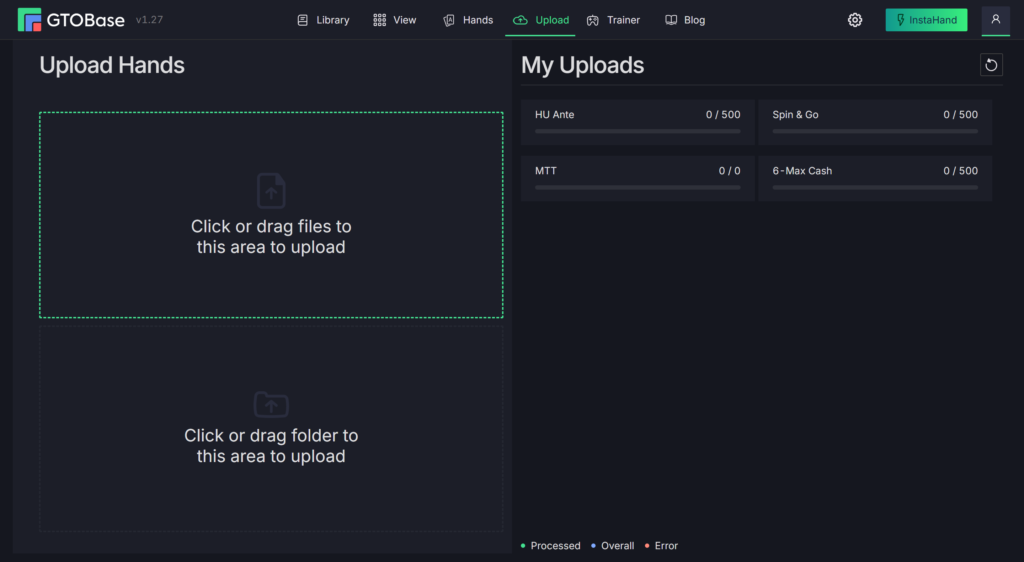
Bulk Upload
The Upload section accepts hand histories from poker rooms. You can upload individual files or an entire folder. Uploading takes place in two stages: first, the files are transferred to the server; then the server processes them and matches them with library solutions. The second stage runs on the server, so you can close the tab after transferring the files and return for the results later. Hands are automatically sorted by poker format, and the remaining monthly upload allowance is displayed nearby.
InstaHand
InstaHand provides a quick analysis of a single hand. Copy the hand text from a poker client or tracker to the clipboard, then click the InstaHand button. The application immediately displays the analysis: which action was chosen on each street, how the GTO strategy plays the hand, and how much EV was lost. The analysis covers not only the hero but also every opponent in the hand. From the analyzed hand, you can open the strategy viewer or immediately start practicing the spot.
Hand Reports
Uploaded hands appear in the Hands section, which contains the following reports:
- Hands — a list of hands with filters for stakes, dates, the street where a mistake occurred, stack, buy-in, position, and type of postflop situation;
- Lines — statistics for action lines compared with GTO frequencies;
- Players — a summary by player, including opponents;
- Hand | Line and Player | Line — breakdowns showing which specific hands and players have the largest deviations from GTO;
- HUD — a HUD-style report available for Spin & Go.
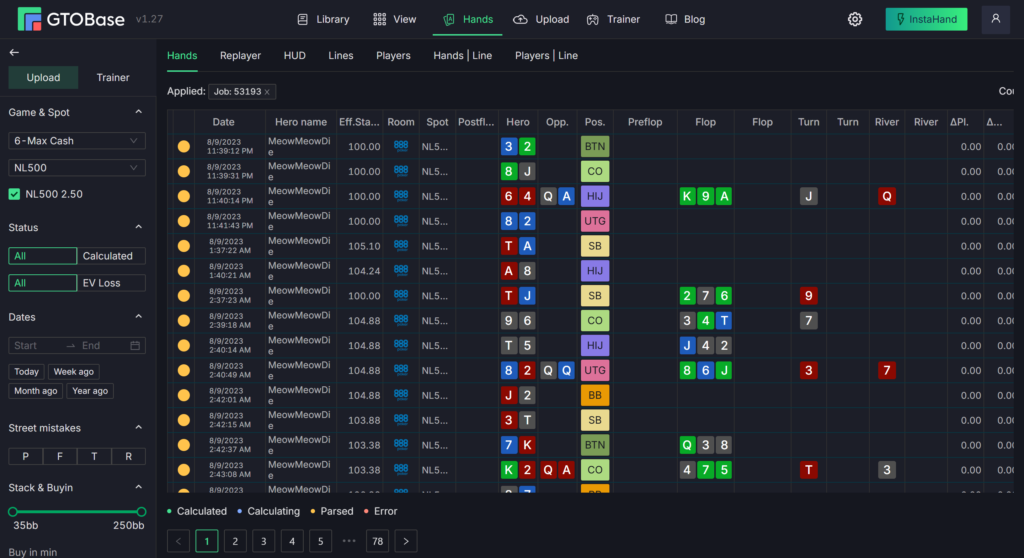
The key metric in these reports is ΔEV (EV delta), the difference between the EV of the selected action and that of the optimal action. The larger the ΔEV, the more costly the mistake. By sorting hands according to this metric, players can immediately identify their most expensive decisions from a session.
Before reviewing the reports, make sure the hands are associated with the correct screen names. If you upload someone else’s databases, data from different players will be mixed together.
How This Helps in Practice
Hand analysis reveals actual mistakes rather than assumed ones. Instead of receiving general advice such as “defend the big blind more often,” the player sees specific hands where they folded a hand that the GTO strategy continues with. Reports on opponents also help players identify systematic deviations and account for them in future games.
Replayer and GPT Coach: Detailed Mistake Analysis
The Replayer plays through a hand step by step on a table display. Each player’s cards, position, stack, and action are shown, along with two frequencies: how often the GTO strategy selects that action with the entire range and how often it selects it with the specific hand. The bottom panel shows the actual action, the action used for the analysis, a “correct” or “mistake” rating, and EV. Navigation buttons switch between actions and hands, while the button for jumping to a mistake immediately opens the point where the deviation occurred. The Replayer works with both uploaded hands and hands played in the Trainer.
GPT Coach is a language-model-based assistant that describes mistakes in plain language. It considers the hand history and solver data, then explains why the selected action is worse than the optimal one. You can request a new explanation, rate it, and submit feedback. GPT Coach is available in the Trainer, the list of hands containing mistakes, and InstaHand. It is not used for hands without mistakes. AI-generated text should be treated as an explanation of the solver’s numbers rather than an independent source: frequencies and EV remain the basis for any conclusions.
Mobile App and Interface Settings
The GTOBase mobile app for iOS and Android uses the same account as the web version. It includes strategy browsing with matrices, EV, and an equity graph, aggregate runout reports, and a trainer with session history and reviews of played hands. The app is developed separately and optimized for smaller screens, so some web-version features are unavailable. Access to the MTT library is limited in the mobile app. You can log in to the web version by scanning a QR code in the mobile app.
In the web version’s settings, accessed through the gear icon, you can select a preset theme, change action colors and order, adjust color scales for ranges, EV, equity, and positions, change the text size and font, select a deck design, and assign keyboard shortcuts. A dark theme suitable for extended use is enabled by default.
Compatibility: Formats, Poker Rooms, and Devices
Poker formats. No-limit hold’em only: Spin & Go and heads-up hyper-turbo SnGs, heads-up with antes, 6-max cash, 8-max and 9-max tournaments, and heads-up cash. Omaha and other poker variants are not supported.
Features by library. Bulk hand analysis is available for Spin & Go, HU Ante, and 6-Max Cash. It is listed as an upcoming feature for MTT and is not available for HU Cash. InstaHand works with every library except HU Cash. The HUD report is available only for Spin & Go.
Poker rooms. The official website lists PokerStars, partypoker, WPN, iPoker, 888poker, Winamax, PPPoker, Ignition, and Bovada among the supported hand-history formats. The easiest way to check whether a particular format can be read is through InstaHand: if a hand pasted from the clipboard is analyzed successfully, bulk uploads from that room should work as well.
Devices. The web version runs in a browser on any operating system—Windows, macOS, or Linux—with no installation required. Mobile apps are available for iOS (iPhone) and Android. A constant internet connection is required because the solutions are stored on servers.
Limitations. Custom calculations are not available: you cannot calculate a spot using arbitrary ranges, stacks, or bet sizes and are limited to the solutions included in the libraries. The tournament library does not include postflop solutions for every situation. Like any solver, GTOBase is not intended for use while playing at the table.
How to Get Started With GTOBase
- Registration. Create an account on the application’s website. The free plan will then be activated automatically for every library.
- Explore the library. In the Library section, select the format you play and open one basic spot. For 6-max cash, this could be opening from the CO and defending the BB; for Spin & Go, use BTN vs. BB at a medium stack depth.
- Browse a strategy. In the View section, follow a simple line through the tree—open, call, c-bet the flop—and examine the strategy using the Strategy, Range, and EV views.
- Check the hand format. Copy one of your hands and paste it into InstaHand. This immediately shows whether the poker room’s format is supported and what the analysis looks like.
- Practice. Open the Trainer from the same spot by clicking Play. The free allowance of 50 hands per day is enough to understand how decisions are evaluated.
- Upload a session. Upload a small session in the Upload section, then open the Hands section to review the Lines report and the list of hands sorted by ΔEV.
After completing these steps, you will know which library you need and which limits matter to you, allowing you to choose an appropriate paid plan.
Plans and Limits
Each GTOBase library has its own subscription. The Free plan is available to everyone and includes unlimited preflop access, 10 postflop solutions per day, 10 InstaHand analyses per day, 50 Trainer hands, and up to 500 uploaded hands per month. The HU Cash library is completely free.
The paid tiers for Spin & Go, 6-Max Cash, and HU Ante are:
- Basic — unlimited browsing and Trainer use, 75 InstaHand analyses per day, up to 2,000 uploaded hands per month, and aggregate flop and turn reports;
- Pro — 100 InstaHand analyses per day, up to 125,000 hands per month, and advanced reports for strategy browsing and hand analysis;
- Ultimate — 200 InstaHand analyses per day, up to 200,000 hands per month, and access to every application feature.
Only the Basic plan is available for MTT. Subscriptions are offered for 1, 3, or 12 months, with annual billing costing approximately one-third less than monthly payments. Basic and Pro can be upgraded to a higher tier at any time by paying the difference for the remaining days, while downgrades do not take effect immediately. If a subscription expires, the Replayer and EV-loss values for previously analyzed hands remain available.
A detailed description of plans and prices is available on the product page.
Conclusion: Who Should Use GTOBase and How
GTOBase combines a library of precomputed solutions, a trainer, and a hand analyzer in one place. For beginners, it provides a convenient introduction to GTO: there is no need to learn how to configure a solver or wait for calculations, and the free plan is sufficient for studying the main spots in your chosen format. The application is particularly useful for Spin & Go and heads-up ante players, as the full set of tools is available for these formats, including bulk analysis and a HUD report.
It is best to learn GTOBase gradually: first understand the matrix and a few basic spots, then add the Trainer, and only after that move on to uploading your own sessions and using aggregate reports. This approach lets you build on concepts you already understand instead of trying to learn the entire application at once.

Featured software



Latest posts
-
 GGPoker Bans Third-Party Poker Software: Five New Security Measures Oct 18, 2026
 -
 Table Wizard Review: Table Organization and Automated Session Analysis Oct 17, 2026
 -
 PeakGTO Review: A GTO Trainer With an ELO Rating System From Jonathan Little’s Team Oct 16, 2026
 -
 Simple Postflop Review: A GTO Solver for Heads-Up Pots from Preflop to River Oct 14, 2026
 -
 Simple Preflop Holdem Review: GTO Preflop Strategies for Any Table Oct 13, 2026
All the poker software you need, gathered in one place. Exclusive discounts, bonuses, latest news and updates.
Join now