Holdem Manager 3 Review: A Poker Tracker with a Customizable HUD and Intuitive Situational Views
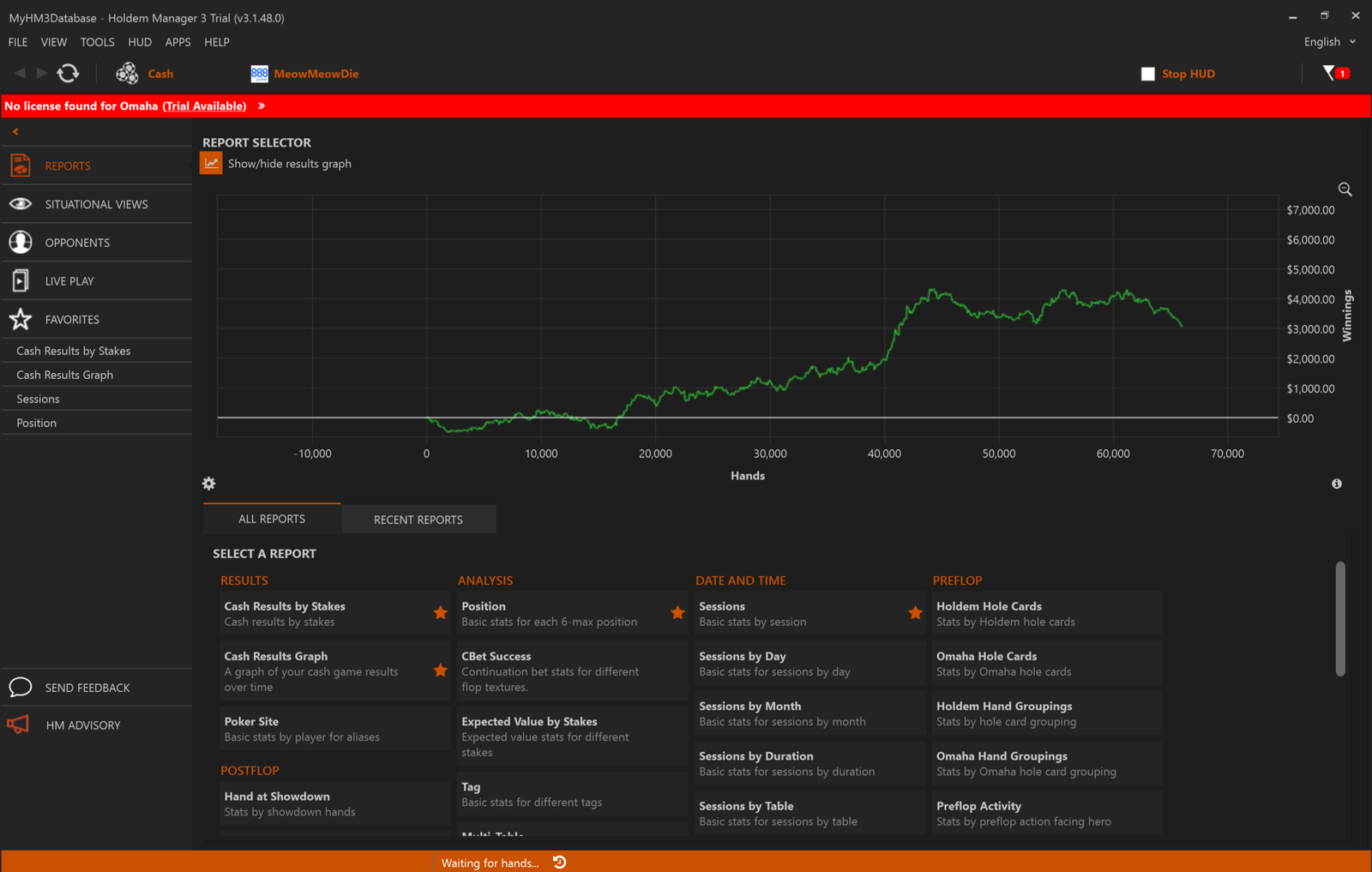
Holdem Manager 3 is a program for online poker players that collects hand histories and turns them into statistics. It shows how opponents play directly at the table in real time and helps you review your own decisions after a session. The program is useful both for beginners who are just starting to rely on numbers rather than intuition and for more experienced players who need a tool for systematically analyzing their own play and that of their opponents.
The program handles two related tasks: during play, it displays opponents’ statistics over the poker table window (this is called a HUD, or heads-up display), while after a session, it lets you review completed hands using reports, visual dashboards, and the replayer.
What Holdem Manager 3 Does
Holdem Manager 3 runs in the background alongside the poker room client. While you play, the program reads the hand history files created by the poker client and saves them to its own database. There is no need to install and configure third-party database software separately: Holdem Manager 3 uses a built-in hand storage engine, which is one reason why the program is easy to install and requires almost no additional setup.
The collected hands are used to generate two types of output. The first is the HUD: an overlay displaying statistics for each opponent directly on the table while a hand is in progress. The second is a set of reports, visual dashboards, and a replayer that open separately from the game and are designed for reviewing completed hands in greater detail.
HUD and Opponent Statistics
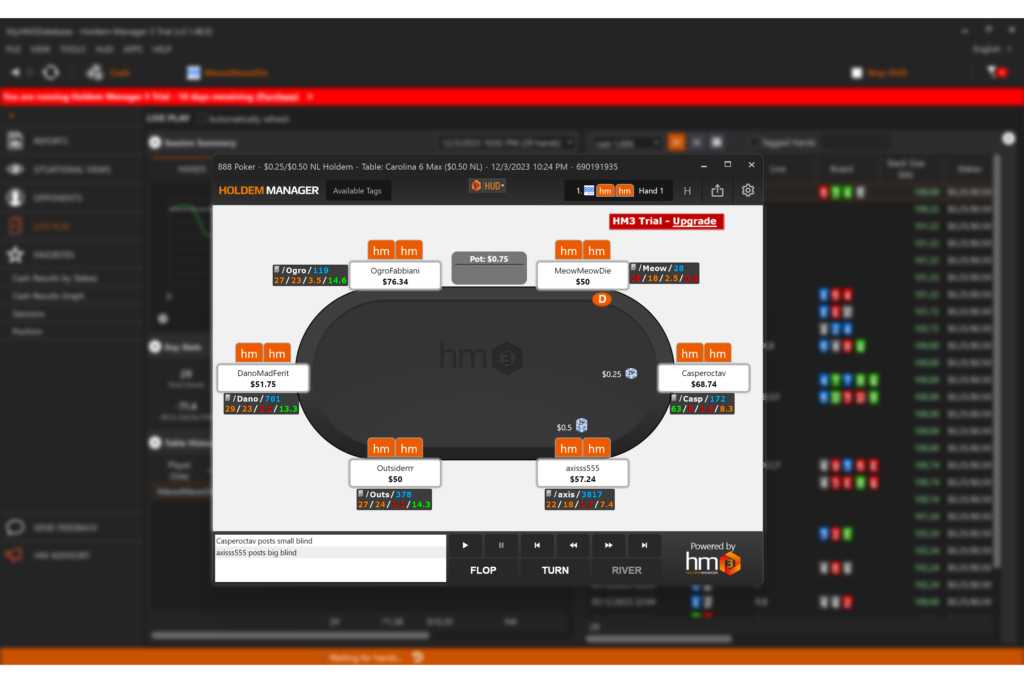
The HUD in Holdem Manager 3 can display more than 2,000 individual stats, ranging from basic metrics such as VPIP (how often a player voluntarily enters a pot) and PFR (preflop raise frequency) to highly specific metrics for particular streets, positions, and hand scenarios. The program includes ready-made HUD profiles with the most important stats to help you get started, as well as an editor for more flexible customization that lets you build a HUD from any required stats by dragging and dropping elements.
In addition to traditional numerical panels, Holdem Manager 3 includes a graphical HUD mode. An opponent’s preflop activity is represented by colored rings ranging from green to red, postflop aggression is shown in a separate color, and the hand sample size is displayed with an additional bar. This mode lets you get an immediate impression of an opponent’s playing style without studying the numbers closely.
For more in-depth analysis, you can open a popup for each HUD stat. This provides a more detailed breakdown—for example, showing how an opponent plays in a particular situation by position or bet size.
Reports, Filters, and Live Play Dashboard
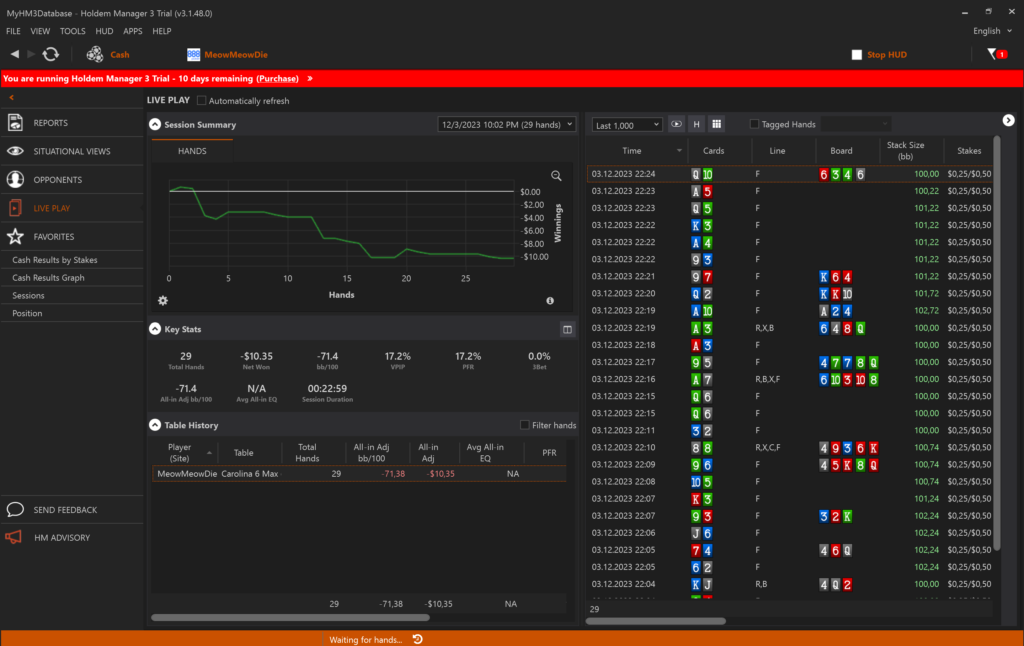
While a session is in progress, Live Play Dashboard displays a graph for the current session and key table statistics. It also lets you flag interesting hands so you can return to them later.
After a session, the program provides more than 25 standard reports covering positions, sessions, stakes, stack sizes, and opponent types. Any report can be customized by adding the required metrics from the full set of available statistics. HMQL is used to find hands more precisely: as you enter a condition, the program suggests available properties and values, while the visual filter editor lets you combine conditions using “and” or “or” without having to memorize the syntax.
Situational Views: Visual Analysis of Common Spots
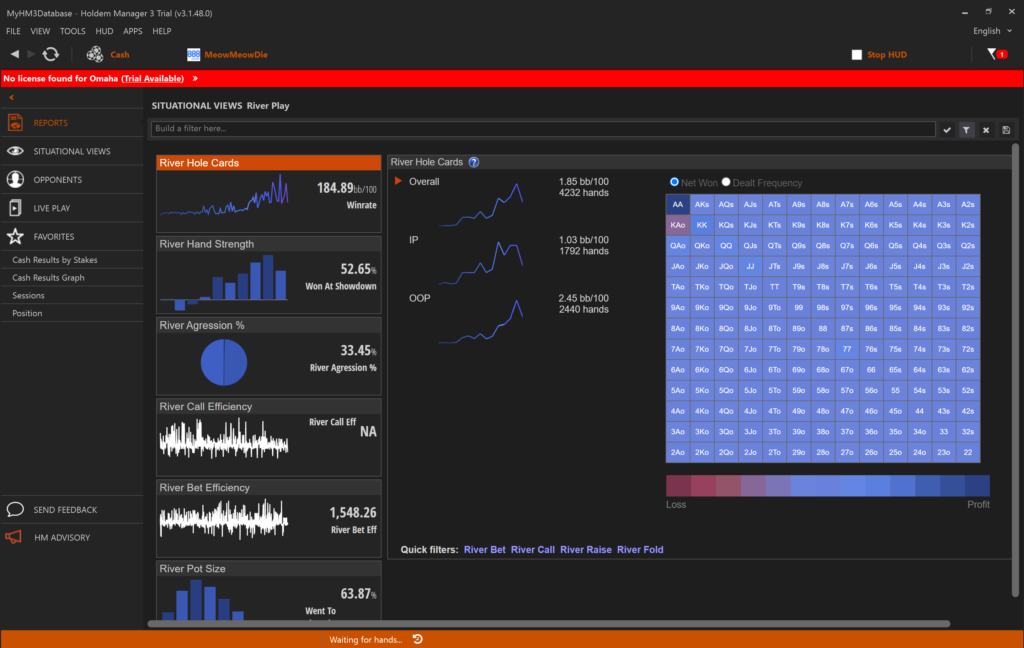
Standard reports require you to configure filters for each specific situation, which can be inconvenient for beginners. Situational Views take a different approach: they are ready-made visual dashboards for the most common poker situations, presenting statistics as easy-to-understand charts instead of tables filled with numbers.
Holdem Manager 3 includes dashboards for several topics: 3-bet pots, involving preflop reraises; continuation bets, or c-bets, made on the flop by the player who raised previously; river play; tournament all-ins; bubble play in tournaments with paid places; and a separate dashboard for systematically identifying leaks in your game. You can click a specific data point on any graph and immediately open the relevant hands in the replayer. This lets you do more than simply view a number—you can see exactly how each hand was played.
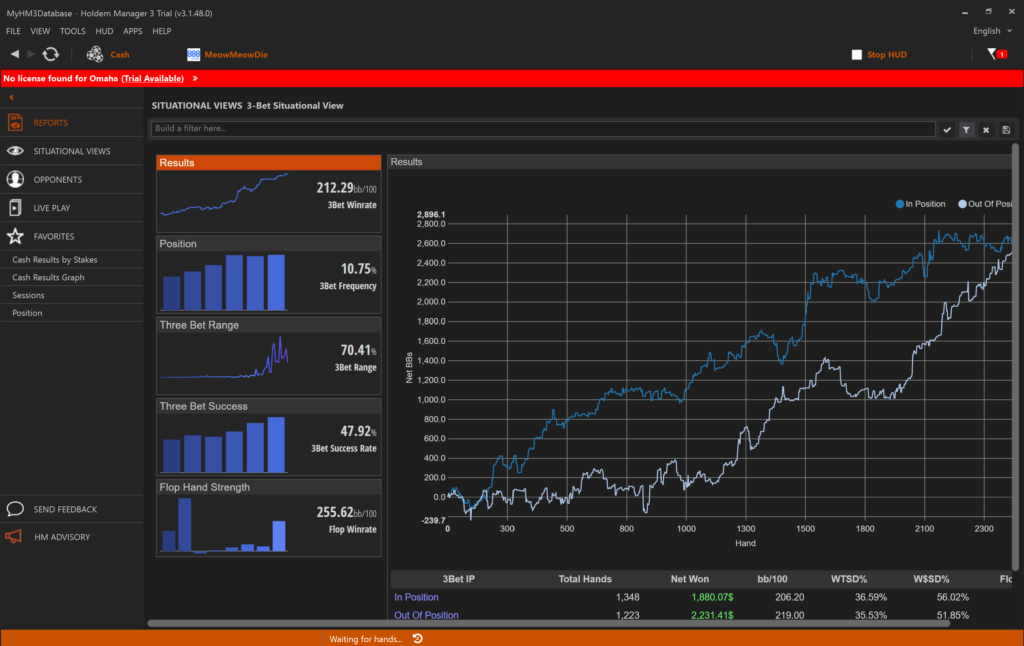
Situational Views are useful for beginners because they do not require complex filter configuration. You simply open the ready-made dashboard for the topic you are interested in and identify patterns that would otherwise have to be compiled manually from several reports.
Hand Replayer and Additional Tools
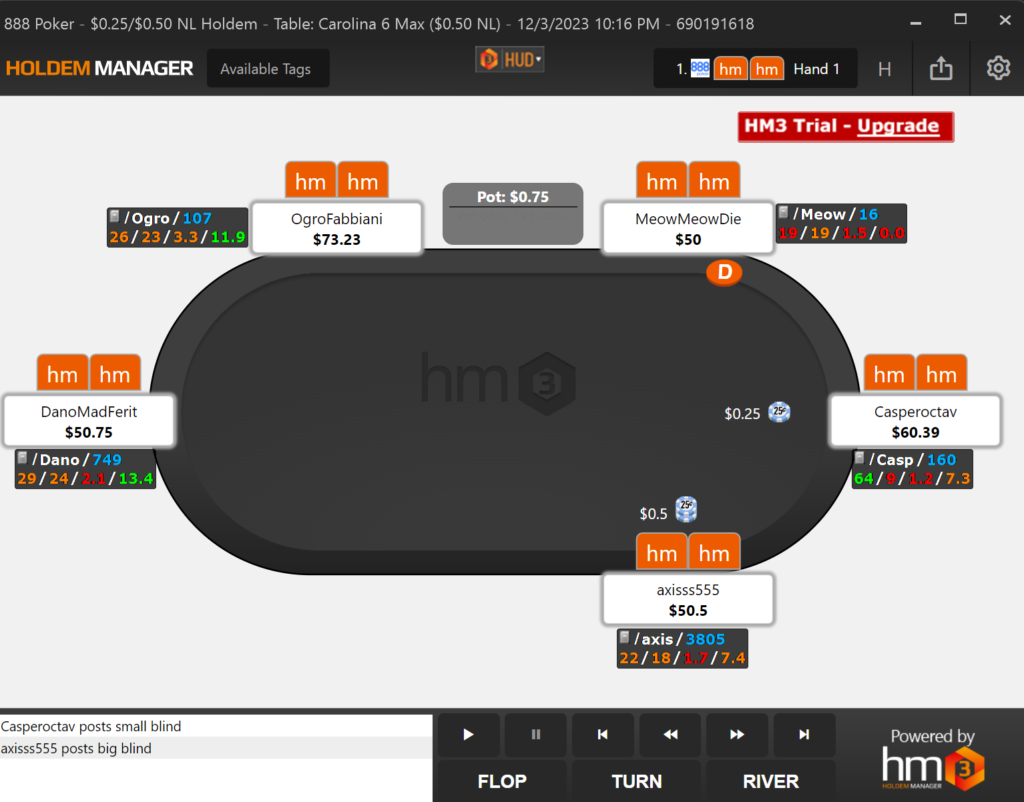
The Holdem Manager 3 replayer plays hands back street by street and displays player statistics as they appeared at the time of the hand rather than their current values. This is important for understanding what information the HUD showed when the player made a decision. Several visual table themes are available, and the pot can be displayed using graphical indicators.
The program also includes Range Wizard, a tool that compares the ranges and statistics of different opponent types and helps you identify an unfamiliar opponent’s playing style more quickly. For poker clients that do not provide hand histories directly—primarily Asian poker club apps—the package includes separate hand history converters that convert these files into a format Holdem Manager 3 can read.
Tournaments and Cash Games
Holdem Manager 3 works with both cash games and tournaments, including MTTs and SNGs. In tournaments, statistics and results can be displayed in big blinds rather than chips. This makes it easier to compare decisions across tournaments with different starting stacks and at different stages.
Compatibility: Formats and Poker Sites
Holdem Manager 3 is available only for Windows. The minimum supported operating system is Windows 10 (64-bit, October 2018 release or later), while Windows 11 is recommended. There is no native macOS version: on a Mac, the program can only run through a Windows installation, such as in a virtual machine on an Apple silicon Mac. Due to the volume of data it processes, the program benefits from a modern processor, at least 8 GB of RAM—although 16 GB or more is preferable—and a fast SSD. Drive speed has a noticeable effect on the program’s responsiveness when loading large numbers of hands.
Full support, including hand imports, a HUD, and real-time statistics, is available for various poker rooms and networks, including PokerStars, WPN, Americas Cardroom, Ignition/Bovada, 888poker, iPoker, Winamax, Chico Poker, Merge Network, and several other networks and their regional versions. Some rooms have specific limitations. For example, the real-time HUD does not work with certain partypoker clients, although importing and reviewing hand histories is still supported. Asian poker club apps such as PokerBros, PPPoker, and ClubGG can be connected through a separate hand history converter. The program’s interface is available in 14 languages, including Russian, making it convenient for players from different countries.
Getting Started
You can start using Holdem Manager 3 in just a few steps: download the installer from the official website, install the program—a separate database is not required because the hand storage engine is built in—launch it, and specify the hand history folder for the relevant poker room. You can then customize the HUD for your needs, for example by choosing one of the ready-made profiles and adding extra stats through the editor if required.
A free 14-day trial with the complete feature set is available before purchase, and no credit card is required. This gives you enough time to try the HUD, Situational Views, and the replayer with your own hands and decide which license best matches the stakes you play.
Pricing
Holdem Manager 3 is sold as a one-time license purchase rather than a subscription. Separate licenses are available for Hold’em and Omaha, along with a combined license covering both games. Each license is available as a stakes-limited Small Stakes version or an unrestricted All Stakes version. The first year of software updates is included in the license price, and update support can be renewed separately from the second year onward if desired. A detailed description of the available licenses and prices can be found on the product page.
Conclusion
Holdem Manager 3 is a convenient starting point for players who want to move from playing by feel to making decisions based on statistics. Straightforward installation without a third-party database, ready-made HUD profiles, and visual Situational Views let you start small by learning a few basic stats and one or two dashboards. You can then gradually explore the program’s more than 2,000 stats, flexible filters, and complete set of reports as you gain experience and develop specific questions about your game.

Featured software

Latest posts
-
 GGPoker Bans Third-Party Poker Software: Five New Security Measures Oct 18, 2026
 -
 Table Wizard Review: Table Organization and Automated Session Analysis Oct 17, 2026
 -
 PeakGTO Review: A GTO Trainer With an ELO Rating System From Jonathan Little’s Team Oct 16, 2026
 -
 GTOBase Review: Ready-Made GTO Solutions and Hand Analysis Oct 15, 2026
 -
 Simple Postflop Review: A GTO Solver for Heads-Up Pots from Preflop to River Oct 14, 2026
All the poker software you need, gathered in one place. Exclusive discounts, bonuses, latest news and updates.
Join now