DriveHUD 3 Review: HUD, MDA Analysis, and GTO Calculator in One Program
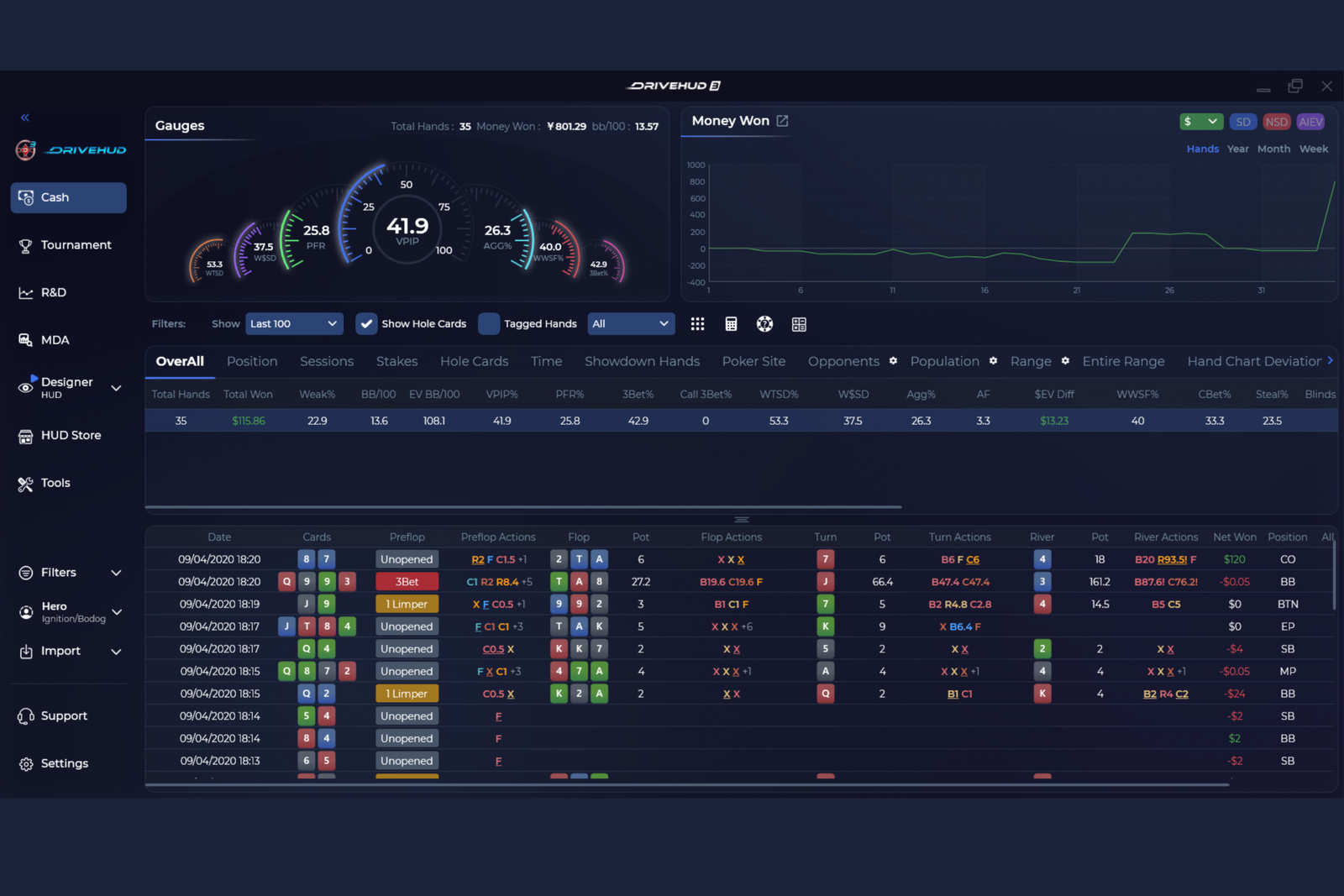
DriveHUD 3 is a tracker for online poker players. It collects hand histories for both you and your opponents, generates statistics from them, and displays those stats during play through a HUD (Heads-Up Display—a panel of numbers overlaid on the table window next to each player’s name). Away from the tables, the same database is used to review your own play through reports, identify weaknesses in your strategy, and practice decision-making.
The purpose of this type of software is to replace guesses about an opponent’s playing style with concrete numbers and your subjective impressions of a session with measurable results. For beginners, this provides two benefits: guidance at the table about what type of player they are facing and material for post-session review to identify areas of their own game that need improvement.
How a Poker Tracker Works
DriveHUD 3 is built around a database that imports hand histories from poker rooms. The software extracts players’ preflop and postflop actions from each hand and converts them into statistics: how often a player open-raises, how often they reach showdown, how often they make a continuation bet (a bet made by the player who was the aggressor on the previous street), and dozens of other metrics.
These numbers are then used in two ways. The first is the in-game HUD: the software monitors active table windows and displays each opponent’s statistics next to their name in real time, updating the numbers as you play. The second is reports and off-table analysis tools, where the same data can be filtered, grouped, and compared over a much longer period than a single session.
Separate from opponent statistics, the software includes a calculation suite consisting of a GTO calculator and related tools. These do not rely on the hand history of a particular player but instead calculate equilibrium, or balanced, decisions for a given situation.
In-Game HUD and Popups
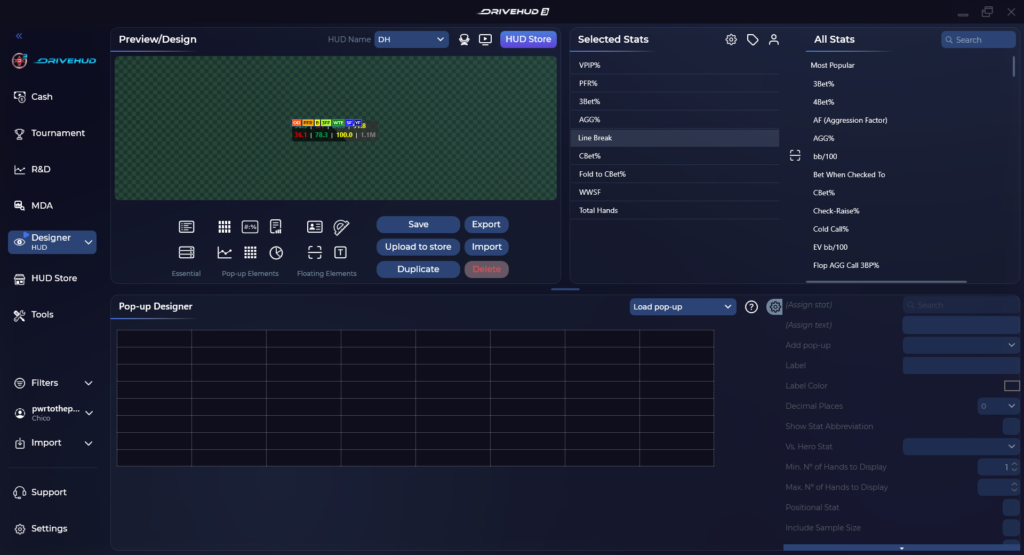
The HUD in DriveHUD 3 displays an opponent’s key stats directly below their name: how often they play hands, how often they raise preflop, how often they reach showdown, and more. The stats shown in the HUD are customizable, allowing you to create your own profile for a specific game format, such as cash games or tournaments, and remove any numbers you do not need.
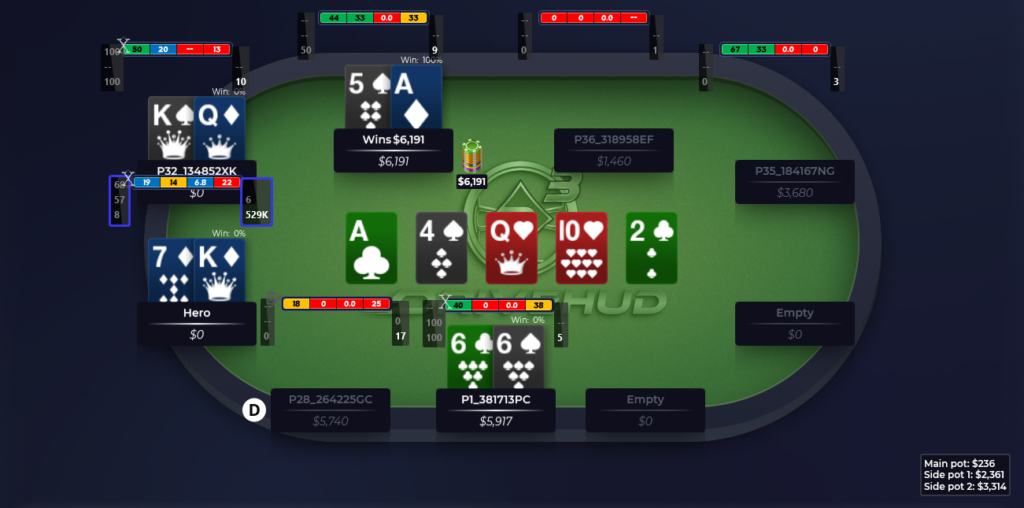
HUD elements and fonts scale with the table window, keeping the numbers readable in both small and large windows without requiring you to reposition the panels for every size. The HUD can display not only an individual opponent’s statistics but also population stats—the average tendencies of all players in your database at that stake—so you can immediately see how far an opponent deviates from the average. You can also add your own ranges—predefined strategies for playing starting hands—for quick reference during play, as well as timing information showing how many seconds an opponent usually takes to make a decision, providing an additional source of information about their hand.
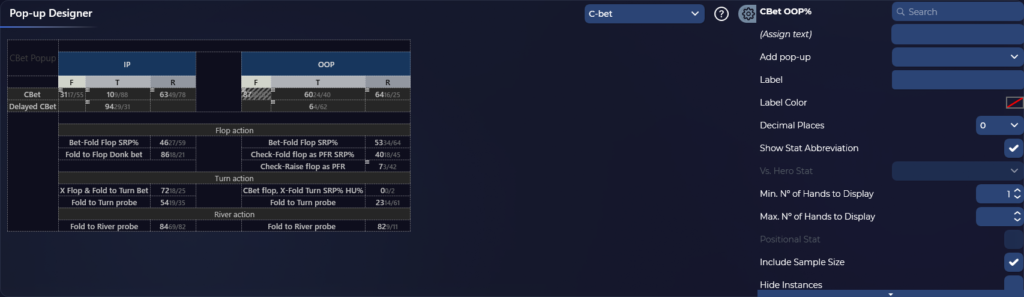
Clicking a stat panel in the HUD opens a popup with a more detailed breakdown for that player. The stats are divided by street and hand type, which is useful when a single short line in the HUD does not provide enough information to make a decision.
Reports, MDA, and Report Builder
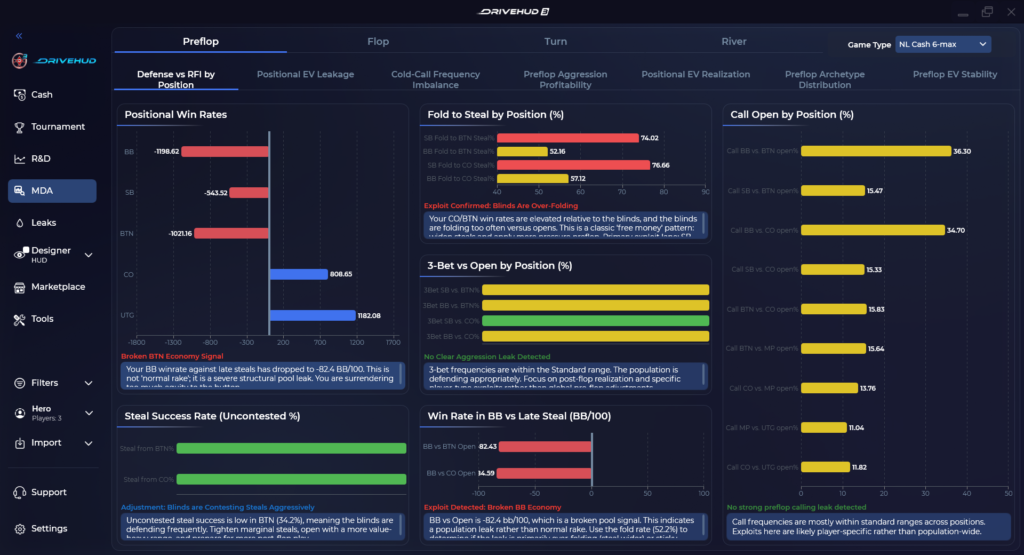
Away from the tables, DriveHUD 3 generates MDA reports (Mass Data Analysis). The software compares population play—the average behavior of all players in the database at a particular stake—with a balanced strategy and shows where players deviate from it most significantly on average. For beginners, this provides practical guidance on which exploits—adjustments that take advantage of opponents’ systematic mistakes—to look for first, without having to calculate population tendencies manually for individual opponents.
The software’s filters are built around common scenarios, including session length, specific time periods, and game format, and determine which hands are included in a report. Dedicated sections provide an overview of potential leaks in your own game for a given session and let you add street-by-street notes to individual hands for later review.
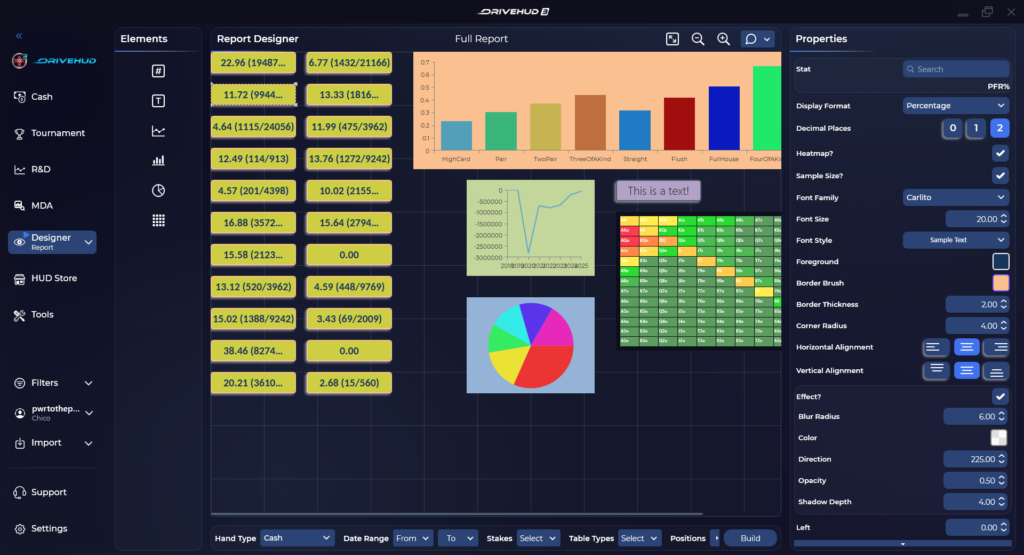
Report Builder lets you create a custom dashboard of graphs and statistical tables, placing the metrics you need next to one another instead of switching between standard tabs. Several types of graphs are available, including pie charts and scatter plots. You can choose stats from the existing selection or create custom ones for specific questions that the standard metrics cannot answer.
GTO Calculator and Range Training
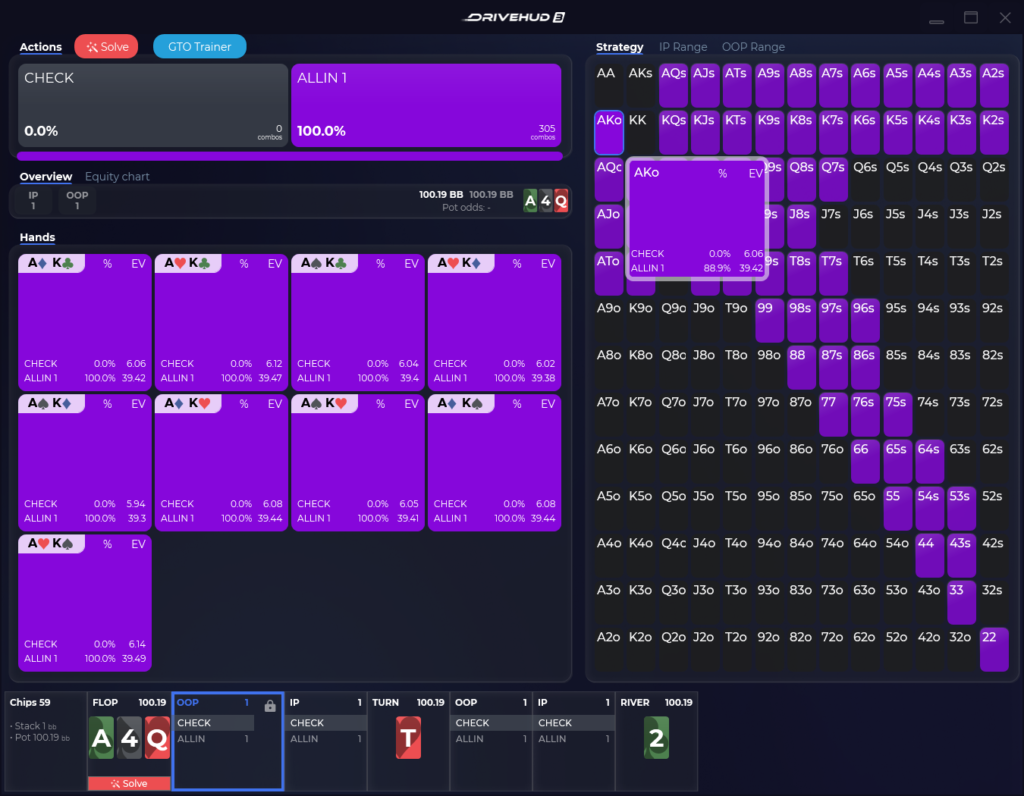
The built-in GTO calculator (GTO stands for Game Theory Optimal, a theoretically balanced strategy) calculates an equilibrium solution for a given situation and compares it with the range actually being played. It shows where the strategy is too aggressive or, conversely, too passive relative to balanced play. This allows you to check questionable decisions with calculations rather than intuition alone, without leaving the software to use a separate solver—a program that finds a mathematically balanced strategy for a given situation.
Alongside the calculator, the software includes a range editor for creating predefined starting-hand strategies for common situations, such as opening from the BTN, or button, or cold-calling from the BB, or big blind. You can use a range to check how much your own play deviates from the predefined strategy: the software automatically finds hands in which your decision differed from the range and places them in a separate list for review. You can also create custom training exercises for specific situations and track your progress, gradually addressing gaps in your strategy for particular ranges rather than trying to improve your entire game at once.
AI Hand Analysis and Hand Replayer
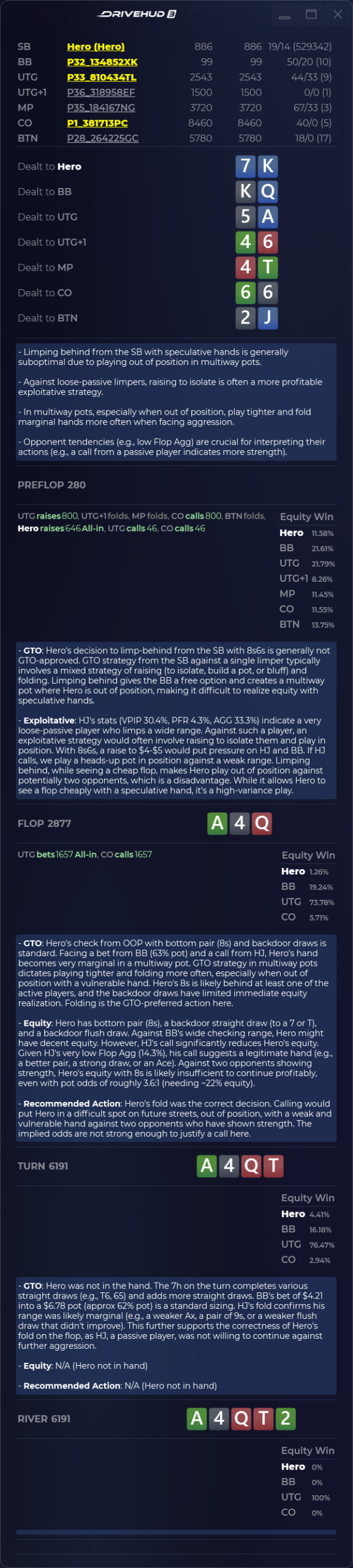
The hand replayer in DriveHUD 3 recreates a hand with an animated table. Cards, bets, and player actions are shown street by street in the order in which they occurred, making it easy to review a hand again without the pressure of a decision timer.
The software also offers AI hand analysis. You can send a specific hand through an API for analysis by an AI model—this requires your own API key for the selected service—and receive step-by-step commentary on your decisions on every street. For beginners, this is a way to get a plain-language explanation of a questionable spot rather than just raw statistics.
Compatibility: Game Formats and Poker Rooms
DriveHUD 3 supports No-Limit and Limit Hold’em, most Omaha variants including PLO4, PLO5, and PLO6, cash games, multi-table tournaments, and sit-and-gos.
The software works natively with a wide range of poker rooms and networks without requiring paid converters. These include Bovada, Bodog, Ignition, PokerStars, CoinPoker, BetOnline, TigerGaming, Sportsbetting.ag, ACR (Americas Cardroom), 888poker, WSOP.net, the iPoker network (bet365, Betfair, William Hill Poker, Titan Poker, and other skins on the network), several Indian platforms (Adda52, The Spartan Poker, PokerBaazi, Junglee, and Pocket52), and the MPN network. Poker apps serving the Asian market, such as WPT Global, PokerBros, PPPoker, and similar platforms, require a separate paid hand history converter called Asian Hand Converter, which is not included in the standard plans. HUD support for some major poker rooms, such as PartyPoker, was unavailable at the time of writing. It is worth checking the current list of supported sites on the developer’s website before purchasing, as poker rooms periodically change their data formats and support for individual platforms may be temporarily suspended.
DriveHUD 3 is a Windows application that requires Windows 10 or later, with at least 16 GB of RAM recommended. On a Mac, it can be run through Windows environment emulation using the paid Parallels solution or the free WINE compatibility layer.
Getting Started
Setup begins by downloading the trial version from the developer’s website. The trial lasts 14 days and provides full access to the software’s features without tool restrictions. From there, it makes sense to follow a few steps in order:
First, install the software and specify which poker rooms it should monitor, or manually import your existing hand histories if you have already played hands in the past. Next, play or import at least a small number of hands so that the database contains enough information to generate statistics. Without hands in the database, neither the HUD nor the reports can display anything meaningful. You should then customize the HUD for your usual game format by choosing which stats to display at the table and testing how it scales with the window size. Next, open an MDA report for your stake to review general player tendencies. Only then should you move on to the GTO calculator and individual hand analysis, as you will have a clearer idea of which decisions need to be examined first.
One license key can be activated on two computers, and the license is valid for one year. All updates for this version of the software are included in the price while the license remains active.
Pricing Plans
DriveHUD 3 is sold as an annual license with several pricing plans. They differ in the stakes at which the software may be used and the included toolset, with higher-tier plans offering a hand history converter for Asian poker rooms. There is a basic plan for games with buy-ins of up to $50, an unrestricted plan with no stake limits, and a bundle that includes the converter for Asian platforms. A free 14-day trial with full functionality is available before purchase. Detailed descriptions of the plans and prices are available on the product page.
Conclusion
DriveHUD 3 addresses two key needs for beginners using poker trackers: it displays opponent statistics at the table through a customizable HUD and provides tools for reviewing your own play, including population MDA reports, a GTO calculator with range training, and AI analysis of individual hands. It is best to learn the software gradually: start with the HUD and basic statistics, then move on to population reports, and only after that explore the calculator and training ranges once you understand which specific decisions need to be checked.

Featured software

Latest posts
-
 GGPoker Bans Third-Party Poker Software: Five New Security Measures Oct 18, 2026
 -
 Table Wizard Review: Table Organization and Automated Session Analysis Oct 17, 2026
 -
 PeakGTO Review: A GTO Trainer With an ELO Rating System From Jonathan Little’s Team Oct 16, 2026
 -
 GTOBase Review: Ready-Made GTO Solutions and Hand Analysis Oct 15, 2026
 -
 Simple Postflop Review: A GTO Solver for Heads-Up Pots from Preflop to River Oct 14, 2026
All the poker software you need, gathered in one place. Exclusive discounts, bonuses, latest news and updates.
Join now