Poker Bankroll Tracker Review: Your Bankroll and Live Sessions in Your Pocket

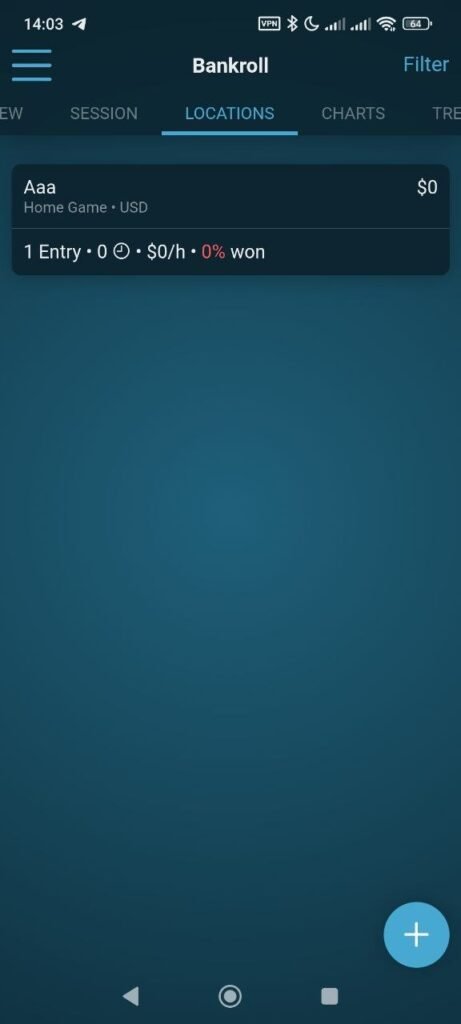
Poker Bankroll Tracker is a poker results tracking app that fits in your pocket and is always within reach at the table. It records every session along with the money, time, expenses, and stack movements involved, then turns these records into a clear picture: how much a player earns per hour, which stakes and venues are most profitable, how much is spent on tips and travel, and how strongly results are affected by variance.
The app is especially useful for live poker, where there is no automatic hand history and all the numbers have to be remembered or written down. In addition to bankroll tracking, it includes a hand replayer, equity calculator, deal and payout calculators, opponent notes, a tournament calendar, and the ability to follow friends’ sessions in real time.
How Poker Bankroll Tracker Builds Your Bankroll
The app is built around entries, or sessions. Each entry describes a single event: a cash game, tournament, multi-day tournament, casino game, jackpot win, expense, or transfer into or out of the bankroll. For a playing session, you enter the date and time, venue, venue type (home game, casino, club, or online), game, betting structure, blinds or buy-in, amount bought in for, and amount cashed out.
All entries are combined to form the bankroll—the player’s overall balance. The app stores it on the device and, if you have an account, syncs it with the server, making the data available on any device where you are signed in. Poker Bankroll Tracker also works without an account, but in that case, entries are stored only on the phone and will be lost if the phone goes missing or the app is deleted.

To keep the numbers clear, the app distinguishes between three types of results:
- Table result — cash-out minus the initial buy-in and any rebuys.
- Net profit — the table result minus playing expenses.
- Overall result — net profit plus shares, staking, casino games, jackpots, and transfers into and out of the bankroll.
By default, hourly profit and ROI are calculated using net profit. The Real Performance toggle changes the calculation: the metrics are based on the table result, excluding expenses. For example, with a $100 buy-in, a $200 cash-out, $10 in expenses, and two hours of play, the standard hourly profit is $45, while the Real Performance figure is $50. Comparing the two numbers shows how much money is being spent not on the game itself, but on everything around it.
How to Record a Game: Standard Entry and Live Session
A session can be entered in two ways. The first is a standard entry added after the game: the player taps “+,” selects the entry type, and completes the fields. The app remembers the duration of the previous session and automatically fills in the times, using the current time as the end and subtracting the same duration to set the start. This is convenient when entering the result immediately after leaving the table.


The second method is a live session. You start it at the beginning of the game by entering the venue, stakes, and starting stack, then starting the timer. As the game progresses, new stack values are added to the session and used to create a stack graph—a line showing how your chip count changed throughout the game. After the game, you only need to enter your final stack and end the session; the app calculates the duration automatically. The timer can be paused during breaks, and notes about important events can be added to a live session, such as changing tables, a weak player leaving, or losing a large pot.
In practice, the stack graph provides more insight than the final result alone. It shows how often the stack dropped sharply, when the game began to go wrong, and whether the downswings coincided with fatigue near the end of a long session. For beginners, it is a simple way to connect the result with specific moments from the evening rather than attributing everything to luck.
There are separate workflows for tournament players. A multi-day tournament is entered as a single record with start and end dates and the total number of hours played: for example, three eight-hour days equals 24 hours. If a player enters several starting flights of the same tournament, they can be tracked simultaneously. Tournament entries can also include the finishing position, number of entrants, number of paid places, starting stack, and bounty winnings.
Expenses, Tips, Jackpots, and Transfers
Live poker almost always costs more than the buy-ins suggest. Poker Bankroll Tracker separates expenses into several categories, and the category determines which metrics they affect:
- Expenses in chips — anything paid with chips directly at the table, most commonly dealer tips. These already reduce the cash-out amount, so they are not deducted from net profit again.
- Expenses — mandatory costs associated with playing, such as a seat fee or time-based rake. These reduce net profit.
- Costs — a separate entry for spending that should not affect hourly profit, such as hotels, flights, and meals while traveling.

A bad beat jackpot win or bonus is entered separately as a Jackpot/Bonus entry. You can choose whether to include it in cash game or tournament statistics so that a large one-off win does not distort the overall picture. Money added to or withdrawn from the bankroll is recorded as a Deposit/Payout with a positive or negative amount.
Shares, Staking, and Tags
Players often buy and sell shares in tournaments and high-stakes cash games. The app tracks both. If a player sells a share, the amount the buyer contributed toward the buy-in is entered under Share Income, while the amount they will receive from the cash-out is entered under Share Payouts. For example, when selling 10% of a session with a total buy-in of $100 and a $200 cash-out, share income is $10 and the payout is $20. If the player buys a share in someone else’s game, that player’s buy-in and cash-out are entered, while the buyer’s own portion is entered under Invested and Winnings. A slider helps complete the fields by calculating the amounts based on the share percentage; when selling at a markup, the values are adjusted manually.
The Real Performance toggle shows what the overall bankroll result would have been without any shares sold. This reveals how much selling part of the action ultimately cost.
Tags organize entries into groups. For example, all sessions from one trip can be tagged “Vegas Trip” to generate a separate profit figure and graph for them. A tag can be shared with a friend, allowing them to see every session with that tag. This is useful for staking arrangements where an investor needs to see the results from a specific tournament series.
Statistics and Filters: Where Your Games Are Profitable
On the bankroll page, the app displays total profit, hours played, hourly profit, BB/hour, tournament ROI, percentage of winning sessions, and results graphs. The Pro version adds more statistics and graphs.
It is important to understand the difference between profit in monetary terms and profit in big blinds. Suppose a player spends one hour at $1/$2 and wins $200, which equals 100 BB per hour. They then spend an hour at $2/$4 and lose $300, which equals −75 BB per hour. In monetary terms, the total result is −$100, or −$50 per hour, while in big blinds it is +25 BB, or +12.5 BB per hour. BB/hour indicates the quality of play independently of the stakes, while monetary hourly profit shows actual earnings. For BB/hour to be calculated correctly, the small and big blinds must be entered numerically for every cash session rather than appearing only in the game’s name.
Filters are the main analysis tool. Entries can be filtered by game type, stakes, buy-in, blinds, venue, year, day of the week, time of day, duration, and other parameters. In practice, a player might filter for sessions played late at night and compare them with daytime sessions, or compare one venue with another. These breakdowns reveal the times, venues, and stakes at which the player wins and where they consistently lose. The player must still draw conclusions and decide whether to change their playing schedule or stakes, but the app provides the numbers needed to make that decision.
If a player has multiple separate bankrolls, such as one for live poker and another for online play, the Pro version can track and display them simultaneously. The free version displays only one bankroll at a time.
For players who travel between countries, the app supports more than 40 currencies with exchange rates updated daily. The base currency is selected in the settings, and the total bankroll is displayed in that currency, while each session retains its own currency and exchange rate. For example, if the base currency is USD, a 100 AUD win at a tournament series in Australia will be converted into dollars using the exchange rate at the time of play.
Benchmark: Comparing Your Results With Other Players
The Benchmark feature compares a player’s results with those of other Poker Bankroll Tracker users in the same category. The category is determined by the game (no-limit hold’em or pot-limit Omaha), stake level (micro, low, mid, or high stakes), and environment (live or online). Results are compared using BB/hour.
The calculation includes only users with accounts who have played at least five sessions or 20 hours in the category over the past 365 days. It considers only their own unstaked cash sessions lasting between 15 minutes and 24 hours, with valid blind values and a game name of NLH, Holdem, Texas Holdem, Omaha, or PLO. Obvious outliers are excluded, and the calculation uses table results without expenses.
The app then displays the category median, the player’s percentile—for example, “better than 84% of players”—and a performance level such as Crusher or Strong Winner. The player pool is recalculated once per day at midnight UTC. If there is not enough data, the player’s statistics are shown without a comparison.
For beginners, Benchmark provides a useful reference point by showing how their win rate compares with the typical result at those stakes. This helps them judge realistically whether they should move up or first establish themselves at their current level.
Calculating Variance and Risk of Ruin
Variance is the natural fluctuation in poker results: even a strong player can lose for weeks. Poker Bankroll Tracker’s variance calculation uses recent cash sessions to determine two figures: the expected result (EV) in big blinds per 100 hands and the standard deviation, which measures how far individual session results deviate from the average. If the win rate is +10 BB per 100 hands and the standard deviation is 20 BB, the results of future sessions will most often fall between −10 and +30 BB per 100 hands.



Based on these figures, the app simulates 20 possible outcomes and displays the best and worst of them alongside the expected-results line. It also calculates Risk of Ruin—the probability of losing the entire bankroll—and the number of big blinds required to keep that risk below 5%.
The calculation requires at least five cash sessions with their actual durations and correctly entered blinds. Sessions with a duration of zero greatly inflate the standard deviation, resulting in an unrealistically large bankroll requirement. These entries should be located using the duration filter and corrected.
In practice, this calculation helps beginners remain calmer during downswings: the graph shows that a prolonged losing stretch may still fall within normal variance rather than meaning their game has fallen apart. The required bankroll also provides a clear guide for choosing stakes.
Hand Replayer and Analysis Hub
The replayer lets you reconstruct a hand step by step, including players’ cards, actions on each street, and the board. It supports hold’em, Omaha, and five- and six-card Omaha. In addition to standard hands, the replayer supports bomb pots—hands in which all players contribute to the pot before going directly to the flop—double-board games, a third blind, and straddles. The turn and river or the entire board can be run twice, just as when players agree to “run it twice” at the table.

Recorded hands are private by default and visible only to the author. To discuss a hand with friends, it can be moved to Analysis Hub, a shared space where only friends can view and comment on it. A hand can also be shared via a link, for example on a poker forum. For video creators, there is a version of the replayer with a solid-color background that can easily be overlaid on a recording.
For beginners, the replayer is a way to preserve questionable hands. In live poker, details can be forgotten within an hour, while a recorded hand can later be reviewed carefully or shown to a more experienced player.
Opponent Notes and Statistics
Poker Bankroll Tracker lets you keep notes on players you regularly encounter at the table. The app also generates opponent statistics from hands entered into the replayer, including:
- VPIP — how often a player voluntarily puts money into the pot preflop.
- PFR — how often they raise preflop.
- 3BetPF — how often they 3-bet preflop.
Hands in the replayer are linked to the player database, so statistics and notes are collected in a single opponent profile. It is important to keep the sample size in perspective: these figures are based only on manually recorded hands rather than every hand played at the table, so the sample is usually small. The numbers serve as clues, while the player draws their own conclusions about an opponent’s style by combining the statistics with what they observed at the table.
Calculators: Equity, Deals, and Payouts
The app includes three calculators that can be useful during a game or while on a break.


The equity calculator calculates the winning chances of hands in hold’em, Omaha, and five- and six-card Omaha. It can compare up to six players in one hand, as well as a specific hand against an opponent’s range. Players can use it to check whether an all-in was profitable in a close spot and determine their hand’s EV—the average expected return over the long run.
The deal calculator calculates how a tournament final-table prize pool can be divided in two ways. ICM (Independent Chip Model) converts players’ stacks into monetary values based on the payout structure. A chip chop divides the money in proportion to each player’s chip count. When a deal is proposed at a final table, the calculator provides a fair starting point, while the player decides whether to accept it.
The payout calculator distributes a tournament prize pool across the finishing positions, which is useful when organizing home tournaments, for example.
Friends, Live Sessions, and the Leaderboard
Poker Bankroll Tracker lets users add other players as friends. Both players must allow each other to follow them. After that, friends’ sessions from the past seven days appear on the home screen, including live sessions. If a friend is playing a tournament, their current stack and session progress are visible, so there is no need to message them for updates. The Pro version also shows the details of these sessions. Any session can be made private, in which case friends will not see it.
The leaderboard includes friends who have played at least five sessions over the past three months and made their three-month trend public, including hours, hourly profit, ROI, and total profit. To see friends’ trends, players must also make their own trend public.
Tournament Calendar
The app includes a public tournament calendar featuring tournament series. It is useful for planning trips and seeing at a glance which events are running at the desired time. Combined with tags and multi-currency tracking, this makes the app convenient for players who travel to different series: schedules, travel expenses, and results are all kept in one place.
Transferring Data: Import, Export, and API
If session history is already being tracked in another app, it can be transferred via CSV import. The app directly accepts export files from 15 apps: Bink Poker Tracker, Left Pocket Bankroll Manager, Poker Analytics, Pokerbase, Pokercharts.com, Poker Expert, Poker Income, Poker Journal, Poker Ledger, Poker Manager, Poker Sheet, Poker Track Pro, Poler, Regroup Poker Tools, and Run Good. Files from some of these apps require minor adjustments before importing. For example, when importing from Pokerbase or Poker Sheet without a separate game-type column, all sessions will be recorded as cash games. Data can also be prepared manually in a spreadsheet using a template with a fixed set of columns.
CSV export serves as a backup: even when server synchronization is enabled, regular exports protect the session history in case access to the account is lost.
Pro users have access to a public API—an interface through which external programs can retrieve session data using a key. The key is created in the account section of the desktop version. The API returns sessions with filters for dates, type, currency, and staking, including stack-change history, and accepts up to 20 requests every 15 minutes. One possible use is to provide the data to an AI assistant and ask questions about your game in everyday language, such as comparing your win rate in casinos and home games over the past year. One user has created and released a ready-made integration for free.
Keeping the Database Organized: Bulk Editing and Trash
Over time, inconsistencies can accumulate in the entries: the same venue might be recorded as both “Aria Vegas” and “Aria Casino Vegas,” while a game might appear as “NL 1/3” in one entry and “Holdem” in another. The maintenance tab on the bankroll page solves these issues by allowing users to rename and merge venues and games, hide unnecessary options from lists, find duplicate entries, and make bulk corrections to cash sessions—for example, adding blinds to every game with a particular name. It also identifies sessions that are not assigned to any bankroll.
Deleted sessions remain in the trash for 30 days and can be restored from there. Users can also delete all or part of their cloud data, such as their bankroll or replayer hands, from the account.
Supported Devices and Games
Devices:
- iPhone and iPad — iOS and iPadOS 15.6 or later.
- Mac with an Apple M1 processor or later — macOS 12.5 or later, through the App Store using the iPad version.
- Android — through Google Play or an installation file from the developer’s website for devices without access to the store.
- Computer — a desktop version that opens in a browser after signing in to an account.
Games and formats:
- Cash games, tournaments, multi-day tournaments, and casino games.
- Any poker variant: game names can be entered freely, allowing users to track hold’em, Omaha, razz, and mixed games.
- Betting structures: no-limit, pot-limit, spread-limit, fixed-limit, and mixed.
- Table sizes: heads-up, short-handed, and full-ring; third blinds and antes are supported.
- Live games in casinos, clubs, and home games, as well as online sessions.
Languages: the interface is available in 12 languages, including English, Spanish, German, French, Chinese, Japanese, Korean, and others.
Known limitations:
- The app does not connect to poker rooms or read hand histories: all sessions and hands must be entered manually. Importing databases from desktop trackers such as PokerTracker and Holdem Manager is not supported.
- The app is designed primarily for live poker. There is no limit on the number of sessions, but it runs faster with 1,000 entries than with 10,000.
- Benchmark works only for no-limit hold’em and pot-limit Omaha cash games with correctly entered blinds.
- The Pro subscription is linked to an Apple or Google account. When switching from one platform to the other, it must first be linked to the Poker Bankroll Tracker account on the old device.
Getting Started
- Installation. The app can be installed for free from the App Store or Google Play. Android users without access to the store can download an installation file from the developer’s website.
- Account. The app can be used without registering, but it is best to create an account immediately because otherwise, the data is stored only on the device. It is important to retain access to the email address used during registration: support will not change the address without it, making it impossible to recover access to the account.
- Base currency. Select the currency in which the total bankroll will be displayed in the settings.
- Transfer existing history. If sessions have already been tracked in another app, they can be uploaded via CSV import.
- First sessions. Cash sessions should be entered carefully: use the actual start and end times, enter the small and big blinds numerically, and use a game name such as NLH, Holdem, or PLO. This ensures that BB/hour, variance calculations, and Benchmark work correctly.
- Live session. The next time you play, start a live session at the table and enter stack updates throughout the game to generate a stack graph.
The free version has no time or session limits, so users can learn how the app works before purchasing Pro.
Free vs. Pro: How the Versions Differ
Poker Bankroll Tracker is available for free. The free version includes unlimited sessions, live sessions, basic statistics, filters, the replayer, calculators, and friends, but it displays ads and shows only one bankroll at a time.
The Pro version removes ads and adds more statistics and graphs, CSV import and export, simultaneous tracking of multiple bankrolls, details of friends’ sessions, and API access. Pro is available either as an automatically renewing annual subscription or as a lifetime license with a one-time payment. Payments are processed through the App Store or Google Play, or through PayPal when installing the Android version from the website. The price varies by country and is recalculated once a year based on exchange rates.
A detailed description of the plans and prices is available on the product page.
Conclusion
Poker Bankroll Tracker solves live poker’s biggest tracking problem: the lack of accurate records. The app keeps money, time, expenses, shares, and stack movements in one place, then turns these entries into statistics that would otherwise have to be calculated manually in live poker. It also brings together several useful tools: a hand replayer, calculators, Benchmark, variance calculations, and social features.
Beginners do not need to learn everything at once. At first, it is enough to record every session carefully and start live sessions at the table. Once several dozen entries have accumulated, filters and Benchmark can be introduced, followed by variance calculations, the replayer, and opponent notes. Learning the features gradually turns the app from a simple logbook into a practical tool for making decisions about stakes, playing times, and bankroll size.

Featured software

Latest posts
-
 Poker Analytics Review: Live Poker Session and Bankroll Tracking Nov 23, 2026
-
 GTO Wizard vs. MonkerSolver: Ready-Made Browser Solutions or Your Own Calculations on a Computer Nov 22, 2026
-
 Snap MDA Review: Player Pool Data Analysis vs. GTO Strategy Nov 21, 2026
-
 Jurojin Review: Table Layouts, Hotkeys, and Overlays for Multi-Tabling Nov 21, 2026
-
 GGPoker Bans Third-Party Poker Software: Five New Security Measures Oct 18, 2026
All the poker software you need, gathered in one place. Exclusive discounts, bonuses, latest news and updates.
Join now