Simple Postflop Review: A GTO Solver for Heads-Up Pots from Preflop to River
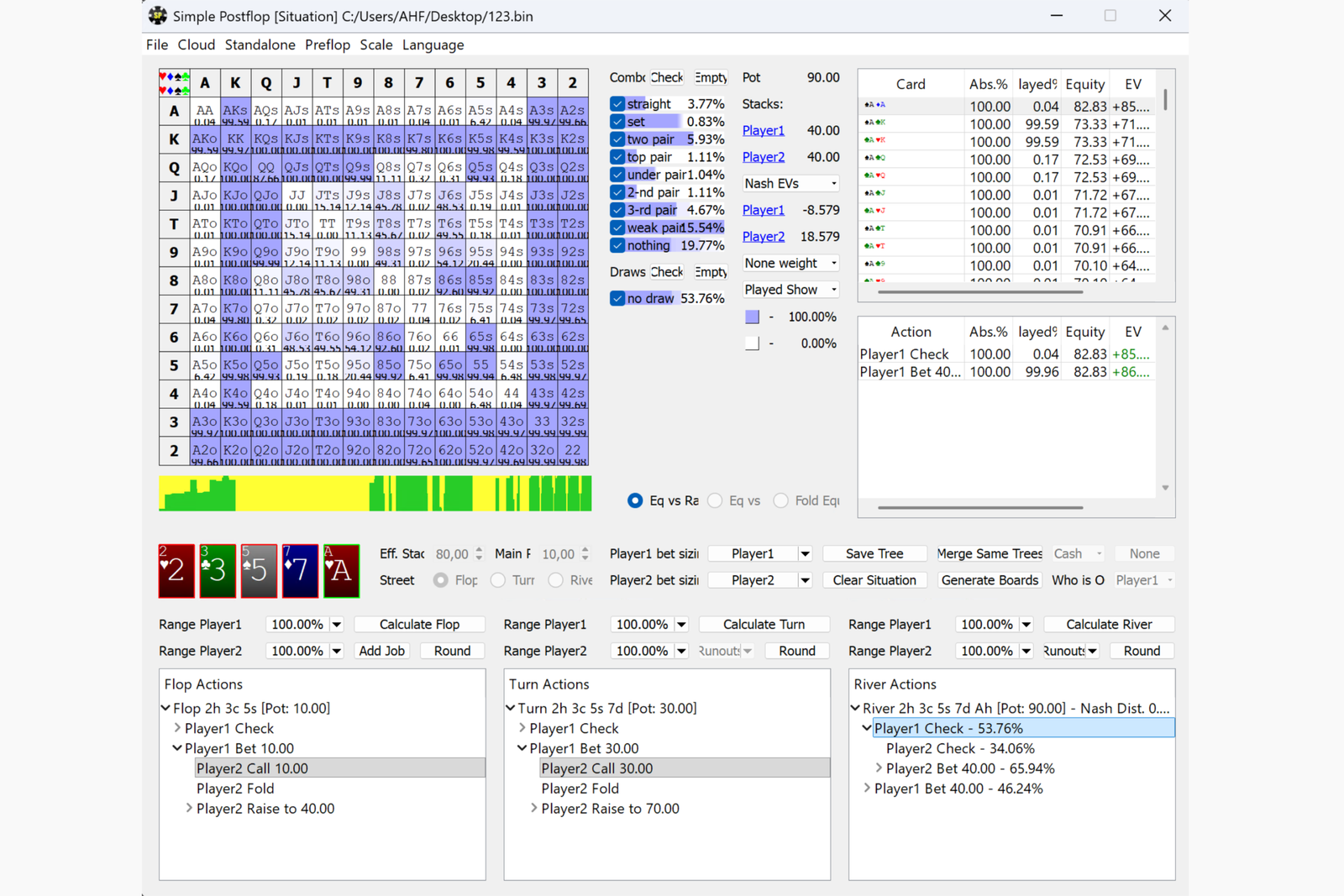
Simple Postflop is a Texas Hold’em solver—a program that calculates a game-theory-optimal (GTO) strategy. The program works with heads-up pots in which only two players remain: for example, when the BTN (button) opens, the BB (big blind) calls to defend, and play continues on the flop.
The user describes the situation: the board cards, stack and pot sizes, the hand ranges with which the players reached this point, and the bet sizes they are allowed to use. The program uses these inputs to build a game tree and find an equilibrium—a pair of strategies in which neither player can benefit by unilaterally changing how they play. The results show how often each hand should bet, check, call, raise, or fold, as well as its average return.
The program was developed by the Simple Poker team. Simple Postflop is installed on a Windows computer. Turn and river calculations are available for free, while flop and preflop calculations require a Standalone license. This type of solver is designed for off-table study: reviewing played hands, finding effective bet sizes, and understanding how to play different parts of a range on different boards.
How Solver Calculations Work
Before using the program for the first time, it is helpful to understand several concepts on which its entire workflow is based.
Equilibrium strategy (GTO). A strategy that cannot be exploited if the opponent also plays optimally. It does not adjust to the mistakes of a specific player, but it provides a reliable baseline that makes deviations in an opponent’s play easier to identify.
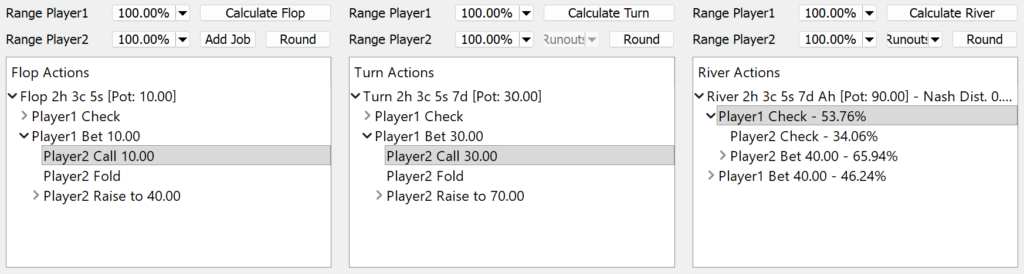
Game tree. A map of all possible player actions: checks, bets, calls, raises, and folds on every street. Each decision point is called a node, and each action at a node is a branch. The more bet sizes are allowed, the larger the tree becomes and the longer it takes to solve.
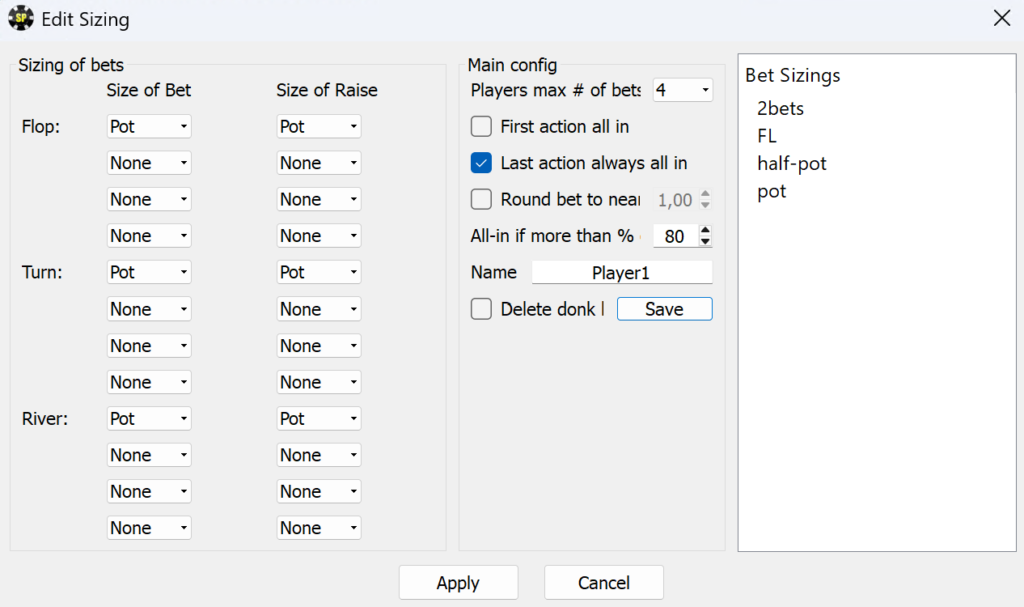
Bet sizes. The bet and raise sizes available to the players. The solver does not invent sizes on its own; it selects the best options from those specified by the user. Therefore, the available lines in the solution directly depend on the chosen set of bet sizes.
Starting ranges. The sets of hands with which each player reached the situation being analyzed. For example, the player who opened from the CO (cutoff) and the BB who defended will have very different ranges on the flop, which has a major effect on the resulting strategy.
Effective stack and pot. The effective stack is the smaller of the two players’ stacks at the beginning of the street being analyzed. This is the maximum number of chips that can actually be played for. The pot is the amount already in the middle of the table.
EV and equity. EV (expected value) shows how much a hand earns on average when played along the selected line. Equity is the share of the pot attributable to a hand if the hand is checked down to showdown with no further betting.
Nash Distance. A measure of solution accuracy that shows how far the calculated strategy is from a perfect equilibrium. The lower the value, the more accurate the calculation.
The workflow in the program always follows the same pattern: describe the situation, specify bet sizes and ranges, build the tree, run the calculation, and study the results.
Setting Up the Situation: Board, Stacks, Rake, and ICM
The calculation begins in the main window, where the basic hand parameters are entered:
- Board. The flop cards and, if necessary, the turn and river. You can enter the full board immediately and then analyze each street in sequence without entering the cards again.
- Eff. Stack and Main Pot. The effective stack and pot size at the beginning of the selected street. For example, if the players started the hand with stacks of 80 and 150 BB and each invested 5 BB preflop, the pot on the flop is 10 BB and the effective stack is 75 BB.
- Street. The flop, turn, or river—the street for which the strategy will be calculated.
- Rake or ICM. For cash games, you specify the rake as a percentage of the pot and its maximum amount (cap) in blinds. For tournaments, the ICM model is enabled instead of rake. ICM (Independent Chip Model) converts chips into real monetary value based on the payout structure. In the ICM window, you enter the stacks of all players at the table and the payout structure, while the Paste button imports data from a copied hand history.
- Out-of-position player. Select the player who acts first postflop.

Once the fields have been completed, the Apply Situation button builds the game tree. The button’s drop-down menu contains previously saved trees, so common situations do not need to be configured again.
How this helps in practice. You can calculate the same hand using the rake structure of your stakes or with ICM considerations at a tournament final table. For beginners, this clearly demonstrates how game conditions change the correct strategy: the same hands are played much more cautiously on an SNG bubble than in a cash game.
Bet Sizes and the Game Tree
You do not have to draw the tree manually, branch by branch. In the sizing menu, you specify bet sizes for each player on every street, and the program automatically turns them into a complete tree.
Sizing menu. You can specify up to three sizes for the first bet on a street, while raise sizes are configured separately. Sizes can be entered as a percentage of the pot or as a fixed amount—the latter option makes it possible to analyze limit hold’em. Additional settings include:
- the maximum number of bets on a single street;
- adding an all-in as the first action and converting the final raise into an all-in;
- automatically going all-in if a bet exceeds a specified percentage of the stack;
- rounding bet sizes;
- removing donk bets (a donk bet is a bet made by the out-of-position player into the player who was the aggressor on the previous street);
- saving sets of bet sizes so they can be applied to new hands with one click.
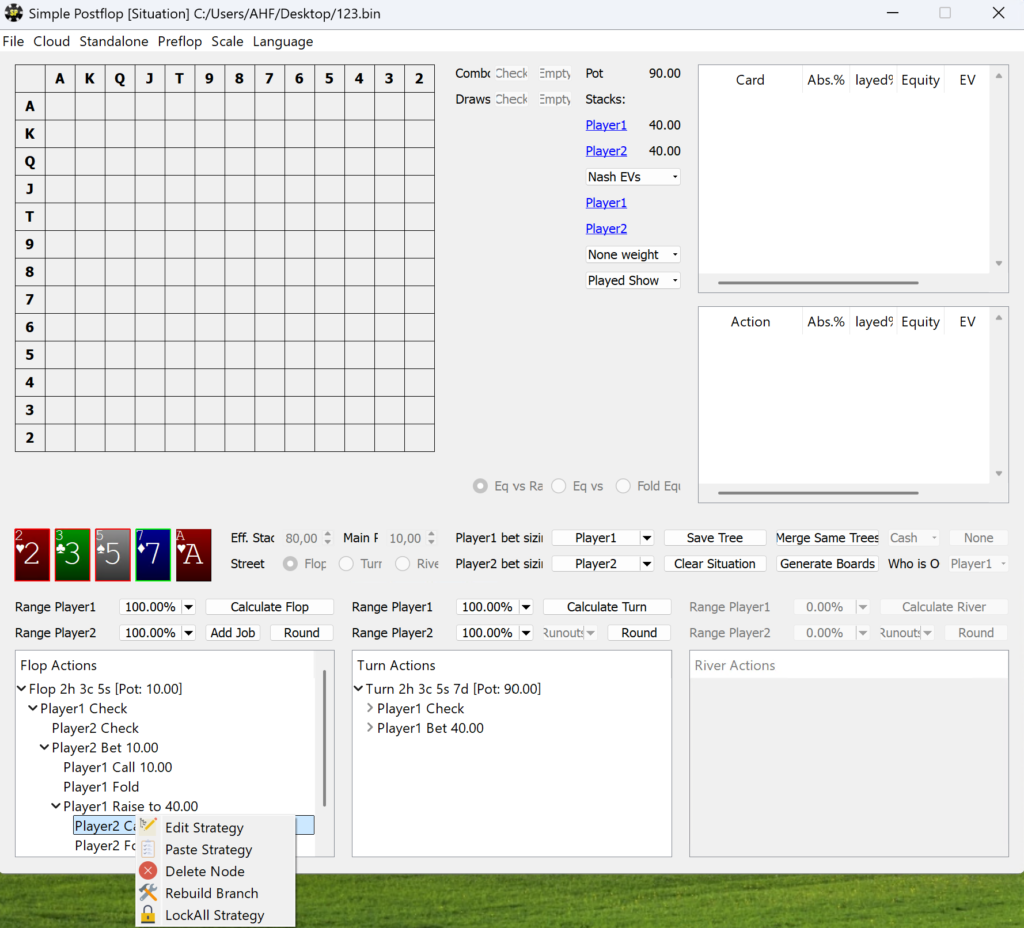
Tree editor. You can edit a completed tree through the context menu of any node: add an action (Add Node), remove it (Delete Node), or rebuild the branch (Rebuild Branch). This allows you to add a fourth or fifth bet size at a specific point in the tree when three options are not enough.
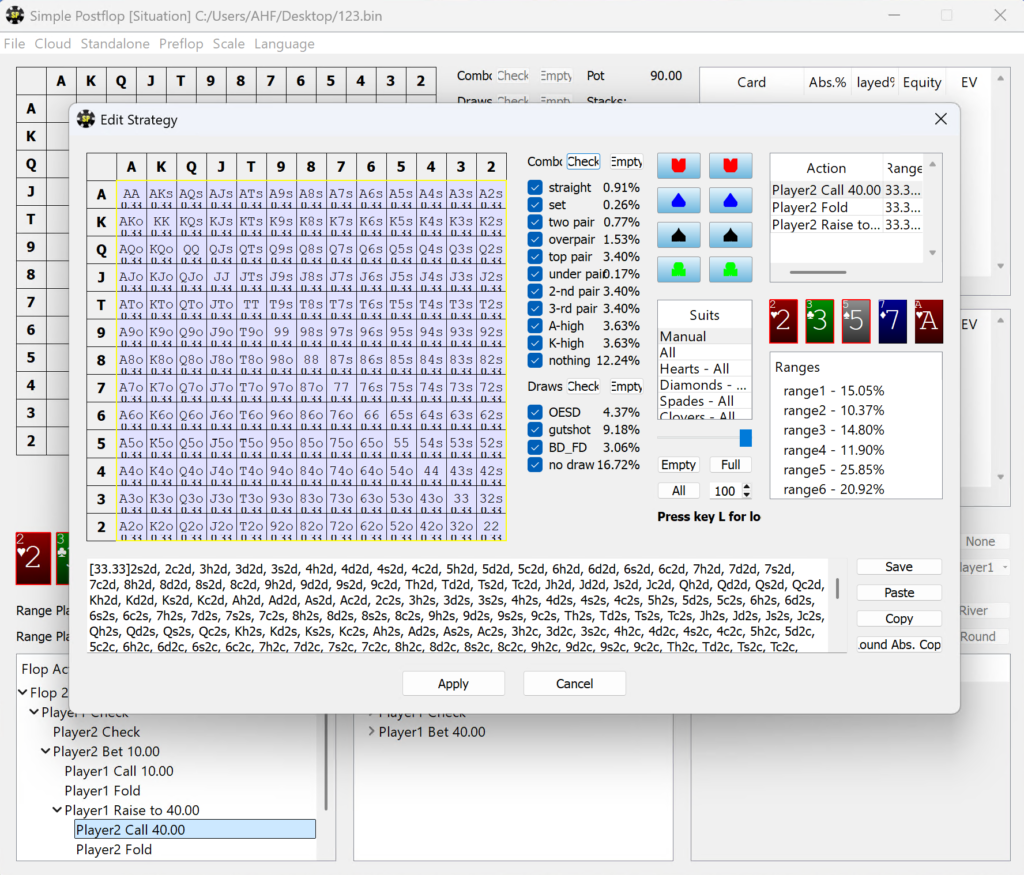
Why beginners need this. Comparing solutions with different sets of bet sizes shows when a small c-bet (continuation bet—a follow-up bet after raising preflop) is more profitable and when a larger size works better. Removing unnecessary branches also helps keep the tree compact and avoids waiting half an hour for a calculation.
Player Ranges
Starting ranges are entered in a separate menu, where you can conveniently build them from scratch or refine existing ones.
- Hand matrix. A standard 13 × 13 grid: clicking adds a hand to the range at the selected frequency, while dragging across the grid with the mouse button held down adds multiple cells at once. The right mouse button works as an eraser.
- Suit filter. Allows you to add or remove only specific suit combinations. For example, you can keep only AhQh and AcQc from AQs.
- Frequency. A slider controls the weight with which a hand is included in the range: fully, half the time, and so on.
- Saved ranges and text format. Completed ranges are stored in a list, while range strings can be copied and pasted. The strings are compatible with Flopzilla and CardRunners EV, and the Round Abs. Copy function rounds frequencies to either 0% or 100% so that the range can be transferred to programs that do not support mixed strategies.
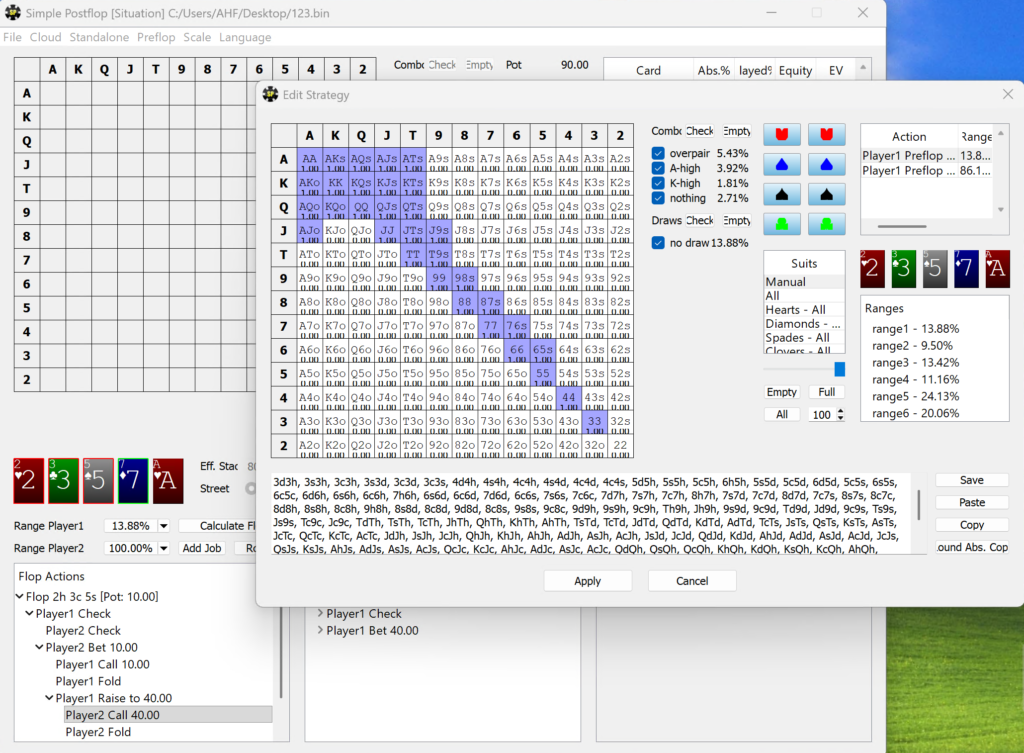
How this helps in practice. The quality of the entire solution depends on the accuracy of the starting ranges. Being able to quickly paste a range from another program saves time, while the suit filter is useful for fine-tuning—for example, when some suited hands have already been filtered out preflop.
Running Calculations: Speed, Algorithms, and Accuracy
A turn calculation usually takes a few seconds, while a river calculation takes less than a second. With standard settings and a small tree, a flop calculation takes several minutes; larger trees take considerably longer. When calculating the flop, the solver considers every possible turn and river card as well as the players’ actions on those streets.
In Standalone → Settings, you can select how each street is calculated:
- Remote — calculations are performed on the developer’s servers. In this mode, turn and river calculations are free and do not require a license.
- A1 — the basic local algorithm. It supports compressing the tree in RAM by up to four times, making it suitable for computers with limited memory. The trade-off is slower calculation speed.
- A2 — requires twice as much memory as A1 without compression and is recommended for complex trees with narrow ranges.
- A3 — also requires twice as much memory but, according to the developer, reaches high accuracy faster than the other algorithms.
The same menu lets you configure calculation accuracy (Low, Middle, High, or Very High—essentially the number of iterations; Middle is recommended for most tasks), the number of CPU cores used (the developer recommends leaving one core free for the system), the accuracy threshold at which the calculation stops automatically, and whether intermediate accuracy is displayed during the calculation.
Calculation queue. Standalone → Jobs contains a list of tasks that the program will calculate one after another. This is useful when you need to analyze dozens of flops: you can start the jobs overnight and review the completed solutions in the morning.

Why beginners need this. You do not have to buy a powerful computer right away: on a lower-end PC, the A1 algorithm with compression and the free Remote mode for turn and river calculations can help. As your needs grow, the same settings let you get the maximum speed from upgraded hardware.
How to Read Calculation Results
Once the calculation is complete, the frequency of each action appears next to it in the tree. When you select an action, the other panels display detailed information about it.
Hand matrix. Each cell is colored according to the available actions: for example, one color for checking, another for betting, and a third for going all-in. You can customize the colors. Right-clicking a cell opens detailed information about the hand, including the number of combinations, EV, equity, and the frequencies of all available actions.

Display modes:
- Strategy Show — displays the complete frequency breakdown of all actions for each hand at the current node;
- Played Show — shows how often a hand is played along the selected line;
- EV Show — shows the expected value of each hand along the selected line;
- Equity Show — shows the equity of each hand against the opponent’s range.
You can also select the cell fill mode (None, Normalize, or Absolute weight), which helps distinguish hands that make up a large part of the range from those that appear only rarely.
Hand-category filter. Shows how hands of a particular strength are played—for example, only straights, only top pairs, or only draws. Frequencies can be displayed as percentages or numbers of combinations. An additional suit filter is also available.
Tables. For all hands or a selected group, the program displays absolute frequency, the frequency of the selected action, equity, and EV. Another panel shows how the pot is divided between the players on average in the current branch.
Accuracy. Nash Distance is displayed next to the result, showing how close the solution is to equilibrium.
How this helps in practice. By examining the EV and equity of individual hands, players can understand why some hands bet while others of similar strength check, which hands make suitable bluffs, and how blockers affect decisions. For beginners, this is the clearest route to purposeful play: instead of memorizing frequencies, they learn the logic behind them.
Runouts: How Strategy Changes on Later Streets
A runout is a specific card dealt on the next street. The Runouts panel lets you switch between different turn or river cards and see how the strategy changes depending on the card dealt. If the calculation started on an earlier street, all options have already been calculated. Otherwise, the Calculate All command calculates all of them at once.
Why beginners need this. Runouts answer a common question: which turn cards are good for continuing aggression after a c-bet, and which ones call for slowing down? Comparing strategies on “good” and “bad” cards helps develop the habit of considering how each card changes the strength of both players’ ranges.
Node Locking and Playing Against a Specific Opponent
An equilibrium strategy assumes a perfect opponent, but real players make mistakes. For these situations, the program includes node locking, which allows you to lock a player’s strategy at a particular node.
Through a node’s context menu, you can define a custom strategy for a player (Edit Strategy) or paste an existing one (Paste Strategy), then lock it (Lock Strategy). The locked part of the tree does not change during the calculation, while the program calculates the other player’s best response to it. This produces an exploitative strategy—a way of playing that maximally punishes a specific mistake. If you lock both players’ strategies, the program functions as an EV calculator for any hand along the specified line.
You can also copy a strategy (Copy Strategy) or copy it with absolute weights (Copy Abs. Strategy) to transfer it to another node or another program.
Strategy rounding. Equilibrium solutions often use mixed strategies, meaning the same hand sometimes bets and sometimes checks. To make strategies easier to memorize, the program can round frequencies all the way to “pure” strategies, in which each hand always takes the same action. It also shows how much accuracy is lost through this simplification.
How this helps in practice. Node locking allows players to test how they should adjust to a particular type of opponent—for example, someone who almost never raises a c-bet or folds too often on the turn. Comparing equilibrium and exploitative strategies shows which hands should be added to the bluffing range or removed from the calling range against that player.
Working With Hundreds of Flops: Board Generation, Merging, and EV Aggregation
Analyzing one flop provides an answer for only one board texture. To understand how to play an entire preflop situation, you need solutions for many flops at once. The program includes three related tools for this purpose.

1,755 flops. Hold’em has more than 22,000 possible flops, but many differ only by suit and are strategically identical. Grouping these together leaves 1,755 distinct flops. A full enumeration takes a great deal of time, so the program includes samples of 25, 74, and 184 flops selected by the developer to represent the overall game as accurately as possible.
Board generator (Generate Boards). Creates sets of flops according to specified rules: by type (three cards of the same rank, a paired board, or three different ranks), number of suits (rainbow, two-tone, or monotone), and card ranks in each position. For example, you can create all ace-high flops with two cards of the same suit in just a few clicks. The tool supports random samples and generation of all 1,755 flops. Flop lists can also be copied as text and pasted back into the program, making it easy to share board sets.
Merging solutions (Merge Same Trees). Solutions for different flops with identical inputs are combined into one. You can then switch conveniently between flops, while suit substitution gives access to every possible flop. A card filter can narrow the list to specific boards—for example, only flops containing an ace.
EV aggregation (EV Aggregate). Shows the average EV of every hand and each player across the entire set of flops, taking into account the weight of each flop—how many similar flops it represents. Weights for the built-in samples can be assigned in two clicks.
Why beginners need this. Aggregation answers a question that cannot be resolved using a single flop: how profitable is it to enter this preflop situation with a specific hand overall? This helps explain why some hands make good BB defenses while others are easier to fold, even if they look attractive on certain flops.
Preflop in Simple Postflop
In addition to postflop play, the program calculates heads-up preflop strategies. The setup is similar to the process used for other streets: you specify the effective stack, blinds, antes or dead money in the pot, bet sizes, and the player who will be out of position on the flop. Starting ranges can also be configured, so you can analyze not only SB (small blind) versus BB but any preflop situation in which only two players remain in the pot.
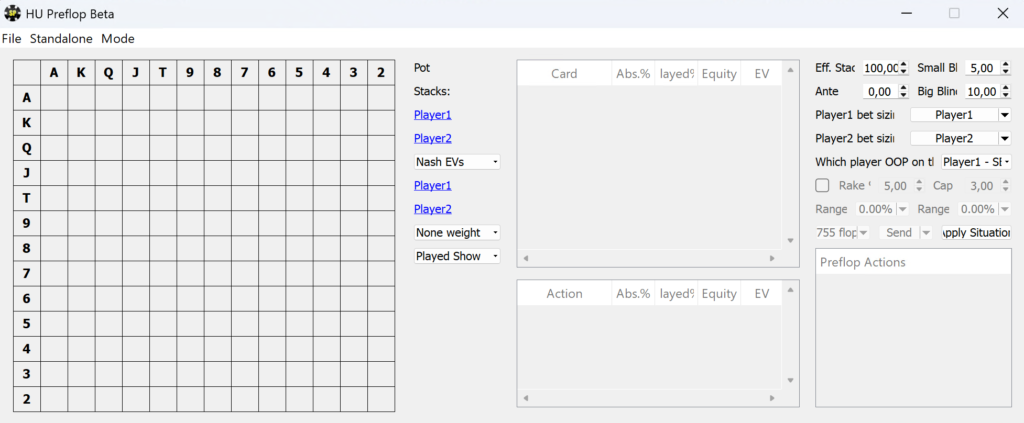
Preflop calculations account for subsequent play on the flop, making them extremely resource-intensive. Calculations using any sample other than the smallest one (25 flops) require anywhere from hundreds of gigabytes to several terabytes of RAM. There are therefore three ways to work with preflop:
- Local calculations with a Standalone license. A home computer can realistically calculate simple trees using a small flop sample. You can configure accuracy (Low, Middle, or High), memory compression, and the number of CPU cores, and save the solved flops together with the preflop solution.
- Custom calculations. A completed tree is sent to the developer’s server cluster, with payment made in preflop points. According to the documentation, calculating one tree takes around five hours on average, and the developers start the process manually.
- Precomputed solution packs. These include solved preflop trees together with the associated flop sample for common situations: SB versus BB in SNGs and 6-max cash games, heads-up SNGs and cash games, BB versus an open in 6-max, late positions versus BB, and SB versus BB in MTTs.
You can move from the preflop tree to its connected flops: right-click the branch leading to the flop and select Go To Tree to open the corresponding postflop solution.
How this helps in practice. Preflop and postflop are connected into a single sequence: first, you can see the ranges with which the players reach the flop, and then how those ranges should be played afterward. For beginners, precomputed solution packs for SB versus BB or heads-up play provide a clear way to see how stack depth affects strategy from the very beginning of a hand.
Compatibility: Formats, Systems, and Limitations
- Game types: no-limit (NL) and fixed-limit (FL) hold’em. Omaha and other poker variants are not supported.
- Number of players: heads-up pots postflop and heads-up preflop situations. The program cannot calculate multiway hands involving three or more players.
- Formats: cash games with rake and a cap, tournaments and SNGs using ICM, and preflop situations with antes and dead money in the pot.
- Poker rooms: the program does not connect to poker clients and is intended for off-table analysis. The rake and payout structure of a specific poker room must be entered manually. Many poker rooms prohibit the use of solvers during play, so Simple Postflop should be used specifically for off-table study.
- Operating system: 64-bit Windows. The program does not run natively on macOS, but it can be used through Parallels (Windows in a virtual machine, with both operating systems running simultaneously) or Boot Camp (Windows boots as the main operating system).
- System requirements: an Intel Core i5-class processor, at least 8 GB of RAM, a display with a vertical resolution greater than 900 pixels, and internet access for activation. Large flop trees and preflop calculations require significantly more memory.
- Saving solutions: with a Standalone license, a single file stores two streets at a time—for example, saving a flop also saves all turns. Otherwise, the files would become too large. The remaining streets can be recalculated when necessary.
How to Get Started
- Download and install the program from the official Simple Poker website. The installer is free.
- Register a free account through Cloud → Login → Register. Registration unlocks cloud features and free preflop solution examples.
- Check the free calculation mode. In Standalone → Settings, Remote should be selected for turn and river calculations. Without a license, these streets are calculated on the developer’s servers.
- Analyze your first turn spot. Enter four board cards, the effective stack and pot, select a saved set of bet sizes, specify ranges for both players, click Apply Situation, and then click Calculate Turn. The calculation will take a few seconds.
- Study the precomputed solutions. Three solved flops from John Juanda’s book and sample preflop trees let you practice reading results by switching between Strategy, EV, and Equity modes, reviewing runouts, and using hand-category filters.
- Activate a license when you are ready to calculate flop and preflop strategies. Enter the key in Standalone → License, then select the algorithm, Middle accuracy, and number of CPU cores in the settings.
Pricing
The program is available for free: without a license, you can calculate turn and river strategies on the developer’s servers, access solved flops from John Juanda’s book, and explore sample preflop solutions. The Standalone license costs $299 and removes restrictions on local flop and preflop calculations; it can be activated on two computers. Complex preflop trees can be calculated to order using preflop points, while precomputed preflop solution packs are sold separately for $149.99 to $349.99 per pack. A detailed description of the plans and prices is available on the product page.
Conclusion
Simple Postflop is a full-featured solver for heads-up pots that covers everything from preflop to river—from calculating an individual hand to aggregating EV across hundreds of flops and node locking against a specific opponent. Free turn and river calculations make it possible to start learning how to use solvers before purchasing a license.
Beginners can learn the program gradually: start by reviewing their own hands on later streets and learning to read the hand matrix, EV, and equity; then move on to flops with small trees; and only afterward explore the board generator, aggregation tools, and preflop calculations.

Featured software

Latest posts
-
 GGPoker Bans Third-Party Poker Software: Five New Security Measures Oct 18, 2026
 -
 Table Wizard Review: Table Organization and Automated Session Analysis Oct 17, 2026
 -
 PeakGTO Review: A GTO Trainer With an ELO Rating System From Jonathan Little’s Team Oct 16, 2026
 -
 GTOBase Review: Ready-Made GTO Solutions and Hand Analysis Oct 15, 2026
 -
 Simple Preflop Holdem Review: GTO Preflop Strategies for Any Table Oct 13, 2026
All the poker software you need, gathered in one place. Exclusive discounts, bonuses, latest news and updates.
Join now