Asian Hand Converter
A hand history converter that captures hands from Asian poker apps for your HUD, unlocking opponent stats where tracking is normally unavailable. Read full review
Screenshots
Pros & Cons
| Pros | Cons |
|---|---|
| Broad coverage of Asian poker rooms | Windows only |
| Compatible with multiple trackers | Requires an emulator to be installed |
| Works around emulator restrictions on HUDs | Billed separately from the tracker |
| Supports short deck and straddle | Requires root and ADB setup for newer emulator versions |
| Setup takes just a few minutes | |
| Free trial period |
Description
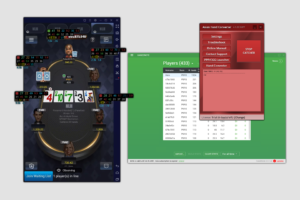
Asian Hand Converter is a tool for players who play poker on their computer through mobile apps from Asian poker rooms, using an Android emulator. These apps don’t natively export hand histories in a standard format, so a regular poker tracker can’t build stats from them or display a HUD (the pop-up panel showing an opponent’s stats right at the table). Asian Hand Converter solves exactly this problem: it captures hand data inside the emulator and converts it into hand history files that your tracker can read.
It works through a separate process — a catcher — that runs alongside the poker app in the emulator and tracks the progress of each hand. As soon as a hand is finished, the catcher generates a hand history record from it and sends it to your chosen tracker. From there, the tracker treats this data like any other: it builds stats, displays the HUD and popups, and saves it to the database for later hand review.
The tool is designed to work alongside several trackers: Holdem Manager, PokerTracker, DriveHUD, and Hand2Note. That means you’re not locked into one tracker — you can keep using the one you’re already comfortable with and simply add support for Asian rooms on top of it. The list of supported apps is also fairly broad, including PokerBros, PPPoker, WPT Global, ClubGG, X-Poker, Suprema Poker, PokerKing, Red Dragon, Bingo Poker, PokerTime, UPoker, Pokerrrr 2, and others.
Cash games and tournaments of any format are supported, including hold’em and Omaha, as well as more specific variants — short deck and straddle hands. That makes the tool suitable not just for a standard table setup, but also for the rarer formats you’ll specifically run into on Asian rooms.
Setup is simple: after purchase, you install the tool on your computer, activate it with a serial number, and then point your tracker’s settings to the hand history folder — that’s the whole setup, and you can start playing right away with a working HUD.
Please be careful: many mobile poker apps prohibit play via a personal computer or emulators. Confirm this with your poker club’s agent or your mobile poker app’s support team.
Pricing
-
Small Stakes plan: $29 per month or $139 for 6 months.
-
All Stakes plan: $49 per month or $235 for 6 months.
-
The bundle with the DriveHUD tracker on an annual plan works out cheaper than paying month to month, thanks to the annual discount.